

XML technologies / ePUB / ePub für (In)Designer / Images / Creating boxes and colored highlights
(Excerpt from “ePub für (In)Designer — Mit InDesign Schritt für Schritt zum E-Book” by Sascha Heck & Yves Apel)
Underlining creates colored highlights easily in InDesign; frames and fills also create boxes. HTML and CSS files offer the same. Unfortunately InDesign exports neither boxes nor highlights into ePub. Adobe still has substantial work to do here.
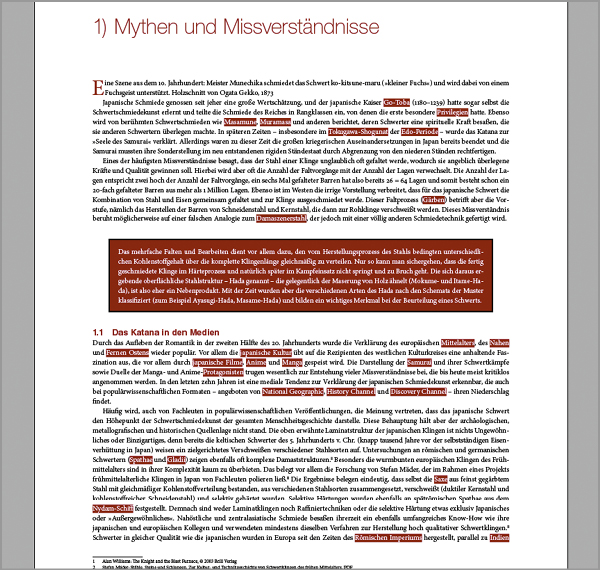
Figure: InDesign colored highlights and boxes.
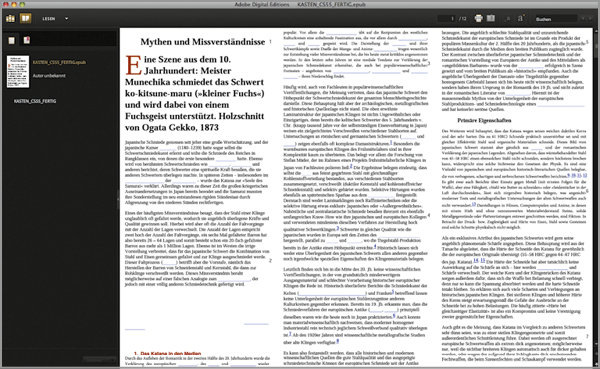
Figure: ePub without InDesign preparation.
Preparing the InDesign file
Colored highlights require consistent use of character styles in InDesign. Assign each highlighted word a character style with any name. Ideally its properties should already match the final highlight. With a dark background, for example, choose light text.
Boxes need more preparation. Each should have its own text frame. Anchor this frame to a blank line as with images; see Wrapping text around images and boxes. Unlike image anchoring, this line needs no special formatting.
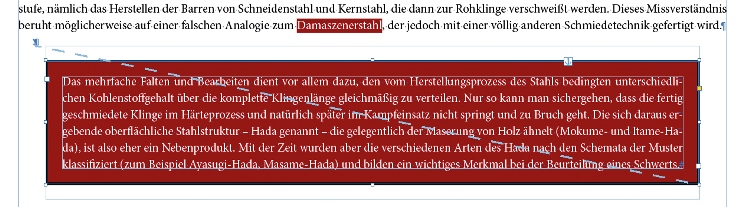
Figure: Box anchored to a blank line.
Assign an object style to every box. One style suffices for identical borders and backgrounds; each variation needs another style. Here we use the style named Kasten.

Figure: Selecting the Kasten object style.
For post-export editing, see Completing boxes and colored highlights.
Copyright © dpunkt.verlag GmbH 2012
You may print the online version for your private use.
Otherwise, this chapter from “ePub für (In)Designer” is subject to the same terms as the printed edition: the work and all its parts are protected by copyright. All rights reserved, including reproduction, translation, microfilming, and storage and processing in electronic systems.
dpunkt.verlag GmbH, Wieblinger Weg 17, 69123 Heidelberg, fon 06221-14830, fax 06221-148399, hallo(at)dpunkt.de