

XML technologies / XSLT / Java and XSLT / Development environments, testing and performance / Performance improvement techniques
(Excerpt from “Java and XSLT” by Eric M. Burke)
XSLT is often criticized for performance. Transforming XML into another format adds overhead, the price of separating data and programming logic and adapting transformations to different clients. Here we examine strategies that improve performance while retaining XSLT’s advantages.
Transformation itself is not always the main bottleneck. XML parsers strongly affect performance, but database access, application logic and network transfers matter too.
Excessive optimization often produces incomprehensible, unmaintainable code. Technically, fastest may seem best; economically, time to market and maintenance often matter more than runtime speed. Meeting performance requirements with maintainable code makes more business sense than a fast but cryptic application nobody can change after its author leaves.
Load testing with JMeter
Simulating real use measures throughput. Apache JMeter measures web response times as user counts increase. Written in Java, it graphs times as shown.
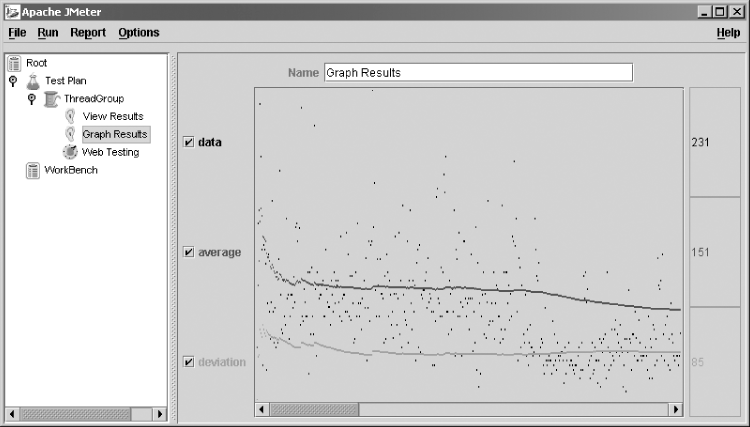
Figure: JMeter output
This is JMeter 1.6 Alpha; later versions may differ. Version 1.6 redesigned the GUI, with some details unfinished. Dots show actual response times, the upper line the mean, the lower the standard deviation.
The key measure is mean response time, shown at right in milliseconds: this application averages 151 ms.
Run load tests for several minutes until the average stabilizes. Initial requests are slower while Java loads classes, starts threads and allocates memory. Garbage collection and HotSpot optimization also change performance. It should stabilize unless there are memory leaks or the application cannot meet demand.
The table measures the “Monthly view” page of the discussion forum with JMeter, showing worst and best cases. Other combinations of servlet container, XSLT processor and database are omitted. Column four counts simulated users; the last gives average response time.
Table: Monthly-view response times
Servlet container | XSLT processor | Database | Threads | Mean response time (ms) |
|---|---|---|---|---|
Tomcat 3.2.1 | Xalan 2.0 | Access 2000 | 1 | 130 |
'' | '' | '' | 5 | 320 |
'' | '' | '' | 10 | 760 |
'' | '' | '' | 20 | 1600 |
Tomcat 4.0 | SAXON 6.2.2 | MySQL | 1 | 18 |
'' | '' | '' | 5 | 150 |
'' | '' | '' | 10 | 320 |
'' | '' | '' | 20 | 610 |
The table is incomplete but shows how switching tools and libraries can dramatically improve performance. Here up to 20 simulated users requested simultaneously without delay. JMeter can also insert random delays, more closely resembling real use.
This compared relative tool performance rather than benchmarking the forum. Fast processor/container release cycles prevent naming current products here. Over several hours, combinations were tested. Tomcat 4.0 and SAXON 6.2.2 slightly outperformed Tomcat 3.2.1 and Xalan 2.0, but replacing Access with MySQL gave the largest improvement.
More detailed measurements
JMeter measures load behavior and compares software/hardware configurations from an end-user perspective. If requirements are unmet, additional tools must locate Java bottlenecks: JMeter does not time individual methods.
Commercial solutions
Commercial profiling tools include Sitraka JProbe and VMGear OptimizeIt. They measure call counts, time per method and memory use, locating critical code. Usually a few methods consume most resources, the 80/20 rule. Optimizing these often brings the greatest gains for relatively little effort.
JVMPI
Sun’s Java 2 SDK has command-line options enabling the Java Virtual Machine Profiling Interface (JVMPI), which logs detailed profiling while the application runs. The next help page appears with command java -Xrunhprof:help.
Example: JVMPI command-line options
C:\>java -Xrunhprof:help
Hprof usage: -Xrunhprof[:help]|[<option>=<value>, ...]

Option Name and Value   Description          Default
---------------------   -----------          -------
heap=dump|sites|all      heap profiling         all
cpu=samples|times|old    CPU usage              off
monitor=y|n              monitor contention       n
format=a|b            ascii or binary output      a
file=<file>      write data to file      java.hprof(.txt for ascii)
net=<host>:<port>   send data over a socket write to file
depth=<size>          stack trace depth           4
cutoff=<value>       output cutoff point     0.0001
lineno=y|n          line number in traces?        y
thread=y|n             thread in traces?          n
doe=y|n                  dump on exit?            y

Example: java -Xrunhprof:cpu=samples,file=log.txt,depth=3 FooClass
Though experimental, JVMPI helps when other tools are unavailable. To find CPU bottlenecks, set option cpu to samples, estimating statistically through periodic sampling. This can drastically reduce performance and is off by default.
The excerpt ranks methods by total time in one application run. A 20 ms method called millions of times will probably rank above a one-second method called once.
Example: JVMPI output excerpt
rank self accum count trace method
1 13.70% 13.70%      20 31 java.lang.ClassLoader.defineClass0
2 7.53% 21.23%      11 19 java.util.zip.ZipFile.getEntry
3 5.48% 26.71%       8 35 java.io.Win32FileSystem.getBooleanAttributes
4 4.11% 30.82%       6 26 java.util.zip.ZipFile.read
5 3.42% 34.25%       5 92 java.util.zip.Inflater.inflateBytes
6 3.42% 37.67%       5 6 java.lang.ClassLoader.findBootstrapClass
7 2.74% 40.41%       4 22 java.util.zip.ZipFile.getEntry
8 2.74% 43.15%       4 143 org.apache.xalan.templates
                    StylesheetRootnewTransformer
9 2.74% 45.89%       4 14 java.util.zip.ZipFile.open
10 1.37% 47.26%       2 4 java.net.URLClassLoader.defineClass
Depending on application size and profiling duration, the file can reach several megabytes. Distinguishing application bottlenecks from Java library costs is difficult in so much text.
Much of the output consists of numbered stack traces. Option depth controls lines per trace. The fifth column above gives a trace number for locating it in the file:
TRACE 31:
   java.lang.ClassLoader.defineClass0(ClassLoader.java:Native method)
   java.lang.ClassLoader.defineClass(ClassLoader.java:486)
   java.security.SecureClassLoader.defineClass(SecureClassLoader.java:111)
   java.net.URLClassLoader.defineClass(URLClassLoader.java:248)
   java.net.URLClassLoader.access$100(URLClassLoader.java:56)
   java.net.URLClassLoader$1.run(URLClassLoader.java:195)
Increasing trace depth makes your code more likely to appear, but enlarges reports. Traces identify methods contributing to costly execution points.
Companies able to afford JProbe or OptimizeIt should consider them. JVMPI offers nearly the same capabilities, but its text output requires much manual work. Commercial profilers still require analysis, yet graphical results are easier to survey.
Unit tests
Do not underestimate simple measurements. A fifteen-line Java program often tests one feature best. Consider the small transformation program in XSLT processing with Java: A simple example. Use method System.currentTimeInMillis( ) to measure before and after transformation. Try different stylesheets to find the fastest approach.
Similarly test database access, key business logic and XML generation independently. Since JUnit times every test, combine performance measurements with meaningful unit tests.
Ignore initial runs, distorted by class loading and initialization. Run once without timing, then time several thousand repetitions together. Divide total time by runs for a more accurate mean than a few isolated measurements.
Account for caching. Real requests change data, usually preventing result reuse. Repeatedly transforming one file may let the processor cache results and report unrealistically high performance.
Using XSLT processors effectively
Measurement comes first. Once bottlenecks in Java/XSLT applications are found, they can be removed.
Caching stylesheets
As noted repeatedly, caching stylesheets is an important optimization. JAXP provides interface Templates for this; a stylesheet cache was shown in Stylesheet compilation. The table shows gains from interface Templates when transforming a small XML file repeatedly. Each variant ran the same transformation a hundred times.
Table: Performance gains from caching
Processor | Without Templates | With Templates | Templates and cached XML |
|---|---|---|---|
Xalan 2.0 | 71.8ms | 45.9ms | 39.2ms |
SAXON 6.2.2 | 52.7ms | 37.3ms | 34.2ms |
“Without Templates” is slowest because each transformation rereads the stylesheet. Reusing a Templates instance in the next column substantially improves performance.
The final column caches XML as a DOM document. Reusing one tree avoids repeated filesystem reads and improves performance further.
These results do not prove SAXON always faster than Xalan: source size and XSLT features matter. Test your application with several tools before choosing.
Caching results
With changing data, only stylesheets can be cached. Repeatedly requested stable data, such as a company home page, instead favors caching transformation results, regenerating them only when XML or XSLT changes.
The next helper caches results from static XML and XSLT files. A changed timestamp triggers transformation; otherwise the cached result is returned.
Example: ResultCache.java
package com.oreilly.javaxslt.util;

import java.io.*;
import java.util.*;
import javax.xml.transform.*;
import javax.xml.transform.stream.*;

/**
 * Eine Hilfsklasse, die die Ergebnisse von XSLT-Transformationen zwischenspeichert.
 *
 * @author Eric M. Burke
 */
public class ResultCache {
  private static Map cache = new HashMap( );

  /**
   * Lösche alle Ergebnisse aus dem Cache.
   */
  public static synchronized void flushAll( ) {
    cache.clear( );
  }
  /**
   * Führe eine XSLT-Transformation durch.
   */
  public static synchronized String transform(String xmlFileName,
      String xsltFileName) throws TransformerException {

    MapKey key = new MapKey(xmlFileName, xsltFileName);

    File xmlFile = new File(xmlFileName);
    File xsltFile = new File(xsltFileName);

    MapValue value = (MapValue) cache.get(key);
    if (value == null || value.isDirty(xmlFile, xsltFile)) {
      // dieser Schritt führt die Transformation durch
      value = new MapValue(xmlFile, xsltFile);
      cache.put(key, value);
    }

    return value.result;
  }

  // vermeide die Instantiierung dieser Klasse
  private ResultCache( ) {
  }

  /////////////////////////////////////////////////////////////////////
  // eine Hilfsklasse, die einen Schlüssel in der Cache-Map darstellt
  /////////////////////////////////////////////////////////////////////
  static class MapKey {
    String xmlFileName;
    String xsltFileName;

    MapKey(String xmlFileName, String xsltFileName) {
      this.xmlFileName = xmlFileName;
      this.xsltFileName = xsltFileName;
    }
    public boolean equals(Object obj) {
      if (obj instanceof MapKey) {
        MapKey rhs = (MapKey) obj;
        return this.xmlFileName.equals(rhs.xmlFileName)
          && this.xsltFileName.equals(rhs.xsltFileName);
      }
      return false;
    }

    public int hashCode( ) {
      return this.xmlFileName.hashCode() ^ this.xsltFileName.hashCode( );
    }
  }

  /////////////////////////////////////////////////////////////////////
  // eine Hilfsklasse, die einen Wert in der Cache-Map darstellt
  /////////////////////////////////////////////////////////////////////
  static class MapValue {
    long xmlLastModified; // letzte Änderung der XML-Datei
    long xsltLastModified; // letzte Änderung der XSLT-Datei
    String result;

    MapValue(File xmlFile, File xsltFile) throws TransformerException {
      this.xmlLastModified = xmlFile.lastModified( );
      this.xsltLastModified = xsltFile.lastModified( );

      TransformerFactory transFact = TransformerFactory.newInstance( );
      Transformer trans = transFact.newTransformer(
        new StreamSource(xsltFile));

      StringWriter sw = new StringWriter( );
      trans.transform(new StreamSource(xmlFile), new StreamResult(sw));

      this.result = sw.toString( );
    }

    /**
     * @return true, wenn die letzte Änderung der XML- oder der XSLT-Datei
     * nach diesem Cache-Eintrag gemacht wurde
     */
    boolean isDirty(File xmlFile, File xsltFile) {
      return this.xmlLastModified < xmlFile.lastModified( )
        || this.xsltLastModified < xsltFile.lastModified( );
    }
  }
}
The key method is transform( ), taking XML and stylesheet filenames and returning the result as a string. Errors throw a TransformerException:
public static synchronized String transform(String xmlFileName,
     String xsltFileName) throws TransformerException {
The cache uses java.util.Map key-value pairs, with helper MapKey as key:
MapKey key = new MapKey(xmlFileName, xsltFileName);

File xmlFile = new File(xmlFileName);
File xsltFile = new File(xsltFileName);
Next retrieve the cached value. Helper MapValue tracks the result and last modification of each file. Initially it is null; otherwise use isDirty( ), which checks for changed files:
  MapValue value = (MapValue) cache.get(key);
  if (value == null || value.isDirty(xmlFile, xsltFile)) {
    // dieser Schritt führt die Transformation durch
    value = new MapValue(xmlFile, xsltFile);
    cache.put(key, value);
  }

  return value.result;
}
Creating a new MapValue performs transformation. Without exceptions, the result is returned.
Compared with table Performance gains from caching, this is much faster: after the initial transformation, mean response time is under one millisecond.
Static file collections make this easy; databases do not. Dynamic requests may generate new XML each time. The main problem is stale data: changing the database must invalidate cached results so users see correct information.
In the forum, immutable posted messages make “View message” suitable for caching. Keep a fixed number of pages, add each rendered message, and evict oldest entries when full.
For changing pages such as “View month”, query the newest message timestamp. Regenerate if it is newer than the cached page. Decide caching usefulness case by case according to database structure.
Warning:
URL-rewriting session tracking prevents result caching because, as explained in Session tracking without cookies, every URL must be dynamically encoded using the value jsessionid when cookies are disabled.
Weigh caching gains against extra complexity. Analyze logs to find the most requested pages and focus optimization there.
Efficient XSLT code
Transformation itself may cause large slowdowns. Avoid repeatedly scanning large tree portions, especially for large XML. Operator // is especially critical:
<xsl:apply-templates select="/.//name"/>This recursively searches the entire document from its root for all <name> elements. Unknown locations require examining every node. A known path permits the efficient alternative:
<xsl:apply-templates select="/firma/angestellter/name"/>Variables also help when repeatedly copying data. You could repeatedly output the company owner’s name with:
<xsl:value-of select="/firma/besitzer/name/nachname"/>
<xsl:text> </xsl:text>
<xsl:value-of select="/firma/besitzer/name/vorname"/>
Assigning the name to a variable and reusing it is faster and clearer:
<!-- Ausgabe des Wertes der Variablen firmenBesitzer -->
<xsl:value-of select="$firmenBesitzer"/>
Inline code can also help. Rather than recursively calling <xsl:apply-templates> over XML, output the current node directly with <xsl:value-of>. This may duplicate code, since templates provide reusable modules. It illustrates the tradeoff between maintainability and raw performance.
Sorting requires processing the whole node-set before output. If Java presorts XML, XSLT may use less memory because part of the result can be emitted before the full document is processed.
Smaller stylesheets can also improve performance. Use Cascading Style Sheets (CSS) where possible: separate CSS files shrink XSLT and the result tree. External JavaScript files likewise avoid embedding script code in stylesheets.
The forum uses CSS this way, solely for visual styles such as fonts, indentation, layout and colors. Many can also be expressed directly in HTML:
<h1 align="center">Überschrift</h1>A separate CSS file reduces HTML to:
<h1>Überschrift</h1>Simpler HTML also simplifies XSLT, making CSS a useful complement.
EJB interactions
Enterprise JavaBeans (EJB) are server components encapsulating business logic or data access. In application servers they are typically accessed through Java Remote Method Invocation (RMI): network method calls are much slower than local calls within one JVM. Data transfer therefore needs care.
Sending XML from EJBs
For Java/XSLT, the question is where XML is created. One option creates it in the EJB container, giving every client a pure XML interface. A bean could expose:
public String getLeaderXML( ) throws RemoteException;
public String getTeamMembersXML( ) throws RemoteException;
public String getProjectInformation( ) throws RemoteException;
Each method returns a String containing XML. The figure illustrates this model.
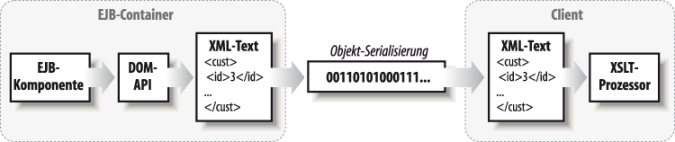
Figure: Generating XML in the EJB layer
Note:
A helper could generate XML instead of the bean methods themselves.
EJB generates XML before responding. Though the figure shows DOM, JDOM or any other API works. Servlet or standalone client sees only XML.
Returned strings may be whole well-formed documents or fragments combined by the client. Assembly adds work but offers flexibility.
This appears to give the cleanest EJB interface: unchanged XML structure lets both sides alter their internal object models independently.
Warning:
Many DOM implementations do not use serializable Java objects. Clients may also use different DOM implementations, making EJB-to-client DOM trees a poor choice.
EJB-generated XML also has drawbacks. Large documents may need compression, reducing bandwidth but increasing server compression and client decompression CPU costs. Classes java.util.zip.GZIPInputStream and java.util.zip.GZIPOutputStream support this.
Keeping all business logic in EJB is often impossible. Even if desirable, every operation then requires a network call. Receiving only XML also makes moving some logic to the client difficult.
Sending objects from EJBs
Alternatively, beans avoid XML and return helper objects such as Employee or ProjectInfo. Clients can then run business logic through local methods. The figure shows XML generation in this model.
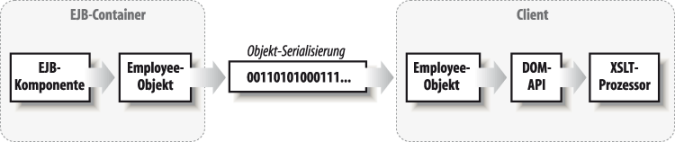
Figure: Generating XML on the client
The Employee object is serialized and sent instead of a long text string. On the client, DOM converts the Employee object to XML for XSLT. Avoiding full text conversion also speeds transformation.
Note:
DOM generation is common, but automated XML data binding is gaining importance. Sun’s Java Architecture for XML Data Binding (JAXB) standardizes Java object/XML mappings in both directions.
Serialized objects need bandwidth comparable to compressed XML, but simplify many requests. In insurance, an employee may have a spouse, children, beneficiary and benefits. While navigating pages, cache the Employee in the HttpSession. Additional page data can be obtained by calling this Employee object’s methods:
// ein Ausschnitt aus einem Servlet...
if (employee.isMarried( )) {
  // ermittle den Ehegatten; mache dazu eine Anfrage bei der EJB-Schicht
  // falls der Ehegatte noch nicht nachgefragt und somit nicht im Cache ist
  Person spouse = employee.getSpouse( );
  // erzeuge die XML-Daten für den Ehegatten...
} else {
  // erzeuge XML-Daten für den Angestellten; keine Anfrage bei der EJB-Schicht
}
No EJB request occurs if the employee is single. With XML, almost every page needs another EJB call because the web layer sees only large XML blocks, making business logic integration harder.
Objects chiefly keep EJB free of presentation logic. Web pages combine several EJBs, and users change interfaces more often than underlying data. Leave EJB unchanged and adapt XML generation in the web layer.
Copyright © 2002 O'Reilly Verlag GmbH & Co. KG
You may print the online version for your private use.
Otherwise, this chapter from “Java und XSLT” is subject to the same conditions as the bound edition. The work, including all its parts, is protected by copyright. All rights reserved, including reproduction, translation, microfilming, and storage and processing in electronic systems.
O’Reilly Verlag GmbH & Co. KG, Balthasarstraße 81, 50670 Köln, kommentar(at)oreilly.de