

XML technologies / XSLT / Java and XSLT / Development environments, testing and performance / Testing and debugging
(Excerpt from “Java und XSLT” by Eric M. Burke)
Developers have shown increasing interest in software testing in recent years. An important driving force has been the programming methodology eXtreme, which emphasizes small units and continual testing to ensure high software quality. More information about eXtreme Programming is available at Xprogramming.com. Several files are needed to demonstrate testing XSLT transformations. The following example shows the XML data.
Example: aidan.xml
<?xml version="1.0" encoding="ISO-8859-1"?>
<person>
    <vorname>Aidan</vorname>
    <vorname2>Garrett</vorname2>
    <nachname>Burke</nachname>
    <geburtstag tag="25" monat="6" jahr="1999"/>
</person>
These data are trivial, but the concept also applies to larger, more realistic examples. The following example shows the corresponding XSLT stylesheet.
Example: condensePerson.xslt
<?xml version="1.0" encoding="ISO-8859-1"?>
<!--
 ***********************************************************
 ** Transformiert eine XML-Datei mit der Repräsentation einer
 ** Person in ein übersichtlicheres Format.
 ********************************************************-->
<xsl:stylesheet version="1.0" xmlns:xsl="http://www.w3.org/1999/XSL/Transform">
    <xsl:param name="mitVorname2" select="'ja'"/>
    <xsl:output method="xml" version="1.0" encoding="ISO-8859-1" indent="yes" doctype-system="condense.dtd"/>
    <!-- Template für das Element <person> -->
    <xsl:template match="person">
        <!-- erzeuge ein neues Element <person> in verkürzter Form -->
        <xsl:element name="person">
            <xsl:element name="name">
                <xsl:value-of select="vorname"/>
                <xsl:text> </xsl:text>
                <xsl:if test="$mitVorname2 = 'ja'">
                    <xsl:value-of select="vorname2"/>
                    <xsl:text> </xsl:text>
                </xsl:if>
                <xsl:value-of select="nachname"/>
            </xsl:element>
            <xsl:element name="geburtstag">
                <xsl:value-of select="geburtstag/@tag"/>
                <xsl:text>.</xsl:text>
                <xsl:value-of select="geburtstag/@monat"/>
                <xsl:text>.</xsl:text>
                <xsl:value-of select="geburtstag/@jahr"/>
            </xsl:element>
        </xsl:element>
    </xsl:template>
</xsl:stylesheet>
This stylesheet transforms the XML data into the concise format shown in the following example.
Example: Expected output
<?xml version="1.0" encoding="ISO-8859-1"?>
<!DOCTYPE person SYSTEM "condense.dtd">
<person>
    <name>Aidan Garrett Burke</name>
    <geburtstag>25.6.1999</geburtstag>
</person>
Finally, the following example shows the DTD for the condensed XML format.
Example: condense.dtd
<!ELEMENT person (name, geburtstag)>
<!ELEMENT geburtstag (#PCDATA)>
<!ELEMENT name (#PCDATA)>
The DTD for the XML output lets a unit test validate the result of one or more transformations. Such a test writes the transformation result to a file and then tries to read and validate it with an XML parser.
JUnit
JUnit is an open source testing framework. It is a convenient tool designed specifically for unit tests. Other tools are often better suited to integration and functional tests, which are not discussed here.
XSLT transformations can run independently of the rest of an application, making them ideal for automated unit testing. By contrast, a technology such as JSP cannot run outside a JSP container and web browser, making automated testing difficult.
An automated test reports success or failure after running without requiring operator interaction during the test. A test requiring a user to enter values into HTML form fields and inspect the resulting web page is certainly not automated. A test producing a lengthy report is not automated either, since a knowledgeable person must read it to identify errors.
A developer can instead run a set of automated tests with a simple command-line program. It reports which tests failed and where, so problems can be fixed immediately.
A central principle of successful unit testing is that every individual test must pass with 100 percent success. If changing an XSLT stylesheet or XML file causes a test to fail, the developer knows the changes caused the problem. If failing tests remain in a project too long, developers soon stop using the test program because manually sifting through error messages becomes too much work.
Warning:
Enforce a policy requiring every developer to run a set of unit tests on changed code before checking it into a repository such as CVS.
A simple XSLT test validates a transformation’s result against a DTD or schema. Once the structure is validated, further tests can check the content for semantic errors. A DTD can establish, for example, whether the element <vorname> exists, but additional tests must determine whether the content of <vorname> is actually the correct name.
A unit test example
The following example shows how to create a simple test fixture with the JUnit framework. JUnit describes fixtures as a group of unit tests.
Example: A test fixture
package chap9;

import java.io.*;
import java.net.*;
import java.util.*;

// JAXP wird für die XSLT-Transformationen verwendet
import javax.xml.transform.*;
import javax.xml.transform.stream.*;

// JDOM wird für das Parsen und Validieren der XML-Daten verwendet
import org.jdom.*;
import org.jdom.input.*;

// Klassen von JUnit
import junit.framework.Test;
import junit.framework.TestCase;
import junit.framework.TestSuite;
import junit.textui.TestRunner;

/**
 * Ein Beispiel für einen JUnit-Test. Diese Klasse führt eine
 * XSLT-Transformation durch und validiert das Ergebnis.
 */
public class SampleUnitTest extends TestCase {
  private String workingDir;

  // XML-Eingabedateien
  private File aidanXMLFile;
  private File johnXMLFile;

  // ein Stylesheet, das die XML-Daten verdichtet
  private File condenseXSLTFile;

  // die Ergebnisse der Transformationen
  private File aidanCondensedXMLFile;
  private File johnCondensedXMLFile;

  private TransformerFactory transFact;

  /**
   * JUnit-Tests besitzen einen Konstruktor, der als Parameter den Testnamen erhält.
   */
  public SampleUnitTest(String name) {
    super(name);
  }

  /**
   * Initialisierung, bevor eine der test[...]-Methoden aufgerufen wird.
   */
  public void setUp( ) {
    // suche die Datei test.properties im Paket chap9
    ResourceBundle rb = ResourceBundle.getBundle("chap9.test");
    this.workingDir = rb.getString("chap9.workingDir");

    assertNotNull(workingDir);
    assert("Kann Datei nicht finden: " + this.workingDir,
      new File(this.workingDir).exists( ));

    this.aidanXMLFile = new File(workingDir + File.separator
      + "aidan.xml");
    this.johnXMLFile = new File(workingDir + File.separator
      + "john.xml");
    this.condenseXSLTFile = new File(workingDir + File.separator
      + "condensePerson.xslt");

    this.aidanCondensedXMLFile = new File(this.workingDir + File.separator
      + "aidanCondensed.xml");
    this.johnCondensedXMLFile = new File(this.workingDir + File.separator
      + "johnCondensed.xml");

    this.transFact = TransformerFactory.newInstance( );
  }

  /**
   * Säuberungen nach jeder test[...]-Methode
   */
  public void tearDown( ) {
    // die Transformationsergebnisse könnten hier gelöscht werden,
    // der Code hierfür ist aber absichtlich auskommentiert,
    // damit die erzeugten Dateien begutachtet werden können:
    // this.aidanCondensedXMLFile.delete( );
    // this.johnCondensedXMLFile.delete( );
  }

  /**
   * Ein einzelner Unit-Test.
   */
  public void testTransformWithTemplates( ) throws Exception {
    Templates templates = this.transFact.newTemplates(
      new StreamSource(this.condenseXSLTFile));

    Transformer trans = templates.newTransformer( );

    // führe zwei Transformationen mit identischem Transformer durch
    trans.transform(new StreamSource(this.aidanXMLFile),
      new StreamResult(this.aidanCondensedXMLFile));
    trans.transform(new StreamSource(this.johnXMLFile),
      new StreamResult(this.johnCondensedXMLFile));

    // validiere die beiden Dateien
    validateCondensedFile(this.aidanCondensedXMLFile,
      "Aidan Garrett Burke", "25.6.1999");
    validateCondensedFile(this.johnCondensedXMLFile,
      "John Emanuel Schmidt", "29.5.1917");
  }
  /**
   * Ein weiterer Unit-Test.
   */
  public void testTransformer( ) throws Exception {
    Transformer trans = this.transFact.newTransformer(
      new StreamSource(this.condenseXSLTFile));

    trans.transform(new StreamSource(this.aidanXMLFile),
      new StreamResult(this.aidanCondensedXMLFile));

    validateCondensedFile(this.aidanCondensedXMLFile,
      "Aidan Garrett Burke", "6/25/1999");
  }

  // eine Hilfsmethode, die von den Unit-Tests verwendet wird
  private void validateCondensedFile(File file, String expectedName,
      String expectedBirthDate) {
    try {
      // führe eine einfache Validierung gegen die DTD durch
      SAXBuilder builder = new SAXBuilder(true); // Validierung
      Document doc = builder.build(file);

      // führe weitere Prüfungen durch
      Element nameElem = doc.getRootElement( ).getChild("name");
      assertEquals("Name war nicht korrekt",
        expectedName, nameElem.getText( ));

      Element birthDateElem = doc.getRootElement( ).getChild("geburtstag");
      assertEquals("Geburtsdatum war nicht korrekt",
        expectedBirthDate, birthDateElem.getText( ));

    } catch (JDOMException jde) {
      fail("XML-Daten waren nicht gültig: " + jde.getMessage( ));
    }
  }
 /**
  * @return eine TestSuite, die eine Zusammensetzung von Testobjekten ist.
  */
  public static Test suite( ) {
    // verwendet die Reflection-API, um alle Methoden mit Namen test[...]
    // zu finden
    return new TestSuite(SampleUnitTest.class);
  }

  /**
   * Erlaubt die Ausführung der Unit-Tests im Textmodus von der Kommandozeile.
   */
  public static void main(String[] args) {
    TestRunner.run(suite( ));
  }
}
The class SampleUnitTest extends junit.framework.TestCase. Each subclass of TestCase defines a fixture and may contain several individual unit tests. Every method whose name begins with “test” is a unit test. All private members of SampleUnitTest are tailored to our specific needs and are not part of the JUnit framework.
The constructor takes a unit test’s name as its argument:
public SampleUnitTest(String name) {
  super(name);
}
The argument name is the method’s name; JUnit uses Java’s reflection API to find and instantiate the appropriate method. As we will see, the constructor is rarely called directly.
The method setUp( ) is called before every unit test. It establishes the necessary preconditions before running a test. Its counterpart is the method tearDown( ), called after each test. If a fixture contains four unit test methods, for example, setUp( ) and tearDown( ) are each called four times.
In our case, the method setUp( ) locates all files required for the XSLT transformations: XML input files, the XSLT stylesheet and the desired transformation results. It also performs simple tests:
assertNotNull(workingDir);
assert("Kann nicht finden: " + this.workingDir,
    new File(this.workingDir).exists( ));
The assert( ) methods are part of JUnit and cause a test to fail if the tested condition is not met. (In JUnit 3.7, the method assert( ) was renamed assertTrue( ) to avoid conflicts with JDK 1.4’s assert mechanism.) These are important methods for writing unit tests and can be used in test methods as well as in setUp( ) and tearDown( ). If an assert statement is not satisfied, JUnit reports a failure with the line number where it occurred. This is a test failure, as distinct from a test error. An error occurs when JUnit catches an exception thrown by a unit test.
Our example’s first unit test is the method testTransformWithTemplates( ). Since its name begins with “test”, JUnit can find it using reflection. Its task is to perform an XSLT transformation through JAXP’s Templates interface and pass the result to the method validateCondensedFile( ), which performs the actual tests. This approach reuses the same code across a group of individual unit tests.
The method validateCondensedFile( ) performs a two-stage test. First, the transformation result is validated against our DTD. If an exception is thrown, the test fails:
fail("XML-Daten waren nicht gültig: " + jde.getMessage( ));JUnit catches this failure and displays a corresponding message. If validation succeeds, the unit test’s second step uses the method assertEquals( ) to check the XML data’s content:
assertEquals("Name war nicht korrekt",
      expectedName, nameElem.getText( ));
If this method’s second and third arguments differ, an error message is output and the test fails.
Another important method is suite( ):
public static Test suite( ) {
   // verwendet die Reflection-API, um alle Methoden mit Namen test[...]
   // zu finden
   return new TestSuite(SampleUnitTest.class);
}
It automatically finds all methods whose names begin with “test” and assembles them into a test suite. Both TestCase and TestSuite implement the interface Test, with TestSuite being a collection of individual Test objects. Grouping tests into suites lets an entire family of tests run by starting one suite. Test suites can of course contain other suites. At the highest level, one suite can directly or indirectly contain every application test, allowing all tests to run with a single command.
Running the test
To run the test from the command line, enter:
java chap9.SampleUnitTestThis works because our fixture contains the method main( ):
public static void main(String[] args) {
  TestRunner.run(suite( ));
}
The class TestRunner is a command-line tool producing the following output if all tests pass:
Time: 1.081

OK (2 tests)
The dots in the output’s first line represent test methods. Another dot appears whenever a new test runs. If a test fails, JUnit outputs a stack trace, a sometimes helpful error message and the line where the failure occurred. The end shows the counts of tests, failures and errors.
JUnit also has a Swing GUI client, started with this command:
java junit.swingui.TestRunner chap9.SampleUnitTestThe following figure shows the graphical output when a test fails.
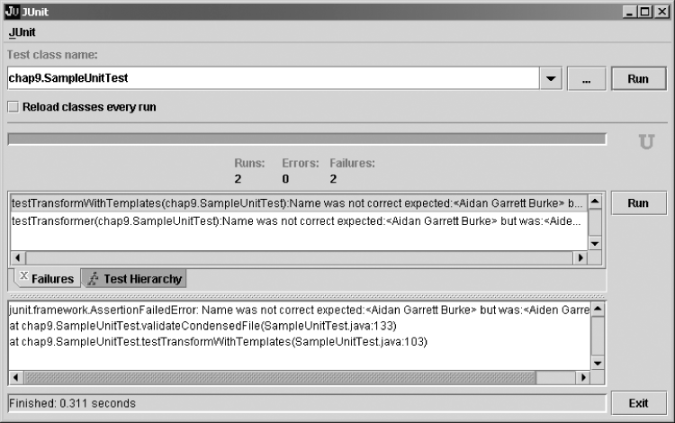
Figure: JUnit output with errors
The rectangle to the left of the “U” is a progress bar showing test execution. With hundreds of tests, it gives a useful sense of how many have run. It changes from green to red if failures or errors occur. The scrollable list in the middle shows individual test errors and failures; the bottom text field shows details of the selected error.
The GUI suits interactive testing, while the command-line version enables automated batch tests, such as those run during nightly builds. We now turn from unit testing software to custom application error handling with JAXP error listeners.
JAXP 1.1 error listeners
When running XSLT transformations with JAXP, errors are normally written to System.err. This suffices for command-line transformations, but some applications need greater control over error output. For these cases, the interface javax.xml.transform.ErrorListener is available.
Implementing this interface lets applications catch transformation errors and provide detailed information about their cause and location. The following example presents a Swing table model. This class implements the interface javax.xml.transform.ErrorListener and is used by a JTable to display errors graphically. In the example TransformerWindow.java, we then show how to assign this error listener to a TransformerFactory and a Transformer.
Example: ErrorListenerModel
package com.oreilly.javaxslt.swingtrans;

import java.io.*;
import java.util.*;
import javax.swing.table.*;

// Import-Anweisungen für XML
import javax.xml.transform.ErrorListener;
import javax.xml.transform.SourceLocator;
import javax.xml.transform.TransformerException;

/**
 * Das Datenmodell JTable stellt detaillierte Informationen über eine Liste
 * von Objekten des Typs javax.xml.transform.TransformerException bereit.
 */
public class ErrorListenerModel extends AbstractTableModel
    implements ErrorListener {

  // Tabellenspalte
  private static final int LINE_COL = 0;
  private static final int COLUMN_COL = 1;
  private static final int PUBLIC_ID_COL = 2;
  private static final int SYSTEM_ID_COL = 3;
  private static final int MESSAGE_AND_LOC_COL = 4;
  private static final int LOCATION_COL = 5;
  private static final int EXCEPTION_COL = 6;
  private static final int CAUSE_COL = 7;

  private static final String[] COLUMN_NAMES = {
    "Zeile",
    "Spalte",
    "Public ID",
    "System ID",
    "Meldung & Position",
    "Position",
    "Ausnahme",
    "Ursache"
  };

  // die eigentlichen Daten
  private List exceptionList = null;

  /**
   * @return eine detaillierte Textmeldung der Ausnahme in der angegebenen Zeile.
   */
  public String getDetailReport(int row) {
    if (this.exceptionList == null
        || row < 0 || row >= this.exceptionList.size( )) {
      return "";
    }
    TransformerException te = (TransformerException)
      this.exceptionList.get(row);
    SourceLocator loc = te.getLocator( ); // könnte null sein

    // den Report puffern
    StringWriter sw = new StringWriter( );
    PrintWriter pw = new PrintWriter(sw);

    pw.println(te.getClass().getName( ));
    pw.println("-----------------------------------------------------");
    if (loc == null) {
      pw.println("Zeile : [null SourceLocator]");
      pw.println("Spalte : [null SourceLocator]");
      pw.println("Public-ID : [null SourceLocator]");
      pw.println("System-ID : [null SourceLocator]");
    } else {
      pw.println("Zeile : " + loc.getLineNumber( ));
      pw.println("Spalte : " + loc.getColumnNumber( ));
      pw.println("Public-ID : " + loc.getPublicId( ));
      pw.println("System-ID : " + loc.getSystemId( ));
    }

    pw.println("Meldung & Position : " + te.getMessageAndLocation( ));
    pw.println("Position : " + te.getLocationAsString( ));

    pw.println("Ausnahme : " + te.getException( ));
    if (te.getException( ) != null) {
      te.getException( ).printStackTrace(pw);
    }

    pw.println("Ursache : " + te.getCause( ));
    if (te.getCause() != null && (te.getCause() != te.getException( ))) {
      te.getCause( ).printStackTrace(pw);
    }

    return sw.toString( );
  }
  /**
   * Ein Teil des Interface TableModel.
   */
  public Object getValueAt(int row, int column) {
    if (this.exceptionList == null) {
      return "Keine Fehler oder Warnungen";
    } else {
      TransformerException te = (TransformerException)
        this.exceptionList.get(row);
      SourceLocator loc = te.getLocator( );

      switch (column) {
      case LINE_COL:
        return (loc != null)
          ? String.valueOf(loc.getLineNumber( )) : "N/A";
      case COLUMN_COL:
        return (loc != null)
          ? String.valueOf(loc.getColumnNumber( )) : "N/A";
      case PUBLIC_ID_COL:
        return (loc != null) ? loc.getPublicId( ) : "N/A";
      case SYSTEM_ID_COL:
        return (loc != null) ? loc.getSystemId( ) : "N/A";
      case MESSAGE_AND_LOC_COL:
        return te.getMessageAndLocation( );
      case LOCATION_COL:
        return te.getLocationAsString( );
      case EXCEPTION_COL:
        return te.getException( );
      case CAUSE_COL:
        return te.getCause( );
      default:
        return "[Fehler]"; // sollte nicht auftreten
      }
    }
  }

  /**
   * Ein Teil des Interface TableModel.
   */
  public int getRowCount( ) {
    return (this.exceptionList == null) ? 1 :
      this.exceptionList.size( );
  }

  /**
    * Ein Teil des Interface TableModel.
    */
  public int getColumnCount( ) {
    return (this.exceptionList == null) ? 1 :
      COLUMN_NAMES.length;
  }

  /**
   * Ein Teil des Interface TableModel.
   */
  public String getColumnName(int column) {
    return (this.exceptionList == null)
      ? "Probleme bei der Transformation"
      : COLUMN_NAMES[column];
  }

  /**
   * @return true, wenn ein Fehler auftritt.
   */
  public boolean hasErrors( ) {
    return this.exceptionList != null;
  }

  /**
   * Das ist ein Teil des Interface javax.xml.transform.ErrorListener.
   * Zeigt an, daß eine Warnung aufgetreten ist. Transformer müssen nach
   * einer Warnung weiterarbeiten, außer wenn die Anwendung eine
   * TransformerException erzeugt.
   */
  public void warning(TransformerException te) throws TransformerException {
    report(te);
  }

  /**
   * Das ist ein Teil des Interface javax.xml.transform.ErrorListener.
   * Zeigt an, daß ein behebbarer Fehler aufgetreten ist.
   */
  public void error(TransformerException te) throws TransformerException {
    report(te);
  }

  /**
   * Das ist ein Teil des Interface javax.xml.transform.ErrorListener.
   * Zeigt an, daß ein nicht-behebbarer Fehler aufgetreten ist.
   */
  public void fatalError(TransformerException te) throws TransformerException {
    report(te);
  }

  // Hängt die Ausnahme an die exceptionList an und benachrichtigt JTable,
  // daß sich der Inhalt der Tabelle geändert hat.
  private void report(TransformerException te) {
    if (this.exceptionList == null) {
      this.exceptionList = new ArrayList( );
      this.exceptionList.add(te);
      fireTableStructureChanged( );
    } else {
      this.exceptionList.add(te);
      int row = this.exceptionList.size( )-1;
      super.fireTableRowsInserted(row, row);
    }
  }
}
Code relating to the interface ErrorListener is highlighted; the remaining code displays errors in a Swing table. The Swing component JTable displays data in rows and columns, obtaining the data from the underlying interface javax.swing.table.TableModel. The abstract class javax.swing.table.AbstractTableModel implements TableModel and serves as a base class for application-specific table models, as in this example. As you can see, the class ErrorListenerModel extends AbstractTableModel.
Since our table model implements the interface ErrorListener, it can be assigned to a JAXP Transformer. If problems occur during transformation, warning( ), error( ) or fatalError( ) is called. Since these methods have identical signatures, they all call the method report( ). The code comments explain which problems trigger each method. However, XSLT processors are not consistent in how they report errors.
The method report( ) adds an object of type TransformerException to a private list of exceptions and fires a Swing event so that the JTable redraws its content. When the JTable receives the event, it queries the ErrorListenerModel for the row number, column number and values at specific positions in the table model. This functionality resides in the methods getRowCount( ), get-ColumnCount( ) and getValueAt( ), all declared in the interface TableModel.
Our class has another method named getDetailReport( ) that creates a text message for a TransformerException object. This method is interesting because it illustrates which methods are available for handling transformation problems. As the code in example ErrorListenerModel shows, many fields may be null. Some XSLT processors may provide extensive, detailed error messages, while others simply return null.
A GUI for XSLT transformations
This section develops a GUI for XSLT transformations. It is a simple Swing application that transforms an XML file using an XSLT stylesheet. The transformation result appears in a text field inside a JTable. Any transformation errors are also displayed using the class ErrorListenerModel from the example ErrorListenerModel.
The XML data produced by the transformation can also be validated. Provided the stylesheet generates XML at all, the tool tries to parse and validate the result. For example, you can ensure your stylesheet produces valid XHTML data by validating the transformation result against an XHTML DTD.
The Ant build file in example build.xml contains target “run”, which starts the application simply by entering ant run.
Application window
The application’s first window appears in the following figure. It is always displayed and lets the user select the XML input file and XSLT stylesheet. (The screenshots show Java Swing’s look and feel on Linux.)

Figure: SwingTransformer window
Clicking the Transform button opens the window in the following figure. Further transformations can be performed, each opening a new window. Since XML and XSLT files are reread for every transformation, the application need not restart after changes to them.
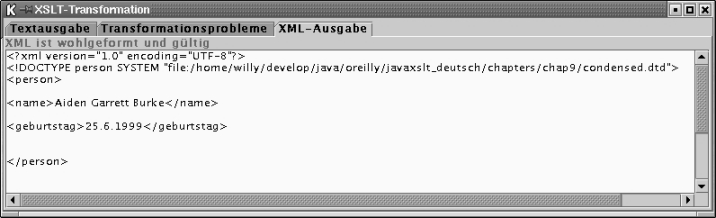
Figure: XML output panel
The Text output tab always appears first. It is not shown here because it only displays the transformation result as text, including all whitespace produced by the transformation. If the user selects the XML output tab, the result is parsed and validated against a DTD. JDOM’s class XMLOutputter then displays the XML data, removing insignificant whitespace and neatly formatting the output.
If errors occur during transformation, the text and XML output panels remain empty. The user then sees the window in the following figure.
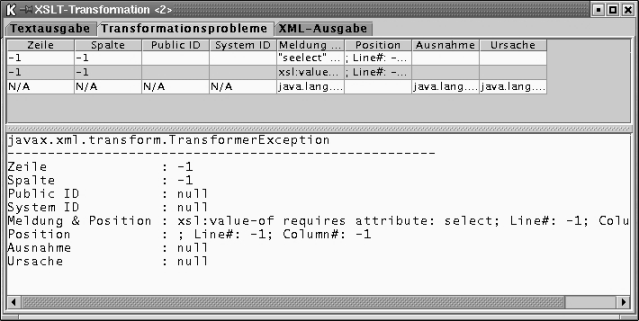
Figure: Displaying transformation problems
The display illustrates how the ErrorListenerModel from example ErrorListenerModel is used. The upper JTable shows a tabular overview of all errors; the text field below displays the output of method getDetailReport( ) of ErrorListenerModel. In the example shown, the attribute select in the XSLT stylesheet was deliberately written as seelect.
Source code
The following example shows the main window’s source code. It is a subclass of JFrame that allows XML and XSLT filenames to be selected. Almost all code concerns the GUI and is not discussed further here.
Example: SwingTransformer.java
package com.oreilly.javaxslt.swingtrans;

import java.awt.*;
import java.awt.event.*;
import java.io.*;
import javax.swing.*;

/**
 * Die Hauptklasse der Anwendung. Diese Klasse zeigt das Hauptfenster
 * an, in dem der Nutzer XML- und XSLT-Datei wählen kann.
 */
public class SwingTransformer extends JFrame {
  private JTextField xmlFileFld = new JTextField(30);
  private JTextField xsltFileFld = new JTextField(30);

  // Dateifilter, die in der Klasse JFileChooser verwendet werden
  private XMLFileFilter xmlFilter = new XMLFileFilter( );
  private XSLTFileFilter xsltFilter = new XSLTFileFilter( );
  private JFileChooser fileChooser = new JFileChooser( );

  // Aktionen werden mit JButtons verknüpft
  private Action loadXMLAction =
      new javax.swing.AbstractAction("OK") {
    public void actionPerformed(ActionEvent evt) {
      selectXMLFile( );
    }
  };

  private Action loadXSLTAction =
      new javax.swing.AbstractAction("OK") {
    public void actionPerformed(ActionEvent evt) {
      selectXSLTFile( );
    }
  };

  private Action transformAction =
      new javax.swing.AbstractAction("Transformieren") {
    public void actionPerformed(ActionEvent evt) {
      File xmlFile = new File(xmlFileFld.getText( ));
      File xsltFile = new File(xsltFileFld.getText( ));

      if (!xmlFile.exists() || !xmlFile.canRead( )) {
        showErrorDialog("Kann XML-Datei nicht lesen");
        return;
      }

      if (!xsltFile.exists() || !xsltFile.canRead( )) {
        showErrorDialog("Kann XSLT-Datei nicht lesen");
        return;
      }

      // stelle das Transformationsergebnis in einem neuen Fenster dar
      new TransformerWindow( ).transform(xmlFile, xsltFile);
    }
  };

  /**
   * Der Startpunkt der Anwendung; zeigt das Hauptfenster.
   */
  public static void main(String[] args) {
    new SwingTransformer( ).setVisible(true);
  }

  /**
   * Erzeuge das Hauptfenster und das Layout der GUI.
   */
  public SwingTransformer( ) {
    super("Swing XSLT-Transformation");

    // Bemerkung: diese Zeile benötigt Java 2 v1.3
    setDefaultCloseOperation(JFrame.EXIT_ON_CLOSE);

    Container cp = getContentPane( );
    cp.setLayout(new GridBagLayout( ));

    GridBagConstraints gbc = new GridBagConstraints( );
    gbc.anchor = GridBagConstraints.WEST;
    gbc.fill = GridBagConstraints.HORIZONTAL;
    gbc.gridx = GridBagConstraints.RELATIVE;
    gbc.gridy = 0;
    gbc.insets.top = 2;
    gbc.insets.left = 2;
    gbc.insets.right = 2;

    cp.add(new JLabel("XML-Datei:"), gbc);
    gbc.weightx = 1.0;
    cp.add(this.xmlFileFld, gbc);
    gbc.weightx = 0.0;
    cp.add(new JButton(this.loadXMLAction), gbc);

    gbc.gridy++;
    cp.add(new JLabel("XSLT-Stylesheet:"), gbc);
    gbc.weightx = 1.0;
    cp.add(this.xsltFileFld, gbc);
    gbc.weightx = 0.0;
    cp.add(new JButton(this.loadXSLTAction), gbc);

    gbc.gridy++;
    gbc.gridx = 0;
    gbc.gridwidth = GridBagConstraints.REMAINDER;
    gbc.anchor = GridBagConstraints.CENTER;
    gbc.fill = GridBagConstraints.NONE;
    cp.add(new JButton(this.transformAction), gbc);
    pack( );
  }

  /**
   * Zeige den Dateidialog mit allen XML-Dateien.
   */
  private void selectXMLFile( ) {
    this.fileChooser.setDialogTitle("Wählen Sie eine XML-Datei");
    this.fileChooser.setFileFilter(this.xmlFilter);
    int retVal = this.fileChooser.showOpenDialog(this);
    if (retVal == JFileChooser.APPROVE_OPTION) {
      this.xmlFileFld.setText(
        this.fileChooser.getSelectedFile().getAbsolutePath( ));
    }
  }

  /**
   * Zeige den Dateidialog mit allen XSLT-Dateien.
   */
  private void selectXSLTFile( ) {
    this.fileChooser.setDialogTitle("Wählen Sie ein XSLT-Stylesheet");
    this.fileChooser.setFileFilter(this.xsltFilter);
    int retVal = this.fileChooser.showOpenDialog(this);
    if (retVal == JFileChooser.APPROVE_OPTION) {
      this.xsltFileFld.setText(
        this.fileChooser.getSelectedFile().getAbsolutePath( ));
    }
  }

  private void showErrorDialog(String msg) {
    JOptionPane.showMessageDialog(this, msg, "Fehler",
      JOptionPane.ERROR_MESSAGE);
  }
}

/**
 * Wird im JFileChooser verwendet, um nur die Endungen .xml und .XML zuzulassen.
 */
class XMLFileFilter extends javax.swing.filechooser.FileFilter {
  public boolean accept(File f) {
    String name = f.getName( );
    return f.isDirectory( ) || name.endsWith(".xml")
      || name.endsWith(".XML");
  }

  public String getDescription( ) {
    return "XML-Dateien";
  }
}

/**
 * Wird im JFileChooser verwendet, um nur die Endungen .xsl, .XSL, .xslt und .XSLT
 * zuzulassen.
 */
class XSLTFileFilter extends javax.swing.filechooser.FileFilter {
  public boolean accept(File f) {
    String name = f.getName( );
    return f.isDirectory( ) || name.endsWith(".xsl")
      || name.endsWith(".xslt") || name.endsWith(".XSL")
      || name.endsWith(".XSLT");
  }

  public String getDescription( ) {
    return "XSLT-Stylesheet";
  }
}
The next class, in the following example, creates the windows shown in figures SwingTransformer window and XML output panel. Much of its code formats the component JTabbedPane with its three tabs. The class also performs the actual XSLT transformation.
Example: TransformerWindow.java
package com.oreilly.javaxslt.swingtrans;

import java.awt.*;
import java.awt.event.*;
import java.io.*;
import javax.swing.*;
import javax.swing.table.*;
import javax.swing.event.*;

// import-Anweisungen in bezug auf XML
import javax.xml.transform.SourceLocator;
import javax.xml.transform.Transformer;
import javax.xml.transform.TransformerConfigurationException;
import javax.xml.transform.TransformerException;
import javax.xml.transform.TransformerFactory;
import javax.xml.transform.stream.StreamResult;
import javax.xml.transform.stream.StreamSource;

/**
 * Ein sekundärer JFrame, der das Ergebnis einer einzelnen XSLT-
 * Transformation anzeigt. Es wird das Interface JTabbedPane verwendet,
 * um Transformationsergebnis, Fehlermeldungen und XML-Ausgabe darzustellen.
 */
public class TransformerWindow extends JFrame {
  // das Ergebnis der XSLT-Transformation als Text
  private String resultText;

  private JTabbedPane tabPane = new JTabbedPane( );
  private JTextArea textOutputArea = new JTextArea(30, 70);
  private XMLOutputPanel xmlOutputPanel = new XMLOutputPanel( );
  private ErrorListenerModel errModel = new ErrorListenerModel( );
  private JTable errorTable = new JTable(this.errModel);
  private JTextArea errorDetailArea = new JTextArea(10, 70);
  private String xsltURL;

  /**
   * Erzeuge eine neue Instanz und ordne die GUI-Komponenten an.
   */
  public TransformerWindow( ) {
    super("XSLT-Transformation");

    // füge den Tab-Pane hinzu
    Container cp = getContentPane( );
    cp.add(this.tabPane, BorderLayout.CENTER);

    // füge die einzelnen Tabs hinzu
    this.tabPane.add("Textausgabe", new JScrollPane(this.textOutputArea));
    this.tabPane.add("Transformations-Probleme",
      createErrorPanel( ));
    this.tabPane.add("XML-Ausgabe", this.xmlOutputPanel);

    // achte auf Auswahländerungen der Tabs
    this.tabPane.addChangeListener(new ChangeListener( ) {
      public void stateChanged(ChangeEvent evt) {
        tabChanged( );
      }
    });

    this.textOutputArea.setEditable(false);

    // achte auf Auswahländerungen in der Fehlertabelle
    this.errorTable.getSelectionModel( ).addListSelectionListener(
      new ListSelectionListener( ) {
        public void valueChanged(ListSelectionEvent evt) {
          if (!evt.getValueIsAdjusting( )) {
            showErrorDetails( );
          }
        }
      });
    pack( );
  }

  /**
   * Zeige die Details zum aktuell ausgewählten Fehler.
   */
  private void showErrorDetails( ) {
    int selRow = this.errorTable.getSelectedRow( );
    this.errorDetailArea.setText(this.errModel.getDetailReport(selRow));
  }

  /**
   * Führe die XSLT-Transformation durch.
   */
  public void transform(File xmlFile, File xsltFile) {
    setVisible(true);
    try {
      // Ermittle das Verzeichnis der XSLT-Datei. Dort wird
      // auch nach der DTD gesucht
      if (xsltFile != null) {
        File xsltDir = xsltFile.getParentFile( );
        if (xsltDir.isDirectory( )) {
          this.xsltURL = xsltDir.toURL().toExternalForm( );
        }
      }

      TransformerFactory transFact = TransformerFactory.newInstance( );

      // registriere das TableModel als Error-Listener
      transFact.setErrorListener(this.errModel);

      Transformer trans = transFact.newTransformer(
        new StreamSource(xsltFile));

      // Prüfe auf null, weil die Factory evtl. keine Ausnahme
      // auslöst, wenn der Aufruf von newTransformer( ) fehlschlägt.
      // Das ist nötig, da wir einen Error-Listener angemeldet haben,
      // der keine Ausnahmen auslöst.
      if (trans != null) {
        trans.setErrorListener(this.errModel);

        // hole das Ergebnis der XSLT-Transformation
        StringWriter sw = new StringWriter( );
        trans.transform(new StreamSource(xmlFile),
          new StreamResult(sw));

        // visualisiere das Ergebnis
        this.resultText = sw.toString( );
        this.textOutputArea.setText(this.resultText);
      }

    } catch (TransformerConfigurationException tce) {
      try {
        this.errModel.fatalError(tce);
      } catch (TransformerException ignored) {
    }
    } catch (TransformerException te) {
      try {
        this.errModel.fatalError(te);
      } catch (TransformerException ignored) {
    }
    } catch (Exception unexpected) {
      System.err.println(
        "Der XSLT-Prozessor hat eine unerwartete Ausnahme erzeugt");
      unexpected.printStackTrace( );
    }

    // zeige den Fehler-Tab
    if (this.errModel.hasErrors( )) {
      this.tabPane.setSelectedIndex(1);
    }
  }

  // der Nutzer hat einen anderen Tab ausgewählt
  private void tabChanged( ) {
    try {
      setCursor(Cursor.getPredefinedCursor(Cursor.WAIT_CURSOR));
      int selIndex = this.tabPane.getSelectedIndex( );
      String selTab = this.tabPane.getTitleAt(selIndex);

      // Bei Auswahl des XML-Tabs wird der Text im XML-Panel angezeigt.
      // Der Text muß zwar kein XML sein, wir wissen das aber erst,
      // wenn er geparst wurde.
      if ("XML-Ausgabe".equals(selTab)) {
        this.xmlOutputPanel.setXML(this.resultText, this.xsltURL);
      }
    } finally {
      setCursor(Cursor.getPredefinedCursor(Cursor.DEFAULT_CURSOR));
    }
  }

  // eine Hilfsmethode, die das Panel für die Fehlermeldungen erzeugt
  private JComponent createErrorPanel( ) {
    JSplitPane splitPane = new JSplitPane(JSplitPane.VERTICAL_SPLIT);
    this.errorTable.setAutoResizeMode(JTable.AUTO_RESIZE_OFF);
    int size = this.errorDetailArea.getFont().getSize( );
    this.errorDetailArea.setEditable(false);
    this.errorDetailArea.setFont(
      new Font("Monospaced", Font.PLAIN, size+2));

    splitPane.setTopComponent(new JScrollPane(this.errorTable));
    splitPane.setBottomComponent(new JScrollPane(this.errorDetailArea));
    return splitPane;
  }
}
The highlighted code shows how the error listener table model and the Transformer instance are registered with the TransformerFactory. Besides installing the error listener, exceptions must also be caught, since XSLT processors can throw exceptions and errors despite the listener. Errors occurring at the TransformerFactory stem from problems parsing the XSLT stylesheet, while transformer error listeners are notified of problems with the actual transformation of XML data.
The class XMLOutputPanel appears in the following example.
Example: XMLOutputPanel.java
package com.oreilly.javaxslt.swingtrans;

import java.awt.*;
import java.io.*;
import javax.swing.*;

// import-Anweisungen in bezug auf XML
import org.jdom.Document;
import org.jdom.input.SAXBuilder;
import org.jdom.output.XMLOutputter;

/**
 * Zeigt einen XML-Text in einem scrollbaren Textfeld an. Eine Statuszeile
 * zeigt an, ob die XML-Daten wohlgeformt und gültig sind.
 */
public class XMLOutputPanel extends JPanel {
  // zeigt die XML-Daten an
  private JTextArea xmlArea = new JTextArea(20,70);
  private String xml;
  private JLabel statusLabel = new JLabel( );

  /**
   * Erzeuge das Panel und ordne die GUI-Komponenten an.
   */
  public XMLOutputPanel( ) {
    super(new BorderLayout( ));
    add(new JScrollPane(this.xmlArea), BorderLayout.CENTER);
    add(this.statusLabel, BorderLayout.NORTH);
  }

  /**
   * @param xml die anzuzeigenden XML-Daten.
   * @param uri die Position der XML-Daten; sie erlauben dem
   * Parser, die DTD zu finden.
   */
  public void setXML(String xml, String uri) {
    // sofort zurückkehren, wenn diese XML-Daten bereits angezeigt werden
    if (xml == null || xml.equals(this.xml)) {
      return;
    }
    this.xml = xml;

    // verwende JDOM, um die XML-Daten zu parsen
    Document xmlDoc = null;
    try {
      // versuche die XML-Daten zu validieren
      SAXBuilder saxBuilder = new SAXBuilder(true);
      xmlDoc = saxBuilder.build(new StringReader(this.xml), uri);
      this.statusLabel.setText("XML ist wohlgeformt und gültig");
    } catch (Exception ignored) {
      // die Daten sind zwar nicht gültig, wir sollten sie aber
      // noch einmal parsen, um festzustellen, ob sie wohlgeformt sind
    }

    if (xmlDoc == null) {
      try {
        // nicht validieren
        SAXBuilder saxBuilder = new SAXBuilder(false);
        xmlDoc = saxBuilder.build(new StringReader(this.xml));
        this.statusLabel.setText("XML ist wohlgeformt, aber nicht gültig");
      } catch (Exception ex) {
        this.statusLabel.setText("XML ist nicht wohlgeformt");

        // zeige den Stack-Trace im Textfeld an
        StringWriter sw = new StringWriter( );
        ex.printStackTrace(new PrintWriter(sw));
        this.xmlArea.setText(sw.toString( ));
      }
    }

    // zeige das Dokument an, falls es geparst wurde
    if (xmlDoc != null) {
      try {
        // formatiere die XML-Daten durch Einrückung um zwei Stellen
        XMLOutputter xmlOut = new XMLOutputter(" ", true);
        StringWriter sw = new StringWriter( );
        xmlOut.output(xmlDoc, sw);
        this.xmlArea.setText(sw.toString( ));
      } catch (Exception ex) {
        this.statusLabel.setText("Daten konnten nicht angezeigt werden.");

        // zeige den Stack-Trace im Textfeld
        StringWriter sw = new StringWriter( );
        ex.printStackTrace(new PrintWriter(sw));
        this.xmlArea.setText(sw.toString( ));
      }
    }
  }
}
XMLOutputPanel parses the result to determine whether it is well-formed, valid XML. First, the text is examined with a validating parser, simply ignoring errors. If no errors occur, the XML is well-formed and valid and can be displayed in the text field. Otherwise the document is read again, this time without validation, to establish whether the XML is at least well-formed.
If the document is not well-formed or valid, the parser’s stack trace appears in the GUI. Many XSLT transformations deliberately produce non-XML results, so this message can be ignored. If errors do occur, however, finding their cause should be straightforward.
Copyright © 2002 O'Reilly Verlag GmbH & Co. KG
You may print the online version for your private use.
Otherwise, this chapter from “Java und XSLT” is subject to the same conditions as the bound edition. The work, including all its parts, is protected by copyright. All rights reserved, including reproduction, translation, microfilming, and storage and processing in electronic systems.
O’Reilly Verlag GmbH & Co. KG, Balthasarstraße 81, 50670 Köln, kommentar(at)oreilly.de