

XML technologies / XSLT / Java and XSLT / XSLT processing with Java / Introduction to JAXP 1.1
(Excerpt from “Java und XSLT” by Eric M. Burke)
TrAX was an excellent idea, and its original work and concepts were incorporated into JAXP (Java API for XML Processing) version 1.1. If web searches for TrAX yield little useful information, the focus has simply shifted to JAXP. The name changed, but the concept remains: JAXP provides a standard Java interface to many XSLT processors, letting you choose an underlying implementation while retaining portability.
First released in March 2000, Sun’s JAXP 1.0 supported XML 1.0, XML Namespaces 1.0, SAX 1.0 and DOM Level 1. JAXP is a standard Java extension: Sun provides a specification and reference implementation through its Java Community Process (JCP). JAXP 1.1 follows the same design principles as 1.0, adding DOM Level 2, SAX 2 and XSLT 1.0 support. JAXP is needed because the XSLT specification defines only a transformation language, not how to write a Java XSLT processor. Although processors perform the same basic tasks, each uses a different API and programming conventions.
JAXP is neither an XML parser nor an XSLT processor. It provides a common Java interface hiding differences among implementations of supported standards. Using JAXP avoids dependence on vendor-specific standards and makes adapting code to new tools easier.
JAXP’s design centers on adapter layers called plugability layers. They provide consistent Java interfaces to underlying SAX, DOM and XSLT implementations. To use an API, you need a factory class without embedding Xalan or SAXON code in the application. A lookup mechanism based on Java system properties does this. Three separate layers let you use DOM, SAX and XSLT implementations from different vendors. In practice, direct DOM-tree transformation probably requires a DOM parser compatible with the XSLT processor. The following figure shows JAXP 1.1’s high-level architecture.
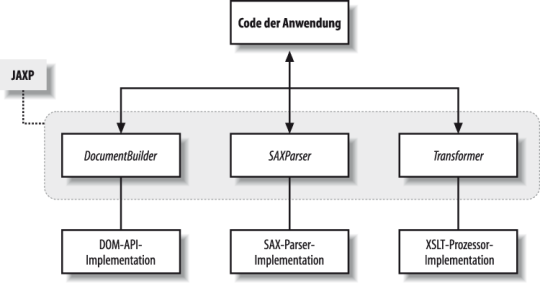
Figure: JAXP 1.1 architecture
Application code does not directly address a particular parser or processor such as SAXON or Xalan. Instead, it targets JAXP’s abstract classes. This indirection lets you choose implementations without recompiling the application.
JAXP’s main drawback is the “lowest common denominator” effect familiar to AWT programmers. To maximize portability, it mainly offers functionality supported by all XSLT processors. For example, Xalan’s proprietary XPath APIs are absent. Exploiting processor-specific advantages requires nonportable code, negating the plugability-layer benefit. Fortunately, JAXP supports common tasks, so implementation-specific code should remain exceptional.
Although JAXP specifies neither a parser nor a processor, reference implementations include both: the open source Apache XML tools Crimson and Xalan, with full source available.
JAXP 1.1 implementation
We now implement the simple example again using Sun’s JAXP 1.1. Any compatible processor can run behind the scenes; the code was developed and tested with Apache Xalan 2. The following example shows the complete source.
Example: BeispielJaxp.java
package kapitel5;

import java.io.*;

/**
 * Ein einfaches Beispiel für JAXP 1.1
 */
public class BeispielJaxp {

  /**
   * Akzeptiert zwei Kommandozeilenparameter: den Namen einer XML-Datei und
   * den Namen eines XSLT-Stylesheets. Das Ergebnis der Transformation wird auf
   * stdout ausgegeben.
   */
  public static void main(String[] args)
     throws javax.xml.transform.TransformerException {
   if (args.length != 2) {
     System.err.println("Syntax:");
     System.err.println(" java " + BeispielJaxp.class.getName( )
        + " xmlDateiname xsltDateiname");
     System.exit(1);
  }
  File xmlDatei = new File(args[0]);
  File xsltDatei = new File(args[1]);

  javax.xml.transform.Source xmlSource =
      new javax.xml.transform.stream.StreamSource(xmlDatei);
  javax.xml.transform.Source xsltSource =
      new javax.xml.transform.stream.StreamSource(xsltDatei);
  javax.xml.transform.Result ergebnis =
      new javax.xml.transform.stream.StreamResult(System.out);

  // eine Instanz von TransformerFactory wird erzeugt
  javax.xml.transform.TransformerFactory transFact =
      javax.xml.transform.TransformerFactory.newInstance( );

  javax.xml.transform.Transformer trans =
      transFact.newTransformer(xsltSource);

  trans.transform(xmlSource, ergebnis);
  }
}
As before, explicit package names highlight which classes belong to JAXP. Later examples favor import statements to reduce typing and improve readability. Our program starts by declaring it can throw a TransformerException:
public static void main(String[] args)
     throws javax.xml.transform.TransformerException {
This general-purpose exception covers anything that can go wrong during transformation. Other processors typically report SAX-specific exceptions. In JAXP, the TransformerException can wrap any type of Exception object thrown by different XSLT processors.
Next, command-line arguments are converted into File objects. SAXON and Xalan examples created a system ID for each file. Since JAXP can read directly from a File object, no extra URI conversion is necessary:
File xmlDatei = new File(args[0]);
File xsltDatei = new File(args[1]);

javax.xml.transform.Source xmlSource =
        new javax.xml.transform.stream.StreamSource(xmlDatei);
javax.xml.transform.Source xsltSource =
        new javax.xml.transform.stream.StreamSource(xsltDatei);
The interface Source reads both XML and XSLT files. Unlike SAX’s class InputSource or Xalan’s class XSLTInputSource, Source is an interface with potentially many implementations. This example uses a StreamSource object, which reads from a File object, an InputStream, a Reader or a system ID. Later we examine additional Source implementations accepting SAX and DOM input. Like Source, Result is an interface with various possible implementations. Here a StreamResult object sends transformation output to System.out:
javax.xml.transform.Result ergebnis =
     new javax.xml.transform.stream.StreamResult(System.out);
Next, an instance of TransformerFactory is created:
javax.xml.transform.TransformerFactory transFact =
     javax.xml.transform.TransformerFactory.newInstance( );
The class TransformerFactory creates Transformer and Template objects. This example creates a Transformer object:
javax.xml.transform.Transformer trans =
     transFact.newTransformer(xsltSource);
Transformer objects are not thread-safe, although they are reusable. This simple example causes no trouble, but multiple servlet users cannot access the same Transformer instance concurrently. JAXP also provides a Templates interface representing a stylesheet that many concurrent threads can access.
The Transformer instance then performs the actual transformation:
trans.transform(xmlSource, ergebnis);This applies the stylesheet to the XML data and sends the result to System.out.
XSLT plugability layer
JAXP 1.1 defines a lookup procedure to find a suitable XSLT processor without vendor-specific application code, using Java system properties and JAR service providers. First, code locates an instance of the TransformerFactory class:
javax.xml.transform.TransformerFactory transFact =
     javax.xml.transform.TransformerFactory.newInstance( );
Since TransformerFactory is abstract, the method newInstance( ) creates an instance of a specific subclass. The lookup algorithm starts by checking system property javax.xml.transform.TransformerFactory. Suppose com.irgendwas.DingsTransformer is a new JAXP 1.1-compatible XSLT processor. To use it instead of the default, specify the system property when starting the application from the command line. System properties can also be set in Ant build files:
java -Djavax.xml.transform.TransformerFactory=com.irgendwas.DingsTransformer MyAppvIf JAXP can instantiate DingsTransformer, that processor is used. Naturally, DingsTransformer must extend TransformerFactory; vendors must therefore supply JAXP support.
Without the system property, JAXP next looks for a properties file named lib/jaxp.properties in the JRE directory. A properties file contains name=wert pairs; JAXP looks for a line such as:
javax.xml.transform.TransformerFactory=com.irgendwas.DingsTransformerLocate the JRE with this code:
String javaHomeVerzeichnis = System.getProperty("java.home");Note:
Some common development tools change java.home during installation, possibly preventing JAXP from finding its jaxp.properties file. Borland JBuilder, for example, installs and defaults to its own Java 2 version.
Placing jaxp.properties in this directory lets every JAXP application use your preferred processor without a command-line system property. You can still override the file with the -D command-line syntax.
If jaxp.properties is not found, JAXP uses the JAR service provider mechanism to find the appropriate subclass of TransformerFactory.
Sun’s JAR service-provider mechanism merely requires a file in a JAR’s META-INF/services directory. For JAXP, the filename is javax.xml.transform.TransformerFactory. Its single line identifies the implementation of TransformerFactory: com.irgendwas.DingsTransformer in our fictitious example. Look inside JAXP 1.1’s xalan.jar to find this file. To use another compatible parser, ensure its JAR is listed first in your CLASSPATH.
If none of the three locations supplies an implementation, JAXP uses its default TransformerFactory implementation. In summary, JAXP finds a Factory class as follows:
Use the system property
javax.xml.transform.TransformerFactoryif present.If the file JRE/lib/jaxp.properties exists, look for an entry of the form
javax.xml.transform.TransformerFactory=ImplementationClass.Use a JAR service provider to search every JAR in CLASSPATH for the file META-INF/services/javax.xml.transform.TransformerFactory.
Use the default instance of
TransformerFactory.
JAXP 1.1’s SAX and DOM layers follow the same process as XSLT, using system properties javax.xml.parsers.SAXParserFactory and javax.xml.parsers.DocumentBuilderFactory respectively. JAXP 1.0’s simpler algorithm only checks for a system property; if absent, it uses the default implementation.
The Transformer class
As example BeispielJaxp.java showed, obtain a Transformer object through TransformerFactory as follows:
javax.xml.transform.TransformerFactory transFact =
         javax.xml.transform.TransformerFactory.newInstance( );
javax.xml.transform.Transformer trans =
         transFact.newTransformer(xsltSource);
The Transformer instance encapsulates a stylesheet and supports any number of transformations. Beware of threads: multiple threads cannot concurrently use a single Transformer instance. For each transformation, call its transform method:
abstract void transform(Source xmlSource, Result outputTarget)
     throws TransformerException
This method is abstract because TransformerFactory returns a subclass of Transformer that performs the work. The interface Source defines where XML data come from; the interface Result defines the result’s destination. The TransformerException is thrown on transformation problems and can contain their location and a reference to the original exception. Location accuracy depends entirely on the underlying implementation’s error reporting. Later we discuss specific implementations of the interfaces Source and Result.
Besides transforming, the implementation of Transformer lets you set output properties and stylesheet parameters. In XSLT a parameter is declared and used as follows:
<?xml version="1.0" encoding="ISO-8859-1"?>
<xsl:stylesheet version="1.0" xmlns:xsl="http://www.w3.org/1999/XSL/Transform">
    <xsl:output method="html"/>
    <xsl:param name="bilder_verzeichnis" select="'bilder'"/>
    <xsl:template match="/">
        <html>
            <body>
                <h1>Beispiel für Stylesheet-Parameter</h1>
                <img src="{$bilder_verzeichnis}/sample.gif"/>
            </body>
        </html>
    </xsl:template>
</xsl:stylesheet>
The element <xsl:param> declares the parameter’s name and an optional select attribute providing the default when no parameter is passed. Here the default string is 'bilder'. Single quotes make it a string rather than an XPath expression. Later, using Attribute Value Template syntax, variable bilder_verzeichnis is referenced as {$bilder_verzeichnis}.
Passing an image-location variable is common because development and production may use different directories. Another common use passes dynamic data directly, such as a servlet ID for session tracking.
JAXP passes this parameter through the Transformer instance. The code is simple:
javax.xml.transform.Transformer trans = transFact.newTransformer(xsltSource);
trans.setParameter("bilder_verzeichnis", "grafiken");
Set as many parameters as desired; they are stored and reused for every transformation with this Transformer instance. To remove a parameter, call clearParameters( ), resetting all parameters for this Transformer instance. Parameters work like a java.util.Map: setting one twice replaces the first value with the second.
Another use of the Transformer class is reading and setting output properties with these methods:
void setOutputProperties(java.util.Properties props)
void setOutputProperty(String name, String value)
java.util.Properties getOutputProperties( )
String getOutputProperty(String name)
Properties are string name/value pairs, readable and writable individually or together. Unlike stylesheet parameters, individual properties can be reset by passing null as the value. Allowed names are defined in class javax.xml.transform.OutputKeys and explained in the following table.
Table: Constants in javax.xml.transform.OutputKeys
Constant | Meaning |
|---|---|
| Specifies a whitespace-separated list of elements whose content should be output as CDATA sections. See the W3C XSLT specification for examples. |
| Used only if |
| Instructs the processor to output a document type declaration. |
| Sets the result tree’s character encoding, for example UTF-8 or ISO-8859-1. |
| Specifies whether to add whitespace to the result tree to improve readability. Valid values are |
| The MIME type of the result tree. |
| The output method, either |
| Valid values are |
| Valid values are |
| Sets the output method’s version, defaulting to |
These properties deliberately match those set in the <xsl:output> element of stylesheets. For example:
<xsl:output method="xml" indent="yes" encoding="ISO-8859-1"/>JAXP can add output properties or override stylesheet settings. To change character encoding, write:
// hat Vorrang vor der im Stylesheet angegebenen Zeichenkodierung
trans.setOutputProperty(OutputKeys.ENCODING, "UTF-16");
This not only writes encoding="UTF-16" into the XML declaration; it also tells the processor to use that encoding for the result tree. Specifying UTF-16 therefore produces 16-bit Unicode characters, causing display problems in many ASCII editors.
JAXP XSLT design
Having seen some code and begun exploring the Transformer class, let us step back and examine the overall XSLT layer design. JAXP’s XSLT support is divided among the packages below.
Table: JAXP transformation packages
Package | Description |
|---|---|
| Defines a general XML transformation API independent of SAX or DOM. The |
| Defines DOM transformations. Contains implementations of |
| Supports SAX2 transformations, defining SAX versions of |
| Defines I/O stream implementations of |
JAXP’s core XSLT support resides in package javax.xml.transform, providing mechanisms and the overall process for transformations. It mainly contains interfaces and abstract classes, except for OutputKeys and a few exception and error classes. The following UML diagram shows the package.
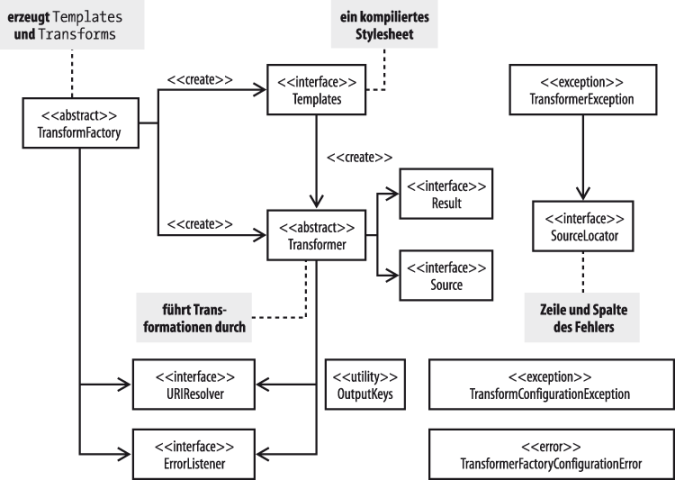
Figure: javax.xml.transform class diagram
This small package reflects JAXP’s role as a wrapper around tools performing the transformations. Its entry point is class TransformerFactory, which creates instances of Transformer and of the abstract class Templates. A Templates object represents a compiled stylesheet, discussed in detail below. “Compiled” is loosely defined: processors may optimize cached stylesheets freely. Compilation’s benefit is performance: the same Templates object can be reused repeatedly by many threads without reparsing the XSLT file.
The interface URIResolver resolves URIs found in stylesheets, usually without your direct involvement. It is used when a stylesheet imports or includes another document and the processor must locate it. For example:
<xsl:import href="allgemeineFusszeile.xslt"/>ErrorListener is an interface letting your code register as a listener for error conditions. It defines these three methods:
void error(TransformerException ex)
void fatalError(TransformerException ex)
void warning(TransformerException ex)
The TransformerException can wrap another Exception or a Throwable object and return an instance of the SourceLocator class. If the underlying implementation supplies no SourceLocator, null is returned. The interface SourceLocator defines methods for locating where a TransformerException originated. For error() and warning(), the processor must continue to the document’s end. For fatalError(), however, it need not continue. Without a registered ErrorListener object, all errors, warnings and fatal errors are output normally to System.err. TransformerFactoryConfigurationError and TransformerConfigurationException complete JAXP’s error-handling APIs, reporting underlying processor configuration problems. The class TransformerFactoryConfigurationError is generally used when the implementation class is absent from CLASSPATH or cannot be instantiated. TransformerConfigurationException indicates a “serious configuration error” according to its documentation.
Copyright © 2002 O'Reilly Verlag GmbH & Co. KG
You may print the online version for your private use.
Otherwise, this chapter from “Java und XSLT” is subject to the same conditions as the bound edition. The work, including all its parts, is protected by copyright. All rights reserved, including reproduction, translation, microfilming, and storage and processing in electronic systems.
O’Reilly Verlag GmbH & Co. KG, Balthasarstraße 81, 50670 Köln, kommentar(at)oreilly.de