

XML technologies / XSLT / Java and XSLT / Development environments, testing and performance / Development environment
(Excerpt from “Java and XSLT” by Eric M. Burke)
Specialized lightweight tools matter to Java developers. Commercial integrated development environments (IDEs) are only a small part of Java projects’ tools, which include Ant for builds, JUnit for tests, various XML parsers and XSLT processors. The figure shows tools in a typical Java and XSLT development environment.
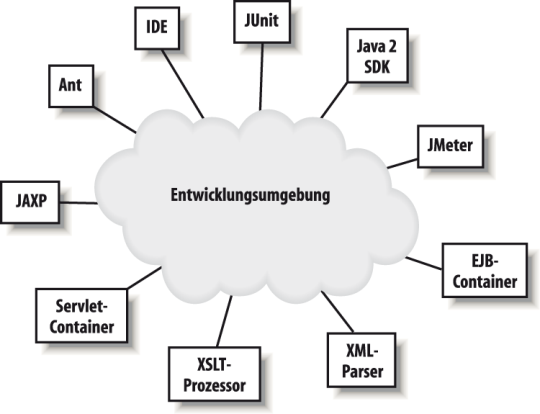
Figure: Common Java, XML and XSLT tools
Many tools are involved. The table summarizes their uses.
Table: Tool overview
Tool | Description |
|---|---|
Java 2 SDK | Java 2 Software Development Kit (JDK) |
Apache JMeter | Load-testing tool for servlet and website scalability and performance |
EJB container | Enterprise JavaBeans server such as JBoss, Enhydra, WebLogic or WebSphere |
XML parser | |
Xalan, SAXON or another XSLT processor | |
Servlet container | Apache Tomcat or another servlet host; many application servers contain servlet and EJB containers |
Common API for XML parsers and XSLT processors | |
Apache Ant | Java equivalent of make; Ant build files ensure consistent compilation and testing in a development environment |
IDE | Integrated development environment such as Borland JBuilder |
JUnit | Open source unit-testing framework |
Some tools work better together. Combining JUnit with Ant ensures all team members compile and test with identical settings, so one developer’s tests work identically for others. Without Ant, tests passing for one developer may fail for others using different tool versions.
CLASSPATH problems
Moving beyond first-generation XML parsers and XSLT processors was unpleasant for Java developers. The newer APIs are excellent, but old JARs remain in many applications and directories, causing configuration problems. This section covers common problems and tool configuration.
JAR hell?
Microsoft Windows is often criticized for “DLL hell”: two applications need different versions of one DLL (Dynamic Link Library). Installing a new application can overwrite a DLL version needed by another, causing errors or total system crashes, also known as the “blue screen of death”.
Java developers also increasingly face incompatible JAR versions. JAXP 1.0 and 1.1 both include a JAR named jaxp.jar. Applications requiring JAXP 1.1 fail if version 1.0 of jaxp.jar precedes the newer version in CLASSPATH. This is common: many commercial and open source tools include XML parsers and XSLT processors, and installers may add JARs without informing or asking users.
Finding and deleting old JARs is simplest, but filenames often lack version numbers. Many tools change or ignore CLASSPATH at startup, so removing old entries often is insufficient. Help for Ant, Tomcat and JBuilder follows.
Some JARs now record versions in file META-INF/MANIFEST.MF, also called the manifest. Extract it from JAR filename.jar with this command:
jar -xf filename.jar META-INF/MANIFEST.MFView the extracted manifest in any text editor. This example shows the version 1.0 manifest of jaxp.jar:
Example: jaxp.jar version 1.0 manifest
Manifest-Version: 1.0
Specification-Title: Java API for XML Parsing Interfaces
Specification-Vendor: Sun Microsystems
Created-By: 1.2.2 (Sun Microsystems Inc.)
Specification-Version: 1.0.0
Name: javax/xml/parsers
Package-Version: 1.0.0
Specification-Title: Java API for XML Parsing
Specification-Vendor: Sun Microsystems
Sealed: true
Specification-Version: 1.0.0
Package-Vendor: Sun Microsystems, Inc.
Package-Title: javax.xml.parsers
The manifest identifies JAR contents. Sun products use this feature, but it is optional and many products omit the information.
Sealing violations
A dreaded “sealing violation” is a cryptic exception. The next example shows its stack trace.
Example: Sealing-violation stack trace
Exception in thread "main" java.lang.SecurityException: sealing violation
at java.net.URLClassLoader.defineClass(URLClassLoader.java:234)
at java.net.URLClassLoader.access$100(URLClassLoader.java:56)
at java.net.URLClassLoader$1.run(URLClassLoader.java:195)
at java.security.AccessController.doPrivileged(Native Method)
at java.net.URLClassLoader.findClass(URLClassLoader.java:188)
at java.lang.ClassLoader.loadClass(ClassLoader.java:297)
at sun.misc.Launcher$AppClassLoader.loadClass(Launcher.java:286)
at java.lang.ClassLoader.loadClass(ClassLoader.java:253)
at java.lang.ClassLoader.loadClassInternal(ClassLoader.java:313)
at java.lang.Class.forName0(Native Method)
at java.lang.Class.forName(Class.java:120)
at javax.xml.transform.TransformerFactory.newInstance(TransformerFactory.java:117)
at Test.main(Test.java:17)
The uninformative message and mostly internal Java classes obscure the cause. The trace blames line 17 of Test.java:
TransformerFactory transFact = TransformerFactory.newInstance( );That line is correct. CLASSPATH is again responsible. A sealing violation means one or more sealed JARs occur in the wrong CLASSPATH order.
A sealed JAR’s manifest contains Sealed: true, as shown in example jaxp.jar version 1.0 manifest. Individual packages can also be sealed; see Java 2 Standard Edition documentation. Package sealing was introduced in Java 1.2 to ensure version consistency. Every class in a sealed package must load from the same JAR. Loading some from another JAR raises a java.lang.SecurityException exception, as illustrated below.
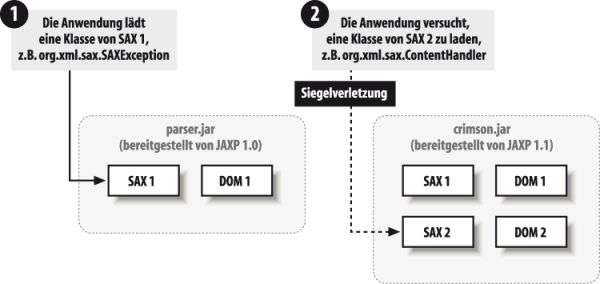
Figure: Sealing violation
Here parser.jar precedes crimson.jar in CLASSPATH. Java loads JARs in that order. After the JVM loads class org.xml.sax.SAXException, all other classes and interfaces in package org.xml.sax must also load from sealed parser.jar. If the application then needs an instance of ContentHandler, the class loader tries loading it from crimson.jar, causing the SecurityException in example Sealing-violation stack trace. The solution is to remove parser.jar from CLASSPATH, making all classes of package org.xml.sax load from crimson.jar.
Other exceptions and errors
Other JAXP configuration exceptions are javax.xml.transform.TransformerConfigurationException and javax.xml.parsers.FactoryConfigurationError. They can occur with an older version of jaxp.jar in CLASSPATH. JAXP 1.0 knew neither SAX 2, DOM 2 nor XSLT transformations. Applications requiring them raise these exceptions if 1.0 is installed instead of 1.1.
Both JAXP versions use filename jaxp.jar. Ensure the newer version is installed. JAXP 1.1 is backwards compatible, so replacing the old version should not affect existing applications.
The easiest exception to fix is java.lang.ClassNotFoundException. It occurs when CLASSPATH includes JAXP 1.1 but no parser or XSLT processor. Add JAXP-compatible implementations to CLASSPATH.
Optional Java packages
The JVM does not load classes solely through CLASSPATH. First it searches the optional-package directory. An installed optional package is a JAR in directory lib/ext of the Java 2 Runtime Environment, or directory jre/lib/ext of the Java 2 SDK.
If no installed optional package is found, the JVM looks for downloadable optional packages: JARs explicitly referenced by another JAR’s manifest header. For example:
Class-Path: jaxp.jarThe JVM then searches the directory containing the referring JAR for jaxp.jar.
To ensure the correct XML parser, XSLT processor and JAXP versions, copy their JARs into the optional-package directory. Developers should install Java 2 SDK and copy JARs into JAVA_HOME/jre/lib/ext. End users with only the Java 2 Runtime Environment can use directory lib/ext in their JRE installation.
To uninstall an optional package, delete its JAR from that directory.
Integrated Java development environments
Many developers use IDEs such as Borland JBuilder. These can cause problems because they usually include their own Java 2 SDK. Compiling or running inside the IDE uses its Java directory instead of a separately installed Sun SDK. The figure shows a typical directory structure illustrating this risk.
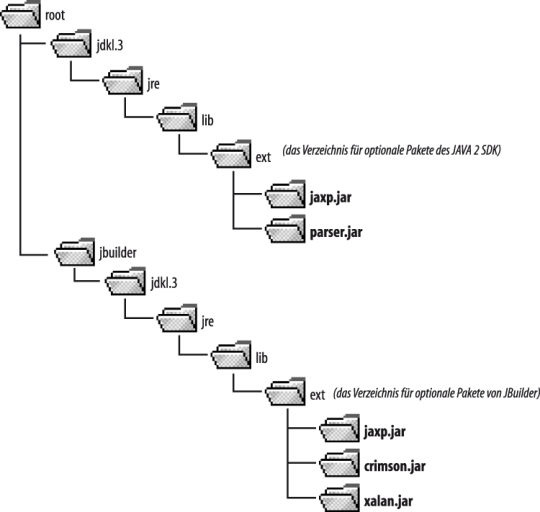
Figure: Typical directory structure
Here JBuilder correctly includes JAXP 1.1, Crimson and Xalan 2.0, so compilation, execution and debugging work inside it. Outside it, the application probably fails because Java 2 SDK contains JAXP 1.0 and an older matching parser.
Adding newer JAXP JARs to CLASSPATH probably causes a sealing violation: optional packages load first. Replace files jaxp.jar and parser.jar with the corresponding JBuilder JARs. Alternatively set JAVA_HOME and PATH to JBuilder’s Java installation.
Ant
Configuring JARs and CLASSPATH for one developer is difficult; synchronizing a whole team is harder. Everyone must use the same build process when testing and integrating changes. Apache Ant helps.
In Antdoc — A documentation stylesheet for Ant, Apache Ant was introduced as a Java-based build tool and an excellent alternative to make. These remarks concern Ant 1.3; later versions may handle JARs differently. Ant offers:
XML build files are easier to create than Makefiles.
Written in Java, Ant is portable.
Builds are fast because most steps reuse the same JVM.
Download Ant from Apache Ant.
Installing Ant
Download and unpack the binary distribution into any directory. Environment variable ANT_HOME must point there and JAVA_HOME to the Java installation. To test, enter ant -version for output similar to:
Ant version 1.3 compiled on March 2 2001Since Ant is Java-based, avoid conflicts between its JARs and CLASSPATH JARs. This especially matters for XSLT: Ant ships JAXP 1.0 JARs incompatible with JAXP 1.1 implementations.
After installing Ant, update files ANT_HOME/lib/jaxp.jar and ANT_ HOME/lib/parser.jar. All JARs in directory ANT_ HOME/lib automatically join Ant’s CLASSPATH and are available to build tasks. Copying JAXP 1.1-compatible JARs into ANT_HOME/lib avoids most problems with applications requiring DOM 2, SAX 2 or XSLT.
A typical Ant build file
To learn Ant, download it, read the manual’s first part, then study build files. This example compiles some of this chapter’s code and performs an XSLT transformation.
Example: build.xml
<?xml version="1.0" encoding="ISO-8859-1"?>
<!--
 *******************************************************
 ** Beispiel einer Build-Datei für Ant.
 **
 ** Erwartet die folgende Verzeichnisstruktur:
 ** examples
 ** +-chapters
 ** | +-chap9
 ** | build.xml (diese Datei)
 ** | aidan.xml (Beispiel einer XML-Datei)
 ** | condensePerson.xslt (Beispiel einer XSLT-Datei)
 ** +-common
 ** | +-src
 ** | +-com/oreilly/javaxslt/swingtrans/...
 ** |
 ** +-build (wird von dieser Build-Datei erzeugt)
 **
 **************************************************** -->
<project name="chap9" default="help" basedir="../..">
    <!--
    *******************************************************
    ** Globale Eigenschaften.
    **************************************************** -->
    <property name="builddir" value="build"/>
    <path id="thirdparty.class.path">
        <pathelement path="lib/saxon_6.2.2.jar"/>
        <pathelement path="lib/jaxp_1.1.jar"/>
        <pathelement path="lib/servlet_2.3.jar"/>
        <pathelement path="lib/junit_3.5.jar"/>
        <pathelement path="lib/jdom_beta6.jar"/>
    </path>
    <!--
    *******************************************************
    ** Erzeuge die Verzeichnisstruktur für die Ausgabe.
    **************************************************** -->
    <target name="prepare">
        <mkdir dir="${builddir}"/>
    </target>
    <!--
    *******************************************************
    ** Zeige eine kurze Hilfemeldung. Es ist das Default-
    ** Ziel, das aufgerufen wird, wenn der Nutzer "ant" eingibt.
    **************************************************** -->
    <target name="help" description="Zeigt eine kurze Hilfemeldung">
         <echo message="Beispiel Build-Datei für Kapitel 9"/>
         <echo message="'ant -projecthelp' zeigt weitere Hilfe"/>
    </target>
    <!--
    ********************************************************
    ** Lösche das gesamte Build-Verzeichnis
    ***************************************************** -->
    <target name="clean"description="Lösche den gesamten kompilierten Code">
         <delete dir="${builddir}"/>
    </target>
    <!--
    ********************************************************
    ** Kompiliere das Paket com.oreilly.javaxslt.swingtrans
    ***************************************************** -->
    <target name="compile" depends="prepare" description="Kompiliere die Anwendung SwingTransformer">
         <javac srcdir="common/src" destdir="${builddir}" includes="com/oreilly/javaxslt/swingtrans/**">
              <classpath refid="thirdparty.class.path"/>
         </javac>
    </target>
    <!--
    ********************************************************
    ** Führe com.oreilly.javaxslt.swingtrans.SwingTransformer aus
    ***************************************************** -->
    <target name="run" depends="compile" description="Führe die Anwendung SwingTransformer aus">
         <java fork="yes" classname="com.oreilly.javaxslt.swingtrans.SwingTransformer">
            <classpath>
                 <pathelement path="${builddir}"/>
            </classpath>
            <classpath refid="thirdparty.class.path"/>
         </java>
    </target>
    <!--
    ********************************************************
    ** Führe eine XSLT-Transformation durch. Wenn die XML-Datei
    ** oder das XSLT-Stylesheet geändert wird, wird die
    ** Transformation erneut durchgeführt.
    **
    ** basedir - spezifiziert den Ort der XSLT-Datei
    ** destdir - dieses Attribut muß zwar angegeben werden, Ant 1.3
    ** ignoriert es aber. Die Konsolenausgabe suggeriert,
    ** daß das Verzeichnis destdir verwendet wird.
    ** Tatsächlich muß das Attribut "out" ebenfalls
    ** das Zielverzeichnis spezifizieren.
    ***************************************************** -->
    <target name="transform" description="Führe eine XSLT-Transformation durch">
        <style processor="trax" basedir="chapters/chap9" destdir="${builddir}" style="condensePerson.xslt" in="chapters/chap9/aidan.xml" out="${builddir}/aidan_condensed.xml">
            <!-- übergib einen Stylesheet-Parameter -->
            <param name="includeMiddle" expression="yes"/>
        </style>
    </target>
</project>
Build files are XML with root element <project>, specifying the default target and base directory. Each target is an element <target> and may depend on others. Targets contain tasks performing individual steps.
Define CLASSPATH once and reuse it throughout the file. Element <path> is highlighted in example build.xml. It lists several JARs from directory lib, for example:
<pathelement path="lib/servlet_2.3.jar"/>Two points ensure consistency. First, include version numbers in JAR filenames to avoid conflicts and unexpected errors from identically named different versions. The drawback is manually updating build files for new versions.
Second, this build uses its own CLASSPATH, not the developer’s environment variable, which can contain different JARs for everyone. Defining it in the build ensures identical compilation and test configurations.
This target compiles the application:
<target name="compile" depends="prepare" description="Kompiliere die Anwendung SwingTransformer">
    <javac srcdir="common/src" destdir="${builddir}" includes="com/oreilly/javaxslt/swingtrans/**">
        <classpath refid="thirdparty.class.path"/>
    </javac>
</target>
Run it by entering ant compile on the command line. It depends on prepare, so directory build is created before compilation. Task <javac> compiles only changed sources, making Ant much faster than manually running javac *.java.
Attributes srcdir and destdir are relative to basedir, specified in element <project>. Ant uses forward slashes (/) to separate path components. These relative paths work on Windows, Unix and Linux. Attribute includes filters files to compile.
The final target performs XSLT through task <style>, described next.
Transformations with Ant’s style task
XSLT developers will particularly appreciate Ant’s <style> task. It performs one or more XSLT transformations. Update Ant’s JAXP JARs as described. A simple example:
<style basedir="." destdir="." style="sample.xslt" processor="trax" in="company.xml" out="report.txt"/>XML and XSLT files are sought in the project base directory and results written to report.txt. The processor is trax, meaning JAXP 1.1. Ant uses the first JAXP-compatible processor in CLASSPATH. The table lists all attributes of task <style>.
Table: Ant <style> task attributes
Attribute | Description | Required? |
|---|---|---|
| Directory containing XML files. | yes |
| Output directory. | yes |
| Default filename extension for transformation results. | no |
| XSLT stylesheet filename. | yes |
| Selects the processor: “trax” for TrAX-compatible processors, “xslp” for XSL:P, “xalan” for Xalan 1.x, or a class implementing | no |
| Comma-separated list of included files. | no |
| Filename containing | no |
| Comma-separated list of excluded files. | no |
| Filename containing | no |
| Valid values: “yes” or “no”; default: “yes”. | no |
| Single XML input file. | no |
| Single output filename. | no |
Pattern attributes such as includes and excludes work like other Ant patterns, determining which files to transform. Without them, all files in the base directory are transformed. Transform an entire XML directory as follows:
<style basedir="xmlfiles" includes="*.xml" destdir="build/doc" style="report.xslt" extension="html"/>As example build.xml showed, pass parameters with nested <param> elements, which require attributes name and expression:
<style basedir="xmlfiles" includes="*.xml" destdir="build/doc" style="report.xslt" extension="html">
   <param name="reportType" expression="'detailed'"/>
</style>
Tomcat
Apache’s Tomcat is the servlet/JSP container mentioned throughout this book. Installation and configuration are simple:
Download the latest Tomcat release for your operating system.
Unpack the distribution into a directory.
Set TOMCAT_HOME to that directory.
Set JAVA_HOME to your Java installation directory.
Since web applications read configuration from XML deployment descriptor (web.xml), all current Tomcat versions include an XML parser.
Configuring Tomcat 3.2.x
Tomcat 3.2.x includes JARs in directory $TOMCAT_ HOME/lib, including jaxp.jar and parser.jar, supporting JAXP 1.0, SAX 1.0 and DOM 1.0. Every JAR added to directory lib is available to all web applications. A simple script finds *.jar in directory lib and adds them to CLASSPATH in operating-system listing order, usually alphabetical. Tomcat 3.2.x’s full CLASSPATH contains:
$TOMCAT_HOME/classes
$TOMCAT_HOME/lib/*.jar
Any existing CLASSPATH
$JAVA_HOME/jre/lib/tools.jar
Directory lib conveniently installs helpers shared by all applications, but conflicts arise when applications need different SAX, DOM or JAXP versions. Finding an old version first usually causes exceptions. A sealing violation occurs, for example, with a new crimson.jar and an old parser.jar in CLASSPATH.
Configure Tomcat 3.2.x for XML as follows:
Delete jaxp.jar and parser.jar from directory $TOMCAT_HOME/lib.
Copy these files from JAXP 1.1 into directory $TOMCAT_HOME/lib: jaxp.jar, crimson.jar and xalan.jar.
JAXP 1.1 also supports tools other than Crimson and Xalan. If preferred, replace crimson.jar and xalan.jar with other compatible products.
Configuring Tomcat 4.0.x
Tomcat 4.0 improves configuration in two ways. First, the user’s CLASSPATH is no longer appended to Tomcat’s, avoiding code that works for a developer with a needed file in CLASSPATH but fails for others with slightly different settings.
Second, its JAXP JARs are invisible to web applications, which must install their own XML support. This avoids conflicts with Tomcat’s internal XML libraries. Without XML support, Tomcat reports java.lang.NoClassDefFoundError.
Install the needed JARs in directory $TOMCAT_HOME/lib for all applications, or in each application’s WEB-INF/lib directory. Each application can then use different package versions without conflicts.
Copyright © 2002 O'Reilly Verlag GmbH & Co. KG
You may print the online version for your private use.
Otherwise, this chapter from “Java und XSLT” is subject to the same conditions as the bound edition. The work, including all its parts, is protected by copyright. All rights reserved, including reproduction, translation, microfilming, and storage and processing in electronic systems.
O’Reilly Verlag GmbH & Co. KG, Balthasarstraße 81, 50670 Köln, kommentar(at)oreilly.de