XML technologies / XSL-FO / Reference / Antenna House Formatter XSL Extensions / Properties / number-transform
(Excerpt from "XSL-FO ― Die Referenz" by Manuel Montero Pineda & Steffen Herkert, 2016, dpunkt.verlag)
A | B | C | D | E | F | G | H | I | J | K | L | M | N | O | P | Q | R | S | T | U | V | W | X | Y | Z
Category Text Transformation
Converts the number sequence in the character string. [no-LT]
Value: | none | kansuji | kansuji-if-vertical | <list-style-type> | <string> |
Initial value: | none |
Applies to: | all block-level and inline-level formatting objects |
Inherited: | yes |
Percentages: | N/A |
Values have the following meanings.
none | Do nothing. |
kansuji | Converts the contained number sequence into Japanese numerals. The details of the Japanese numeral format can be specified by axf:kansuji-style, axf:kansuji-letter and axf:kansuji-grouping-letter. |
kansuji-if-vertical | Only with the vertical writing, such as writing-mode="tb-rl", axf:number-transform="kansuji" is applied. Nothing is changed when it's not the vertical writing. |
<list-style-type> | Among the list-style-type defined by CSS, the number related types which can be specified are <algorithmic>, <numeric>, <alphabetic>, <symbolic>, <non-repeating>. Convertible digit numbers may differ depending on list-style-type. Too long number sequence cannot be converted. |
<string> | When a character string is specified, the behavior is same as when the character string is specified by format. |
A number sequence (number) here indicates character strings of the following forms.
number ::= digits digits ::= [0-9]+
When it is simultaneously specified with text-transform or axf:text-replace, axf:number-transform is evaluated previously.
XSL-FO sample:
<fo:root xml:lang="ja" xmlns:fo="http://www.w3.org/1999/XSL/Format" xmlns:cpfo="http://www.compart.net/xmlns/cpfo" xmlns:svg="http://www.w3.org/2000/svg" xmlns:axf="http://www.antennahouse.com/names/XSL/Extensions">
<axf:document-info name="document-title" value="カウンタスタイルの設定例"/>
<axf:document-info name="author" value="Antenna House, Inc."/>
<fo:layout-master-set>
<fo:simple-page-master page-height="297mm" page-width="210mm" margin-top="10mm" margin-left="20mm" margin-right="20mm" margin-bottom="10mm" master-name="PageMaster1">
<fo:region-after extent="7mm"/>
<fo:region-body margin-top="0mm" margin-left="0mm" margin-right="0mm" margin-bottom="10mm"/>
</fo:simple-page-master>
</fo:layout-master-set>
<fo:declarations>
<axf:counter-style name="cs-01" system="cyclic" symbols="a b c"/>
<axf:counter-style name="cs-02" system="numeric" symbols="a b c"/>
<axf:counter-style name="cs-03" system="alphabetic" symbols="a b c"/>
<axf:counter-style name="cs-04" system="symbolic" symbols="a b c"/>
<axf:counter-style name="cs-05" system="additive" additive-symbols="5 v,1 i"/>
<axf:counter-style name="cs-06" system="fixed" symbols="a b c"/>
<axf:counter-style name="cs-07" system="extends decimal" pad="2 '0'"/>
<axf:counter-style name="cs-08" system="cyclic" symbols="a b c" range="1 3" fallback="cjk-decimal"/>
<axf:counter-style name="cs-09" system="extends decimal" negative="[ ]"/>
<axf:counter-style name="cs-page" system="fixed" symbols="1" prefix="'('" suffix="')'"/>
</fo:declarations>
<fo:page-sequence format="cs-page" master-reference="PageMaster1">
<fo:static-content flow-name="xsl-region-after">
<fo:block font-size="0.8em" text-align="right" color="green">
<fo:basic-link external-destination="http://www.antenna.co.jp/AHF/">
Antenna House, Inc.
</fo:basic-link>
</fo:block>
<fo:block text-align="center">
<fo:page-number/>
</fo:block>
</fo:static-content>
<fo:flow flow-name="xsl-region-body" font-family="serif" font-size="1em" line-height="1.6" axf:hyphenate-hyphenated-word="false" hyphenate="true">
<fo:block span="all" font-family="sans-serif" font-size="2em" font-weight="bold" line-height="2" space-before="1em" space-after="1em" space-before.conditionality="retain" space-after.conditionality="retain" background-color="#EEEEEE">
<fo:block start-indent="1em" end-indent="1em">
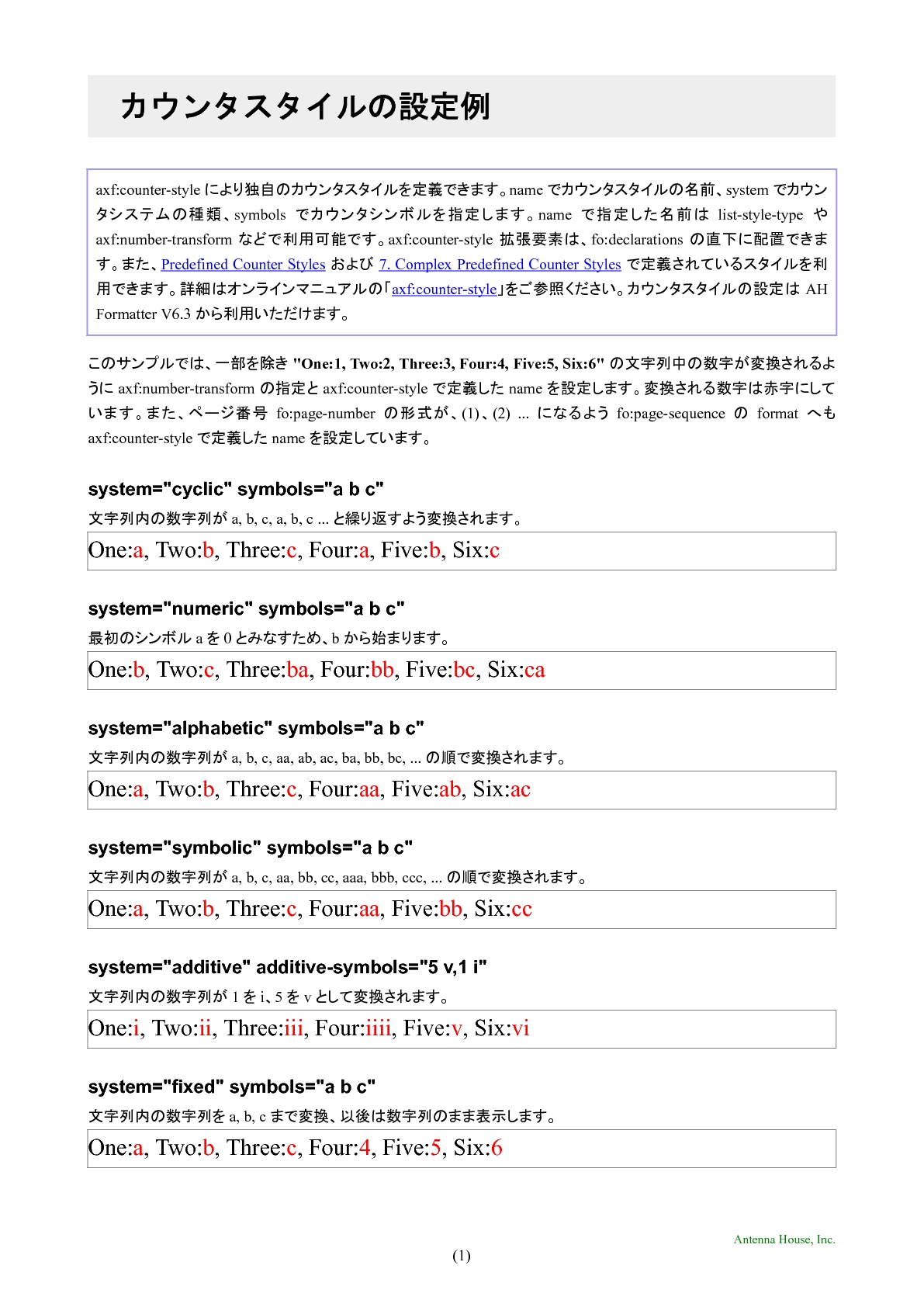
カウンタスタイルの設定例
</fo:block>
</fo:block>
<fo:block span="all" space-before="1em" space-after="1em" space-after.conditionality="retain" text-indent="0em" border="1pt solid #9999FF" start-indent="0.5em" end-indent="0.5em" padding="0.5em" text-align="justify">
<fo:block>
axf:counter-style により独自のカウンタスタイルを定義できます。name でカウンタスタイルの名前、system でカウンタシステムの種類、symbols でカウンタシンボルを指定します。name で指定した名前は list-style-type や axf:number-transform などで利用可能です。axf:counter-style 拡張要素は、fo:declarations の直下に配置できます。また、
<fo:inline text-decoration="underline" color="blue">
<fo:basic-link external-destination="https://www.w3.org/TR/2015/WD-predefined-counter-styles-20150203/">
Predefined Counter Styles
</fo:basic-link>
</fo:inline>
 および
<fo:inline text-decoration="underline" color="blue">
<fo:basic-link external-destination="https://www.w3.org/TR/2015/CR-css-counter-styles-3-20150203/#complex-predefined-counters">
7. Complex Predefined Counter Styles
</fo:basic-link>
</fo:inline>
 で定義されているスタイルを利用できます。詳細はオンラインマニュアルの「
<fo:inline text-decoration="underline" color="blue">
<fo:basic-link external-destination="http://www.antenna.co.jp/AHF/help/v63/ahf-ext.html#axf.counter-style">
axf:counter-style
</fo:basic-link>
</fo:inline>
」をご参照ください。カウンタスタイルの設定は AH Formatter V6.3 から利用いただけます。
</fo:block>
</fo:block>
<fo:block text-align="justify">
このサンプルでは、一部を除き
<fo:inline font-weight="bold">
"One:1, Two:2, Three:3, Four:4, Five:5, Six:6"
</fo:inline>
 の文字列中の数字が変換されるように axf:number-transform の指定と axf:counter-style で定義した name を設定します。変換される数字は赤字にしています。また、ページ番号 fo:page-number の形式が、(1)、(2) ... になるよう fo:page-sequence の format へも axf:counter-style で定義した name を設定しています。
</fo:block>
<fo:block space-before="1em" font-family="sans-serif" font-size="1.2em" font-weight="bold" text-indent="0em" line-height="2" keep-with-next.within-column="always">
system="cyclic" symbols="a b c"
</fo:block>
<fo:block text-align="justify">
文字列内の数字列が a, b, c, a, b, c ... と繰り返すよう変換されます。
</fo:block>
<fo:block axf:number-transform="cs-01" font-size="1.5em" border="0.5pt solid gray">
 One:
<fo:inline color="red">
1
</fo:inline>
, Two:
<fo:inline color="red">
2
</fo:inline>
, Three:
<fo:inline color="red">
3
</fo:inline>
, Four:
<fo:inline color="red">
4
</fo:inline>
, Five:
<fo:inline color="red">
5
</fo:inline>
, Six:
<fo:inline color="red">
6
</fo:inline>
</fo:block>
<fo:block space-before="1em" font-family="sans-serif" font-size="1.2em" font-weight="bold" text-indent="0em" line-height="2" keep-with-next.within-column="always">
system="numeric" symbols="a b c"
</fo:block>
<fo:block text-align="justify">
最初のシンボル a を 0 とみなすため、b から始まります。
</fo:block>
<fo:block axf:number-transform="cs-02" font-size="1.5em" border="0.5pt solid gray">
 One:
<fo:inline color="red">
1
</fo:inline>
, Two:
<fo:inline color="red">
2
</fo:inline>
, Three:
<fo:inline color="red">
3
</fo:inline>
, Four:
<fo:inline color="red">
4
</fo:inline>
, Five:
<fo:inline color="red">
5
</fo:inline>
, Six:
<fo:inline color="red">
6
</fo:inline>
</fo:block>
<fo:block space-before="1em" font-family="sans-serif" font-size="1.2em" font-weight="bold" text-indent="0em" line-height="2" keep-with-next.within-column="always">
system="alphabetic" symbols="a b c"
</fo:block>
<fo:block text-align="justify">
文字列内の数字列が a, b, c, aa, ab, ac, ba, bb, bc, ... の順で変換されます。
</fo:block>
<fo:block axf:number-transform="cs-03" font-size="1.5em" border="0.5pt solid gray">
 One:
<fo:inline color="red">
1
</fo:inline>
, Two:
<fo:inline color="red">
2
</fo:inline>
, Three:
<fo:inline color="red">
3
</fo:inline>
, Four:
<fo:inline color="red">
4
</fo:inline>
, Five:
<fo:inline color="red">
5
</fo:inline>
, Six:
<fo:inline color="red">
6
</fo:inline>
</fo:block>
<fo:block space-before="1em" font-family="sans-serif" font-size="1.2em" font-weight="bold" text-indent="0em" line-height="2" keep-with-next.within-column="always">
system="symbolic" symbols="a b c"
</fo:block>
<fo:block text-align="justify">
文字列内の数字列が a, b, c, aa, bb, cc, aaa, bbb, ccc, ... の順で変換されます。
</fo:block>
<fo:block axf:number-transform="cs-04" font-size="1.5em" border="0.5pt solid gray">
 One:
<fo:inline color="red">
1
</fo:inline>
, Two:
<fo:inline color="red">
2
</fo:inline>
, Three:
<fo:inline color="red">
3
</fo:inline>
, Four:
<fo:inline color="red">
4
</fo:inline>
, Five:
<fo:inline color="red">
5
</fo:inline>
, Six:
<fo:inline color="red">
6
</fo:inline>
</fo:block>
<fo:block space-before="1em" font-family="sans-serif" font-size="1.2em" font-weight="bold" text-indent="0em" line-height="2" keep-with-next.within-column="always">
system="additive" additive-symbols="5 v,1 i"
</fo:block>
<fo:block text-align="justify">
文字列内の数字列が 1 を i、5 を v として変換されます。
</fo:block>
<fo:block axf:number-transform="cs-05" font-size="1.5em" border="0.5pt solid gray">
 One:
<fo:inline color="red">
1
</fo:inline>
, Two:
<fo:inline color="red">
2
</fo:inline>
, Three:
<fo:inline color="red">
3
</fo:inline>
, Four:
<fo:inline color="red">
4
</fo:inline>
, Five:
<fo:inline color="red">
5
</fo:inline>
, Six:
<fo:inline color="red">
6
</fo:inline>
</fo:block>
<fo:block space-before="1em" font-family="sans-serif" font-size="1.2em" font-weight="bold" text-indent="0em" line-height="2" keep-with-next.within-column="always">
system="fixed" symbols="a b c"
</fo:block>
<fo:block text-align="justify">
文字列内の数字列を a, b, c まで変換、以後は数字列のまま表示します。
</fo:block>
<fo:block axf:number-transform="cs-06" font-size="1.5em" border="0.5pt solid gray">
 One:
<fo:inline color="red">
1
</fo:inline>
, Two:
<fo:inline color="red">
2
</fo:inline>
, Three:
<fo:inline color="red">
3
</fo:inline>
, Four:
<fo:inline color="red">
4
</fo:inline>
, Five:
<fo:inline color="red">
5
</fo:inline>
, Six:
<fo:inline color="red">
6
</fo:inline>
</fo:block>
<fo:block break-after="page"/>
<fo:block space-before="1em" font-family="sans-serif" font-size="1.2em" font-weight="bold" text-indent="0em" line-height="2" keep-with-next.within-column="always">
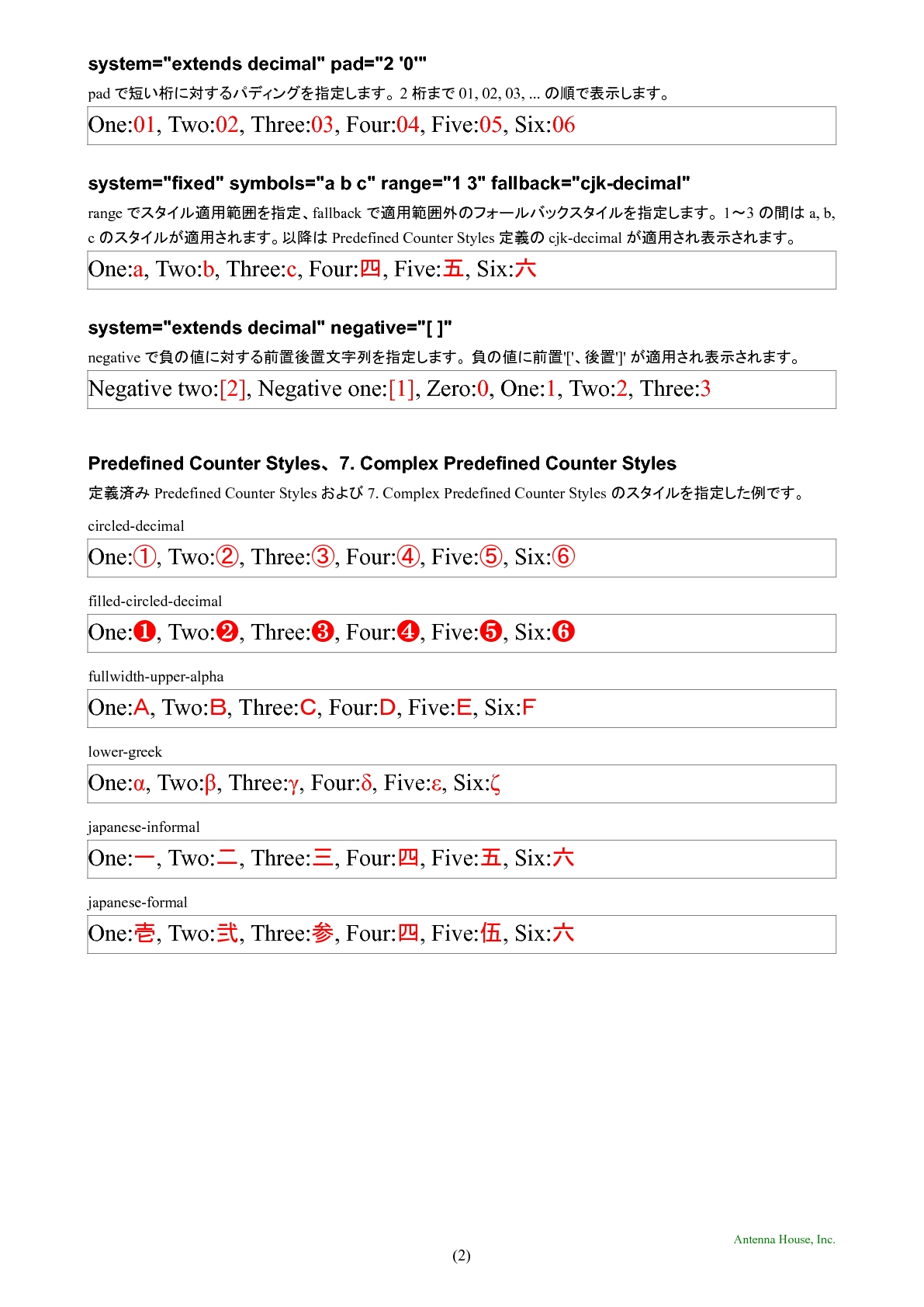
system="extends decimal" pad="2 '0'"
</fo:block>
<fo:block text-align="justify">
pad で短い桁に対するパディングを指定します。 2桁まで 01, 02, 03, ... の順で表示します。
</fo:block>
<fo:block axf:number-transform="cs-07" font-size="1.5em" border="0.5pt solid gray">
 One:
<fo:inline color="red">
1
</fo:inline>
, Two:
<fo:inline color="red">
2
</fo:inline>
, Three:
<fo:inline color="red">
3
</fo:inline>
, Four:
<fo:inline color="red">
4
</fo:inline>
, Five:
<fo:inline color="red">
5
</fo:inline>
, Six:
<fo:inline color="red">
6
</fo:inline>
</fo:block>
<fo:block space-before="1em" font-family="sans-serif" font-size="1.2em" font-weight="bold" text-indent="0em" line-height="2" keep-with-next.within-column="always">
system="fixed" symbols="a b c" range="1 3" fallback="cjk-decimal"
</fo:block>
<fo:block text-align="justify">
range でスタイル適用範囲を指定、fallback で適用範囲外のフォールバックスタイルを指定します。 1~3 の間は a, b, c のスタイルが適用されます。以降は Predefined Counter Styles 定義の cjk-decimal が適用され表示されます。
</fo:block>
<fo:block axf:number-transform="cs-08" font-size="1.5em" border="0.5pt solid gray">
 One:
<fo:inline color="red">
1
</fo:inline>
, Two:
<fo:inline color="red">
2
</fo:inline>
, Three:
<fo:inline color="red">
3
</fo:inline>
, Four:
<fo:inline color="red">
4
</fo:inline>
, Five:
<fo:inline color="red">
5
</fo:inline>
, Six:
<fo:inline color="red">
6
</fo:inline>
</fo:block>
<fo:block space-before="1em" font-family="sans-serif" font-size="1.2em" font-weight="bold" text-indent="0em" line-height="2" keep-with-next.within-column="always">
system="extends decimal" negative="[ ]"
</fo:block>
<fo:block text-align="justify">
negative で負の値に対する前置後置文字列を指定します。 負の値に前置'['、後置']' が適用され表示されます。
</fo:block>
<fo:block axf:number-transform="cs-09" font-size="1.5em" space-after="1.5em" border="0.5pt solid gray">
 Negative two:
<fo:inline color="red">
-2
</fo:inline>
, Negative one:
<fo:inline color="red">
-1
</fo:inline>
, Zero:
<fo:inline color="red">
0
</fo:inline>
, One:
<fo:inline color="red">
1
</fo:inline>
, Two:
<fo:inline color="red">
2
</fo:inline>
, Three:
<fo:inline color="red">
3
</fo:inline>
</fo:block>
<fo:block space-before="1em" font-family="sans-serif" font-size="1.2em" font-weight="bold" text-indent="0em" line-height="2" keep-with-next.within-column="always">
Predefined Counter Styles、7. Complex Predefined Counter Styles
</fo:block>
<fo:block text-align="justify" space-after="0.5em">
定義済み Predefined Counter Styles および 7. Complex Predefined Counter Styles のスタイルを指定した例です。
</fo:block>
<fo:block text-align="justify">
circled-decimal
</fo:block>
<fo:block axf:number-transform="circled-decimal" font-size="1.5em" border="0.5pt solid gray" space-after="0.5em">
 One:
<fo:inline color="red">
1
</fo:inline>
, Two:
<fo:inline color="red">
2
</fo:inline>
, Three:
<fo:inline color="red">
3
</fo:inline>
, Four:
<fo:inline color="red">
4
</fo:inline>
, Five:
<fo:inline color="red">
5
</fo:inline>
, Six:
<fo:inline color="red">
6
</fo:inline>
</fo:block>
<fo:block text-align="justify">
filled-circled-decimal
</fo:block>
<fo:block axf:number-transform="filled-circled-decimal" font-size="1.5em" border="0.5pt solid gray" space-after="0.5em">
 One:
<fo:inline color="red">
1
</fo:inline>
, Two:
<fo:inline color="red">
2
</fo:inline>
, Three:
<fo:inline color="red">
3
</fo:inline>
, Four:
<fo:inline color="red">
4
</fo:inline>
, Five:
<fo:inline color="red">
5
</fo:inline>
, Six:
<fo:inline color="red">
6
</fo:inline>
</fo:block>
<fo:block text-align="justify">
fullwidth-upper-alpha
</fo:block>
<fo:block axf:number-transform="fullwidth-upper-alpha" font-size="1.5em" border="0.5pt solid gray" space-after="0.5em">
 One:
<fo:inline color="red">
1
</fo:inline>
, Two:
<fo:inline color="red">
2
</fo:inline>
, Three:
<fo:inline color="red">
3
</fo:inline>
, Four:
<fo:inline color="red">
4
</fo:inline>
, Five:
<fo:inline color="red">
5
</fo:inline>
, Six:
<fo:inline color="red">
6
</fo:inline>
</fo:block>
<fo:block text-align="justify">
lower-greek
</fo:block>
<fo:block axf:number-transform="lower-greek" font-size="1.5em" border="0.5pt solid gray" space-after="0.5em">
 One:
<fo:inline color="red">
1
</fo:inline>
, Two:
<fo:inline color="red">
2
</fo:inline>
, Three:
<fo:inline color="red">
3
</fo:inline>
, Four:
<fo:inline color="red">
4
</fo:inline>
, Five:
<fo:inline color="red">
5
</fo:inline>
, Six:
<fo:inline color="red">
6
</fo:inline>
</fo:block>
<fo:block text-align="justify">
japanese-informal
</fo:block>
<fo:block axf:number-transform="japanese-informal" font-size="1.5em" border="0.5pt solid gray" space-after="0.5em">
 One:
<fo:inline color="red">
1
</fo:inline>
, Two:
<fo:inline color="red">
2
</fo:inline>
, Three:
<fo:inline color="red">
3
</fo:inline>
, Four:
<fo:inline color="red">
4
</fo:inline>
, Five:
<fo:inline color="red">
5
</fo:inline>
, Six:
<fo:inline color="red">
6
</fo:inline>
</fo:block>
<fo:block text-align="justify">
japanese-formal
</fo:block>
<fo:block axf:number-transform="japanese-formal" font-size="1.5em" border="0.5pt solid gray" space-after="0.5em">
 One:
<fo:inline color="red">
1
</fo:inline>
, Two:
<fo:inline color="red">
2
</fo:inline>
, Three:
<fo:inline color="red">
3
</fo:inline>
, Four:
<fo:inline color="red">
4
</fo:inline>
, Five:
<fo:inline color="red">
5
</fo:inline>
, Six:
<fo:inline color="red">
6
</fo:inline>
</fo:block>
</fo:flow>
</fo:page-sequence>
</fo:root>Output:
page 2