

XML technologies / XSLT / Java and XSLT / XSLT – Advanced techniques / Antdoc – A documentation stylesheet for Ant
(Excerpt from “Java und XSLT” by Eric M. Burke)
Apache Ant has taken Java developers by storm, supporting traditional development environments and replacing Makefiles in most Java projects. Ant is a build tool similar to make, but uses XML files instead of Makefiles. Besides its portable XML build files, Ant itself is written in Java and has few platform dependencies. It can also reuse one Java Virtual Machine instance for almost every build step, making it extremely fast. Ant is available from Apache Ant and is open source.
Ant basics
Ant is controlled by an XML build file, also called a build file, consisting of a project. The project contains one or more targets that can depend on one another. The project and targets are represented in XML by <project> and <target>; <project> must be the document root. Usually a prepare target creates output directories, and a compile target depends on the prepare target. Asking Ant to run the compile target first makes it check whether the prepare target has created the required directories. An Ant build file has approximately this structure:
<?xml version="1.0"?>
<project name="BeispielProjekt" default="compile" basedir=".">
   <!-- globale Eigenschaften -->
   <property name="srcdir" value="src"/>
   <property name="builddir" value="build"/>
   <target name="prepare" description="Erzeugt die Ausgabeverzeichnisse">
      ...einzelne Arbeitsschritte
   </target>
   <target name="compile" depends="prepare">
      ...einzelne Arbeitsschritte
   </target>
   <target name="distribute" depends="compile">
      ...einzelne Arbeitsschritte
   </target>
</project>
Ant determines for each target whether files have changed and work is needed. During compilation it compares timestamps of .class files with those of .java files. These dependencies avoid needless compilation and improve performance. Although the targets shown here have simple dependencies, one target can depend on several others:
<target name="X" depends="A,B,C">Although Ant build files are much simpler than corresponding Makefiles, complex projects can have many dependencies that are hard to visualize. A hierarchical tree listing all targets and dependencies can help, and XSLT can generate that report.
Stylesheet functionality
Since build files are XML, XSLT easily creates HTML pages summarizing targets and dependencies. Our stylesheet lists global properties and can easily be extended to show the build file’s other contents.
The stylesheet includes useful HTML tables, but its most interesting feature is a complete dependency diagram of all Ant targets. The next example shows its output.
Example: Target dependencies
clean
  all (abhängig von clean, dist)
prepare
  tomcat (abhängig von prepare)
    j2ee (abhängig von tomcat)
      j2ee-dist (abhängig von j2ee)
    main (abhängig von tomcat, webapps)
      dist (abhängig von , webapps)
       dist-zip (abhängig von dist)
       all (abhängig von clean, dist)
    webapps (abhängig von prepare)
      dist (abhängig von main, webapps)
       dist-zip (abhängig von dist)
       all (abhängig von clean, dist)
    main (abhängig von tomcat, webapps)
      dist (abhängig von main, webapps)
       dist-zip (abhängig von dist)
       all (abhängig von clean, dist)
targets
This is output for Apache Tomcat’s build file. Top-level targets appear at the root, followed by indented dependent targets. Targets in parentheses indicate each target’s dependencies. Recursive dependency analysis constructs this tree. The build file expresses dependencies like this:
<target name="all" depends="clean,dist">The next figure shows part of the browser output. A table of all targets follows the diagram, then a table of all global properties defined in the build file.
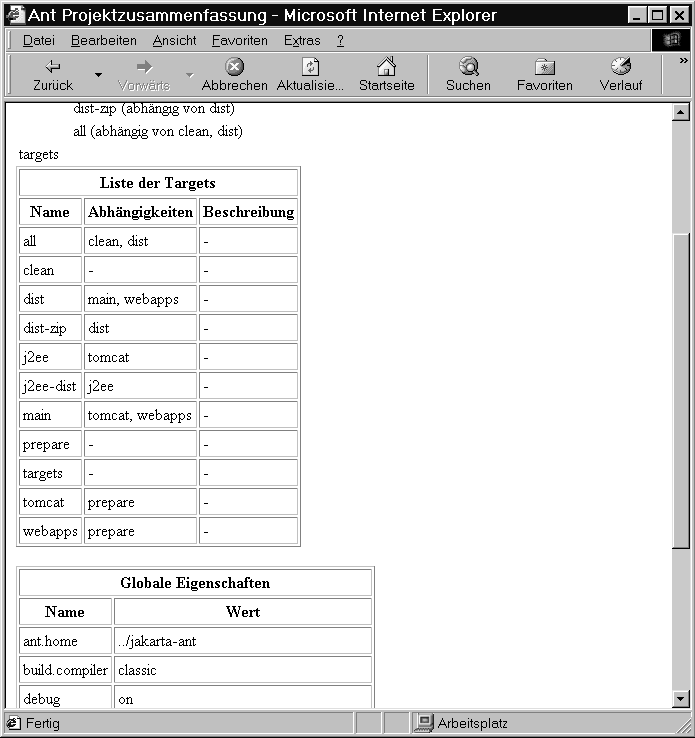
Figure: Sample Antdoc output
The comma-separated dependency list is best handled recursively. Each target needs a list of the targets depending on it. Multiple dependencies mean a build file can contain a <target> like this:
<target name="dokumentation" depends="clean, prepare.dokumentation, compile">The first Antdoc prototype uses simple substring operations to determine whether another target depends on the current one. Unrelated targets may have similar names, causing infinite recursion for some build files. In the preceding example, the prototype says "dokumentationen" depends on itself because its dependency list contains the text prepare.dokumentation.
The final version cleans the dependency list by removing commas and spaces. For example, "clean, prepare.dokumentation, compile" becomes "|clean|prepare.dokumentation|compile|". Putting a pipe character (|) before and after each dependency makes string-based searches much easier.
The complete example
The complete stylesheet appears in antdoc.xslt. Code comments explain each step. To use it, invoke your preferred XSLT processor from the command line, passing antdoc.xslt and your Ant build files as parameters.
Example: antdoc.xslt
<?xml version="1.0" encoding="ISO-8859-1"?>
<!--
**************************************************************
** Antdoc v1.0
**
** Erstellt von Eric Burke (burke_e@ociweb.com)
**
** Verwendet XSLT, um HTML-Zusammenfassungen von Ant-Konstruktionsdateien
** zu erzeugen.
*********************************************************** -->
<xsl:stylesheet version="1.0" xmlns:xsl="http://www.w3.org/1999/XSL/Transform">
<xsl:output method="xml" doctype-public="-//W3C//DTD XHTML 1.0 Strict//EN" doctype-system="http://www.w3.org/TR/xhtml1/DTD/xhtml1-strict.dtd" indent="yes" encoding="ISO-8859-1"/>
<!-- globale Variable: der Projektname -->
<xsl:variable name="projektName" select="/project/@name"/>
<xsl:template match="/">
<html xmlns="http://www.w3.org/1999/xhtml">
<head>
<title>Ant-Projektzusammenfassung -
<xsl:value-of select="$projektName"/></title>
</head>
<body>
<h1>Ant-Projektzusammenfassung</h1>
<xsl:apply-templates select="projekt"/>
</body>
</html>
</xsl:template>
<!--
***************************************************************
** "Projekt"-Template
************************************************************ -->
<xsl:template match="project">
<!-- Die Projektzusammenfassung wird mit Basisinformationen wie Name, Default-Target und Basisverzeichnis als Tabelle ausgegeben -->
<table border="1" cellpadding="4" cellspacing="0">
<tr><th colspan="2">Projektzusammenfassung</th></tr>
<tr>
<td>Projektname:</td>
<td><xsl:value-of select="$projektName"/></td>
</tr>
<tr>
<td>Default-Target:</td>
<td><xsl:value-of select="@default"/></td>
</tr>
<tr>
<td>Basisverzeichnis:</td>
<td><xsl:value-of select="@basedir"/></td>
</tr>
</table>
<!-- alle Target-Abhängigkeiten werden als Baum ausgegeben -->
<h3>Target-Abhängigkeiten als Baum</h3>
<xsl:apply-templates select="target[not(@depends)]" mode="baum">
<xsl:sort select="@name"/>
</xsl:apply-templates>
<p/>
<!-- Eine Tabelle mit allen Targets wird ausgegeben -->
<table border="1" cellpadding="4" cellspacing="0">
<tr><th colspan="3">Liste der Targets</th></tr>
<tr>
<th>Name</th>
<th>Abhängigkeiten</th>
<th>Beschreibung</th>
</tr>
<xsl:apply-templates select="target" mode="tabellenZeile">
<xsl:sort select="count(@description)" order="descending"/>
<xsl:sort select="@name"/>
</xsl:apply-templates>
</table>
<p/>
<xsl:call-template name="globaleEigenschaften"/>
</xsl:template>
<!--
***************************************************************
** Eine Tabelle mit allen globalen Eigenschaften wird erzeugt.
************************************************************ -->
<xsl:template name="globaleEigenschaften">
<xsl:if test="property">
<table border="1" cellpadding="4" cellspacing="0">
<tr><th colspan="2">Globale Eigenschaften</th></tr>
<tr>
<th>Name</th>
<th>Wert</th>
</tr>
<xsl:apply-templates select="property" mode="tabellenZeile">
<xsl:sort select="@name"/>
</xsl:apply-templates>
</table>
</xsl:if>
</xsl:template>
<!--
***************************************************************
** Eine individuelle Eigenschaft wird in einer Tabellenzeile ausgegeben.
************************************************************ -->
<xsl:template match="property[@name]" mode="tabellenZeile">
<tr>
<td><xsl:value-of select="@name"/></td>
<td>
<xsl:choose>
<xsl:when test="not(@value)">
<xsl:text disable-output-escaping="yes">&nbsp;</xsl:text>
</xsl:when>
<xsl:otherwise>
<xsl:value-of select="@value"/>
</xsl:otherwise>
</xsl:choose>
</td>
</tr>
</xsl:template>
<!--
***************************************************************
** "target"-Template, mode=tabellenZeile
** Ein Target-Name und seine Abhängigkeiten werden in
** einer Tabellenzeile ausgegeben.
************************************************************ -->
<xsl:template match="target" mode="tabellenZeile">
<tr valign="top">
<td><xsl:value-of select="@name"/></td>
<td>
<xsl:choose>
<xsl:when test="@depends">
<xsl:call-template name="abhaengigkeitenParsen">
<xsl:with-param name="depends" select="@depends"/>
</xsl:call-template>
</xsl:when>
<xsl:otherwise>-</xsl:otherwise>
</xsl:choose>
</td>
<td>
<xsl:if test="@description">
<xsl:value-of select="@description"/>
</xsl:if>
<xsl:if test="not(@description)">
<xsl:text>-</xsl:text>
</xsl:if>
</td>
</tr>
</xsl:template>
<!--
***************************************************************
** "abhaengigkeitenParsen"-Template
** zerlegt den übergeben Parameter und gibt eine kommaseparierte
** Liste von Abhängigkeiten aus. Das erste Token wird ausgegeben,
** und die übrigen werden diesem Template rekursiv übergeben.
************************************************************ -->
<xsl:template name="abhaengigkeitenParsen">
<!-- Dieser Parameter enthält die Liste der Abhängigkeiten -->
<xsl:param name="depends"/>
<!-- Alles vor dem ersten Komma wird ausgewählt bzw. der ganze String, wenn es keine Kommas gibt. -->
<xsl:variable name="erstesToken">
<xsl:choose>
<xsl:when test="contains($depends, ',')">
<xsl:value-of select="normalize-space(substring-before($depends, ','))"/>
</xsl:when>
<xsl:otherwise>
<xsl:value-of select="normalize-space($depends)"/>
</xsl:otherwise>
</xsl:choose>
</xsl:variable>
<xsl:variable name="restlicheToken" select="normalize-space(substring-after($depends, ','))"/>
<!-- die erste Abhängigkeit wird ausgegeben -->
<xsl:value-of select="$erstesToken"/>
<!-- Das Template wird rekursiv mit dem Rest der kommaseparierten Liste aufgerufen -->
<xsl:if test="$restlicheTokens">
<xsl:text>, </xsl:text>
<xsl:call-template name="abhaengigkeitenParsen">
<xsl:with-param name="depends" select="$restlicheTokens"/>
</xsl:call-template>
</xsl:if>
</xsl:template>
<!--
***************************************************************
** Dieses Template startet einen rekursiven Prozeß, der das
** Abhängigkeitsdiagramm für alle Targets erstellt.
************************************************************ -->
<xsl:template match="target" mode="baum">
<xsl:param name="einrueckungsTiefe" select="'0'"/>
<xsl:variable name="aktName" select="@name"/>
<div style="text-indent: {$einrueckungsTiefe}em;">
<xsl:value-of select="$aktName"/>
<!-- wenn das 'depends'-Attribut vorhanden ist, wird die Liste der Abhängigkeiten angezeigt -->
<xsl:if test="@depends">
<xsl:text> (abhängig von </xsl:text>
<xsl:call-template name="abhaengigkeitenParsen">
<xsl:with-param name="depends" select="@depends"/>
</xsl:call-template>
<xsl:text>)</xsl:text>
</xsl:if>
</div>
<!-- die Einrückung vornehmen -->
<xsl:variable name="naechsteEbene" select="$einrueckungsTiefe+1"/>
<!-- Alle anderen <target>-Elemente, die "depends"-Attribute haben, werden durchsucht -->
<xsl:for-each select="../target[@depends]">
<!-- Die kommaseparierte Liste der Abhängigkeiten wird "bereinigt". Siehe auch die Kommentare des "korrigiereAbhaengigkeit"-Templates -->
<xsl:variable name="korrekteAbhaengigkeit">
<xsl:call-template name="korrigiereAbhaengigkeit">
<xsl:with-param name="depends" select="@depends"/>
</xsl:call-template>
</xsl:variable>
<!-- Nun ist die Abhängigkeitsliste durch Pipes (|) begrenzt, was die Suche nach Substrings einfacher macht. Dieses Template wird für alle Targets, die vom aktuellen Target abhängen, rekursiv instantiiert. -->
<xsl:if test="contains($korrekteAbhaengigkeit,concat('|',$aktName,'|'))">
<xsl:apply-templates select="." mode="baum">
<xsl:with-param name="einrueckungsTiefe" select="$naechsteEbene"/>
</xsl:apply-templates>
</xsl:if>
</xsl:for-each>
</xsl:template>
<!--
***************************************************************
** Dieses Template nimmt eine kommaseparierte Liste von Abhängigkeiten an
** und wandelt alle Kommas in Pipe-Symbole (|) um. Es entfernt auch
** alle Leerzeichen. Zum Beispiel:
**
** Eingabe: depends="a, b,c "
** Ausgabe: |a|b|c|
**
** Der resultierende Text ist mit XSLT leichter zu parsen.
************************************************************ -->
<xsl:template name="korrigiereAbhaengigkeiten">
<xsl:param name="depends"/>
<!-- Alles vor dem ersten Komma wird ausgewählt bzw. der ganze String, wenn es keine Kommas gibt. -->
<xsl:variable name="erstesToken">
<xsl:choose>
<xsl:when test="contains($depends, ',')">
<xsl:value-of select="normalize-space(substring-before($depends, ','))"/>
</xsl:when>
<xsl:otherwise>
<xsl:value-of select="normalize-space($depends)"/>
</xsl:otherwise>
</xsl:choose>
</xsl:variable>
<!-- Eine Variable wird definiert, die alles nach dem ersten Komma enthält -->
<xsl:variable name="restlicheToken" select="normalize-space(substring-after($depends, ','))"/>
<xsl:text>|</xsl:text>
<xsl:value-of select="$erstesToken"/>
<xsl:choose>
<xsl:when test="$restlicheToken">
<xsl:call-template name="korrigiereAbhaengigkeit">
<xsl:with-param name="depends" select="$restlicheToken"/>
</xsl:call-template>
</xsl:when>
<xsl:otherwise>
<xsl:text>|</xsl:text>
</xsl:otherwise>
</xsl:choose>
</xsl:template>
</xsl:stylesheet>Setting XHTML output
One of the first actions sets the output method to "xml" because the result should be XHTML rather than HTML. Attributes doctype-public and doctype-system are required for valid XHTML and specify the Strict DTD:
<xsl:output method="xml" doctype-public="-//W3C//DTD XHTML 1.0 Strict//EN" doctype-system="http://www.w3.org/TR/xhtml1/DTD/xhtml1-strict.dtd" indent="yes" encoding="ISO-8859-1"/>XHTML also requires declaring the namespace of the element <html>:
<xsl:template match="/">
   <html xmlns="http://www.w3.org/1999/xhtml">
      ...
   </html>
</xsl:template>
These XSLT elements produce the following XHTML result tree:
<?xml version="1.0" encoding="ISO-8859-1"?>
<!DOCTYPE html PUBLIC "-//W3C//DTD XHTML 1.0 Strict//EN" "http://www.w3.org/TR/xhtml1/DTD/xhtml1-strict.dtd">
<html xmlns="http://www.w3.org/1999/xhtml">
   ...
</html>
Generating the dependency diagram
The most interesting and difficult feature is producing the complete dependency diagram for every Ant target. First find targets with no dependencies. As shown in Target dependencies, these targets in Tomcat’s build file are called clean, prepare and targets. Select them by finding <target> elements with no attribute named depends:
<!-- Alle Abhängigkeiten als Baum ausgeben -->
<h3>Target Abhängigkeitsbaum</h3>
<xsl:apply-templates select="target[not(@depends)]" mode="baum">
   <xsl:sort select="@name"/>
</xsl:apply-templates>
The predicate [not(@depends)] narrows the list of <target> elements to those without a depends attribute. <xsl:apply-templates> instantiates this template without parameters:
<xsl:template match="target" mode="baum">
 <xsl:param name="einrueckungsTiefe" select="'0'"/>
 <xsl:variable name="aktName" select="@name"/>
In antdoc.xslt, this is the second-last template. Since we have split it into pieces here, reading the original may be easier. Parameter einrueckungsTiefe was not supplied, so it defaults to '0', appropriate for top-level targets. Recursive instantiation increases indentation. Variable aktName is local to this template and holds the current target name. Text lines are indented using a style attribute:
<div style="text-indent: {$einrueckungsTiefe}em;">With CSS, everything inside the <div> tag is indented by the value in ems (one em is roughly the width of a lowercase “m” in the current font). The target name then appears with the correct indentation:
<xsl:value-of select="$aktName"/>If the current <target> element has a depends attribute, its dependencies appear beside its name in the report. This is handled by the template abhaengigkeitenParsen. This template, also part of antdoc.xslt, is instantiated using <xsl:call-template> as shown:
<xsl:if test="@depends">
 <xsl:text> (abhängig von </xsl:text>
 <xsl:call-template name="abhaengigkeitenParsen">
  <xsl:with-param name="depends" select="@depends"/>
 </xsl:call-template>
 <xsl:text>)</xsl:text>
</xsl:if>
To continue the dependency diagram, the template target must instantiate itself recursively. First increase indentation. Since XSLT variables cannot be modified, create a new variable:
<xsl:variable name="naechsteEbene" select="$einrueckungsTiefe+1"/>During recursive instantiation, naechsteEbene is supplied as the value for parameter einrueckungsTiefe:
<xsl:apply-templates select="." mode="baum">
 <xsl:with-param name="einrueckungsTiefe" select="$naechsteEbene"/>
</xsl:apply-templates>
The remainder is not repeated here but appears in antdoc.xslt. The basic algorithm is:
Use
<xsl:for-each>to select all targets with dependencies.Instantiate the “korrigiereAbhaengigkeit” template to replace commas with
|symbols.Recursively instantiate the “target” template for all targets depending on the current one.
Cleaning dependency lists
The last template tokenizes a comma-separated list by inserting a pipe character (|) between dependencies:
<xsl:template name="korrigiereAbhaengigkeit">
  <xsl:param name="depends"/>
The parameter depends can contain text such as “a, b, c”. The template produces this output:
|a|b|c|Since XSLT has no equivalent of Java’s class StringTokenizer, recursion is needed again. Process text before the first comma, then recursively everything after it. This code assigns text before the first comma to variable erstesToken:
<xsl:variable name="erstesToken">
   <xsl:choose>
      <xsl:when test="contains($depends, ',')">
         <xsl:value-of select="normalize-space(substring-before($depends, ','))"/>
      </xsl:when>
      <xsl:otherwise>
         <xsl:value-of select="normalize-space($depends)"/>
      </xsl:otherwise>
   </xsl:choose>
</xsl:variable>
If parameter depends contains a comma, the substring-before( ) function locates text before it, and normalize-space( ) removes whitespace. Without commas there can be only one dependency.
Text after the first comma is then assigned to variable restlicheToken. If there are no commas, restlicheToken holds an empty string:
<xsl:variable name="restlicheToken" select="normalize-space(substring-after($depends, ','))"/>The template emits a pipe followed by the first token:
<xsl:text>|</xsl:text>
<xsl:value-of select="$erstesToken"/>
Next, if variable restlicheToken is not empty, template korrigiereAbhaengigkeit is recursively instantiated. Otherwise another pipe is emitted at the end:
<xsl:choose>
 <xsl:when test="$restlicheToken">
  <xsl:call-template name="korrigiereAbhaengigkeit">
   <xsl:with-param name="depends" select="$restlicheToken"/>
  </xsl:call-template>
 </xsl:when>
 <xsl:otherwise>
  <xsl:text>|</xsl:text>
 </xsl:otherwise>
</xsl:choose>
These descriptions should clarify the stylesheet’s harder aspects. Experiment to understand it fully: change parts and inspect browser results. Also try a command-line XSLT processor and inspect the output in a text editor. Browsers skip unknown tags, so some errors become visible only in the source.
Copyright © 2002 O'Reilly Verlag GmbH & Co. KG
You may print the online version for your private use.
Otherwise, this chapter from “Java und XSLT” is subject to the same conditions as the bound edition. The work, including all its parts, is protected by copyright. All rights reserved, including reproduction, translation, microfilming, and storage and processing in electronic systems.
O’Reilly Verlag GmbH & Co. KG, Balthasarstraße 81, 50670 Köln, kommentar(at)oreilly.de