

XML technologies / XSLT / XSLT Cookbook / Recipes for vertical XSLT applications / Converting Visio VDX documents to SVG: conversion
(Excerpt from “XSLT Kochbuch” by Sal Mangano)
Problem
You want to convert Microsoft Visio XML files, VDX, into more portable SVG.
Solution
John Breen implemented this solution, chiefly mapping Visio elements to SVG as in this table.
Table: Visio-to-SVG mapping.
Visio element | SVG element |
| Color value |
| CSS style |
|
|
|
|
|
|
|
|
|
|
|
|
|
|
|
|
|
|
|
|
This section covers only the main stylesheet and some imports. The complete source and examples are available at Visio VDX to SVG XSLT Stylesheet.
<xsl:stylesheet xmlns:xsl="http://www.w3.org/1999/XSL/Transform" xmlns:v="urn:schemas-microsoft-com:office:visio" xmlns:xlink="http://www.w3.org/1999/xlink" xmlns:math="java.lang.Math" xmlns:jDouble="java.lang.Double" xmlns:saxon="http://icl.com/saxon" exclude-result-prefixes="v math saxon jDouble" xmlns="http://www.w3.org/2000/svg" version="1.0">
  <xsl:output method="xml" version="1.0" omit-xml-declaration="no" media-type="image/svg+xml" encoding="iso-8859-1" indent="yes" cdata-section-elements="style" doctype-public="-//W3C//DTD SVG 1.0//EN" doctype-system="http://www.w3.org/TR/2001/REC-SVG-20010904/DTD/svg10.dtd"/>
Parameter pageNumber selects the page to extract, while parameter userScale sets the scaling factor from Visio to user units:
  <xsl:param name="pageNumber" select="1"/>
  <xsl:param name="userScale"  select="100"/>
  <!-- =  =  =  =  Variablen (d.h. Konstanten)  =  =  =  =  =  =  =  =  =  =  =  = -->
  <!-- Farbtabelle -->
  <xsl:variable name="Colors" select="//v:Colors[position( )=1]/v:ColorEntry"/>
  <!-- Gerade verarbeitete Seite -->
  <xsl:variable name="Page" select="/v:VisioDocument/v:Pages/v:Page[number($pageNumber)]"/>
  <!-- Template Masters -->
  <xsl:variable name="Masters" select="//v:Masters[position( )=1]/v:Master"/>
  <!-- Template viewBoxMaster -->
  <xsl:variable name="viewBoxMaster" select="$Masters[@NameU='viewBox']"/>
  <!-- Seitenverhältnis von Schrifthöhe zu -breite (Fummelfaktor) -->
  <xsl:variable name="fontRatio" select="2"/>
  <!-- Pi (SVG verwendet Grad, Visio verwendet Bogenmaß) -->
  <xsl:variable name="pi" select="3.14159265358979323846264338327"/>
The stylesheet is split into these components, some discussed below. It implements JavaScript extensions, but even if your XSLT processor does not support JavaScript, it remains usable, though some text may look less attractive:
  <!-- Inkludierte Dateien -->
  <xsl:include href="visio-style.xsl"/>
  <xsl:include href="visio-text.xsl"/>
  <xsl:include href="visio-masters.xsl"/>
  <xsl:include href="visio-nurbs.xsl"/>
  <!-- Skripten -->
  <xsl:template name="required-scripts">
    <script xlink:href="wordwrap.js" type="text/ecmascript"/>
  </xsl:template>
  <xsl:template match="/v:VisioDocument">
    <xsl:apply-templates select="$Page"/>
  </xsl:template>
A Visio page maps to an SVG graphic. Other document information determines its layout in a view box:
  <!-- =  =  =  =  =  =  =  = Seite =  =  =  =  =  =  =  =  =  =  =  =  =  =  = = =-->
  <xsl:template match="v:Page">
    <xsl:message>
      <xsl:value-of select="@NameU"/>
    </xsl:message>
    <svg id="{@NameU}">
      <xsl:attribute name="xml:space">
        <xsl:value-of select="'preserve'"/>
      </xsl:attribute>
      <xsl:choose>
        <!-- Verwende viewBox namens 'default', wenn vorhanden -->
        <xsl:when test="//v:Shape[@Master=$viewBoxMaster/@ID and @NameU='default'][1]">
          <xsl:for-each select="//v:Shape[@Master=$viewBoxMaster/@ID and @NameU='default']">
            <xsl:attribute name="viewBox">
              <xsl:value-of select="concat(v:XForm/v:PinX*$userScale, ' ',-v:XForm/v:PinY*$userScale, ' ',v:XForm/v:Width*$userScale, ' ',v:XForm/v:Height*$userScale)"/>
            </xsl:attribute>
          </xsl:for-each>
        </xsl:when>
        <!-- Sonst auf der Seite zentrieren -->
        <xsl:otherwise>
          <xsl:attribute name="viewBox">
            <xsl:value-of select="concat('0 ',-v:PageSheet/v:PageProps/v:PageHeight*$userScale, ' ',v:PageSheet/v:PageProps/v:PageWidth*$userScale, ' ',v:PageSheet/v:PageProps/v:PageHeight*$userScale)"/>
          </xsl:attribute>
        </xsl:otherwise>
      </xsl:choose>
      <xsl:call-template name="required-scripts"/>
      <xsl:call-template name="predefined-pattern-fgnds"/>
      <xsl:call-template name="predefined-markers"/>
Conversion starts by turning Visio stylesheet elements into equivalent CSS directives, then converting every shape to SVG:
<xsl:apply-templates select="../../v:StyleSheets"/>
<xsl:apply-templates select="v:Shapes/v:Shape"/>
</svg>
</xsl:template>
<!-- = = = = = = = = StyleSheets = = = = = = = = = -->
<xsl:template match="v:StyleSheets">
<defs>
<xsl:for-each select="v:StyleSheet">
<!-- Linienstil -->
<style id="ss-line-{@ID}" type="text/css">
<xsl:text>*.ss-line-</xsl:text><xsl:value-of select="@ID"/>
<xsl:text> { </xsl:text>
<xsl:call-template name="recursive-line-style">
<xsl:with-param name="ss" select="."/>
</xsl:call-template>
<xsl:text> }</xsl:text>
</style>
<!-- Füllstil -->
<style id="ss-fill-{@ID}" type="text/css">
<xsl:text>*.ss-fill-</xsl:text><xsl:value-of select="@ID"/>
<xsl:text> { </xsl:text>
<xsl:call-template name="recursive-fill-style">
<xsl:with-param name="ss" select="."/>
</xsl:call-template>
<xsl:text> }</xsl:text>
</style>
<!-- Textstil -->
<style id="ss-text-{@ID}" type="text/css">
<xsl:text>*.ss-text-</xsl:text><xsl:value-of select="@ID"/>
<xsl:text> { </xsl:text>
<xsl:call-template name="recursive-text-style">
<xsl:with-param name="ss" select="."/>
</xsl:call-template>
<xsl:text> } </xsl:text>
</style>
</xsl:for-each>
</defs>
</xsl:template>
<!-- Rekursiv durch StyleSheet-Erbfolge durchgehen -->
<xsl:template name="recursive-line-style">
<xsl:param name="ss"/>
<xsl:if test="$ss/@LineStyle">
<xsl:call-template name="recursive-line-style">
<xsl:with-param name="ss" select="$ss/../v:StyleSheet[@ID=$ss/@LineStyle]"/>
</xsl:call-template>
</xsl:if>
<xsl:apply-templates select="$ss/v:Line" mode="style"/>
</xsl:template>
<xsl:template name="recursive-fill-style">
<xsl:param name="ss"/>
<xsl:if test="$ss/@FillStyle">
<xsl:call-template name="recursive-fill-style">
<xsl:with-param name="ss" select="$ss/../v:StyleSheet[@ID=$ss/@FillStyle]"/>
</xsl:call-template>
</xsl:if>
<xsl:apply-templates select="$ss/v:Fill" mode="style"/>
</xsl:template>
<xsl:template name="recursive-text-style">
<xsl:param name="ss"/>
<xsl:if test="$ss/@TextStyle">
<xsl:call-template name="recursive-text-style">
<xsl:with-param name="ss" select="$ss/../v:StyleSheet[@ID=$ss/@TextStyle]"/>
</xsl:call-template>
</xsl:if>
<xsl:apply-templates select="$ss/v:Char|$ss/v:Para" mode="style"/>
</xsl:template>
<!-- Dieses Template gibt einen String für den Linienstil zurück -->
<xsl:template match="v:Line" mode="style">
<xsl:for-each select="v:LineWeight">
<xsl:text>stroke-width:</xsl:text>
<xsl:value-of select=". * $userScale"/><xsl:text>;</xsl:text>
</xsl:for-each>
<xsl:for-each select="v:LineColor">
<xsl:choose>
<xsl:when test="../v:LinePattern > 0">
<xsl:text>stroke:</xsl:text>
<xsl:call-template name="lookup-color">
<xsl:with-param name="c_el" select="."/>
</xsl:call-template>
</xsl:when>
<xsl:when test="../v:LinePattern = 0">
<xsl:text>stroke:none</xsl:text>
</xsl:when>
</xsl:choose>
<xsl:text>;</xsl:text>
</xsl:for-each>
<xsl:for-each select="v:EndArrow">
<xsl:choose>
<xsl:when test=". = 0">
<xsl:value-of select="string('marker-end:none;')"/>
</xsl:when>
<xsl:otherwise>
<xsl:value-of select="concat('marker-end:url(#EndArrow-', .,'-', ../v:EndArrowSize, ');')"/>
</xsl:otherwise>
</xsl:choose>
</xsl:for-each>
<xsl:apply-templates select="v:LinePattern[. > 1]" mode="style"/>
</xsl:template>
<!-- Dieses Template gibt einen String für den Füllstil zurück -->
<xsl:template match="v:Fill" mode="style">
<xsl:for-each select="v:FillForegnd">
<xsl:choose>
<xsl:when test="../v:FillPattern = 1">
<xsl:text>fill:</xsl:text>
<xsl:call-template name="lookup-color">
<xsl:with-param name="c_el" select="."/>
</xsl:call-template>
</xsl:when>
<xsl:when test="../v:FillPattern = 0">
<xsl:text>fill:none</xsl:text>
</xsl:when>
<xsl:otherwise>
<xsl:text>fill:url(#</xsl:text>
<xsl:value-of select="generate-id(../..)"/>
<xsl:text>-pat)</xsl:text>
</xsl:otherwise>
</xsl:choose>
<xsl:text>;</xsl:text>
</xsl:for-each>
</xsl:template>
<!-- Dieses Template gibt einen String für den Textstil zurück -->
<xsl:template match="v:Char|v:Para" mode="style">
<xsl:for-each select="v:Color">
<!-- Ich glaube, Visio beherrscht keine gefüllten Zeichen -->
<xsl:text>stroke:none</xsl:text>
<xsl:text>;fill:</xsl:text>
<xsl:call-template name="lookup-color">
<xsl:with-param name="c_el" select="."/>
</xsl:call-template>
<xsl:text>;</xsl:text>
</xsl:for-each>
<xsl:for-each select="v:Size">
<xsl:text>font-size:</xsl:text>
<xsl:value-of select=". * $userScale"/><xsl:text>;</xsl:text>
</xsl:for-each>
<xsl:for-each select="v:HorzAlign">
<xsl:text>text-anchor:</xsl:text>
<xsl:choose>
<xsl:when test="(. = 0) or (. = 3)">
<xsl:text>start</xsl:text>
</xsl:when>
<xsl:when test=". = 1">
<xsl:text>middle</xsl:text>
</xsl:when>
<xsl:when test=". = 2">
<xsl:text>end</xsl:text>
</xsl:when>
</xsl:choose>
<xsl:text>;</xsl:text>
</xsl:for-each>
</xsl:template>
<!-- Ignoriere alle anderen StyleSheet-Elemente -->
<xsl:template match="*[parent::v:StyleSheet]" priority="-100"/>Shapes now map to SVG equivalents. A shape may be associated with a master: a shape template supplying inherited attributes and behavior.
Each Visio shape normally becomes a <g> element because it can contain graphics and text. SVG element <g> groups graphic elements with shared styles.
SvgElement is a user-added Visio shape property requesting special handling. Set svgElement to another SVG container, such as defs. This prevents rendering some shapes, such as paths in animateMotion elements, allowing references without display.
A main use of svgElement is special shapes converted to elements with no Visio counterpart, such as animate, animateMotion and viewBox. They are handled by visio-master.xsl, discussed below:
  <!-- = = = = = = = Shape = = = = = = = = = = = = = -->
  <xsl:template match="v:Shape">
    <xsl:variable name="master" select="/v:VisioDocument//v:Masters[1]/v:Master[@ID=current( )/@Master]"/>
    <xsl:variable name="svgElement">
      <xsl:choose>
        <!-- Teste auf spezielle svgElement-Eigenschaft im Shape... -->
        <xsl:when test="./v:Prop/v:Label[.='svgElement']">
          <xsl:value-of select="./v:Prop/v:Label[.='svgElement']/../v:Value"/>
        </xsl:when>
        <!-- ... und im Master -->
        <xsl:when test="@Master and  $master//v:Prop/v:Label[.='svgElement']">
          <xsl:value-of select="$master//v:Prop/v:Label[.='svgElement']/../v:Value"/>
        </xsl:when>
        <!-- Im einfachen Fall wird ein Shape auf eine SVG (g)ruppe abgebildet -->
        <xsl:otherwise>
          <xsl:value-of select="'g'"/>
        </xsl:otherwise>
      </xsl:choose>
    </xsl:variable>
    <xsl:choose>
      <xsl:when test="@Master and string($svgElement) and contains($specialMasters, $svgElement)">
        <xsl:call-template name="choose-special-master">
          <xsl:with-param name="master" select="$master"/>
          <xsl:with-param name="masterElement" select="$svgElement"/>
        </xsl:call-template>
      </xsl:when>
      <xsl:when test="($svgElement = 'defs') or ($svgElement = 'g') or ($svgElement = 'symbol')">
        <xsl:choose>
          <xsl:when test="v:Hyperlink">
            <!-- Umgib Shape mit einem 'a'-Element -->
            <!-- Das ist eine minimale Implementierung, die keine Unteradresse, mehrere Links usw. unterstützt -->
            <a xlink:title="{v:Hyperlink/v:Description}" xlink:href="{v:Hyperlink/v:Address}">
              <xsl:if test="v:Hyperlink/v:NewWindow">
                <xsl:attribute name="show">
                  <xsl:value-of select="new"/>
                </xsl:attribute>
              </xsl:if>
              <xsl:element name="{$svgElement}">
                <xsl:call-template name="userShape"/>
              </xsl:element>
            </a>
          </xsl:when>
          <xsl:otherwise>
            <xsl:element name="{$svgElement}">
              <xsl:call-template name="userShape"/>
            </xsl:element>
          </xsl:otherwise>
        </xsl:choose>
      </xsl:when>
    </xsl:choose>
  </xsl:template>
Ordinary user-created shapes are mapped as in the table above:
  <!-- Das hier verarbeitet normale 'Benutzer'-Shapes -->
  <xsl:template name="userShape">
    <xsl:variable name="master" select="/v:VisioDocument/v:Masters/v:Master[(@ID=current( )/@Master) and (current( )/@Type != 'Group')] /v:Shapes/v:Shape | /v:VisioDocument/v:Masters/v:Master[@ID=current( ) /ancestor::v:Shape[@Master]/@Master] //v:Shape[@ID=current( )/@MasterShape] | ."/>
    <xsl:call-template name="setIdAttribute"/>
    <xsl:attribute name="class">
      <xsl:for-each select="($master[@LineStyle])[last( )]">
        <xsl:text> ss-line-</xsl:text>
        <xsl:value-of select="@LineStyle"/>
      </xsl:for-each>
      <xsl:for-each select="($master[@FillStyle])[last( )]">
        <xsl:text> ss-fill-</xsl:text>
        <xsl:value-of select="@FillStyle"/>
      </xsl:for-each>
    </xsl:attribute>
    <xsl:attribute name="style">
      <xsl:for-each select="$master">
        <xsl:apply-templates select="./v:Line" mode="style"/>
        <xsl:apply-templates select="./v:Fill" mode="style"/>
      </xsl:for-each>
    </xsl:attribute>
    <xsl:for-each select="v:XForm">
      <xsl:call-template name="transformAttribute">
      </xsl:call-template>
    </xsl:for-each>
    <!-- Hiermit wird das angepasste Muster erzeugt -->
    <xsl:apply-templates select="v:Fill" mode="Shape"/>
    <xsl:for-each select="v:Geom">
      <xsl:apply-templates select="v:Ellipse"/>
      <xsl:if test="v:MoveTo or v:LineTo">
        <xsl:call-template name="pathElement"/>
      </xsl:if>
    </xsl:for-each>
    <xsl:for-each select="($master/v:Text)[last( )]">
      <xsl:apply-templates select="."/>
    </xsl:for-each>
    <xsl:apply-templates select="v:Shapes/v:Shape"/>
    <!-- Füge Elemente aus den Properties hinzu -->
    <xsl:for-each select="v:Prop">
      <xsl:choose>
        <xsl:when test="starts-with(v:Label, 'svg-element')">
          <!-- Das ist recht hässlich - verschwindet hoffentlich bald -->
          <xsl:value-of disable-output-escaping="yes" select="v:Value"/>
        </xsl:when>
      </xsl:choose>
    </xsl:for-each>
  </xsl:template>
  <xsl:template match="v:Ellipse">
    <!-- Das ist eine etwas beschränkte Übersetzung, die annimmt, dass die Achsen parallel zu den X- und Y-Achsen sind und die untere linke Ecke der Bounding-Box den Ursprung darstellt (anscheinend ist das die Voreinstellung dafür, wie Visio sie zeichnet). -->
    <ellipse id="ellipse-{generate-id(ancestor::v:Shape[1])}" cx="{v:X*$userScale}" cy="{-v:Y*$userScale}" rx="{v:X*$userScale}" ry="{v:Y*$userScale}"/>
  </xsl:template>
  <!-- =  =  =  =  =  =  =  = Hilfs-Templates =  =  =  =  =  =  =  =  =  =  =  =  =  = -->
  <!-- Farbwert im Colors-Element nachschlagen -->
  <xsl:template name="lookup-color">
    <xsl:param name="c_el"/>
    <xsl:choose>
      <xsl:when test="starts-with($c_el, '#')">
        <xsl:value-of select="$c_el"/>
      </xsl:when>
      <xsl:otherwise>
        <xsl:value-of select="$Colors[@IX=string($c_el)]/@RGB"/>
      </xsl:otherwise>
    </xsl:choose>
  </xsl:template>
A named Visio element uses its name as shape ID; otherwise use generate-id( ):
  <xsl:template name="setIdAttribute">
    <xsl:attribute name="id">
      <xsl:choose>
        <xsl:when test="@NameU">
          <xsl:value-of select="@NameU"/>
        </xsl:when>
        <xsl:otherwise>
          <xsl:value-of select="generate-id(.)"/>
        </xsl:otherwise>
      </xsl:choose>
    </xsl:attribute>
  </xsl:template>
  <!-- Übersetze XForm-Element in transform-Attribut -->
  <xsl:template name="transformAttribute">
    <xsl:attribute name="transform">
      <xsl:text>translate(</xsl:text>
      <xsl:value-of select="concat((v:PinX - v:LocPinX)*$userScale,',', -(v:PinY - v:LocPinY)*$userScale)"/>
      <xsl:if test="v:Angle != 0">
        <xsl:text>) rotate(</xsl:text>
        <xsl:value-of select="-v:Angle*180 div $pi"/>
        <xsl:value-of select="concat(',', v:LocPinX*$userScale,',', -v:LocPinY*$userScale)"/>
      </xsl:if>
      <xsl:text>)</xsl:text>
    </xsl:attribute>
  </xsl:template>
Geom Visio elements become paths. Most mapping is straightforward, except NURBS (Non-Uniform Rational B-Splines), delegated to specialized templates in visio-nurbs.xsl, available in the complete distribution:
<!-- Übersetze Geom-Element in path-Element -->
<xsl:template name="pathElement">
<xsl:variable name="pathID">
<xsl:text>path-</xsl:text>
<xsl:choose>
<xsl:when test="ancestor::v:Shape[1]/@NameU">
<xsl:value-of select="ancestor::v:Shape[1]/@NameU"/>
</xsl:when>
<xsl:otherwise>
<xsl:value-of select="generate-id(ancestor::v:Shape[1])"/>
</xsl:otherwise>
</xsl:choose>
</xsl:variable>
<path id="{$pathID}">
<xsl:attribute name="d">
<xsl:for-each select="v:*">
<xsl:choose>
<xsl:when test="name( ) = 'MoveTo'">
<xsl:value-of select="concat('M', v:X*$userScale,',', -v:Y*$userScale, ' ')"/>
</xsl:when>
<xsl:when test="name( ) = 'LineTo'">
<xsl:value-of select="concat('L', v:X*$userScale,',', -v:Y*$userScale, ' ')"/>
</xsl:when>
<xsl:when test="name( ) = 'EllipticalArcTo'">
<!-- Falls wir keinen Zugang zu trigonometr. Funktionen haben, wird der Bogen einfach durch zwei Liniensegmente dargestellt. -->
<xsl:choose>
<xsl:when test="function-available('math:atan2')">
<xsl:call-template name="ellipticalArcPath"/>
</xsl:when>
<xsl:otherwise>
<xsl:value-of select="concat('L', v:A*$userScale,',', -v:B*$userScale,' L', v:X*$userScale,',', -v:Y*$userScale, ' ')"/>
</xsl:otherwise>
</xsl:choose>
</xsl:when>
<xsl:when test="(name( ) = 'NoFill') or (name( ) = 'NoLine') or (name( ) = 'NoShow') or (name( ) = 'NoSnap')">
<!-- Diese ignorieren -->
</xsl:when>
<xsl:when test="name( ) = 'NURBSTo'">
<xsl:call-template name="NURBSPath"/>
</xsl:when>
<xsl:otherwise>
<xsl:message>
<xsl:text>Warning: unsupported path command found:</xsl:text>
<xsl:value-of select="name( )"/>
<xsl:text>; replacing with LineTo</xsl:text>
</xsl:message>
<xsl:value-of select="concat('L', v:X*$userScale,',', -v:Y*$userScale, ' ')"/>
</xsl:otherwise>
</xsl:choose>
</xsl:for-each>
</xsl:attribute>
<xsl:if test="v:NoFill = 1">
<xsl:attribute name="fill"><xsl:text>none</xsl:text></xsl:attribute>
</xsl:if>
</path>
</xsl:template>
<!-- Dieses Template berechnet den Pfadstring für einen elliptischen Bogen -->
<xsl:template name="ellipticalArcPath">
<!-- Bestimme Bogen, ausgehend vom Winkel des aktuellen Punkts nach (X,Y) und (A,B) -->
<!-- TODO: eine bessere Methode finden, um sicherzugehen, dass das vorherige Geschwisterlement eines zum Zeichnen ist. -->
<xsl:variable name="lastX" select="preceding-sibling::*[1]/v:X"/>
<xsl:variable name="lastY" select="preceding-sibling::*[1]/v:Y"/>
<xsl:variable name="angle" select="math:atan2(v:Y - $lastY, v:X - $lastX) - math:atan2(v:B - $lastY, v:A - $lastX)"/>
<xsl:variable name="sweep">
<xsl:choose>
<xsl:when test="$angle > 0 and math:abs($angle) < 180">
<xsl:value-of select='0'/>
</xsl:when>
<xsl:when test="$angle < 0 and math:abs($angle) > 180">
<xsl:value-of select='0'/>
</xsl:when>
<xsl:otherwise>
<xsl:value-of select='1'/>
</xsl:otherwise>
</xsl:choose>
</xsl:variable>
<xsl:value-of select="concat('A', (preceding-sibling::*[1]/v:X - v:X)*$userScale, ',', (preceding-sibling::*[1]/v:Y - v:Y)*$userScale, ' ', v:C, ' 0,', $sweep, ' ', v:X*$userScale, ',', -v:Y*$userScale, ' ')"/>
</xsl:template>
</xsl:stylesheet>Discussion
Current Visio versions can export SVG, but this recipe helps with older versions or customized conversion. SVG cannot represent every Visio construct exactly, but gets close. Simple diagrams convert almost perfectly; complex output may need an SVG editor. Release notes list missing features. This figure shows nearly flawless rendering of SVG generated from Visio.
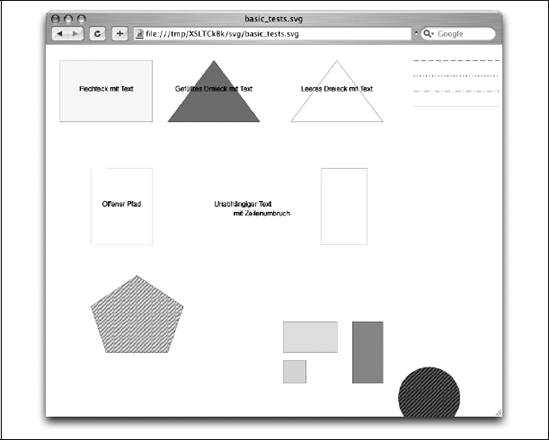
Figure: Simple SVG shapes and text converted from Visio.
The main lesson goes beyond VDX, SVG or clever implementation details: this complex transformation was the author’s first XSLT experience, demonstrating the power of its transformation model.
Copyright © 2006 O'Reilly Verlag GmbH & Co. KG
You may print the online version for your private use.
Otherwise, this chapter from “XSLT Kochbuch” is subject to the same conditions as the bound edition. The work, including all its parts, is protected by copyright. All rights reserved, including reproduction, translation, microfilming, and storage and processing in electronic systems.
O'Reilly Verlag GmbH & Co. KG, Balthasarstraße 81, 50670 Köln, kommentar(at)oreilly.de