

XML technologies / XSLT / XSLT Cookbook / Recipes for vertical XSLT applications / Generating websites from XTM topic maps.
(Excerpt from “XSLT Kochbuch” by Sal Mangano)
Problem
You want to record knowledge about a subject in a topic map so XSLT can easily generate a website from it.
Solution
This uses the CTW framework (Cogitative Topic Maps Web Site), introduced in XML Topic Maps edited by Jack Park (Addison-Wesley, 2002). The work first appeared at Extreme Markup Languages 2000.
CTW maps topic-map elements to HTML as follows:
Topic-map element | HTML representation |
Topic map | Website |
Topic | Web page |
Topic associations | Site map |
Topic occurrences | Images, graphics, text, HTML fragments, etc. |
Topic names | Page headings, titles, lists and hyperlink titles |
Our topic map concerns algorithms, especially sorting. Online sources supply knowledge structured as class-subclass relationships and occurrences of descriptions, demonstrations and code examples in several languages.
Once subject and content were chosen, the ontology emerged naturally. CTW’s ontology classifies both site subjects and topic characteristics forming page content.
Both classifications control appearance. A topic’s type determines page layout; characteristic types determine element and component styles. See the figure.
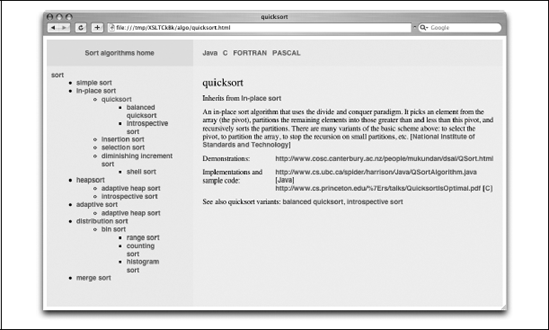
Figure: Generated website appearance.
The following subsections describe this sorting-algorithm site’s subjects.
Sorting algorithms
The main subjects are sorting-algorithm subclasses:
<topic id="sort">
  ...
</topic>
<association>
  <instanceOf>
    <topicRef xlink:href="#_class-subclass"/>
  </instanceOf>
  <member>
    <roleSpec>
      <topicRef xlink:href="#_superclass"/>
    </roleSpec>
    <topicRef xlink:href="#sort"/>
  </member>
  <member>
    <roleSpec>
      <topicRef xlink:href="#_subclass"/>
    </roleSpec>
    <topicRef xlink:href="#simplesort"/>
    <topicRef xlink:href="#in-place sort"/>
    <topicRef xlink:href="#heapsort"/>
    <topicRef xlink:href="#adaptivesort"/>
    <topicRef xlink:href="#distributionsort"/>
    <topicRef xlink:href="#mergesort"/>
  </member>
</association>
Note:
The complete map and stylesheets are available online at Cogito Ergo XML. Only illustrative fragments appear here.
Each algorithm may have subclasses. For example, four variants of in-place-sort could each have further subclasses:
<association>
  <instanceOf>
    <topicRef xlink:href="#_class-subclass"/>
  </instanceOf>
  <member>
    <roleSpec>
      <topicRef xlink:href="#_superclass"/>
    </roleSpec>
    <topicRef xlink:href="#in-place sort"/>
  </member>
  <member>
    <roleSpec>
      <topicRef xlink:href="#_subclass"/>
    </roleSpec>
    <topicRef xlink:href="#quicksort"/>
    <topicRef xlink:href="#insertionsort"/>
    <topicRef xlink:href="#selsort"/>
    <topicRef xlink:href="#dimincrsort"/>
  </member>
</association>
The US standards agency NIST (National Institute of Standards and Technology) maintains an excellent algorithm website collecting algorithm information, one page per algorithm. Our map uses those URLs as subject-indicator addresses:
<topic id="insertionsort">
  <subjectIdentity>
    <subjectIndicatorRef xlink:href="http://www.nist.gov/dads/HTML/insertsrt.html"/>
  </subjectIdentity>
Beyond class-subclass relationships, algorithms have names and occurrences.
Their names identify them readily:
<baseName>
  <baseNameString>insertion sort</baseNameString>
</baseName>
Alternative names sometimes appear with scope also-known-as:
<baseName>
  <scope>
    <topicRef xlink:href="#also-known-as"/>
  </scope>
  <baseNameString>linear insertion sort</baseNameString>
</baseName>
Descriptions are occurrences of type description scoped to the source. This NIST quotation is scoped to topic nist and reads: “In NIST’s context, insertion sorting ( insertion-sort) is described as…”
<occurrence>
  <instanceOf>
    <topicRef xlink:href="#description"/>
  </instanceOf>
  <scope>
    <topicRef xlink:href="#nist"/>
  </scope>
  <resourceData>Sort by repeatedly taking the next item and inserting it into the final data structure in its proper order with respect to items already inserted.</resourceData>
</occurrence>
Links to applet and animated demonstrations are occurrences of type demonstration:
<occurrence>
  <instanceOf>
    <topicRef xlink:href="#demo"/>
  </instanceOf>
  <resourceRef xlink:href="http://www.cosc.canterbury.ac.nz/people/mukundan/dsal/ISort.html"/>
</occurrence>
Implementation links are occurrences of type code sample scoped to the programming language. Languages form another topic class, an orthogonal navigation dimension:
  <occurrence>
    <instanceOf>
      <topicRef xlink:href="#code"/>
    </instanceOf>
    <scope>
      <topicRef xlink:href="#fortran"/>
    </scope>
    <resourceRef xlink:href="http://gams.nist.gov/serve.cgi/Module/TOMS/505/8547"/>
  </occurrence>
  <occurrence>
    <instanceOf>
      <topicRef xlink:href="#code"/>
    </instanceOf>
    <scope>
      <topicRef xlink:href="#java"/>
    </scope>
    <resourceRef xlink:href="http://www.cs.ubc.ca/spider/harrison/Java/InsertionSortAlgorithm.java"/>
  </occurrence>
</topic>
This covers our algorithm information: headings, related algorithms, descriptions and explanatory links, demonstrations, and code examples cross-linked to their languages.
Programming languages
Languages, with names and definitions, are instances of class programming language:
<topic id="java">
  <subjectIdentity>
    <subjectIndicatorRef xlink:href="http://foldoc.doc.ic.ac.uk/foldoc/foldoc.cgi?query=java"/>
  </subjectIdentity>
  <instanceOf>
    <topicRef xlink:href="#plang"/>
  </instanceOf>
  <baseName>
    <baseNameString>Java</baseNameString>
  </baseName>
  <occurrence>
    <instanceOf>
      <topicRef xlink:href="#definition"/>
    </instanceOf>
    <scope>
      <topicRef xlink:href="#cnet"/>
    </scope>
    <resourceData>Sun Microsystems' Java is a programming language for adding animation and other action to Web sites. The small applications (called applets) that Java creates can play back on any graphical system that's Web-ready, but your Web browser has to be Java-capable for you to see it. According to Sun's description, Java is a "simple, object-oriented, distributed, interpreted, robust, secure, architecture-neutral, portable, high-performance, multithreaded, dynamic, buzzword-compliant, general-purpose programming language." </resourceData>
  </occurrence>
</topic>
The language page shown next links its code examples and their algorithms.
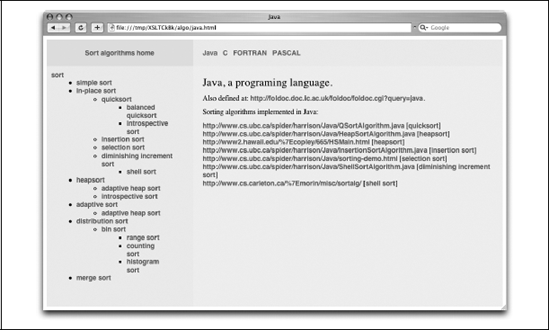
Figure: Programming-language page.
Root topic
In CTW, root is the root, described by the map document itself. It reifies the document to which it belongs:
<topic id="default">
  <subjectIdentity>
    <subjectIndicatorRef xlink:href="#map"/>
  </subjectIdentity>
When merging maps, CTW adds this topic to all characteristic-assignment scopes. It also corresponds to the homepage.
Its hyperlink name appears at top left on every page:
<baseName>
  <baseNameString>Sort algorithms home</baseNameString>
</baseName>
Store remarks and assertions about the map here. This example stores only project and copyright metadata:
  <occurrence>
    <instanceOf>
      <topicRef xlink:href="#definition"/>
    </instanceOf>
    <resourceData><![CDATA[This web site covers the subject of algorithms and specifically sorting algorithms.<br><br> It was created for the purposes of a CTW recipe for the O'Reilly XSLT Cookbook.]]> </resourceData>
  </occurrence>
</topic>
The root page introduces the site with only the project description.
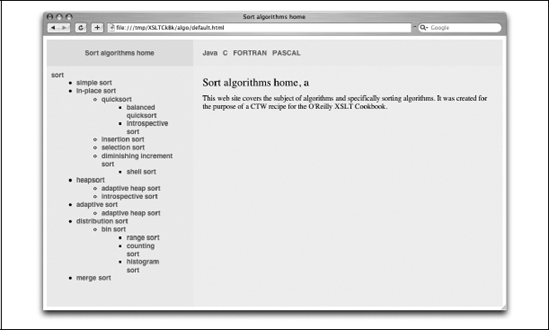
Figure: Sorting-site root page.
Page elements and layout
First define variable root representing the root topic described by the surrounding map document:
<xsl:variable name="root" select="//topic[subjectIdentity/subjectIndicatorRef/@xlink:href = concat('#',/topicMap/@id)]"/>The same node is available with key subjectIndicator matching topics by resource address:
<xsl:key name="subjectIndicator" match="topic" use="subjectIdentity/subjectIndicatorRef/@xlink:href"/>
<xsl:variable name="root" select="key('subjectIndicator',concat('#',/topicMap/@id))"/>
Generate the homepage by invoking the layout template root-page for the root:
<xsl:template match="/">
  <xsl:call-template name="root-page">
    <xsl:with-param name="this" select="$root"/>
  </xsl:call-template>
Next generate pages for every subclass of sorting algorithm by calling layout template algorithm-page with a simple sorting algorithm as parameter this. It recurses over every subclass:
<xsl:call-template name="algorithm-page">
  <xsl:with-param name="this" select="key('topicByID','#sort')"/>
</xsl:call-template>
Generate a page per language instance with layout template plang-page:
  <xsl:for-each select="key('instanceOf','#plang')">
    <xsl:call-template name="plang-page"/>
  </xsl:for-each>
</xsl:template>
Key instanceOf returns instances of all classes using hashed class-topic IDs:
<xsl:key name="instanceOf" match="topic" use="instanceOf/topicRef/@xlink:href" />All three layouts have four rectangular regions controlled by the shared homepage template. First create an output file relative to directory parameter $out-dir. Build the title from the current topic’s unconstrained name by instantiating matching elements topic in mode label. Then divide the page. Top left, link to the homepage using the unconstrained name of topic root, using its matching template in mode link. Top right, iterate language instances for language-page links. Bottom left, show the sorting classification sitemap. Bottom right, output the current topic’s content, supplied in parameter content to template page:
<xsl:template name="page">
  <xsl:param name="this"/>
  <xsl:param name="content"/>
  <redirect:write select="concat($out-dir,$this/@id,'.html')">
    <HTML>
      <head>
        <title>
          <xsl:apply-templates select="$this" mode="label"/>
        </title>
      </head>
      <body>
        <table width="1000" height="100%" cellspacing="0" cellpadding="10">
          <tr>
            <td width="250" height="20" bgcolor="#ffddbb" align="center">
              <xsl:apply-templates select="$root" mode="link"/>
            </td>
            <td width="750" height="20" valign="top" bgcolor="#eeeeee">
              <table cellspacing="10">
                <tr>
                  <xsl:for-each select="key('instanceOf','#plang')">
                    <td background="grey">
                      <xsl:apply-templates select="." mode="link"/>
                    </td>
                  </xsl:for-each>
                </tr>
              </table>
            </td>
          </tr>
          <tr>
            <td valign="top" bgcolor="#eeeeee">
              <xsl:call-template name="sitemap">
                <xsl:with-param name="classRef">#sort</xsl:with-param>
                <xsl:with-param name="current" select="$this/@id"/>
              </xsl:call-template>
            </td>
            <td valign="top" bgcolor="#ffeedd" >
              <xsl:copy-of select="$content"/>
            </td>
          </tr>
        </table>
      </body>
    </HTML>
  </redirect:write>
</xsl:template>
That template uses the template matching baseName in mode label:
<xsl:template match="topic" mode="label">
  <xsl:value-of select="baseName[not(scope)]/baseNameString"/>
</xsl:template>
The template matching baseName in mode link creates a hyperlink to the topic page:
<xsl:template match="topic" mode="link">
  <a href="{@id}.html">
    <xsl:value-of select="baseName[not(scope)]/baseNameString"/>
  </a>
</xsl:template>
Later use the template matching baseName in mode subject-indicator to link to a resource describing the topic:
<xsl:template match="topic" mode="indicator">
  <a href="{subjectIdentity/subjectIndicatorRef/@xlink:href}">
    <xsl:value-of select="baseName[not(scope)]/baseNameString"/>
  </a>
</xsl:template>
Template sitemap traverses subclasses of topic sort, links derived algorithms and recurses over their subclasses:
<xsl:template name="sitemap">
  <xsl:param name="classRef"/>
  <xsl:param name="current"/>
  <xsl:variable name="topic" select="key('topicByID',$classRef)"/>
  <xsl:choose>
    <xsl:when test="$topic/@id=$current">
      <span class="A">
       <xsl:apply-templates select="$topic" mode="label"/>
      </span>
    </xsl:when>
    <xsl:otherwise>
      <xsl:apply-templates select="$topic" mode="link"/>
    </xsl:otherwise>
  </xsl:choose>
  <xsl:variable name="aref" select="key('classAssoc',$classRef)"/>
  <xsl:if test="$aref">
    <ul>
      <xsl:for-each select="$aref/member[roleSpec/topicRef/@xlink:href='#_subclass']/topicRef">
        <li>
          <xsl:call-template name="sitemap">
            <xsl:with-param name="classRef" select="@xlink:href"/>
            <xsl:with-param name="current" select="$current"/>
          </xsl:call-template>
        </li>
      </xsl:for-each>
    </ul>
  </xsl:if>
</xsl:template>
Key classRef used by template sitemap uses the given topic ID to find matching relationships superclass-subclass where the topic has role super-class:
<xsl:key name="classAssoc" match="association[instanceOf/topicRef/@xlink:href='#_class-subclass']" use="member[roleSpec/topicRef/@xlink:href='#_superclass']/topicRef/@xlink:href" />Later key subClassRef also matches relationships superclass-subclass but uses member where the topic’s role is sub-class:
<xsl:key name="subClassAssoc" match="association[instanceOf/topicRef/@xlink:href='#_class-subclass']" use="member[roleSpec/topicRef/@xlink:href='#_subclass']/topicRef/@xlink:href" />Now proceed to the three layouts.
Layout template root-page is simple: call the page template, passing through parameter content the generated HTML for occurrences of type description:
<xsl:template name="root-page">
  <xsl:param name="this"/>
  <xsl:call-template name="page">
    <xsl:with-param name="this" select="$this"/>
    <xsl:with-param name="content">
      <font size="+1">
        <xsl:apply-templates select="$this/occurrence[instanceOf/topicRef/@xlink:href='#description']"/>
      </font>
    </xsl:with-param>
  </xsl:call-template>
</xsl:template>
Layout template plang-page is more complex. Its title combines topic name and type name. The subject-indicator address links to an external definition, followed by descriptions. List code occurrences in this language and link each resource to its sorting algorithm in brackets:
<xsl:template name="plang-page">
  <xsl:param name="this" select="."/>
  <xsl:call-template name="page">
    <xsl:with-param name="this" select="$this"/>
    <xsl:with-param name="content">
      <font size="+2">
        <xsl:apply-templates select="$this" mode="label"/>, a
        <xsl:apply-templates mode="label" select="key('topicByID',$this/instanceOf/topicRef/@xlink:href)" />.
      </font>
      <br/><br/>
      <xsl:apply-templates select="$this/subjectIdentity"/>
      <xsl:apply-templates select="$this/occurrence[instanceOf/topicRef/@xlink:href='#description']"/>
      <xsl:variable name="codes" select="key('plang-codes',concat('#',$this/@id))"/>
      <xsl:if test="$codes">
        <span>Sorting algorithms implemented in <xsl:apply-templates select="$this" mode="label"/>:</span>
        <ul>
          <xsl:for-each select="$codes">
            <li>
              <a href="{resourceRef/@xlink:href}">
                <xsl:value-of select="resourceRef/@xlink:href"/>
              </a> [<xsl:apply-templates select=".." mode="link"/>]<br/>
            </li>
          </xsl:for-each>
        </ul>
        <br/><br/>
      </xsl:if>
    </xsl:with-param>
  </xsl:call-template>
</xsl:template>
Key plang-codes matches all occurrences regardless of scope topics:
<xsl:key name="plang-codes" match="occurrence" use="scope/topicRef/@xlink:href"/>Finally, layout template algorithm-page combines the topic name and names of also-known-as in brackets for its title. After the subject address, list parent algorithms, descriptions, demonstration links and code examples cross-linked to languages in brackets. End with subclasses or variants. Then layout template algorithm-page recurses to generate pages for all subclass descendants:
<xsl:template name="algorithm-page">
  <xsl:param name="this"/>
  <xsl:call-template name="page">
    <xsl:with-param name="this" select="$this"/>
    <xsl:with-param name="content">
      <font size="+2">
        <xsl:apply-templates select="$this" mode="label"/>
        <xsl:if test="$this/baseName[scope/topicRef/@xlink:href='#also-known-as']">[<xsl:value-of select="$this/baseName[scope/topicRef/@xlink:href='#also-known-as']/baseNameString"/>]</xsl:if>
      </font>
      <br/><br/>
      <xsl:apply-templates select="$this/subjectIdentity"/>
      <xsl:variable name="superclasses" select="key('subClassAssoc',concat('#',$this/@id))member[roleSpec/topicRef/@xlink:href='#_superclass']/topicRef"/>
      <xsl:if test="$superclasses">Inherits from
        <xsl:for-each select="$superclasses">
          <xsl:apply-templates select="key('topicByID',@xlink:href)" mode="link"/>
            <xsl:if test="position( ) != last( )">, </xsl:if>
        </xsl:for-each>
        <br/><br/>
      </xsl:if>
      <xsl:apply-templates select="$this/occurrence[instanceOf/topicRef/@xlink:href='#description']"/>
      <xsl:variable name="demos" select="$this/occurrence[instanceOf/topicRef/@xlink:href='#demo']"/>
      <xsl:if test="$demos">
        <span>Demonstrations: </span>
        <ul>
          <xsl:for-each select="$demos">
            <li>
              <a href="{resourceRef/@xlink:href}"><xsl:value-of select="resourceRef/@xlink:href"/></a>
              <br/>
            </li>
          </xsl:for-each>
        </ul>
        <br/>
      </xsl:if>
      <xsl:variable name="codes" select="$this/occurrence[instanceOf/topicRef/@xlink:href='#code']"/>
      <xsl:if test="$codes">
        <span>Implementations and sample code: </span>
        <ul>
          <xsl:for-each select="$codes">
            <li>
              <a href="{resourceRef/@xlink:href}">
                <xsl:value-of select="resourceRef/@xlink:href"/>
              </a>[<xsl:apply-templates mode="link" select="key('topicByID',scope/topicRef/@xlink:href)"/>]
            </li>
          </xsl:for-each>
        </ul>
        <br/>
      </xsl:if>
      <xsl:variable name="subclasses" select="key('classAssoc',concat('#',$this/@id))/member[roleSpec/topicRef/@xlink:href='#_subclass']/topicRef"/>
      <xsl:if test="$subclasses">
        See also
        <xsl:value-of select="$this/baseName[not(scope)]/baseNameString"/>
        variants:
        <xsl:for-each select="$subclasses">
          <xsl:apply-templates select="key('topicByID',@xlink:href)" mode="link"/>
          <xsl:if test="position( ) != last( )">, </xsl:if>
        </xsl:for-each>
      </xsl:if>
    </xsl:with-param>
  </xsl:call-template>
  <xsl:variable name="aref" select="key('classAssoc',concat('#',$this/@id))"/>
  <xsl:for-each select="$aref/member[roleSpec/topicRef/@xlink:href='#_subclass']/topicRef">
    <xsl:call-template name="algorithm-page">
      <xsl:with-param name="this" select="key('topicByID',@xlink:href)"/>
    </xsl:call-template>
  </xsl:for-each>
</xsl:template>
Discussion
Topic maps collect and manage real-world knowledge. Here they link algorithms, objects and resources. Following CTW conventions carefully lets one map generate an entire website.
This example has few object and relationship types; real applications are more complex. It chiefly demonstrates CTW’s power and possibilities.
One map controls all content and structure. A clean CTW architecture maintains page links, content and metadata robustly and intuitively. CTW sites merge easily and avoid links to missing pages. XSLT gives consistent appearance, portability and reuse.
The cost is thinking in topics, characteristics and associations. Content must fit the chosen ontology, which keeps knowledge organized and navigable.
XSLT transforms and styles map knowledge modularly and maintainably. Dynamic CTW solutions scale to thousands of topics; static ones are limited only by disk space.
See also
XML Topic Maps: Creating and Using Topic Maps for the Web, edited by Jack Park (Addison-Wesley, 2002), clearly covers theory and applications of topic maps.
Copyright © 2006 O'Reilly Verlag GmbH & Co. KG
You may print the online version for your private use.
Otherwise, this chapter from “XSLT Kochbuch” is subject to the same conditions as the bound edition. The work, including all its parts, is protected by copyright. All rights reserved, including reproduction, translation, microfilming, and storage and processing in electronic systems.
O'Reilly Verlag GmbH & Co. KG, Balthasarstraße 81, 50670 Köln, kommentar(at)oreilly.de