

Tecnologías XML / XSLT / Recetario XSLT / Recetas para aplicaciones XSLT verticales / Convertir documentos Visio VDX a SVG: conversión
(Extracto de «XSLT Kochbuch» de Sal Mangano)
Problema
Quiere convertir archivos XML de Visio, VDX, a SVG más portable.
Solución
John Breen implementó esta solución, principalmente asignando elementos Visio a SVG según esta tabla.
Tabla: correspondencias de Visio a SVG.
Elemento Visio | Elemento SVG |
| Valor de color |
| CSS: estilo |
|
|
|
|
|
|
|
|
|
|
|
|
|
|
|
|
|
|
|
|
Esta sección solo trata la hoja principal y algunas importaciones. El código completo y ejemplos están disponibles en Visio VDX to SVG XSLT Stylesheet.
<xsl:stylesheet xmlns:xsl="http://www.w3.org/1999/XSL/Transform" xmlns:v="urn:schemas-microsoft-com:office:visio" xmlns:xlink="http://www.w3.org/1999/xlink" xmlns:math="java.lang.Math" xmlns:jDouble="java.lang.Double" xmlns:saxon="http://icl.com/saxon" exclude-result-prefixes="v math saxon jDouble" xmlns="http://www.w3.org/2000/svg" version="1.0">
  <xsl:output method="xml" version="1.0" omit-xml-declaration="no" media-type="image/svg+xml" encoding="iso-8859-1" indent="yes" cdata-section-elements="style" doctype-public="-//W3C//DTD SVG 1.0//EN" doctype-system="http://www.w3.org/TR/2001/REC-SVG-20010904/DTD/svg10.dtd"/>
El parámetro pageNumber elige la página que se extrae, mientras el parámetro userScale fija el factor de conversión de unidades Visio a unidades de usuario:
  <xsl:param name="pageNumber" select="1"/>
  <xsl:param name="userScale"  select="100"/>
  <!-- =  =  =  =  Variablen (d.h. Konstanten)  =  =  =  =  =  =  =  =  =  =  =  = -->
  <!-- Farbtabelle -->
  <xsl:variable name="Colors" select="//v:Colors[position( )=1]/v:ColorEntry"/>
  <!-- Gerade verarbeitete Seite -->
  <xsl:variable name="Page" select="/v:VisioDocument/v:Pages/v:Page[number($pageNumber)]"/>
  <!-- Template Masters -->
  <xsl:variable name="Masters" select="//v:Masters[position( )=1]/v:Master"/>
  <!-- Template viewBoxMaster -->
  <xsl:variable name="viewBoxMaster" select="$Masters[@NameU='viewBox']"/>
  <!-- Seitenverhältnis von Schrifthöhe zu -breite (Fummelfaktor) -->
  <xsl:variable name="fontRatio" select="2"/>
  <!-- Pi (SVG verwendet Grad, Visio verwendet Bogenmaß) -->
  <xsl:variable name="pi" select="3.14159265358979323846264338327"/>
La hoja se divide en estos componentes, algunos tratados más adelante. Utiliza extensiones JavaScript, pero aunque su procesador XSLT no admite JavaScript, sigue siendo utilizable, aunque algunos textos queden menos cuidados:
  <!-- Inkludierte Dateien -->
  <xsl:include href="visio-style.xsl"/>
  <xsl:include href="visio-text.xsl"/>
  <xsl:include href="visio-masters.xsl"/>
  <xsl:include href="visio-nurbs.xsl"/>
  <!-- Skripten -->
  <xsl:template name="required-scripts">
    <script xlink:href="wordwrap.js" type="text/ecmascript"/>
  </xsl:template>
  <xsl:template match="/v:VisioDocument">
    <xsl:apply-templates select="$Page"/>
  </xsl:template>
Una página Visio se convierte en un gráfico SVG. Otra información determina su disposición en una caja de vista:
  <!-- =  =  =  =  =  =  =  = Seite =  =  =  =  =  =  =  =  =  =  =  =  =  =  = = =-->
  <xsl:template match="v:Page">
    <xsl:message>
      <xsl:value-of select="@NameU"/>
    </xsl:message>
    <svg id="{@NameU}">
      <xsl:attribute name="xml:space">
        <xsl:value-of select="'preserve'"/>
      </xsl:attribute>
      <xsl:choose>
        <!-- Verwende viewBox namens 'default', wenn vorhanden -->
        <xsl:when test="//v:Shape[@Master=$viewBoxMaster/@ID and @NameU='default'][1]">
          <xsl:for-each select="//v:Shape[@Master=$viewBoxMaster/@ID and @NameU='default']">
            <xsl:attribute name="viewBox">
              <xsl:value-of select="concat(v:XForm/v:PinX*$userScale, ' ',-v:XForm/v:PinY*$userScale, ' ',v:XForm/v:Width*$userScale, ' ',v:XForm/v:Height*$userScale)"/>
            </xsl:attribute>
          </xsl:for-each>
        </xsl:when>
        <!-- Sonst auf der Seite zentrieren -->
        <xsl:otherwise>
          <xsl:attribute name="viewBox">
            <xsl:value-of select="concat('0 ',-v:PageSheet/v:PageProps/v:PageHeight*$userScale, ' ',v:PageSheet/v:PageProps/v:PageWidth*$userScale, ' ',v:PageSheet/v:PageProps/v:PageHeight*$userScale)"/>
          </xsl:attribute>
        </xsl:otherwise>
      </xsl:choose>
      <xsl:call-template name="required-scripts"/>
      <xsl:call-template name="predefined-pattern-fgnds"/>
      <xsl:call-template name="predefined-markers"/>
La conversión transforma primero estilos Visio en directivas CSS y después todas las formas en SVG:
<xsl:apply-templates select="../../v:StyleSheets"/>
<xsl:apply-templates select="v:Shapes/v:Shape"/>
</svg>
</xsl:template>
<!-- = = = = = = = = StyleSheets = = = = = = = = = -->
<xsl:template match="v:StyleSheets">
<defs>
<xsl:for-each select="v:StyleSheet">
<!-- Linienstil -->
<style id="ss-line-{@ID}" type="text/css">
<xsl:text>*.ss-line-</xsl:text><xsl:value-of select="@ID"/>
<xsl:text> { </xsl:text>
<xsl:call-template name="recursive-line-style">
<xsl:with-param name="ss" select="."/>
</xsl:call-template>
<xsl:text> }</xsl:text>
</style>
<!-- Füllstil -->
<style id="ss-fill-{@ID}" type="text/css">
<xsl:text>*.ss-fill-</xsl:text><xsl:value-of select="@ID"/>
<xsl:text> { </xsl:text>
<xsl:call-template name="recursive-fill-style">
<xsl:with-param name="ss" select="."/>
</xsl:call-template>
<xsl:text> }</xsl:text>
</style>
<!-- Textstil -->
<style id="ss-text-{@ID}" type="text/css">
<xsl:text>*.ss-text-</xsl:text><xsl:value-of select="@ID"/>
<xsl:text> { </xsl:text>
<xsl:call-template name="recursive-text-style">
<xsl:with-param name="ss" select="."/>
</xsl:call-template>
<xsl:text> } </xsl:text>
</style>
</xsl:for-each>
</defs>
</xsl:template>
<!-- Rekursiv durch StyleSheet-Erbfolge durchgehen -->
<xsl:template name="recursive-line-style">
<xsl:param name="ss"/>
<xsl:if test="$ss/@LineStyle">
<xsl:call-template name="recursive-line-style">
<xsl:with-param name="ss" select="$ss/../v:StyleSheet[@ID=$ss/@LineStyle]"/>
</xsl:call-template>
</xsl:if>
<xsl:apply-templates select="$ss/v:Line" mode="style"/>
</xsl:template>
<xsl:template name="recursive-fill-style">
<xsl:param name="ss"/>
<xsl:if test="$ss/@FillStyle">
<xsl:call-template name="recursive-fill-style">
<xsl:with-param name="ss" select="$ss/../v:StyleSheet[@ID=$ss/@FillStyle]"/>
</xsl:call-template>
</xsl:if>
<xsl:apply-templates select="$ss/v:Fill" mode="style"/>
</xsl:template>
<xsl:template name="recursive-text-style">
<xsl:param name="ss"/>
<xsl:if test="$ss/@TextStyle">
<xsl:call-template name="recursive-text-style">
<xsl:with-param name="ss" select="$ss/../v:StyleSheet[@ID=$ss/@TextStyle]"/>
</xsl:call-template>
</xsl:if>
<xsl:apply-templates select="$ss/v:Char|$ss/v:Para" mode="style"/>
</xsl:template>
<!-- Dieses Template gibt einen String für den Linienstil zurück -->
<xsl:template match="v:Line" mode="style">
<xsl:for-each select="v:LineWeight">
<xsl:text>stroke-width:</xsl:text>
<xsl:value-of select=". * $userScale"/><xsl:text>;</xsl:text>
</xsl:for-each>
<xsl:for-each select="v:LineColor">
<xsl:choose>
<xsl:when test="../v:LinePattern > 0">
<xsl:text>stroke:</xsl:text>
<xsl:call-template name="lookup-color">
<xsl:with-param name="c_el" select="."/>
</xsl:call-template>
</xsl:when>
<xsl:when test="../v:LinePattern = 0">
<xsl:text>stroke:none</xsl:text>
</xsl:when>
</xsl:choose>
<xsl:text>;</xsl:text>
</xsl:for-each>
<xsl:for-each select="v:EndArrow">
<xsl:choose>
<xsl:when test=". = 0">
<xsl:value-of select="string('marker-end:none;')"/>
</xsl:when>
<xsl:otherwise>
<xsl:value-of select="concat('marker-end:url(#EndArrow-', .,'-', ../v:EndArrowSize, ');')"/>
</xsl:otherwise>
</xsl:choose>
</xsl:for-each>
<xsl:apply-templates select="v:LinePattern[. > 1]" mode="style"/>
</xsl:template>
<!-- Dieses Template gibt einen String für den Füllstil zurück -->
<xsl:template match="v:Fill" mode="style">
<xsl:for-each select="v:FillForegnd">
<xsl:choose>
<xsl:when test="../v:FillPattern = 1">
<xsl:text>fill:</xsl:text>
<xsl:call-template name="lookup-color">
<xsl:with-param name="c_el" select="."/>
</xsl:call-template>
</xsl:when>
<xsl:when test="../v:FillPattern = 0">
<xsl:text>fill:none</xsl:text>
</xsl:when>
<xsl:otherwise>
<xsl:text>fill:url(#</xsl:text>
<xsl:value-of select="generate-id(../..)"/>
<xsl:text>-pat)</xsl:text>
</xsl:otherwise>
</xsl:choose>
<xsl:text>;</xsl:text>
</xsl:for-each>
</xsl:template>
<!-- Dieses Template gibt einen String für den Textstil zurück -->
<xsl:template match="v:Char|v:Para" mode="style">
<xsl:for-each select="v:Color">
<!-- Ich glaube, Visio beherrscht keine gefüllten Zeichen -->
<xsl:text>stroke:none</xsl:text>
<xsl:text>;fill:</xsl:text>
<xsl:call-template name="lookup-color">
<xsl:with-param name="c_el" select="."/>
</xsl:call-template>
<xsl:text>;</xsl:text>
</xsl:for-each>
<xsl:for-each select="v:Size">
<xsl:text>font-size:</xsl:text>
<xsl:value-of select=". * $userScale"/><xsl:text>;</xsl:text>
</xsl:for-each>
<xsl:for-each select="v:HorzAlign">
<xsl:text>text-anchor:</xsl:text>
<xsl:choose>
<xsl:when test="(. = 0) or (. = 3)">
<xsl:text>start</xsl:text>
</xsl:when>
<xsl:when test=". = 1">
<xsl:text>middle</xsl:text>
</xsl:when>
<xsl:when test=". = 2">
<xsl:text>end</xsl:text>
</xsl:when>
</xsl:choose>
<xsl:text>;</xsl:text>
</xsl:for-each>
</xsl:template>
<!-- Ignoriere alle anderen StyleSheet-Elemente -->
<xsl:template match="*[parent::v:StyleSheet]" priority="-100"/>Las formas se asignan a sus equivalentes SVG. Un maestro es una plantilla de forma que transmite atributos y comportamiento.
Cada forma normalmente se convierte en un elemento <g> porque puede contener gráficos y texto. El elemento SVG <g> agrupa gráficos con estilos comunes.
SvgElement es una propiedad añadida a una forma para pedir un tratamiento especial. Establezca svgElement en otro contenedor SVG, como defs. Esto impide mostrar ciertas formas, como rutas en animateMotion, permitiendo referenciarlas sin mostrarlas.
Uno de los usos principales de svgElement es convertir formas especiales a elementos sin equivalente Visio, como animate, animateMotion y viewBox. Los trata visio-master.xsl, tratado más adelante:
  <!-- = = = = = = = Shape = = = = = = = = = = = = = -->
  <xsl:template match="v:Shape">
    <xsl:variable name="master" select="/v:VisioDocument//v:Masters[1]/v:Master[@ID=current( )/@Master]"/>
    <xsl:variable name="svgElement">
      <xsl:choose>
        <!-- Teste auf spezielle svgElement-Eigenschaft im Shape... -->
        <xsl:when test="./v:Prop/v:Label[.='svgElement']">
          <xsl:value-of select="./v:Prop/v:Label[.='svgElement']/../v:Value"/>
        </xsl:when>
        <!-- ... und im Master -->
        <xsl:when test="@Master and  $master//v:Prop/v:Label[.='svgElement']">
          <xsl:value-of select="$master//v:Prop/v:Label[.='svgElement']/../v:Value"/>
        </xsl:when>
        <!-- Im einfachen Fall wird ein Shape auf eine SVG (g)ruppe abgebildet -->
        <xsl:otherwise>
          <xsl:value-of select="'g'"/>
        </xsl:otherwise>
      </xsl:choose>
    </xsl:variable>
    <xsl:choose>
      <xsl:when test="@Master and string($svgElement) and contains($specialMasters, $svgElement)">
        <xsl:call-template name="choose-special-master">
          <xsl:with-param name="master" select="$master"/>
          <xsl:with-param name="masterElement" select="$svgElement"/>
        </xsl:call-template>
      </xsl:when>
      <xsl:when test="($svgElement = 'defs') or ($svgElement = 'g') or ($svgElement = 'symbol')">
        <xsl:choose>
          <xsl:when test="v:Hyperlink">
            <!-- Umgib Shape mit einem 'a'-Element -->
            <!-- Das ist eine minimale Implementierung, die keine Unteradresse, mehrere Links usw. unterstützt -->
            <a xlink:title="{v:Hyperlink/v:Description}" xlink:href="{v:Hyperlink/v:Address}">
              <xsl:if test="v:Hyperlink/v:NewWindow">
                <xsl:attribute name="show">
                  <xsl:value-of select="new"/>
                </xsl:attribute>
              </xsl:if>
              <xsl:element name="{$svgElement}">
                <xsl:call-template name="userShape"/>
              </xsl:element>
            </a>
          </xsl:when>
          <xsl:otherwise>
            <xsl:element name="{$svgElement}">
              <xsl:call-template name="userShape"/>
            </xsl:element>
          </xsl:otherwise>
        </xsl:choose>
      </xsl:when>
    </xsl:choose>
  </xsl:template>
Las formas ordinarias se convierten según la tabla:
  <!-- Das hier verarbeitet normale 'Benutzer'-Shapes -->
  <xsl:template name="userShape">
    <xsl:variable name="master" select="/v:VisioDocument/v:Masters/v:Master[(@ID=current( )/@Master) and (current( )/@Type != 'Group')] /v:Shapes/v:Shape | /v:VisioDocument/v:Masters/v:Master[@ID=current( ) /ancestor::v:Shape[@Master]/@Master] //v:Shape[@ID=current( )/@MasterShape] | ."/>
    <xsl:call-template name="setIdAttribute"/>
    <xsl:attribute name="class">
      <xsl:for-each select="($master[@LineStyle])[last( )]">
        <xsl:text> ss-line-</xsl:text>
        <xsl:value-of select="@LineStyle"/>
      </xsl:for-each>
      <xsl:for-each select="($master[@FillStyle])[last( )]">
        <xsl:text> ss-fill-</xsl:text>
        <xsl:value-of select="@FillStyle"/>
      </xsl:for-each>
    </xsl:attribute>
    <xsl:attribute name="style">
      <xsl:for-each select="$master">
        <xsl:apply-templates select="./v:Line" mode="style"/>
        <xsl:apply-templates select="./v:Fill" mode="style"/>
      </xsl:for-each>
    </xsl:attribute>
    <xsl:for-each select="v:XForm">
      <xsl:call-template name="transformAttribute">
      </xsl:call-template>
    </xsl:for-each>
    <!-- Hiermit wird das angepasste Muster erzeugt -->
    <xsl:apply-templates select="v:Fill" mode="Shape"/>
    <xsl:for-each select="v:Geom">
      <xsl:apply-templates select="v:Ellipse"/>
      <xsl:if test="v:MoveTo or v:LineTo">
        <xsl:call-template name="pathElement"/>
      </xsl:if>
    </xsl:for-each>
    <xsl:for-each select="($master/v:Text)[last( )]">
      <xsl:apply-templates select="."/>
    </xsl:for-each>
    <xsl:apply-templates select="v:Shapes/v:Shape"/>
    <!-- Füge Elemente aus den Properties hinzu -->
    <xsl:for-each select="v:Prop">
      <xsl:choose>
        <xsl:when test="starts-with(v:Label, 'svg-element')">
          <!-- Das ist recht hässlich - verschwindet hoffentlich bald -->
          <xsl:value-of disable-output-escaping="yes" select="v:Value"/>
        </xsl:when>
      </xsl:choose>
    </xsl:for-each>
  </xsl:template>
  <xsl:template match="v:Ellipse">
    <!-- Das ist eine etwas beschränkte Übersetzung, die annimmt, dass die Achsen parallel zu den X- und Y-Achsen sind und die untere linke Ecke der Bounding-Box den Ursprung darstellt (anscheinend ist das die Voreinstellung dafür, wie Visio sie zeichnet). -->
    <ellipse id="ellipse-{generate-id(ancestor::v:Shape[1])}" cx="{v:X*$userScale}" cy="{-v:Y*$userScale}" rx="{v:X*$userScale}" ry="{v:Y*$userScale}"/>
  </xsl:template>
  <!-- =  =  =  =  =  =  =  = Hilfs-Templates =  =  =  =  =  =  =  =  =  =  =  =  =  = -->
  <!-- Farbwert im Colors-Element nachschlagen -->
  <xsl:template name="lookup-color">
    <xsl:param name="c_el"/>
    <xsl:choose>
      <xsl:when test="starts-with($c_el, '#')">
        <xsl:value-of select="$c_el"/>
      </xsl:when>
      <xsl:otherwise>
        <xsl:value-of select="$Colors[@IX=string($c_el)]/@RGB"/>
      </xsl:otherwise>
    </xsl:choose>
  </xsl:template>
El nombre de un elemento sirve de ID de forma; en otro caso, utilice generate-id( ):
  <xsl:template name="setIdAttribute">
    <xsl:attribute name="id">
      <xsl:choose>
        <xsl:when test="@NameU">
          <xsl:value-of select="@NameU"/>
        </xsl:when>
        <xsl:otherwise>
          <xsl:value-of select="generate-id(.)"/>
        </xsl:otherwise>
      </xsl:choose>
    </xsl:attribute>
  </xsl:template>
  <!-- Übersetze XForm-Element in transform-Attribut -->
  <xsl:template name="transformAttribute">
    <xsl:attribute name="transform">
      <xsl:text>translate(</xsl:text>
      <xsl:value-of select="concat((v:PinX - v:LocPinX)*$userScale,',', -(v:PinY - v:LocPinY)*$userScale)"/>
      <xsl:if test="v:Angle != 0">
        <xsl:text>) rotate(</xsl:text>
        <xsl:value-of select="-v:Angle*180 div $pi"/>
        <xsl:value-of select="concat(',', v:LocPinX*$userScale,',', -v:LocPinY*$userScale)"/>
      </xsl:if>
      <xsl:text>)</xsl:text>
    </xsl:attribute>
  </xsl:template>
Geom se convierte en rutas. La conversión es sencilla, salvo NURBS (Non-Uniform Rational B-Splines), delegado a plantillas especializadas en visio-nurbs.xsl, disponible en la distribución completa:
<!-- Übersetze Geom-Element in path-Element -->
<xsl:template name="pathElement">
<xsl:variable name="pathID">
<xsl:text>path-</xsl:text>
<xsl:choose>
<xsl:when test="ancestor::v:Shape[1]/@NameU">
<xsl:value-of select="ancestor::v:Shape[1]/@NameU"/>
</xsl:when>
<xsl:otherwise>
<xsl:value-of select="generate-id(ancestor::v:Shape[1])"/>
</xsl:otherwise>
</xsl:choose>
</xsl:variable>
<path id="{$pathID}">
<xsl:attribute name="d">
<xsl:for-each select="v:*">
<xsl:choose>
<xsl:when test="name( ) = 'MoveTo'">
<xsl:value-of select="concat('M', v:X*$userScale,',', -v:Y*$userScale, ' ')"/>
</xsl:when>
<xsl:when test="name( ) = 'LineTo'">
<xsl:value-of select="concat('L', v:X*$userScale,',', -v:Y*$userScale, ' ')"/>
</xsl:when>
<xsl:when test="name( ) = 'EllipticalArcTo'">
<!-- Falls wir keinen Zugang zu trigonometr. Funktionen haben, wird der Bogen einfach durch zwei Liniensegmente dargestellt. -->
<xsl:choose>
<xsl:when test="function-available('math:atan2')">
<xsl:call-template name="ellipticalArcPath"/>
</xsl:when>
<xsl:otherwise>
<xsl:value-of select="concat('L', v:A*$userScale,',', -v:B*$userScale,' L', v:X*$userScale,',', -v:Y*$userScale, ' ')"/>
</xsl:otherwise>
</xsl:choose>
</xsl:when>
<xsl:when test="(name( ) = 'NoFill') or (name( ) = 'NoLine') or (name( ) = 'NoShow') or (name( ) = 'NoSnap')">
<!-- Diese ignorieren -->
</xsl:when>
<xsl:when test="name( ) = 'NURBSTo'">
<xsl:call-template name="NURBSPath"/>
</xsl:when>
<xsl:otherwise>
<xsl:message>
<xsl:text>Warning: unsupported path command found:</xsl:text>
<xsl:value-of select="name( )"/>
<xsl:text>; replacing with LineTo</xsl:text>
</xsl:message>
<xsl:value-of select="concat('L', v:X*$userScale,',', -v:Y*$userScale, ' ')"/>
</xsl:otherwise>
</xsl:choose>
</xsl:for-each>
</xsl:attribute>
<xsl:if test="v:NoFill = 1">
<xsl:attribute name="fill"><xsl:text>none</xsl:text></xsl:attribute>
</xsl:if>
</path>
</xsl:template>
<!-- Dieses Template berechnet den Pfadstring für einen elliptischen Bogen -->
<xsl:template name="ellipticalArcPath">
<!-- Bestimme Bogen, ausgehend vom Winkel des aktuellen Punkts nach (X,Y) und (A,B) -->
<!-- TODO: eine bessere Methode finden, um sicherzugehen, dass das vorherige Geschwisterlement eines zum Zeichnen ist. -->
<xsl:variable name="lastX" select="preceding-sibling::*[1]/v:X"/>
<xsl:variable name="lastY" select="preceding-sibling::*[1]/v:Y"/>
<xsl:variable name="angle" select="math:atan2(v:Y - $lastY, v:X - $lastX) - math:atan2(v:B - $lastY, v:A - $lastX)"/>
<xsl:variable name="sweep">
<xsl:choose>
<xsl:when test="$angle > 0 and math:abs($angle) < 180">
<xsl:value-of select='0'/>
</xsl:when>
<xsl:when test="$angle < 0 and math:abs($angle) > 180">
<xsl:value-of select='0'/>
</xsl:when>
<xsl:otherwise>
<xsl:value-of select='1'/>
</xsl:otherwise>
</xsl:choose>
</xsl:variable>
<xsl:value-of select="concat('A', (preceding-sibling::*[1]/v:X - v:X)*$userScale, ',', (preceding-sibling::*[1]/v:Y - v:Y)*$userScale, ' ', v:C, ' 0,', $sweep, ' ', v:X*$userScale, ',', -v:Y*$userScale, ' ')"/>
</xsl:template>
</xsl:stylesheet>Discusión
Visio ya exporta SVG, pero esta receta ayuda con versiones antiguas o conversiones personalizadas. SVG no representa todo exactamente, pero se aproxima. Los diagramas sencillos son casi perfectos; los complejos pueden necesitar un editor SVG. Las notas de versión indican las limitaciones. La figura muestra un resultado casi sin fallos.
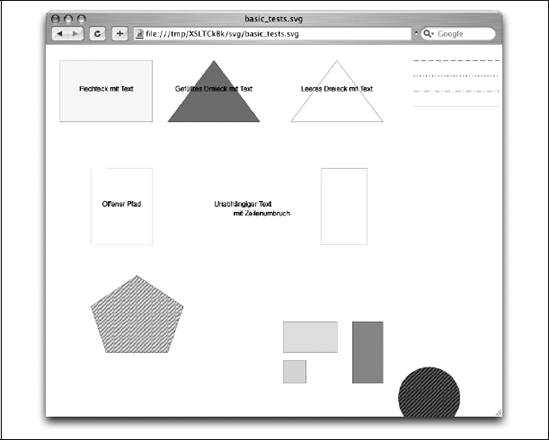
Figura: formas SVG sencillas y texto desde Visio.
La lección supera VDX, SVG y sus trucos: esta transformación compleja fue la primera experiencia XSLT del autor, mostrando la potencia de su modelo.
Copyright © 2006 O'Reilly Verlag GmbH & Co. KG
Puede imprimir la versión en línea para uso privado.
Para cualquier otro uso, este capítulo de «XSLT Kochbuch» está sujeto a las mismas condiciones que la edición encuadernada. La obra y todas sus partes están protegidas por derechos de autor. Todos los derechos reservados, incluidos reproducción, traducción, microfilmación, almacenamiento y tratamiento en sistemas electrónicos.
O'Reilly Verlag GmbH & Co. KG, Balthasarstraße 81, 50670 Köln, kommentar(at)oreilly.de