

XML technologies / CSS / CSS Cookbook / Typography for the web / Overlaying HTML text with images
(Excerpt from “CSS Kochbuch” by Christopher Schmitt)
Problem
You want to overlay HTML text with a repeating image, for example to create ragged edges or stripes, as shown in the following figure.
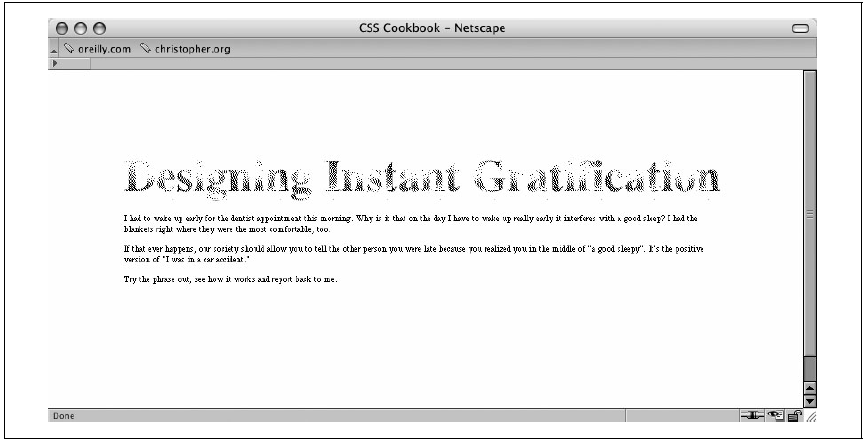
Figure: A striped image repeats over HTML text.
Solution
Insert a span element after the heading’s opening tag but before its text:
<h2><span></span>Designing Instant Gratification</h2>Next, use a version of the Gilder/Levin image replacement technique (see the recipe Replacing HTML text with an image) to overlay the HTML text with a continuous GIF pattern:
h2 {
 font:3em/1em Times, serif;
 font-weight: bold;
 margin:0;
 position: relative;
 overflow: hidden;
 float: left;
}
h2 span {
 position: absolute;
 width: 100%;
 height: 5em;
 background: url(striped.gif);
}
p {
 clear: left;
}
Discussion
The heading’s text is defined as a left-positioned float. This lets the background image in the span element be absolutely positioned over the HTML text.
Normally, the floated element would move left and the remaining content would flow around its right side. However, the paragraph’s property clear prevents this behaviour.
The property height is set to 5em, and overflow is set to hidden to prevent the background image from appearing outside the heading, as shown in the following code example:
See also
The page on the Gilder/Levin image replacement technique.
Copyright of the German edition © 2007 by O’Reilly Verlag GmbH & Co. KG
You may print the online version for your private use.
Otherwise, this chapter from “CSS Kochbuch” is subject to the same conditions as the bound edition: the work, including all its parts, is protected by copyright. All rights reserved, including reproduction, translation, microfilming, and storage and processing in electronic systems.
O’Reilly Verlag GmbH & Co. KG, Balthasarstr. 81, 50670 Köln