

XML technologies / CSS / CSS Cookbook / General information / Different selectors for assigning styles / ID selectors
(Excerpt from “CSS Kochbuch” by Christopher Schmitt)
ID selectors are very similar to class selectors, except that the specification allows them to occur only once in the HTML code. A particular element (often div) is given the attribute id that the selector then targets. To create an ID selector, place a hash sign (#) directly before its name:
#navigation {
  border: 1px solid black;
  padding: 40px;
}
Then give the desired HTML element an id attribute and assign it the value navigation (see the next figure):
<ul id="navigation">
  <li class="warning"><a href="http://csscookbook.com">Äpfel</a></li>
  <li><a href="http://csscookbook.com">Bananen</a></li>
  <li><a href="http://csscookbook.com">Kirschen</a></li>
</ul>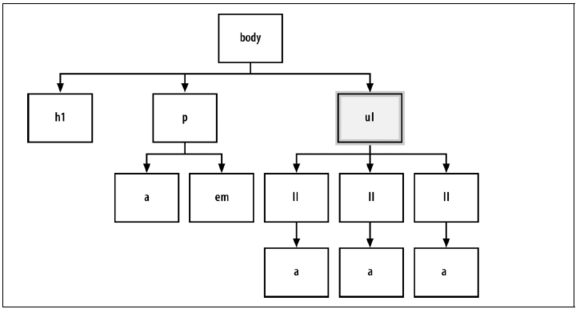
Figure: The unordered list now has its own styles.
Copyright of the German edition © 2007 by O’Reilly Verlag GmbH & Co. KG
You may print the online version for your private use.
Otherwise, this chapter from “CSS Kochbuch” is subject to the same conditions as the bound edition: the work, including all its parts, is protected by copyright. All rights reserved, including reproduction, translation, microfilming, and storage and processing in electronic systems.
O’Reilly Verlag GmbH & Co. KG, Balthasarstr. 81, 50670 Köln
back to top