

XML technologies / CSS / CSS Cookbook / General information / Different selectors for assigning styles / Class selectors
(Excerpt from “CSS Kochbuch” by Christopher Schmitt)
If you often want to apply the same CSS rules to different elements, use a class selector.
For example, a class selector can display warnings in red in both links and list items by assigning both the same class, as shown below.
To create a selector for the class warning, prefix its name with a dot (.):
<html>
  <head>
    <title>CSS Kochbuch</title>
    <style type="text/css">
    <!--
      * {
          font-family: verdana, arial, sans-serif;
      }
      body {
      }
      h1 {
        font-size: 120%;
      }
      #navigation {
        border: 1px solid black;
        padding: 40px;
      }
      li a {
        text-decoration: none;
      }
      p {
        font-size: 90%;
      }
      .warning {
        font-weight: bold;
      }
    -->
    </style>
  </head>
  <body>
    <h1>Seitenüberschrift</h1>
    <p>Dies ist ein Beispielabsatz mit einem <a href="http://csscookbook.com">Link</a>. Lorem ipsum dolor sit amet, consectetuer adipiscing elit, sed diam nonummy nibh euismod tincidunt ut laoreet dolore magna <em class="warning">aliquam erat volutpat</em>. Ut wisi enim ad minim veniam, quis nostrud exerci tation ullamcorper suscipit lobortis nisl ut aliquip ex ea commodo consequat.</p>
    <ul id="navigation">
      <li><a href="http://csscookbook.com">Äpfel</a></li>
      <li><a href="http://csscookbook.com">Bananen</a></li>
      <li><a href="http://csscookbook.com">Kirschen</a></li>
    </ul>
  </body>
</html>
Now give a link, a list item and an em element the attribute class and the corresponding value warning to give these elements special styles (see the next figure):
<html>
  <head>
    <title>CSS Kochbuch</title>
    <style type="text/css">
    <!--
      * {
        font-family: verdana, arial, sans-serif;
      }
      h1 {
        font-size: 120%;
      }
      #navigation {
        border: 1px solid black;
        padding: 40px;
      }
      li a {
        text-decoration: none;
      }
      p {
        font-size: 90%;
      }
      .warning {
        font-weight: bold;
      }
     -->
    </style>
  </head>
  <body>
    <h1>Seitenüberschrift</h1>
    <p>Dies ist ein Beispielabsatz mit einem <a href="http://csscookbook.com" class="warning">Link</a>. Lorem ipsum dolor sit amet, consectetuer adipiscing elit, sed diam nonummy nibh euismod tincidunt ut laoreet dolore magna <em class="warning">aliquam erat volutpat</em>. Ut wisi enim ad minim veniam, quis nostrud exerci tation ullamcorper suscipit lobortis nisl ut aliquip ex ea commodo consequat.</p>
    <ul id="navigation">
      <li class="warning"><a href="http://csscookbook.com">Äpfel</a></li>
      <li><a href="http://csscookbook.com">Bananen</a></li>
      <li><a href="http://csscookbook.com">Kirschen</a></li>
    </ul>
  </body>
</html>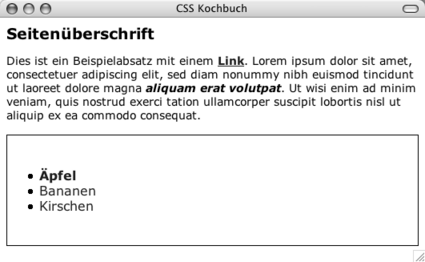
Figure: Modified CSS rules on the web page.
The following figure shows the selectors within the web page’s structure.
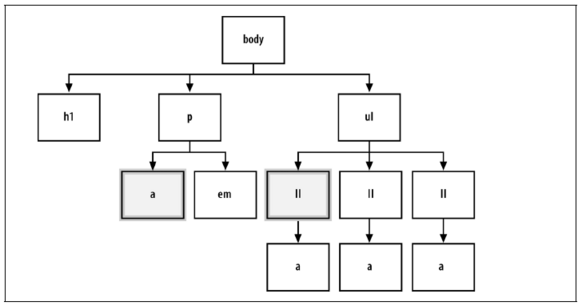
Figure: Styled elements within the page structure.
(Note: The em element should also be highlighted.)
Copyright of the German edition © 2007 by O’Reilly Verlag GmbH & Co. KG
You may print the online version for your private use.
Otherwise, this chapter from “CSS Kochbuch” is subject to the same conditions as the bound edition: the work, including all its parts, is protected by copyright. All rights reserved, including reproduction, translation, microfilming, and storage and processing in electronic systems.
O’Reilly Verlag GmbH & Co. KG, Balthasarstr. 81, 50670 Köln
back to top