

XML technologies / CSS / CSS Cookbook / General information / Different selectors for assigning styles / Descendant selectors (contextual selectors)
(Excerpt from “CSS Kochbuch” by Christopher Schmitt)
Descendant selectors come next in the sequence and can override the definitions of type and class selectors. They typically consist of two elements, the second of which must be a “descendant” of the first:
li a {
 text-decoration: none;
}
To see the result, extend our example with HTML code containing an a element inside a li element, as shown in the next figure:
<ul id="navigation">
  <li class="warning"><a href="http://csscookbook.com">Äpfel</a></li>
  <li><a href="http://csscookbook.com">Bananen</a></li>
  <li><a href="http://csscookbook.com">Kirschen</a></li>
</ul>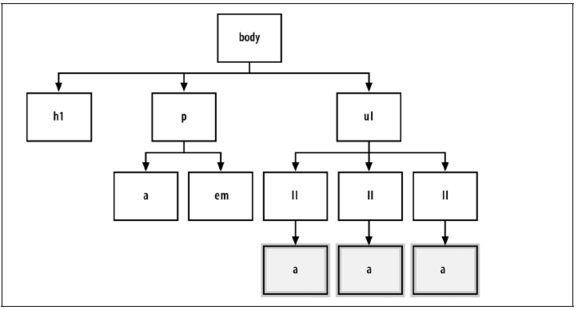
Figure: Links within the list are selected by the descendant selector.
Copyright of the German edition © 2007 by O’Reilly Verlag GmbH & Co. KG
You may print the online version for your private use.
Otherwise, this chapter from “CSS Kochbuch” is subject to the same conditions as the bound edition: the work, including all its parts, is protected by copyright. All rights reserved, including reproduction, translation, microfilming, and storage and processing in electronic systems.
O’Reilly Verlag GmbH & Co. KG, Balthasarstr. 81, 50670 Köln
back to top