

XML technologies / ePUB / Open Publication Structure / Semantic inline elements / Examples and listings
(Excerpt from “E-Books mit ePUB ─ Von Word zum E-Book mit XML” by Dr. Victor Wang)
Examples, code listings and keyboard input also need semantic structure. The corresponding elements <samp>, <pre> or <code> and <kbd> are structurally inline but can become blocks inside a container, <div> or <p>. Here too, DTBook and XHTML do not differ.
First consider examples that are not code and therefore use <samp> (“sample”):
<p><strong>samp</strong>: Das Ziel des Urheberschutzes wird in § 1 des Urhebergesetzes wie folgt beschrieben:</p>
<p><samp><strong>§ 1 Urhebergesetz</strong><br/> Die Urheber von Werken der Literatur, Wissenschaft und Kunst genießen für ihre Werke Schutz nach Maßgabe dieses Gesetzes.</samp></p>
Code example: Simple sample structure in XHTML/DTBook
The element for keyboard input <kbd> (“keyboard”) displays text exactly as it must be typed, or individual keys.
Code examples should usually preserve whitespace —spaces, tabs and newlines—and use a monospace font to resemble an editor. XHTML’s block element <pre> (“preformatted”) marks preformatted text, while its code-example semantics are additionally marked by the inline element <code>.
<p><strong>Code</strong>: Die folgende Routine schreibt die Batchdatei, die das XSLT-Skript, das die OPF schreibt, ausführt:</p>
<pre>
<code>Sub start_1_opf()
Call initPfadParameter
myTempFN = SKRIPT_PATH & "\epubstarter-1-opf.bat"
myBatchFileText = "cd " & SKRIPT_PATH & vbCrLf _
& JAVA_PARAMETER & " " & SAXON_PATH & " " _
& SOURCE_PATH & "\" & SOURCE_FILE & " " _
& SKRIPT_PATH & "\" & SKRIPT_OPF
' temp. Batchdatei schreiben
Open myTempFN For Output As #1
Print #1, myBatchFileText
Close #1
' Batchdatei ausführen
Debug.Print myTempFN; " --> "; Shell(myTempFN, vbMaximizedFocus)
End Sub</code>
</pre>
Code example: Preformatted code in XHTML
XHTML is somewhat redundant here, blurring separation between structure, <code>, and layout, <pre>. The semantic element <code> alone would suffice, as a stylesheet provides monospace display, in CSS through the property font-family. This probably explains DTBook omitting separate preformatted-text markup.
Code is easy to encode within OPS, but long lines are harder to display. May they wrap, as ordinary blocks do? Current readers often lack horizontal scrolling, exposing a present display limitation.
Current improvement approaches are:
Edit source data: insert newlines and spaces to shorten all code lines. Note: the old HTML attribute
widthon<pre>no longer exists in XHTML!
Optimize CSS: reduce code font size or override wrapping with the property
white-space.
Examine the latter approach. The CSS property white-space has these values:
normal: ordinary paragraph behavior, wrapping automatically.pre: preserve all source breaks exactly as written in the code editor, matching usual XHTML behavior of<pre>.pre-wrap: likepre, but wrapping when available width is insufficient.nowrap: no automatic wrapping unless<br/>explicitly inserts breaks.
Test these with the following stylesheet. Give the <code> element a class attribute using names from CSS, for example for white-space: pre-wrap.
<code class="white-space_pre-wrap">Sub start_1_opf()
Call initPfadParameter
myTempFN = SKRIPT_PATH & "\epubstarter-1-opf.bat"
myBatchFileText = "cd " & SKRIPT_PATH & vbCrLf _
& JAVA_PARAMETER & " " & SAXON_PATH & " " _
& SOURCE_PATH & "\" & SOURCE_FILE & " " _
& SKRIPT_PATH & "\" & SKRIPT_OPF
' temp. Batchdatei schreiben
Open myTempFN For Output As #1
Print #1, myBatchFileText
Close #1
' Batchdatei ausführen
Debug.Print myTempFN; " --> "; Shell(myTempFN, vbMaximizedFocus)
End Sub</code>
Code example: class attribute on <code>
A stylesheet formatting these white-space variants could look like this:
code {                                        ①
 display: inline;
 font-family: monospace;
}
code.white-space_pre {                        ②
 display: inline;
 font-family: monospace;
 white-space: pre;
}
code.white-space_pre-wrap {                   ③
 display: inline;
 font-family: monospace;
 white-space: pre;
}
code.white-space_nowrap {                     ④
 display: inline;
 font-family: monospace;
 white-space: nowrap;
}
code.white-space_normal {                     ⑤
 display: inline;
 font-family: courier, verdana, arial, monospace;
 white-space: normal;
}
Code example: CSS white-space property
First inspect case ① without the property white-space. CSS merely enables monospace through font-family:
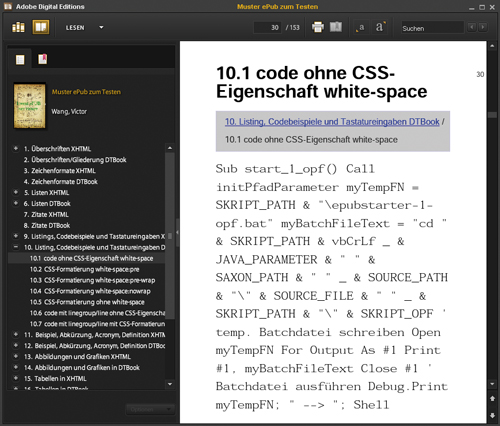
Figure: Code without CSS white-space.
All indentation disappears and code wraps automatically as expected. It is barely readable.
Next, case ② adds the preformatted property white-space: pre; see the next two figures.
Code now resembles the editor, retaining indentation and breaks, but the reader cuts lines off on the right. With smaller text and shorter lines this is acceptable, though imperfect.
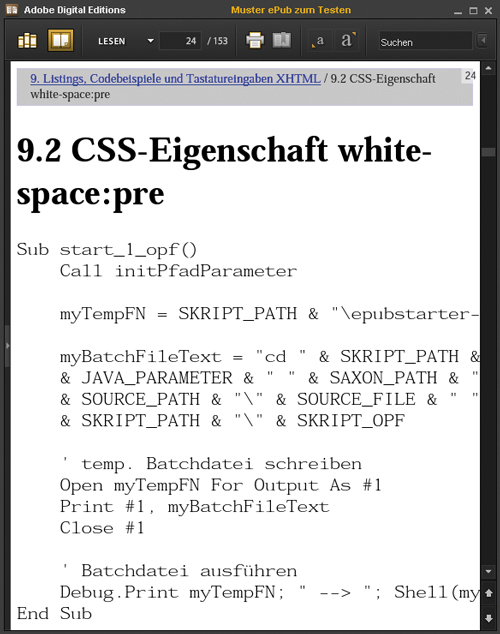
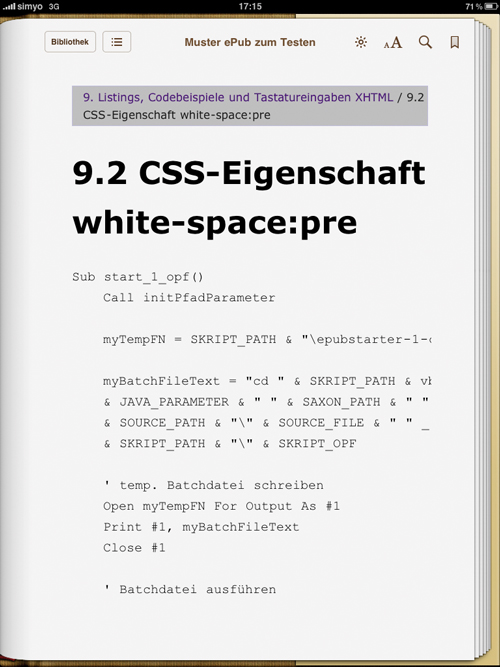
Figures: Code with white-space: pre (Adobe Digital Editions and iBooks).
Similarly, case ③ uses white-space: pre-wrap; see the next two figures. Initial indentation stays, but long lines now wrap.
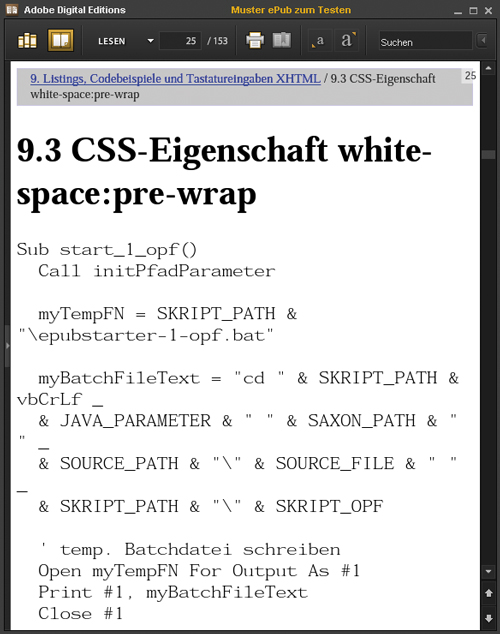
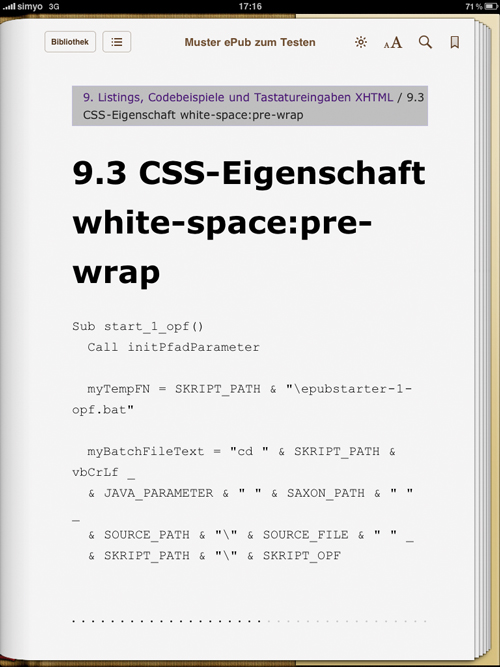
Figures: Code with white-space: pre-wrap (Adobe Digital Editions and iBooks).
We skip case ④ and instead use case ⑤ to test automatic wrapping with explicit OPS line endings marked by <br/>.
<p>
<code class="white-space_normal">Sub start_1_opf()<br/>
Call initPfadParameter<br/>
<br/>
myTempFN = SKRIPT_PATH & "\epubstarter-1-opf.bat"<br/>
<br/>
myBatchFileText = "cd " & SKRIPT_PATH & vbCrLf _<br/>
& JAVA_PARAMETER & " " & SAXON_PATH & " " _<br/>
& SOURCE_PATH & "\" & SOURCE_FILE & " " _<br/>
& SKRIPT_PATH & "\" & SKRIPT_OPF<br/>
<br/>
' temp. Batchdatei schreiben<br/>
Open myTempFN For Output As #1<br/>
Print #1, myBatchFileText<br/>
Close #1<br/>
<br/>
' Batchdatei ausführen<br/>
Debug.Print myTempFN; " --> "; Shell(myTempFN, vbMaximizedFocus)<br/>
End Sub</code>
</p>
Code example: Explicit line breaks
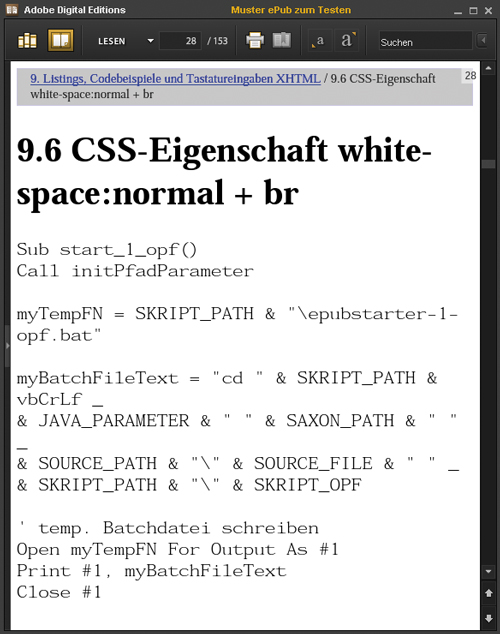
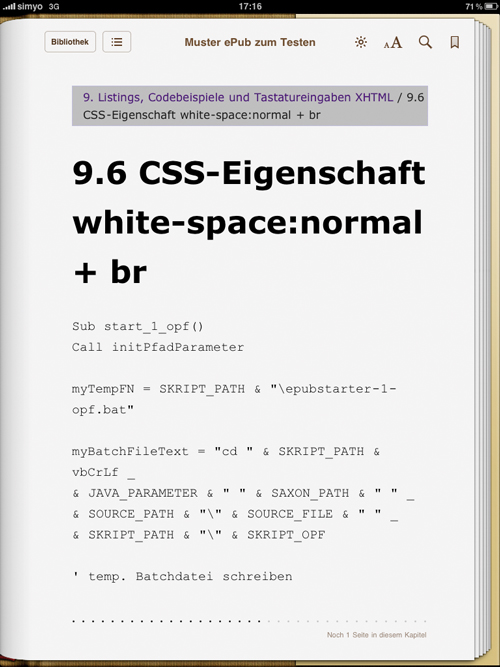
Figures: white-space: normal with added <br/> (Adobe Digital Editions and iBooks).
As expected, it resembles case ①, but preserves line beginnings, improving readability somewhat. Indentation still disappears.
DTBook finally offers an alternative to ugly manual breaks: semantically, use <line> for each code line. However, the content model of <line> permits only inline <code> elements:
<linegroup>
<line><code>Sub start_1_opf()</code></line>
<line><code> Call initPfadParameter</code></line>
<line><code> myTempFN = SKRIPT_PATH & "\epubstarter-1-opf.bat"</code></line>
<line><code> myBatchFileText = "cd " & SKRIPT_PATH & vbCrLf _</code></line>
<line><code> & JAVA_PARAMETER & " " & SAXON_PATH & " " _</code></line>
<line><code> & SOURCE_PATH & "\" & SOURCE_FILE & " " _</code></line>
<line><code> & SKRIPT_PATH & "\" & SKRIPT_OPF</code></line>
<line><code> ' temp. Batchdatei schreiben</code></line>
<line><code> Open myTempFN For Output As #1</code></line>
<line><code> Print #1, myBatchFileText</code></line>
<line><code> Close #1</code></line>
<line><code> ' Batchdatei ausführen</code></line>
<line><code> Debug.Print myTempFN; " --> "; Shell(myTempFN, vbMaximizedFocus)</code></line>
<line><code>End Sub</code></line>
</linegroup>
Code example: <line>/<line-group> in DTBook
No perfect solution exists. Cases ② (white-space: pre) and ③ (white-space: pre-wrap) seem structurally cleanest. Hopefully future readers improve zoom.
Copyright © mitp 2011
You may print the online version for your private use.
Otherwise, this chapter from “E-Books mit ePUB” is subject to the same terms as the printed edition: the work and all its parts are protected by copyright. All rights reserved, including reproduction, translation, microfilming, and storage and processing in electronic systems.
Verlagsgruppe Hüthig Jehle Rehm GmbH, Im Weiher 10, 69121 Heidelberg, kundenbetreuung(at)hjr-verlag.de
back to top