

XML technologies / ePUB / Open Publication Structure / Semantic inline elements / Abbreviations, acronyms and definitions
(Excerpt from “E-Books mit ePUB ─ Von Word zum E-Book mit XML” by Dr. Victor Wang)
XHTML and DTBook have inline elements for abbreviations <abbr>, acronyms <acronym> and definitions <dfn>. All three carry semantic meaning, mainly for subsequent processing.
Start with the classic abbreviation. It can shorten words or terms, such as German Bsp. for Beispiel (example), s. for siehe (see), or phrases: z.B. for zum Beispiel (for example), a.a.O. for am angegebenen Ort (in the cited place). Abbreviations may reduce printed length, but also depend strongly on subject and specialty. They often end in a period, though some omit it.
The element <acronym> encodes an acronym, similar to an abbreviation but formed from initial letters of words. Examples include ePUB (electronic Publication), XML, NATO and SCSI. Many are pronounceable because of their vowels; others, such as SCSI, are difficult. DTBook adds the attribute pronounce="no" to have the acronym read letter by letter.
The third element is the definition <dfn>, introduced as the counterpart of the definition list <dl>. It marks terms to explain in a glossary-like presentation.
<div class="Gliederungsebene">
  <h1>Abkürzung, Akronym und Definition</h1>
  <p><strong>abbr</strong>: Abkürzungen können zwecks leichterer Auswertung gekennzeichnet werden, beispielsweise ist <abbr>UrhG</abbr> die Abkürzung für das Urhebergesetz.</p>
  <p><strong>acronym</strong>: Akronyme sind Kunstworte, die sich aus mehreren Wörtern zusammensetzen. Beispiele hierfür sind:</p>
  <ul>
     <li><acronym>XML</acronym> für "eXtensible Markup Language"</li>
     <li><acronym>ePub</acronym> für "electronic Publication"</li>
  </ul>
  <p><strong>dfn</strong>: Dieses Inline-Element dient der Markierung eines Begriffes, der in einer Definitionsliste (siehe Listen) vorkommt.</p>
  <p>Das Vorgängerformat von <dfn>ePub</dfn> ist <dfn>OEB</dfn>, das Open e-Book Format.</p>
</div>
Code example: Abbreviation, acronym and definition in XHTML
Usually none receives typographic distinction, or only very subtle styling. To illustrate the option, the figure shows DTBook’s default stylesheet in CSS.
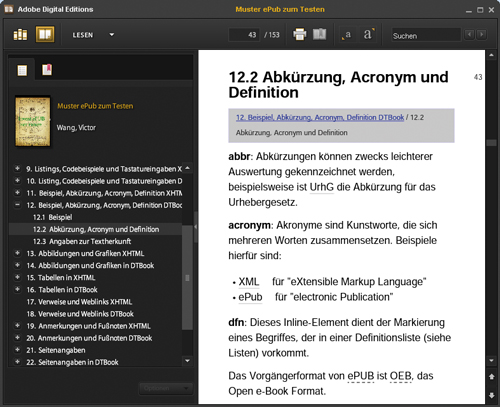
Figure: DTBook default CSS display.
These elements support generating lists and glossaries. Electronic versions could also link them directly to their expanded wording, allowing clearer spoken reading. Acronym markup already provides for this.
Copyright © mitp 2011
You may print the online version for your private use.
Otherwise, this chapter from “E-Books mit ePUB” is subject to the same terms as the printed edition: the work and all its parts are protected by copyright. All rights reserved, including reproduction, translation, microfilming, and storage and processing in electronic systems.
Verlagsgruppe Hüthig Jehle Rehm GmbH, Im Weiher 10, 69121 Heidelberg, kundenbetreuung(at)hjr-verlag.de
back to top