

XML technologies / ePUB / ePub für (In)Designer / Embedded fonts and special characters / Embedding fonts
(Excerpt from “ePub für (In)Designer — Mit InDesign Schritt für Schritt zum E-Book” by Sascha Heck & Yves Apel)
Embedding an InDesign font into ePub is easy; finding a suitable font is not.
Point 1: formats
Most e-readers support OpenType (otf), TrueType (ttf) and Scalable Vector Graphics (svg). InDesign supports more formats, but not Scalable Vector Graphics (svg), limiting you to OpenType and TrueType.
Point 2: licenses
ePub font embedding differs from PDF, where extraction requires special knowledge. ePub usually contains an unencrypted font copy. InDesign encrypts fonts with an Adobe algorithm, preventing their reuse. Licensing specialists debate whether this is distribution rather than embedding. You must check whether your font license permits ePub use and redistribution. If uncertain or the license is unclear, contact the font vendor directly.
Point 3: where to obtain fonts without stealing
Redistributable commercial fonts remain rare. Free fonts abound, but commercial-use permission is often unclear and quality questionable.
A large selection for commercial use and embedding in ePub and websites is available from Font Squirrel.
Embedding fonts during InDesign ePub export
Once a suitable font is used in InDesign, during ePub export on the tab Contents enable Include Embeddable Fonts. InDesign creates the sometimes complex embedding code automatically.
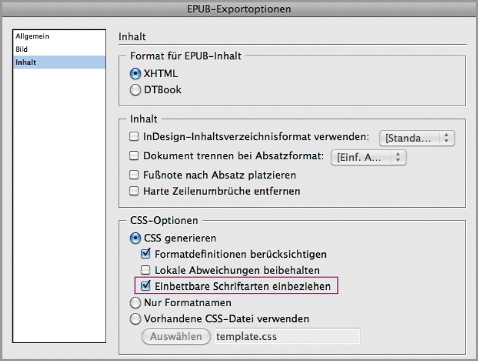
Figure: EPUB Export Options—Include Embeddable Fonts.
Adding a font manually
Unpack ePub and copy your font into the fonts subfolder of OEBPS.
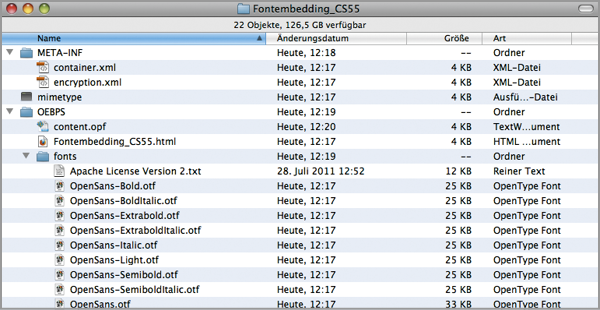
Figure: OEBPS/fonts—copy the font manually.
Open content.opf in an editor and add the code line or lines under <manifest> as <item id="Dateiname.otf" href="fonts/Dateiname.otf" media-type="application/x-font-otf"/> in this example:
<manifest>
   <item id="ncx" href="toc.ncx" media-type="application/x-dtbncx+xml"/>
   <item id="css" href="template.css" media-type="text/css"/>
   <item id="Fontembedding_CS55" href="Fontembedding_CS55.html" media-type="application/xhtml+xml"/>
   <item id="x218.png" href="images/218.png" media-type="image/png"/>
   <item id="OpenSans.otf" href="fonts/OpenSans.otf" media-type="application/x-font-otf"/>
   <item id="OpenSans-Bold.otf" href="fonts/OpenSans-Bold.otf" media-type="application/x-font-otf"/>
   <item id="OpenSans-BoldItalic.otf" href="fonts/OpenSans-BoldItalic.otf" media-type="application/x-font-otf"/>
   <item id="OpenSans-Extrabold.otf" href="fonts/OpenSans-Extrabold.otf" media-type="application/x-font-otf"/>
   <item id="OpenSans-ExtraboldItalic.otf" href="fonts/OpenSans-ExtraboldItalic.otf" media-type="application/x-font-otf"/>
   <item id="OpenSans-Italic.otf" href="fonts/OpenSans-Italic.otf" media-type="application/x-font-otf"/>
   <item id="OpenSans-Light.otf" href="fonts/OpenSans-Light.otf" media-type="application/x-font-otf"/>
   <item id="OpenSans-Semibold.otf" href="fonts/OpenSans-Semibold.otf" media-type="application/x-font-otf"/>
   <item id="OpenSans-SemiboldItalic.otf" href="fonts/OpenSans-SemiboldItalic.otf" media-type="application/x-font-otf"/>
   <item id="OpenSansLight-Italic.otf" href="fonts/OpenSansLight-Italic.otf" media-type="application/x-font-otf"/>
</manifest>
Open template.css in the editor and add these lines at the beginning. Each font needs a separate entry:
@font-face{
   font-family: "Schriftname";
   font-style: normal;
   font-weight: normal;
   src: url("fonts/Dateiname.otf");
}
Then specify the manually added font in CSS styles:
p.Absatzformat {
   font-family: "Schriftname", sans-serif;
   font-weight: normal;
   font-style: normal;
}
Eliminating problems
Adobe InDesign encrypts embedded fonts, allowing distribution without violating licensing rights, though please clarify details with your vendor. Some readers cannot handle this encryption. Replace fonts to remove it, provided you have the necessary rights.
Unpack ePub again and replace OEBPS/fonts contents with original unencrypted fonts, retaining filenames. If TrueType was used, InDesign converted it to OpenType; search content.opf and template.css for otf and replace with ttf.
Delete encryption.xml from META-INF.
Adobe-supported devices are listed under Digital Editions Supported Devices.
Enabling on iOS
Through iOS4.2 and iBooks 1.2, embedded fonts were unsupported. From iBooks 1.2, explicitly declare that they exist and must be used. Create META-INF’s file named exactly com.apple.ibooks.display-options.xml and enter this XML code:
<?xml version="1.0" encoding="UTF-8"?>
<display_options>
   <platform name="*">
      <option name="specified-fonts">true</option>
   </platform>
</display_options>
Reassemble ePub and transfer to iPhone/iPad; iBooks can now display embedded fonts.
Copyright © dpunkt.verlag GmbH 2012
You may print the online version for your private use.
Otherwise, this chapter from “ePub für (In)Designer” is subject to the same terms as the printed edition: the work and all its parts are protected by copyright. All rights reserved, including reproduction, translation, microfilming, and storage and processing in electronic systems.
dpunkt.verlag GmbH, Wieblinger Weg 17, 69123 Heidelberg, fon 06221-14830, fax 06221-148399, hallo(at)dpunkt.de