

XML technologies / ePUB / ePub für (In)Designer / Video in ePub / Converting with Adobe Media Encoder
(Excerpt from “ePub für (In)Designer — Mit InDesign Schritt für Schritt zum E-Book” by Sascha Heck & Yves Apel)
Start Adobe Media Encoder and drag the file into the empty area.
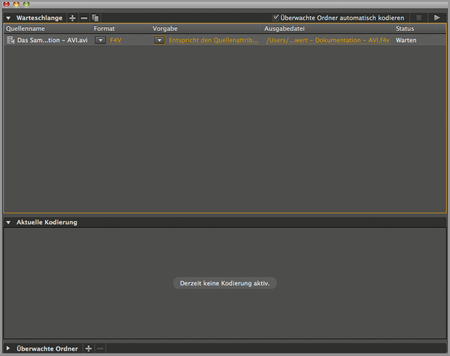
Figure: Adobe Media Encoder CS5.5.
AME CS5 looks slightly different.
In the column Format choose H.264.
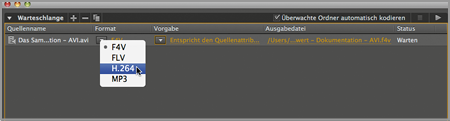
Figure: Adobe Media Encoder → Format → H.264.
Under Preset, output presets already exist. Choose Apple iPad – 640 × 360, 16 × 9, 29.97, 1.200 Kbit/s; for iOS-only output a 4:3 profile is possible. To customize, click the selected Apple iPad – 640 × 360, 16 × 9 … profile name.
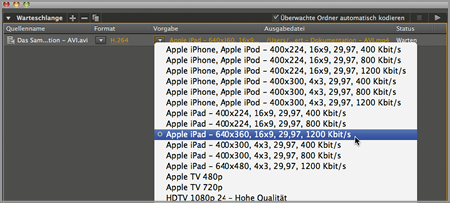
Figure: Preset → Apple iPad – 640 × 360, 16 × 9, 29.97, 1.200 Kbit/s.
The new window offers detail settings. Open the tab Video and enter the video size under Frame Width. Retaining the original 1280-pixel size improves quality but enlarges the file. Use 480 pixels to optimize for the e-book.
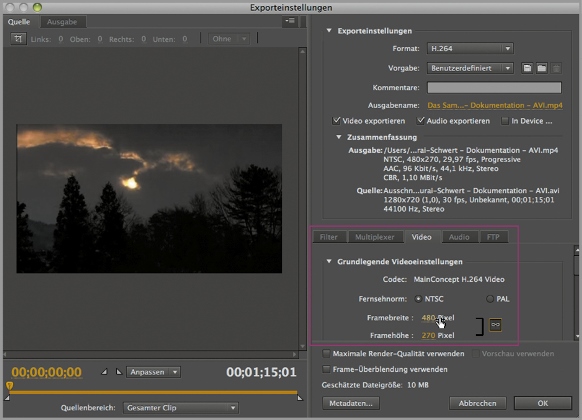
Figure: Video → Frame Width → 480 pixels.
Scroll down to Bitrate [Mbit/s] and enter on the right the value 1,000, preserving the decimal comma. Custom bitrate and resolution can be specified here too.
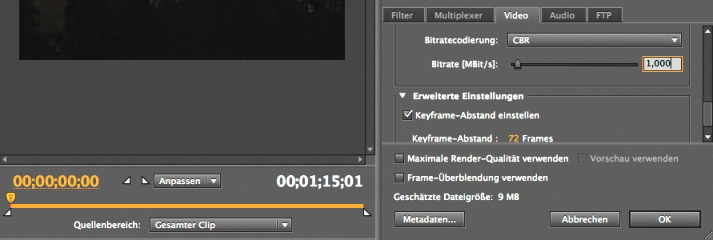
Figure: Bitrate [Mbit/s] → 1,000.
At the bottom, Estimated File Size shows estimated file size. Depending on duration, actual size may differ because calculations are not exact. Confirm with OK.
Click the name in the column Output File to set name and location. Start conversion with the upper-right triangle.
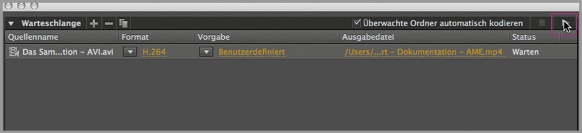
Figure: Clicking the triangle to start conversion.
Conversion can take minutes or hours, usually consuming most computer resources and hindering other work. Allow enough time or run overnight; it needs little attention.
Both Adobe Media Encoder and Wondershare Video Converter offer advanced cropping, quality and color controls beyond this book’s scope.
Copyright © dpunkt.verlag GmbH 2012
You may print the online version for your private use.
Otherwise, this chapter from “ePub für (In)Designer” is subject to the same terms as the printed edition: the work and all its parts are protected by copyright. All rights reserved, including reproduction, translation, microfilming, and storage and processing in electronic systems.
dpunkt.verlag GmbH, Wieblinger Weg 17, 69123 Heidelberg, fon 06221-14830, fax 06221-148399, hallo(at)dpunkt.de
back to top