

XML technologies / SVG / Using text elements / Special text formatting / The meaning of the inherit value
(Excerpt from “Das Einsteigerseminar SVG — Webgrafiken mit XML” by Helma Spona)
Many settings of the style attribute accept the value inherit. Testing it may show no difference from a default such as “normal”. This is because it does not set a specific property value. The word means “take over” or “inherit”: the setting is taken from the parent element.
The following example illustrates this. A group is defined with the setting font-weight set to bold. The group contains two <text> tags using different values of the property font-weight. The first uses inherit, inheriting the group’s setting. The second text explicitly uses normal.
<?xml version="1.0" standalone="no"?>
...
<svg width="500" height="500">
  <g style="font-family:sans-serif; font-weight:bolder">
    <text x="10" y="20" style="font-weight:inherit">Dieser Text ist fett geschrieben"</text>
    <text x="10" y="40" style="font-weight:normal">Dieser Text ist normal geschrieben"</text>
  </g>
</svg>
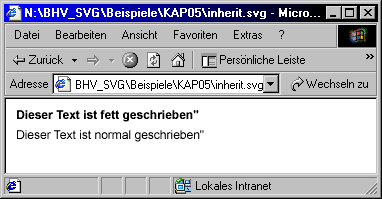
Figure: SVG output with font-weight:inherit and font-weigth:normal.
Copyright © verlag moderne industrie GmbH 2001
You may print the online version for your private use.
Otherwise, this chapter from “Das Einsteigerseminar SVG — Webgrafiken mit XML” is subject to the same conditions as the bound edition. The work, including all its parts, is protected by copyright. All rights reserved, including reproduction, translation, microfilming, and storage and processing in electronic systems.
verlag moderne industrie GmbH, Justus-von-Liebig-Straße 1, D-86899 Landsberg/Lech, fon ++49 (0) 81 91 / 125 – 0, leserservice(at)mi-verlag.de
back to top