

XML technologies / SVG / Using text elements / Special text formatting / Using special characters and umlauts
(Excerpt from “Das Einsteigerseminar SVG — Webgrafiken mit XML” by Helma Spona)
Text often needs umlauts such as ä or ü, or special characters such as © or ™. Simply typing umlauts into the <text> tag causes a syntax error.
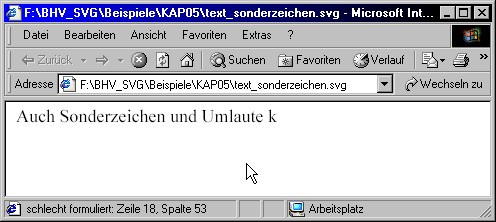
Figure: Umlauts in text cause syntax errors.
Such errors usually display text only up to the offending character. In the example, this is the ö in können.
Two methods are available, depending on whether you need ordinary umlauts and accented letters or special characters such as ® and ©. Normal character-set characters can be entered through their ASCII codes, including German umlauts and ß. For each, enter &#Nummer;, where Nummer represents the character’s ASCII code.
Some special characters, such as &, also accept HTML encodings. In this case, enter &. Only a few characters support HTML encodings; most require ASCII codes.
<?xml version="1.0" standalone="no"?>
...
<svg width="500" height="500">
<defs>
<text id="cr">(c) 2001 by Helma Spona</text>
<text id="titel">Die Webseite zum Buch: SVG - Scalable Vector Graphic</text>
</defs>
<g style="font-size:18;font-family:serif">
<text x="10" y="20">Auch Sonderzeichen und Umlaute können Sie natürlich in</text>
<text x="10" y="35">SVG-Texten verwenden. Dazu stehen wahlweise ASCII-Codes </text>
<text x="10" y="50">oder HTML-Codes bspw. für die Zeichen ©, ® und & zur</text>
<text x="10" y="65">Verfügung.</text>
</g>
</svg>
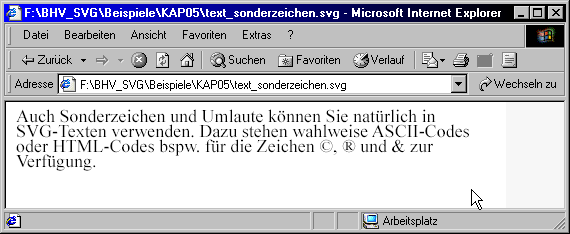
Figure: Text with special characters.
The table lists ASCII codes for important umlauts and special characters.
Table: Important ASCII codes for special characters.
Character | ASCII code |
|---|---|
Ä | 196 |
ä | 228 |
Ö | 214 |
ö | 246 |
Ü | 220 |
ü | 252 |
ß | 223 |
§ | 167 |
® | 174 |
© | 169 |
Entering umlauts this way is laborious, especially in long texts. Specify the SVG file’s character encoding instead. With the correct code page, enter German umlauts and special characters normally without their ASCII codes.
Put the following on the SVG file’s first line: <?xml version="1.0" encoding="iso-8859-1"?> This specifies the encoding.
Copyright © verlag moderne industrie GmbH 2001
You may print the online version for your private use.
Otherwise, this chapter from “Das Einsteigerseminar SVG — Webgrafiken mit XML” is subject to the same conditions as the bound edition. The work, including all its parts, is protected by copyright. All rights reserved, including reproduction, translation, microfilming, and storage and processing in electronic systems.
verlag moderne industrie GmbH, Justus-von-Liebig-Straße 1, D-86899 Landsberg/Lech, fon ++49 (0) 81 91 / 125 – 0, leserservice(at)mi-verlag.de
back to top