

XML technologies / SVG / Using text elements / Special text formatting / Basic font formatting
(Excerpt from “Das Einsteigerseminar SVG — Webgrafiken mit XML” by Helma Spona)
Font properties are essential to text appearance. Adjust these properties in the style attribute of a <text> tag:
font-familysets the font family. For example, usefont-family:Arialto select Arial. If omitted, the browser or SVG plug-in’s default font is used.font-sizesets the font size. For example,font-size:10gives a size of 10 pixels.font-weightsets how bold the font appears. Available values arenormal,bold,bolder,lighter,100,200,300,400,500,600,700,800,900andinherit. For an ordinary bold font, for example, usefont-weight:bold.font-stretchsets the font’s stretch. Supported values arenormal,wider,narrower,ultra-condensed,extra-condensed,condensed,semi-condensed,semi-expanded,expanded,extra-expanded,ultra-expandedandinherit.font-variantdetermines whether lowercase letters appear normally or as small capitals. SVG Viewer supports this only for special SVG fonts.font-styledetermines whether text appears upright or italic. Possible values arenormal,italic,obliqueandinherit. The differences betweenitalicandobliqueare so slight that they are invisible unless SVG Viewer’s unoptimized view is used.
The following figure shows the individual settings’ effects in SVG Viewer 2.0.
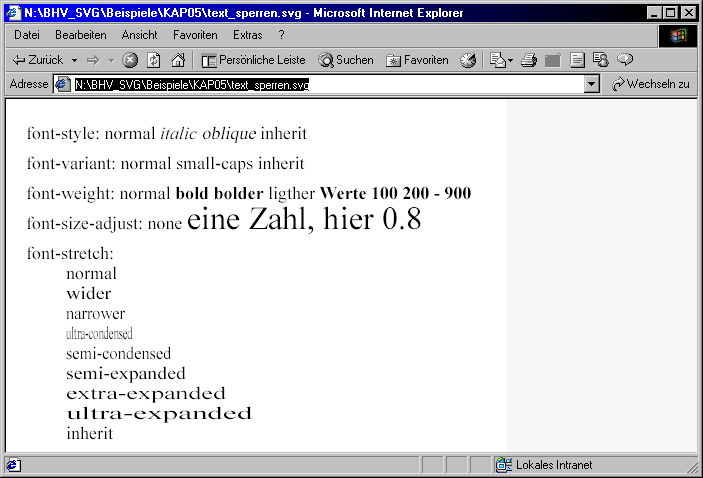
Figure: Font formatting.
Copyright © verlag moderne industrie GmbH 2001
You may print the online version for your private use.
Otherwise, this chapter from “Das Einsteigerseminar SVG — Webgrafiken mit XML” is subject to the same conditions as the bound edition. The work, including all its parts, is protected by copyright. All rights reserved, including reproduction, translation, microfilming, and storage and processing in electronic systems.
verlag moderne industrie GmbH, Justus-von-Liebig-Straße 1, D-86899 Landsberg/Lech, fon ++49 (0) 81 91 / 125 – 0, leserservice(at)mi-verlag.de
back to top