

XML technologies / SVG / Creating simple SVG graphics / SVG tag syntax / Important attributes explained
(Excerpt from “Das Einsteigerseminar SVG — Webgrafiken mit XML” by Helma Spona)
Some attributes are supported by almost all shape-definition tags. These are called universal attributes and are explained below.
Positioning elements with x and y
All positionable elements of an SVG graphic have the attributes x and y to set absolute or relative position. The attribute x sets horizontal position, the distance from the left edge, and y the distance from the top edge.
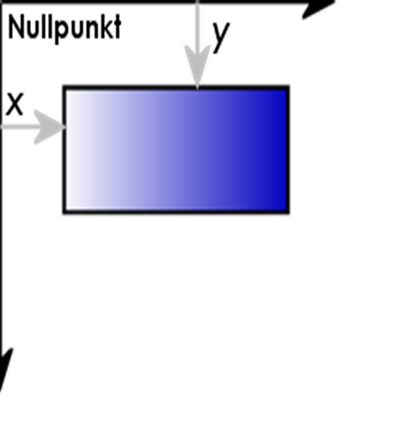
Figure: Positioning SVG elements with x and y.
This positioned the preceding listing’s text 0 pixels from the left, directly at the edge, and 10 pixels from the top.
Note:
More details on positioning and coordinates appear under The coordinate system of SVG graphics.
Formatting with the style attribute
Format shapes with the style attribute, just as in HTML. List formatting instructions in sequence using this form:
style="format:wert;format2:wert2;...formatn:wertn"
. The declaration style="font-family:Arial;font-size:16" inside a <text> tag sets Arial at 16 pixels.
String formatting values generally need no quotes, with exceptions explained later. Decimal values require a dot as separator.
Available formatting depends on the element, though some applies to most shapes. SVG generally supports most formatting from CSS 1.0, CSS 2.0 and the future CSS 3.0 standard, limited to what makes sense for SVG.
Note:
Instead of the style attribute, tags can use so-called presentations attributes: general formatting attributes defined outside the style attribute. Introduced with the latest W3C documentation changes, they are only partly supported by SVG Viewer and not used below. To use them, specify the CSS property as an attribute. The declaration <text ... fill="red" stroke="none">test</text> is therefore equivalent to <text ... style="fill:red;stroke:none">test</text>.
Setting size with width and heigth
Set element size with the attributes width and height. width sets the width, while height sets the height in the specified unit, defaulting to pixels when omitted. The tag <text> lacks these attributes.
Naming elements with the id attribute
Name elements to access them from JavaScript or another language. As in HTML, use the attribute id. Names must be unique within the graphic, differ from attribute or tag names, and contain no special characters or spaces.
The code
<text id="TEXT01" x="0" y="14" style="font-family:Arial;font-size:16">SVG - das ultimative Grafikformat</text>
names the text element "TEXT01", for example.
Copyright © verlag moderne industrie GmbH 2001
You may print the online version for your private use.
Otherwise, this chapter from “Das Einsteigerseminar SVG — Webgrafiken mit XML” is subject to the same conditions as the bound edition. The work, including all its parts, is protected by copyright. All rights reserved, including reproduction, translation, microfilming, and storage and processing in electronic systems.
verlag moderne industrie GmbH, Justus-von-Liebig-Straße 1, D-86899 Landsberg/Lech, fon ++49 (0) 81 91 / 125 – 0, leserservice(at)mi-verlag.de