

XML technologies / CSS / CSS Cookbook / General information / Document types and browser rendering
(Excerpt from “CSS Kochbuch” by Christopher Schmitt)
Problem
Make your page standards-compliant and validatable.
Solution
HTML 4.01 has three document types: strict, transitional and frameset. XHTML 1.1 has just one document type, while XHTML 1.0 has three, like HTML 4.01. An HTML document can contain only one particular document type definition (DTD) specifying its rendering rules. The following DTDs are available:
HTML 4.01 Strict DTD:
<!DOCTYPE HTML PUBLIC "-//W3C//DTD HTML 4.01//EN" "http://www.w3.org/TR/html4/strict.dtd">HTML 4.01 Transitional DTD:
<!DOCTYPE HTML PUBLIC "-//W3C//DTD HTML 4.01 Transitional//EN" "http://www.w3.org/TR/1999/REC-html401-19991224/loose.dtd">HTML 4.01 Frameset DTD:
<!DOCTYPE HTML PUBLIC "-//W3C//DTD HTML 4.01 Frameset//EN" " http://www.w3.org/TR/1999/REC-html401-19991224/frameset.dtd">XHTML 1.0 Strict DTD:
<!DOCTYPE html PUBLIC "-//W3C//DTD XHTML 1.0 Strict//EN" "http://www.w3.org/TR/xhtml1/DTD/xhtml1-strict.dtd">XHTML 1.0 Transitional DTD:
<!DOCTYPE html PUBLIC "-//W3C//DTD XHTML 1.0 Transitional//EN" "http://www.w3.org/TR/xhtml1/DTD/xhtml1-transitional.dtd">XHTML 1.0 Frameset DTD:
<!DOCTYPE html PUBLIC "-//W3C//DTD XHTML 1.0 Frameset//EN" "http://www.w3.org/TR/xhtml1/DTD/xhtml1-frameset.dtd">XHTML 1.1 DTD:
<!DOCTYPE html PUBLIC "-//W3C//DTD XHTML 1.1//EN" "http://www.w3.org/TR/xhtml11/DTD/xhtml11.dtd">This minimal XHTML 1.1 document contains the required elements html, head and body.
<!DOCTYPE html PUBLIC "-//W3C//DTD XHTML 1.1//EN" "http://www.w3.org/TR/xhtml11/DTD/xhtml11.dtd">
<html>
  <head>
    <title>XHTML DTD</title>
  </head>
  <body>
    <p>Jedes XHTML-Dokument muss immer einen Verweis auf die verwendete DTD enthalten. Ansonsten wird es von den Validator-Programmen nicht als gültig erkannt.</p>
  </body>
</html>
Discussion
The DOCTYPE document type definition, or DTD, defines an HTML or XHTML document’s structure and tells browsers and validators which version it uses.
To ensure standards-compliant markup and CSS and rendering according to the DTD, put the DOCTYPE declaration at the start of every document, before the element html.
Without a DTD, an XHTML document cannot be validated and browsers switch to quirks mode. (Note: the English word quirk means an oddity, eccentricity or peculiarity.) Modern browsers use this mode for invalid markup. A page with perfectly correct HTML and CSS can therefore render incorrectly without a DTD.
The World Wide Web Consortium (W3C) provides online validators for HTML and CSS. If an HTML document has no DTD, the validator issues a warning (see the following figure).
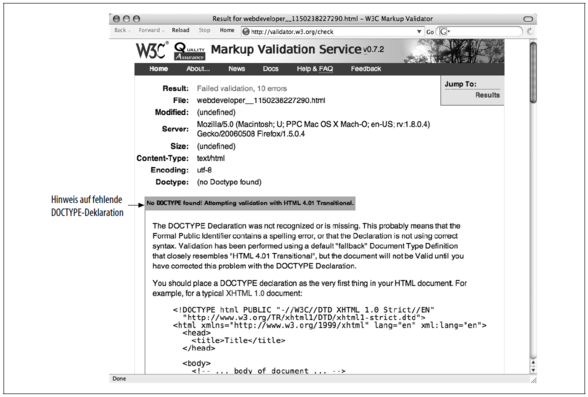
Figure: The W3C validator for (X)HTML.
Missing, older or incorrectly encoded DOCTYPE declarations trigger quirks mode, where the browser treats the page as faulty. Depending on the browser, some content still follows W3C guidelines.
The next two figures show the same document without a DTD in Internet Explorer 6 quirks mode and as intended. The document contains a table inside an element div with a width of 100%.
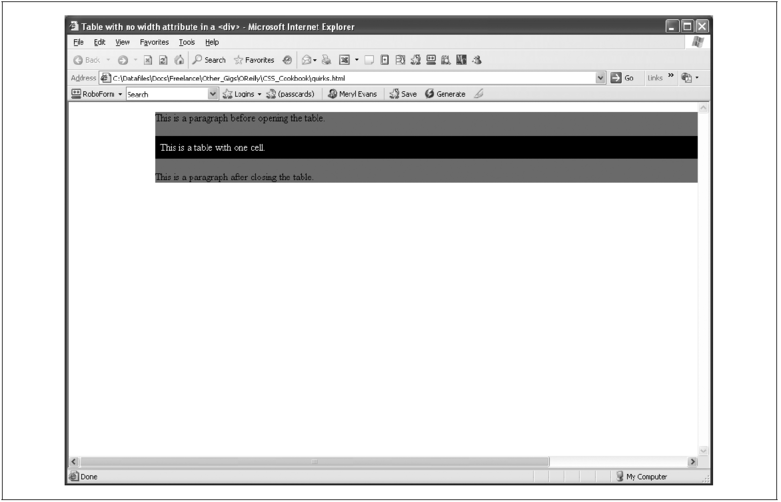
Figure: Table in Internet Explorer 6.0 quirks mode without DOCTYPE.
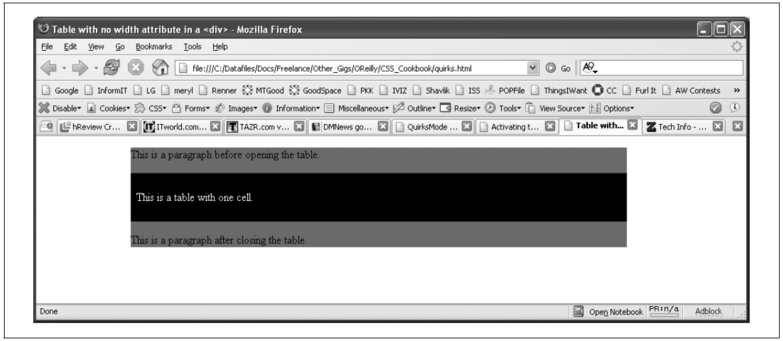
Figure: The same table in Firefox 1.5 standards mode with HTML 4.01 Strict DOCTYPE.
See also
The HTML 4.01 specification on DTDs,
the W3C validators,
the article on DOCTYPEs on the A List Apart website,
the Mozilla information on quirks mode explains differences from normal mode and how documents are handled in quirks mode, and
the Opera DOCTYPE page.
Copyright of the German edition © 2007 by O’Reilly Verlag GmbH & Co. KG
You may print the online version for your private use.
Otherwise, this chapter from “CSS Kochbuch” is subject to the same conditions as the bound edition: the work, including all its parts, is protected by copyright. All rights reserved, including reproduction, translation, microfilming, and storage and processing in electronic systems.
O’Reilly Verlag GmbH & Co. KG, Balthasarstr. 81, 50670 Köln