

XML technologies / SVG / Adding hyperlinks and external files / Including external files / Using complete external graphics
(Excerpt from “Das Einsteigerseminar SVG — Webgrafiken mit XML” by Helma Spona)
Include external graphics of any supported format with the <image> tag, specifying the file with the attribute xlink:href. The next example incorporates a PNG image into a fill pattern, used to fill lettering and a rectangle.
Besides the external image’s name, specify its width and height with the attributes width and height. Omitting them sets width and height to 0, so the image is not displayed.
<?xml version="1.0" standalone="no"?>
...
<svg width="1000" height="800">
  <defs>
    <pattern id="hintergrund" patternUnits="userSpaceOnUse" x="0" y="0" width="600" height="434">
      <image xlink:href="feuer.png" width="600" height="434"/>
    </pattern>
  </defs>
  <text x="10" y="150" style="fill:url(#hintergrund);stroke:none;font-family:'Arial Black';font-size:150;font-weight:bold">Feuer</text>
  <rect x="0" y="0" width="450" height="215" style="fill:url(#hintergrund);fill-opacity:0.4;stroke:orange"/>
</svg>
The result looks as follows:
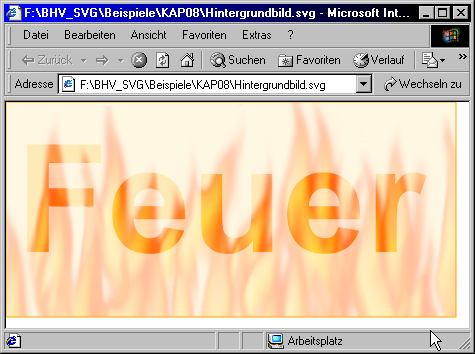
Figure: Result of the fill pattern with a PNG image.
The <image> tag not only defines graphics in fill patterns but can also insert graphics directly. The following example demonstrates this by creating a list with graphic bullets.
<?xml version="1.0" standalone="no"?>
...
<svg width="1000" height="800">
  <g transform="translate(0,0)">
    <image  x="10" y="10" xlink:href="mk.png" width="32" height="24" />
    <text x="40" y="30" style="font-size:12px;font-family:Arial;font-weight:bold">Browser-Bugs.de</text>
  </g>
  <g transform="translate(0,30)">
    <image  x="10" y="10" xlink:href="mk.png" width="32" height="24" />
    <text x="40" y="30" style="font-size:12px;font-family:Arial;font-weight:bold">vmi-buch AG</text>
  </g>
  <g transform="translate(0,60)">
    <image  x="10" y="10" xlink:href="mk.png" width="32" height="24" />
    <text x="40" y="30" style="font-size:12px;font-family:Arial;font-weight:bold">Die Webseite zum Buch</text>
  </g>
  <g transform="translate(0,90)">
    <image  x="10" y="10" xlink:href="mk.png" width="32" height="24" />
    <text x="40" y="30" style="font-size:12px;font-family:Arial;font-weight:bold">Meine Webseite</text>
  </g>
</svg>
This list is the result.
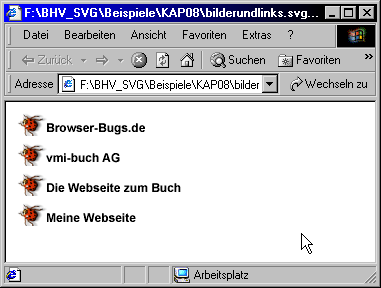
Figure: External graphics as list bullets.
Copyright © verlag moderne industrie GmbH 2001
You may print the online version for your private use.
Otherwise, this chapter from “Das Einsteigerseminar SVG — Webgrafiken mit XML” is subject to the same conditions as the bound edition. The work, including all its parts, is protected by copyright. All rights reserved, including reproduction, translation, microfilming, and storage and processing in electronic systems.
verlag moderne industrie GmbH, Justus-von-Liebig-Straße 1, D-86899 Landsberg/Lech, fon ++49 (0) 81 91 / 125 – 0, leserservice(at)mi-verlag.de
back to top