

Tecnologías XML / SVG / Incluir hipervínculos y archivos externos / Incluir archivos externos / Utilizar gráficos externos completos
(Extracto de «Das Einsteigerseminar SVG — Webgrafiken mit XML» de Helma Spona)
Incluya gráficos externos de cualquier formato compatible con la etiqueta <image>, indicando el archivo con el atributo xlink:href. El siguiente ejemplo incorpora una imagen PNG en un patrón de relleno utilizado para un texto y un rectángulo.
Además del nombre de la imagen externa, indique su anchura y altura con los atributos width y height. Si los omite, la anchura y la altura valen 0 y la imagen no se muestra.
<?xml version="1.0" standalone="no"?>
...
<svg width="1000" height="800">
  <defs>
    <pattern id="hintergrund" patternUnits="userSpaceOnUse" x="0" y="0" width="600" height="434">
      <image xlink:href="feuer.png" width="600" height="434"/>
    </pattern>
  </defs>
  <text x="10" y="150" style="fill:url(#hintergrund);stroke:none;font-family:'Arial Black';font-size:150;font-weight:bold">Feuer</text>
  <rect x="0" y="0" width="450" height="215" style="fill:url(#hintergrund);fill-opacity:0.4;stroke:orange"/>
</svg>
El resultado tiene este aspecto:
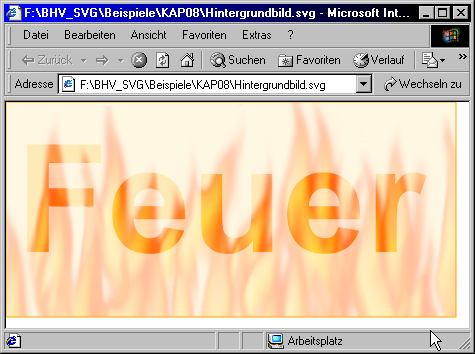
Figura: resultado del patrón de relleno con una imagen PNG.
La etiqueta <image> no solo define gráficos en patrones de relleno, sino que también puede insertarlos directamente. El siguiente ejemplo lo muestra creando una lista con viñetas gráficas.
<?xml version="1.0" standalone="no"?>
...
<svg width="1000" height="800">
  <g transform="translate(0,0)">
    <image  x="10" y="10" xlink:href="mk.png" width="32" height="24" />
    <text x="40" y="30" style="font-size:12px;font-family:Arial;font-weight:bold">Browser-Bugs.de</text>
  </g>
  <g transform="translate(0,30)">
    <image  x="10" y="10" xlink:href="mk.png" width="32" height="24" />
    <text x="40" y="30" style="font-size:12px;font-family:Arial;font-weight:bold">vmi-buch AG</text>
  </g>
  <g transform="translate(0,60)">
    <image  x="10" y="10" xlink:href="mk.png" width="32" height="24" />
    <text x="40" y="30" style="font-size:12px;font-family:Arial;font-weight:bold">Die Webseite zum Buch</text>
  </g>
  <g transform="translate(0,90)">
    <image  x="10" y="10" xlink:href="mk.png" width="32" height="24" />
    <text x="40" y="30" style="font-size:12px;font-family:Arial;font-weight:bold">Meine Webseite</text>
  </g>
</svg>
El resultado es esta lista.
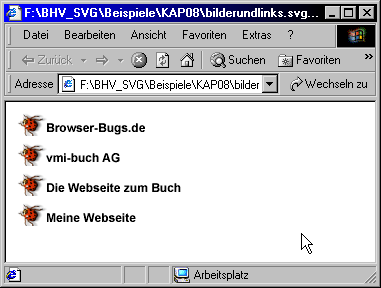
Figura: gráficos externos como viñetas de lista.
Copyright © verlag moderne industrie GmbH 2001
Puede imprimir la versión en línea para uso privado.
Para cualquier otro uso, este capítulo de «Das Einsteigerseminar SVG — Webgrafiken mit XML» está sujeto a las mismas condiciones que la edición encuadernada. La obra y todas sus partes están protegidas por derechos de autor. Todos los derechos reservados, incluidos reproducción, traducción, microfilmación, almacenamiento y tratamiento en sistemas electrónicos.
verlag moderne industrie GmbH, Justus-von-Liebig-Straße 1, D-86899 Landsberg/Lech, fon ++49 (0) 81 91 / 125 – 0, leserservice(at)mi-verlag.de
volver arriba