

XML technologies / SVG / Using complex graphic elements and formatting / Creating complex elements with Bézier curves / Defining the S
(Excerpt from “Das Einsteigerseminar SVG — Webgrafiken mit XML” by Helma Spona)
For the S, you could draw arcs with the a instruction or use Bézier curves. Either way, you must test different settings to obtain the desired proportions. For complex letters, a grid in which to draw them is therefore helpful. In the following example, the grid uses the dimensions in Planning characters correctly and is created by a path with this content:
<path id="konstruktion" d="M0 0 h+130 m-30 +0 v+140 m+30 -20 h-130 v-120 m 0 +50 h+130" style="stroke:gray;fill:none"/> The tag must be in the same group as the letter so that the grid always moves with it. The S path consists mainly of arcs. Start at the upper right, with the upper curve’s outer line.
<path id="konstruktion" d="M0 0 h+130 m-30 +0 v+140 m+30 -20 h-130 v-120 m 0 +50 h+130" style="stroke:gray;fill:none"/>
<path d="M95 0 a37 15 -3 0 0 -50 +50 l+2+1 a30 15 4 0 1 -35 +45 a5 10 0 0 0 0 +20 a30 19.5 4 0 0 +45 -80 l-2 -1 a18.8 5 0 1 1 +35 -16 a5 10 0 0 0 +0 -20" style="stroke:rgb(0,0,0);stroke-width:1;fill:none"/>
This code produces the S shown below. The grid confirms that the desired dimensions are respected.
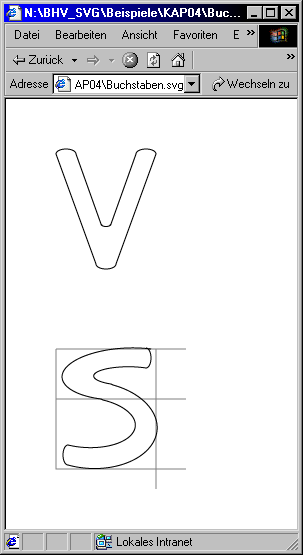
Figure: The S with a grid.
Copyright © verlag moderne industrie GmbH 2001
You may print the online version for your private use.
Otherwise, this chapter from “Das Einsteigerseminar SVG — Webgrafiken mit XML” is subject to the same conditions as the bound edition. The work, including all its parts, is protected by copyright. All rights reserved, including reproduction, translation, microfilming, and storage and processing in electronic systems.
verlag moderne industrie GmbH, Justus-von-Liebig-Straße 1, D-86899 Landsberg/Lech, fon ++49 (0) 81 91 / 125 – 0, leserservice(at)mi-verlag.de
back to top