

XML technologies / SVG / Using complex graphic elements and formatting / Creating complex elements with Bézier curves / Optimizing the pattern
(Excerpt from “Das Einsteigerseminar SVG — Webgrafiken mit XML” by Helma Spona)
The pattern is created, but its shape gives an unfinished impression and does not yet suit a page banner. Displaying only part of the pattern can improve this, as shown below:
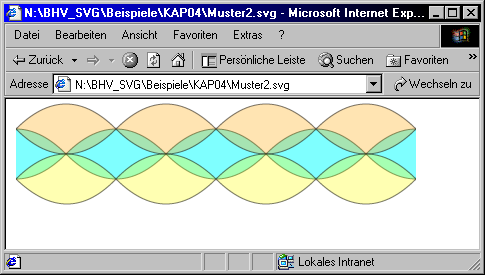
Figure: Clipped pattern.
The <clipPath> tag defines clipping regions. Everything outside is invisible. The pattern needs a rectangular clipping region. To define it, insert another group before the group combining the paths, and define the tag <clipPath>. Name it with the id attribute, because assigning the clipping region to the pattern’s group later requires the tag’s name. Inside the tag, define the region using another path.
Now add a style attribute to the pattern’s group. It must contain the setting clip-path specifying the clipping region to apply.
Note:
References to elements within the SVG file use the url notation, followed by the element’s name in parentheses: here the defined clipping region’s name.
<?xml version="1.0" standalone="no"?>
...
<svg width="500" height="500">
  <g>
    <clipPath id="Ausschnitt">
      <path d="M50 -51 h +400 v+102 h-400 z" />
    </clipPath>
  </g>
  <g transform="translate(-40,55)" style="clip-path:url(#Ausschnitt)">
    ...
  </g>
</svg>
Copyright © verlag moderne industrie GmbH 2001
You may print the online version for your private use.
Otherwise, this chapter from “Das Einsteigerseminar SVG — Webgrafiken mit XML” is subject to the same conditions as the bound edition. The work, including all its parts, is protected by copyright. All rights reserved, including reproduction, translation, microfilming, and storage and processing in electronic systems.
verlag moderne industrie GmbH, Justus-von-Liebig-Straße 1, D-86899 Landsberg/Lech, fon ++49 (0) 81 91 / 125 – 0, leserservice(at)mi-verlag.de
back to top