

XML technologies / XSLT / Java and XSLT / Servlet basics and XSLT / Another servlet example
(Excerpt from “Java and XSLT” by Eric M. Burke)
The next servlet uses DOM and XSLT to generate pages. This separates data and presentation, letting us change HTML without changing Java. XML complicates the small example, but its benefits soon outweigh the cost for larger applications. Enterprise JavaBeans has the same tradeoff: initial configuration looks excessive, but its architecture pays off as complexity grows.
Two pages collect personal information. The first requests name, telephone and email and requires all mandatory fields. The second repeats the data for confirmation.
Design
This small application demonstrates servlet XSLT, using JAXP and DOM to generate XML dynamically and transform it to HTML. The figure shows the design.
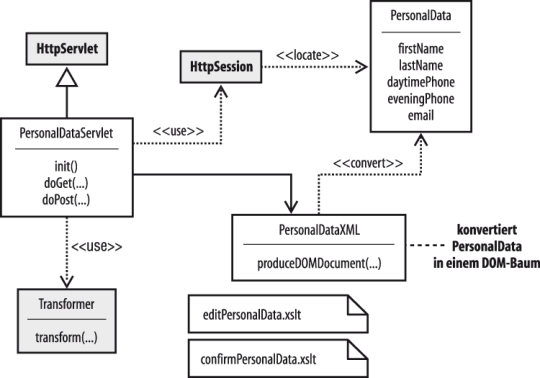
Figure: Personal-information application design
The diagram shows PersonalDataServlet extending HttpServlet and overriding both doGet( ) and doPost( ). An initial HTTP GET calls method doGet( ) to produce the form. Submitting it makes method doPost( ) validate fields and show confirmation if valid, or redisplay the form with errors if fields are missing.
Class PersonalData holds submitted data and is located through HttpSession. Each visitor has a separate HttpSession and thus a separate PersonalData. Helper class PersonalDataXML converts the data to XML.
Many would put XML generation in method getXML( ) of class PersonalData. A separate helper instead makes supporting another technology like JDOM easier without changing existing code. Simply add class PersonalDataJDOM. This keeps class PersonalData lean, responsible only for storing data.
The first page marks mandatory fields with *. Its HTML is generated by editPersonalData.xslt.
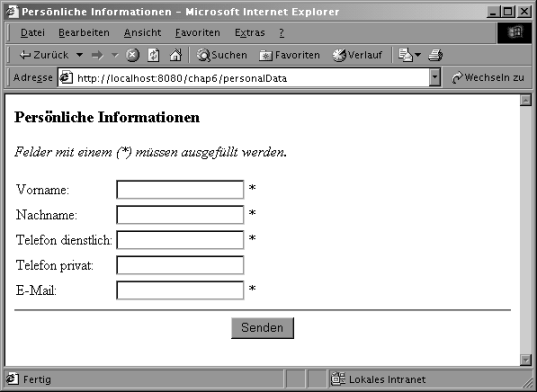
Figure: Empty personal-information form
After submission, missing data produces a red error and bold mandatory fields. Other messages also appear red. This page again uses editPersonalData.xslt.
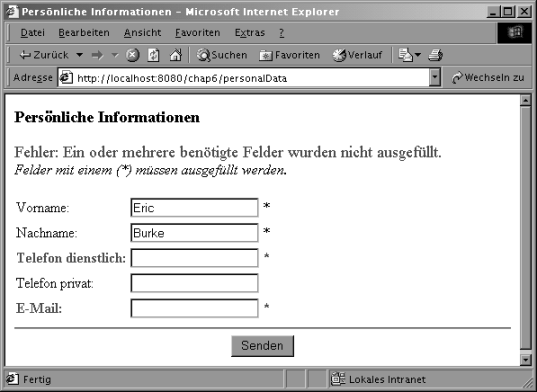
Figure: Personal-information form with errors
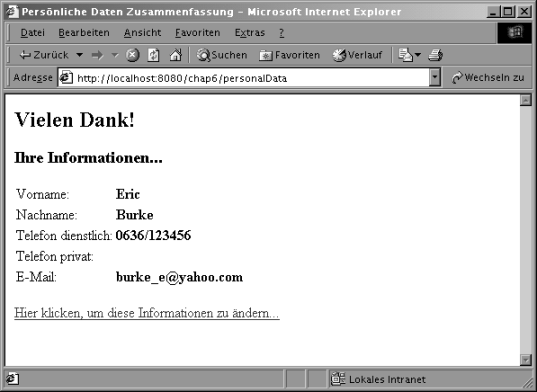
Figure: Confirmation page
Correct data produces the confirmation in figure Confirmation page. Unlike earlier pages, it uses confirmPersonalData.xslt. Edit the corresponding stylesheet to change either page’s appearance.
XML and stylesheets
XML structure strongly affects how output can be configured. Here every page uses the same XML, shown next.
Example: Sample XML output
<?xml version="1.0" encoding="UTF-8"?>
<page>
  <!-- Das nächste Element ist optional: -->
  <!-- <requiredFieldsMissing/> -->
  <personalData>
    <firstName required="true">Eric</firstName>
    <lastName required="true">Burke</lastName>
    <daytimePhone required="true">0636-1234567</daytimePhone>
    <eveningPhone/>
    <email required="true">burke_e@yahoo.com</email>
  </personalData>
</page>
XML stays lean, omitting labels such as "Vorname:". Labels and even * belong to XSLT, giving its author full visual control. XML holds data only; stylesheets can include images, other languages and external headers or footers.
Element <requiredFieldsMissing/> is optional. Omit it to suppress missing-field errors on the initial empty form. The servlet calls method doGet( ) for first requests, disabling errors there.
This static XML is for documentation and testing only. The deployed application generates it dynamically with classes PersonalData and PersonalDataXML. Use the static file to experiment with stylesheet changes.
The next stylesheet generates the form. Stylesheets are usually much longer than data. A simpler servlet approach would embed this logic as println( ) statements, making the servlet large and inflexible.
Example: editPersonalData.xslt
<?xml version="1.0" encoding="ISO-8859-1"?>
<xsl:stylesheet version="1.0" xmlns:xsl="http://www.w3.org/1999/XSL/Transform" xmlns="http://www.w3.org/1999/xhtml">
    <xsl:output method="xml" indent="yes" encoding="ISO-8859-1" doctype-public="-//W3C//DTD XHTML 1.0 Transitional//EN" doctype-system="http://www.w3.org/TR/xhtml1/DTD/xhtml1-transitional.dtd"/>
    <!--
        ***************************************************************
        ** Top-Level-Template. Erzeugt das Gerüst der XHTML-Seite
        ************************************************************ -->
    <xsl:template match="/">
        <html>
            <head><title>Persönliche Informationen</title></head>
            <body>
                <xsl:apply-templates select="page/personalData"/>
            </body>
        </html>
    </xsl:template>
    <!--
        ***************************************************************
        ** Template für das Element <personalData>.
        ************************************************************ -->
    <xsl:template match="personalData">
        <h3>Persönliche Informationen</h3>
        <xsl:if test="../requiredFieldsMissing">
            <div style="color: red; font-size: larger;">Fehler: Ein oder mehrere Felder wurden nicht ausgefüllt.</div>
        </xsl:if>
        <i>Felder mit einem (*) müssen ausgefüllt werden.</i>
        <form action="/chap6/personalData" method="post">
            <table border="0" cellpadding="2" cellspacing="0">
                <!-- Wähle alle direkten Nachkommen, wie firstName, lastName, daytimePhone usw... -->
                <xsl:apply-templates/>
            </table>
            <div align="center">
                <hr/>
                <input type="submit" name="submitBtn" value="Senden"/>
            </div>
        </form>
    </xsl:template>
    <!--
        ***************************************************************
        ** Gebe für jedes Feld eine neue Zeile in der Tabelle aus.
        ************************************************************ -->
    <xsl:template match="firstName|lastName|daytimePhone|eveningPhone|email">
        <tr>
            <xsl:if test="@required='true' and ../../requiredFieldsMissing and .=''">
                <xsl:attribute name="style">
                    <xsl:text>color:red; font-weight:bold;</xsl:text>
                </xsl:attribute>
            </xsl:if>
            <td>
                <xsl:choose>
                    <xsl:when test="name( )='firstName'">Vorname:</xsl:when>
                    <xsl:when test="name( )='lastName'">Nachname:</xsl:when>
                    <xsl:when test="name( )='daytimePhone'">Telefon dienstlich:</xsl:when>
                    <xsl:when test="name( )='eveningPhone'">Telefon privat:</xsl:when>
                    <xsl:when test="name( )='email'">E-Mail:</xsl:when>
                </xsl:choose>
            </td>
            <td>
                <input type="text" name="{name( )}" value="{.}"/>
            </td>
            <td>
                <xsl:if test="@required='true'">*</xsl:if>
            </td>
        </tr>
    </xsl:template>
</xsl:stylesheet>
The first three lines of editPersonalData.xslt tell the XSLT processor to generate XHTML 1.0 Transitional. Our output uses element <i>...</i>, incompatible with XHTML Strict. The top-level template matches "/" and emits the document framework.
The next template matches element <personalData> and generates a heading and optional error. Element <xsl:if> tests for element <requiredFieldsMissing/> and generates the error when present.
<xsl:template match="personalData">
    <h3>Persönliche Informationen</h3>
    <xsl:if test="../requiredFieldsMissing">
        <div style="color: red; font-size: larger;">Fehler: Ein oder mehrere Felder wurden nicht ausgefüllt.</div>
    </xsl:if>
The template then creates element <form>, specifying HTTP POST submission. Attribute action sends data to our servlet. Its action matches the deployment-descriptor URL pattern. To avoid hard-coding it in XSLT, pass it as a stylesheet parameter:
<i>Felder mit einem (*) müssen ausgefüllt werden.</i>
<form action="/chap6/personalData" method="post">
Finally it creates an aligned table. As before, one template creates the table and another the rows.
<table border="0" cellpadding="2" cellspacing="0">
    <!-- Wähle alle direkten Nachkommen, wie firstName, lastName, daytimePhone usw... -->
    <xsl:apply-templates/>
</table>
<div align="center">
    <hr/>
    <input type="submit" name="submitBtn" value="Senden"/>
</div>
</form>
</xsl:template>
This <xsl:apply-templates/> has no select attribute, so selects all children. The next template matches every element type, once per occurrence of <firstName>, <lastName> and so on:
<xsl:template match="firstName|lastName|daytimePhone|eveningPhone|email">This creates a <tr> element. If the corresponding element has attribute required="true", XML contains a <requiredFieldsMissing/> and the value is empty, output is bold red to flag a missing mandatory field. Font weight and color are style attributes of element <tr>:
<tr>
  <xsl:if test="@required='true' and ../../requiredFieldsMissing and .=''">
    <xsl:attribute name="style">
      <xsl:text>color:red; font-weight:bold;</xsl:text>
    </xsl:attribute>
  </xsl:if>
The template creates the first <td> element with the field label. XSLT has no lookup mechanism here, but <xsl:choose> solves it:
<td>
    <xsl:choose>
        <xsl:when test="name( )='firstName'">Vorname:</xsl:when>
        <xsl:when test="name( )='lastName'">Nachname:</xsl:when>
        <xsl:when test="name( )='daytimePhone'">Telefon dienstlich:</xsl:when>
        <xsl:when test="name( )='eveningPhone'">Telefon privat:</xsl:when>
        <xsl:when test="name( )='email'">E-Mail:</xsl:when>
    </xsl:choose>
</td>
This beats hard-coding labels in XML or Java: edit the stylesheet without recompiling. Translating labels needs no Java changes and gives designers flexibility.
The next column holds the input field:
<td>
   <input type="text" name="{name( )}" value="{.}"/>
</td>
The XHTML result is: <input type="text" name="firstName" value="Eric"/>. Finally, the last column displays * if attribute required="true" is set:
    <td>
      <xsl:if test="@required='true'">*</xsl:if>
    </td>
  </tr>
</xsl:template>
The next stylesheet, confirmPersonalData.xslt, is shorter: it summarizes prior input without errors or a form. It shares the basic structure of editPersonalData.xslt, so needs no detailed explanation.
Example: confirmPersonalData.xslt
<?xml version="1.0" encoding="ISO-8859-1"?>
<xsl:stylesheet version="1.0" xmlns:xsl="http://www.w3.org/1999/XSL/Transform" xmlns="http://www.w3.org/1999/xhtml">
    <xsl:output method="xml" indent="yes" encoding="ISO-8859-1" doctype-public="-//W3C//DTD XHTML 1.0 Strict//EN" doctype-system="http://www.w3.org/TR/xhtml1/DTD/xhtml1-strict.dtd"/>
    <!--
     ***************************************************************
     ** Top-Level-Template. Erzeugt das Gerüst der XHTML-Seite.
     ************************************************************ -->
    <xsl:template match="/">
        <html>
            <head>
                <title>Persönliche Daten - Zusammenfassung</title>
            </head>
            <body>
                <xsl:apply-templates select="page/personalData"/>
            </body>
        </html>
    </xsl:template>
    <!--
     ***************************************************************
     ** Template für das Element <personalData>.
     ************************************************************ -->
    <xsl:template match="personalData">
        <h2>Vielen Dank!</h2>
        <h3>Ihre Informationen...</h3>
        <table border="0" cellpadding="2" cellspacing="0">
            <!-- Wähle alle direkten Nachkommen wie firstName, lastName, daytimePhone usw... -->
            <xsl:apply-templates/>
        </table>
        <p><a href="/chap6/personalData">Hier klicken, um diese Informationen zu ändern...</a></p>
    </xsl:template>
    <!--
     ***************************************************************
     ** Gebe für jedes Feld eine neue Zeile in der Tabelle aus.
     ************************************************************ -->
    <xsl:template match="firstName|lastName|daytimePhone|eveningPhone|email">
        <tr>
            <td>
                <xsl:choose>
                    <xsl:when test="name( )='firstName'">Vorname:</xsl:when>
                    <xsl:when test="name( )='lastName'">Nachname:</xsl:when>
                    <xsl:when test="name( )='daytimePhone'">Telefon dienstlich:</xsl:when>
                    <xsl:when test="name( )='eveningPhone'">Telefon privat:</xsl:when>
                    <xsl:when test="name( )='email'">E-Mail:</xsl:when>
                </xsl:choose>
            </td>
            <td>
                <b><xsl:value-of select="."/></b>
            </td>
        </tr>
    </xsl:template>
</xsl:stylesheet>
Design choices
The stylesheets editPersonalData.xslt and confirmPersonalData.xslt share much. We kept them independent for simplicity. One alternative extracts shared functionality with <xsl:import> or <xsl:include>. This would not work here: similar structure still produces different template outputs. Larger sites, however, often share navigation and other design elements that should not be duplicated.
Another approach merges both, selecting “edit” or “confirm” through a parameter passed by the servlet using JAXP class Transformer and element <xsl:param>. The stylesheet needs many <xsl:choose> or <xsl:if> elements for conditional output. JAXP code would resemble:
javax.xml.transform.Transformer trans = ...
trans.setParameter("personalDataMode", "edit");
Valid in principle, this adds complexity here because every template differs. Separate sheets are simpler. Nearly identical pages with small differences instead favor a parameter and a few conditional sections.
Source code
First consider class PersonalData, a data holder with no XML or database code. Simple classes allow standalone tests of each unit. Embedded in a servlet, this code would be difficult to test outside a browser.
Example: PersonalData.java
package chap6;

/**
 * Eine Hilfsklasse, die persönliche Informationen speichert. Sie
 * beinhaltet keinen Code zur Erzeugung von XML. Diese Klasse garantiert,
 * daß ihre Daten nicht leer sind und keinen unnötigen Whitespace
 * enthalten.
 */
public class PersonalData {
  private String firstName;
  private String lastName;
  private String daytimePhone;
  private String eveningPhone;
  private String email;

  public PersonalData( ) {
      this("", "", "", "", "");
  }

  public PersonalData(String firstName, String lastName,
        String daytimePhone, String eveningPhone, String email) {
      this.firstName = cleanup(firstName);
      this.lastName = cleanup(lastName);
      this.daytimePhone = cleanup(daytimePhone);
      this.eveningPhone = cleanup(eveningPhone);
      this.email = cleanup(email);
  }

  /**
   * <code>eveningPhone</code> ist als einziges Feld optional.
   *
   * @return true, wenn alle benötigten Felder ausgefüllt sind.
   */
  public boolean isValid( ) {
    return this.firstName.length( ) > 0
           && this.lastName.length( ) > 0
           && this.daytimePhone.length( ) > 0
           && this.email.length( ) > 0;
  }

  public void setFirstName(String firstName) {
     this.firstName = cleanup(firstName);
  }

  public void setLastName(String lastName) {
     this.lastName = cleanup(lastName);
  }

  public void setDaytimePhone(String daytimePhone) {
     this.daytimePhone = cleanup(daytimePhone);
  }

  public void setEveningPhone(String eveningPhone) {
     this.eveningPhone = cleanup(eveningPhone);
  }

  public void setEmail(String email) {
     this.email = cleanup(email);
  }

  public String getFirstName( ) { return this.firstName; }
  public String getLastName( ) { return this.lastName; }
  public String getDaytimePhone( ) { return this.daytimePhone; }
  public String getEveningPhone( ) { return this.eveningPhone; }
  public String getEmail( ) { return this.email; }

  /**
   * Säubere den String-Parameter, indem null durch den leeren
   * String ersetzt bzw. unnötiger Whitespace gestrichen wird.
   */
  private static String cleanup(String str) {
    return (str != null) ? str.trim( ) : "";
  }
}
Though class PersonalData only stores data, it also validates simply. Its default constructor initializes every field to a non-null value:
public PersonalData( ) {
  this("", "", "", "", "");
  }
The set methods also use private method cleanup( ):
private static String cleanup(String str) {
     return (str != null) ? str.trim( ) : "";
}
Instances therefore eliminate null references and whitespace, relieving the servlet and XML builders. Trimming matters: otherwise users could bypass required-field checks with spaces. Class PersonalData also explicitly checks required fields:
public boolean isValid( ) {
    return this.firstName.length( ) > 0
         && this.lastName.length( ) > 0
         && this.daytimePhone.length( ) > 0
         && this.email.length( ) > 0;
}
Only field eveningPhone is optional and thus not checked. Keeping validation here further limits servlet responsibilities.
The next class, PersonalDataXML, converts PersonalData objects to DOM Document objects. DOM instead of textual XML avoids parsing raw text. Class javax.xml.transform.DOMSource passes the tree directly.
Example: PersonalDataXML.java
package chap6;

import javax.xml.parsers.*;
import org.w3c.dom.*;

/**
 * Konvertiert ein Objekt von PersonalData mit DOM in eine XML-Repräsentation.
 */
public class PersonalDataXML {

  /**
   * @param personalData soll nach XML konvertiert werden.
   * @param includeErrors falls true, wird ein zusätzliches Feld in den
   * XML-Code eingebaut, das den Browser veranlaßt, den Nutzer über
   * unausgefüllte Einträge zu benachrichtigen.
   * @return ein DOM-Document, das die Webseite enthält.
   */
  public Document produceDOMDocument(PersonalData personalData,
    boolean includeErrors) throws ParserConfigurationException {

    // verwende JAXP von Sun, um das DOM-Document zu erzeugen
    DocumentBuilderFactory dbf = DocumentBuilderFactory.newInstance( );
    DocumentBuilder docBuilder = dbf.newDocumentBuilder( );
    Document doc = docBuilder.newDocument( );

    // erzeuge die Wurzel des Dokuments <page>
    Element pageElem = doc.createElement("page");
    doc.appendChild(pageElem);

    // falls verlangt, erzeuge das Element <requiredFieldsMissing/>
    if (includeErrors && !personalData.isValid( )) {
      pageElem.appendChild(doc.createElement(
        "requiredFieldsMissing"));
    }

    Element personalDataElem = doc.createElement("personalData");
    pageElem.appendChild(personalDataElem);

    // verwende eine private Hilfsfunktion, um den aufwendigen
    // Code von DOM zu umgehen
    addElem(doc, personalDataElem, "firstName",
      personalData.getFirstName( ), true);
    addElem(doc, personalDataElem, "lastName",
      personalData.getLastName( ), true);
    addElem(doc, personalDataElem, "daytimePhone",
      personalData.getDaytimePhone( ), true);
    addElem(doc, personalDataElem, "eveningPhone",
      personalData.getEveningPhone( ), false);
    addElem(doc, personalDataElem, "email",
      personalData.getEmail( ), true);

    return doc;
  }
  /**
   * Eine Hilfsmethode, die die Klasse vereinfacht.
   *
   * @param doc: das DOM-Document, wird als Factory zum
   * Erzeugen der Elemente verwendet.
   * @param parent: das DOM-Element, das Elternelement des zugefügten Elementes wird.
   * @param elemName: der Name des zu erzeugenden XML-Elementes.
   * @param elemValue: der Textinhalt des neuen XML-Elementes.
   * @param required: falls true, wird das Attribut 'required="true"' eingefügt.
   */
  private void addElem(Document doc, Element parent, String elemName,
      String elemValue, boolean required) {
    Element elem = doc.createElement(elemName);
    elem.appendChild(doc.createTextNode(elemValue));
    if (required) {
      elem.setAttribute("required", "true");
    }
    parent.appendChild(elem);
  }
}
The code starts with two import statements. Package javax.xml.parsers contains JAXP; package org.w3c.dom contains standard DOM interfaces and classes:
import javax.xml.parsers.*;
import org.w3c.dom.*;
Its public API converts a PersonalData object to a DOM Document object:
public Document produceDOMDocument(PersonalData personalData,
  boolean includeErrors) throws ParserConfigurationException {
Parameter includeErrors controls whether element <requiredFieldsMissing/> is included. A ParserConfigurationException probably indicates an incorrect CLASSPATH, often an older JAXP version.
JAXP needs several lines to obtain the right implementation of abstract class DocumentBuilder. The factory isolates vendor-specific DOM details:
// verwende JAXP von SUN, um das DOM-Dokument zu erzeugen
DocumentBuilderFactory dbf = DocumentBuilderFactory.newInstance( );
DocumentBuilder docBuilder = dbf.newDocumentBuilder( );
Document doc = docBuilder.newDocument( );
Once the doc object exists, it creates the remaining elements. First comes element <page>:
// erzeuge die Wurzel des Dokumentes <page>
Element pageElem = doc.createElement("page");
doc.appendChild(pageElem);
Root element <page> alone is added directly to the document. All others are children or descendants of <page>. Still, the doc object must remain the factory for new elements:
// falls verlangt, erzeuge das Element <requiredFieldsMissing/>
if (includeErrors && !personalData.isValid( )) {
  pageElem.appendChild(doc.createElement(
    "requiredFieldsMissing"));
}
To reduce DOM’s verbosity, descendants of <personalData> are created by helper method addElem( ):
Element personalDataElem = doc.createElement("personalData");
pageElem.appendChild(personalDataElem);

// verwende eine private Hilfsfunktion, um den aufwendigen
// Code von DOM zu umgehen
addElem(doc, personalDataElem, "firstName",
  personalData.getFirstName( ), true);
...
Example PersonalDataXML.java contains method addElem( ) in full. Sample output:
<firstName required="true">Eric</firstName>Finally, example PersonalDataServlet.java presents a simple servlet approach suitable for small programs but with scaling problems discussed later. HTML/XML generation is separate; request processing remains in the servlet and grows with application size.
Example: PersonalDataServlet.java
package chap6;

import java.io.*;
import java.net.*;
import javax.servlet.*;
import javax.servlet.http.*;
import javax.xml.transform.*;
import javax.xml.transform.dom.*;
import javax.xml.transform.stream.*;

/**
 * Ein Beispiel-Servlet, das zwei Seiten erzeugt. Auf der ersten Seite wird der
 * Nutzer aufgefordert, seine "persönlichen Informationen", wie Name, Telefonnummer
 * und E-Mail, einzugeben. Auf der zweiten Seite wird eine Bestätigung dieser
 * Information dargestellt. XSLT wird für die Erzeugung des HTML-Codes verwendet,
 * so daß dieses Servlet kein spezielles Aussehen erzwingt.
 */
public class PersonalDataServlet extends HttpServlet {
  private PersonalDataXML personalDataXML = new PersonalDataXML( );
  private Templates editTemplates;
  private Templates thanksTemplates;

  /**
   * Einmalige Initialisierung des Servlets.
   */

  public void init( ) throws UnavailableException {
    TransformerFactory transFact = TransformerFactory.newInstance( );
    String curName = null;
    try {
      curName = "/WEB-INF/xslt/editPersonalData.xslt";
      URL xsltURL = getServletContext( ).getResource(curName);
      String xsltSystemID = xsltURL.toExternalForm( );
      this.editTemplates = transFact.newTemplates(
        new StreamSource(xsltSystemID));

      curName = "/WEB-INF/xslt/confirmPersonalData.xslt";
      xsltURL = getServletContext( ).getResource(curName);
      xsltSystemID = xsltURL.toExternalForm( );
      this.thanksTemplates = transFact.newTemplates(
        new StreamSource(xsltSystemID));
    } catch (TransformerConfigurationException tce) {
      log("Stylesheet kann nicht kompiliert werden", tce);
      throw new UnavailableException("Stylesheet kann nicht kompiliert werden");
    } catch (MalformedURLException mue) {
      log("kann XSLT-Datei nicht finden: " + curName);
      throw new UnavailableException(
        "kann XSLT-Datei nicht finden: " + curName);
    }
  }

  /**
   * Bearbeitet HTTP GET-Anfragen, z.B. wenn der Nutzer eine
   * URL eingibt oder einen Link betätigt.
   */

  protected void doGet(HttpServletRequest request,
      HttpServletResponse response) throws IOException,
      ServletException {
    PersonalData personalData = getPersonalData(request);
    // der dritte Parameter 'false' bewirkt, daß beim Anzeigen
    // der Seite keine Fehlermeldungen ausgegeben werden.
    showPage(response, personalData, false, this.editTemplates);
  }
  /**
   * Bearbeitet HTTP POST-Anfragen, z.B. wenn der Nutzer den
   * Senden-Button betätigt, um seine persönlichen Daten abzuschicken.
   */
  protected void doPost(HttpServletRequest request,
      HttpServletResponse response) throws IOException,
      ServletException {

    // Hole das Objekt personalData und beschreibe es mit den Informationen,
    // die der Nutzer übermittelt hat.
    PersonalData pd = getPersonalData(request);
    pd.setFirstName(request.getParameter("firstName"));
    pd.setLastName(request.getParameter("lastName"));
    pd.setDaytimePhone(request.getParameter("daytimePhone"));
    pd.setEveningPhone(request.getParameter("eveningPhone"));
    pd.setEmail(request.getParameter("email"));

    if (!pd.isValid( )) {
      // zeige die Seite 'Ändern' mit einer Fehlermeldung
      showPage(response, pd, true, this.editTemplates);
    } else {
      // zeige die Seite 'Bestätigung'
      showPage(response, pd, false, this.thanksTemplates);
    }
  }
  /**
   * Eine Hilfsmethode, die die persönlichen Daten als HTML an den Browser
   * des Clients schickt. Dabei wird ein XSLT-Stylesheet auf den
   * DOM-Baum angewendet.
   */
  private void showPage(HttpServletResponse response,
      PersonalData personalData, boolean includeErrors,
      Templates stylesheet) throws IOException, ServletException {
    try {
      org.w3c.dom.Document domDoc =
        this.personalDataXML.produceDOMDocument(
        personalData, includeErrors);

      Transformer trans = stylesheet.newTransformer( );

      response.setContentType("text/html");
      PrintWriter writer = response.getWriter( );

      trans.transform(new DOMSource(domDoc), new StreamResult(writer));
    } catch (Exception ex) {
     showErrorPage(response, ex);
    }
  }
  /**
   * Falls ein Fehler auftritt, kann diese Methode den Stack-Trace im Browser darstellen.
   */
  private void showErrorPage(HttpServletResponse response,
      Throwable throwable) throws IOException {
    PrintWriter pw = response.getWriter( );
    pw.println("<html><body><h1>Ein Fehler ist aufgetreten</h1><pre>");
    throwable.printStackTrace(pw);
    pw.println("</pre></body></html>");
  }
  /**
   * Eine Hilfsmethode, die das Objekt PersonalData aus der
   * HttpSession ermittelt.
   */
  private PersonalData getPersonalData(HttpServletRequest request) {
    HttpSession session = request.getSession(true);
    PersonalData pd = (PersonalData) session.getAttribute(
      "chap6.PersonalData");
    if (pd == null) {
        pd = new PersonalData( );
        session.setAttribute("chap6.PersonalData", pd);
    }
    return pd;
  }
}
Many import statements import Servlet and JAXP APIs. As usual, the servlet extends HttpServlet with three private members:
public class PersonalDataServlet extends HttpServlet {
 private PersonalDataXML personalDataXML = new PersonalDataXML( );
 private Templates editTemplates;
 private Templates thanksTemplates;
Concurrent clients share this servlet instance, so every member must be thread-safe. Instances of PersonalDataXML are stateless and contain no mutable shared data. Compiled Templates representations of both stylesheets are also thread-safe by design.
As comments explain, method init( ) initializes the servlet once before the first request. The container ensures init( ) finishes before other threads gain access. Initialization errors create an UnavailableException:
public void init( ) throws UnavailableException {
  TransformerFactory transFact = TransformerFactory.newInstance( );
String curName = null;
...
This exception in package javax.servlet indicates loading failure, usually configuration: misplaced stylesheets or missing JARs.
Next method init( ) loads both sheets. Since they are files, StreamSource reads them into JAXP. Avoid hard-coded absolute paths: they work locally but not on deployment. A Windows path like C:\java\tomcat\webapps\chap6\WEB-INF fails on other systems or different Tomcat locations. Prefer a relative path like .\WEB-INF, independent of deployment location.
Relative paths need a base, provided by class ServletContext. It locates resources relative to the web application, avoiding absolute paths. The container maps relative paths to absolute ones.
Install chap6.war in Tomcat directory webapps. Tomcat unpacks it into webapps\chap6 with the WAR structure. First assign variable curName the stylesheet path:
try {
  curName = "/WEB-INF/xslt/editPersonalData.xslt";
There are two possibilities. The ServletContext represents a stylesheet as an InputStream or a URL. With an InputStream, XSLT sees only bytes, not their origin, and cannot resolve relative references. Included sheets become unlocatable. With InputStream, interface javax.xml.transform.Source provides method setSystemId( ) to resolve stylesheet URIs (see XSLT processing with Java).
Our servlet avoids this by replacing an InputStream with a URL. The URL becomes a system identifier, creating a StreamSource instance used to create Templates for the stylesheet:
URL xsltURL = getServletContext( ).getResource(curName);
String xsltSystemID = xsltURL.toExternalForm( );
this.editTemplates = transFact.newTemplates(
    new StreamSource(xsltSystemID));
Repeat for the second sheet, then handle errors:
  curName = "/WEB-INF/xslt/confirmPersonalData.xslt";
  xsltURL = getServletContext( ).getResource(curName);
  xsltSystemID = xsltURL.toExternalForm( );
  this.thanksTemplates = transFact.newTemplates(
    new StreamSource(xsltSystemID));
  } catch (TransformerConfigurationException tce) {
  log("Stylesheet konnte nicht kompiliert werden", tce);
    throw new UnavailableException("Stylesheet konnte nicht kompiliert werden");
} catch (MalformedURLException mue) {
  log("XSLT-Datei wurde nicht gefunden: " + curName);
  throw new UnavailableException(
    "XSLT-Datei wurde nicht gefunden: " + curName);
  }
}
Method log() writes to a Tomcat log in directory TOMCAT_HOME\logs. The UnavailableException indicates the servlet could not be found or loaded; the browser shows an error page.
If init( ) completes, the servlet accepts requests. Implementing methods doGet( ) and doPost( ) supports HTTP GET and POST. Following a link, entering a URL or opening a bookmark sends GET and calls method doGet( ):
protected void doGet(HttpServletRequest request,
    HttpServletResponse response) throws IOException,
    ServletException {
  PersonalData personalData = getPersonalData(request);
  // der dritte Parameter 'false' bewirkt, daß beim Anzeigen
  // der Seite keine Fehlermeldungen ausgegeben werden.
  showPage(response, personalData, false, this.editTemplates);
}
First doGet( ) obtains a PersonalData instance for this user. Since method doPost( ) needs this too, helper getPersonalData( ) shares the code. See example PersonalDataServlet.java. Essentially HttpSession locates the correct PersonalData. A missing session object is created and stored.
Method doGet( ) calls method showPage( ) to do the work and send the page. Method showPage( ) takes:
The
HttpServletResponse, providing access toPrintWriter. Results are sent to this writer.The instance of
PersonalData, telling methodshowPage( )which data to display.Parameter
false, suppressing errors here. SincedoGet( )handles first display, warnings before any input would be inappropriate.A reference to the stylesheet rendering the input form.
Submitting the form calls method doPost( ), similar to doGet( ) (see example PersonalDataServlet.java). The difference is validation through class PersonalData. Valid data shows confirmation; invalid data redisplays the form with errors. Only the stylesheet differs between pages.
Finally, method showPage( ) uses helper PersonalDataXML to create a DOM object of type Documents. Delegating tree construction keeps servlet code concise:
private void showPage(HttpServletResponse response,
    PersonalData personalData, boolean includeErrors,
    Templates stylesheet) throws IOException, ServletException {
  try {
    org.w3c.dom.Document domDoc =
        this.personalDataXML.produceDOMDocument(
        personalData, includeErrors);
It then creates a Transformer instance. As discussed in XSLT processing with Java, Transformer instances are small, containing state for the current transformation only. Because Transformer instances are not thread-safe, they are local variables: each thread has its own copy.
Transformer trans = stylesheet.newTransformer( );Next set the content type of the HttpServletResponse, create a PrintWriter and transform. Output goes directly to the PrintWriter:
    response.setContentType("text/html");
    PrintWriter writer = response.getWriter( );

    trans.transform(new DOMSource(domDoc), new StreamResult(writer));
  } catch (Exception ex) {
    showErrorPage(response, ex);
  }
}
Errors call method showErrorPage( ). A missing XML library may cause the exception, so showErrorPage( ) avoids XML/XSLT to prevent repeating the failure. Instead it uses println( ) calls to generate HTML (see example PersonalDataServlet.java).
Usage
The figure shows the complete WAR. Class SplashScreenServlet.class is included because this extends the first example. As before, .class files go into directory classes for the application’s ClassLoader to access them.
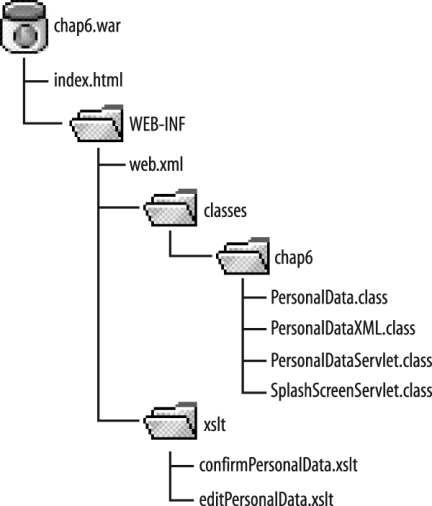
Figure: PersonalDataServlet WAR file
Stylesheets go in directory WEB-INF/xslt. Contents of WEB-INF are hidden from clients, so visitors cannot directly see sheets. Put public sheets outside WEB-INF. File index.html is the public start page, linking to the servlet. Java can access hidden sheets. Example PersonalDataServlet.java located them in method init( ):
curName = "/WEB-INF/xslt/editPersonalData.xslt";
URL xsltURL = getServletContext( ).getResource(curName);
Paths match the WAR layout, so deployment to a server preserves operation.
The descriptor below adds class PersonalDataServlet.
Example: Extended deployment descriptor
<?xml version="1.0" encoding="UTF-8"?>
<!DOCTYPE web-app PUBLIC "-//Sun Microsystems, Inc.//DTD Web Application 2.2//EN" "http://java.sun.com/j2ee/dtds/web-app_2.2.dtd">
<web-app>
   <servlet>
      <servlet-name>personalDataServlet</servlet-name>
      <servlet-class>chap6.PersonalDataServlet</servlet-class>
   </servlet>
   <servlet>
      <servlet-name>splashScreen</servlet-name>
      <servlet-class>chap6.SplashScreenServlet</servlet-class>
   </servlet>
   <servlet-mapping>
      <servlet-name>personalDataServlet</servlet-name>
      <url-pattern>/personalData/*</url-pattern>
   </servlet-mapping>
   <servlet-mapping>
      <servlet-name>splashScreen</servlet-name>
      <url-pattern>/splash/*</url-pattern>
   </servlet-mapping>
</web-app>
Compiling, installing and running
Half of Java problems seem to involve CLASSPATH. To compile, include these JARs:
- jaxp.jar
Java API for XML Processing (JAXP) 1.1
- xalan.jar
Xalan XSLT processor (use JAXP’s)
- crimson.jar
Crimson XML parser (use JAXP’s)
- servlet.jar
Included with Tomcat
Include our source directory too. Then compile PersonalData.java, PersonalDataXML.java and PersonalDataServlet.java with javac *.java. Including SplashScreenServlet.java is optional.
Create the WAR with command jar. To create chap6.war, arrange files as figure PersonalDataServlet WAR file. In the directory containing index.html, run:
jar -cvfM ../chap6.war
This puts chap6.war in the parent directory; slash (/) works on Windows and Unix. Change to its directory and inspect it with:
jar -tvf chap6.war
Its listing must match figure PersonalDataServlet WAR file.
To install, copy file chap6.war to directory TOMCAT_HOME/webapps while Tomcat is stopped. Then try running the servlet. Failures may mean jaxp.jar, xalan.jar and crimson.jar still need installation in TOMCAT_HOME/lib to become available.
Correct versions are hardest. Your Tomcat may contain older jaxp.jar and crimson.jar in directory TOMCAT_HOME/lib. Downloading JAXP 1.1 safely provides all three JARs for TOMCAT_HOME/lib.
Start Tomcat and open:
"http://localhost:8080/chap6/personalData"
The empty personal-information form should await input.
Locating stylesheets with initialization parameters
Placing sheets beneath a WAR’s WEB-INF directory works for one application. Shared sheets, however, would need duplication in several WARs.
A shared directory with no hard-coded servlet path is preferable. Initialization parameters, string name/value pairs in the descriptor, are read through Servlet or ServletContext.
Servlet parameters belong to one servlet; context parameters to the whole web application. The latter suit stylesheet locations and are declared as follows:
<web-app>
  <context-param>
    <param-name>xslt_verzeichnis</param-name>
    <param-value>C:/dev/xslt</param-value>
  </context-param>
  <servlet>
   ...
  </servlet>
</web-app>
Read them with these methods of interface javax.servlet.ServletContext:
public interface ServletContext {
  // null zurückgeben, wenn der Parameter nicht existiert
  String getInitParameter(String name);
  Enumeration getInitParameterNames( );
  ...die restlichen Methoden sind hier ausgelassen
}
Locate a sheet with this code in servlet method init( ):
public class MeinServlet extends HttpServlet {
  private String xsltDirectory;
  public void init(ServletConfig config) throws ServletException {
    super.init(config);
    this.xsltDirectory = config.getServletContext( ).getInitParameter(
      "xslt_verzeichnis");
    if (this.xsltDirectory == null) {
     throw new UnavailableException(
        "Context-Parameter xslt_verzeichnis wurde nicht angegeben");
    }
  }
  ...Rest des Codes wurde ausgelassen
}
The actual location is now in the descriptor and can change without modifying the servlet.
Copyright © 2002 O'Reilly Verlag GmbH & Co. KG
You may print the online version for your private use.
Otherwise, this chapter from “Java und XSLT” is subject to the same conditions as the bound edition. The work, including all its parts, is protected by copyright. All rights reserved, including reproduction, translation, microfilming, and storage and processing in electronic systems.
O’Reilly Verlag GmbH & Co. KG, Balthasarstraße 81, 50670 Köln, kommentar(at)oreilly.de