

XML technologies / XSLT / Java and XSLT / Servlet basics and XSLT / Servlet syntax
(Excerpt from “Java und XSLT” by Eric M. Burke)
The section Java-based web technologies discussed servlet architecture and alternatives. Architecture is a bird’s-eye view ignoring implementation details. We now examine syntax before the interesting examples in later chapters. For comprehensive coverage, see Jason Hunter’s Java Servlet-Programmierung (O’Reilly). Use the second edition, since much changed after the first.
Example: Splash-screen servlet
Our first example produces a simple splash screen. The servlet receives a browser request and returns HTML. The figure shows the class diagram of SplashScreenServlet, derived from HttpServlet.
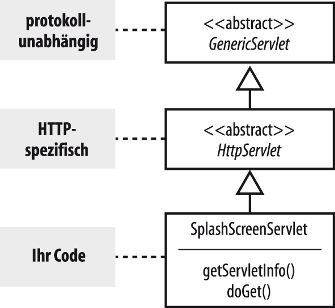
Figure: SplashScreenServlet class diagram
Servlets almost always extend HttpServlet. Here we override method doGet( ), called whenever the browser sends an HTTP GET request. GET occurs when a user enters a URL, clicks a link or submits a form specifying GET in its method attribute. POST is the other common request, used by forms specifying POST in their method attribute, for example:
<form action="someServlet" method="POST">
...Formular-Inhalt
</form>
To handle POST, override method doPost( ) instead of doGet( ). Both methods take two parameters: HttpServletRequest and HttpServletResponse. The request carries client information to the servlet, which sends data back through the response, reflecting HTTP’s request-response model. The next example gives the complete servlet source.
Example: SplashScreenServlet.java
package chap6;

import java.io.*;
import javax.servlet.*;
import javax.servlet.http.*;

/**
 * Ein einfaches Servlet-Beispiel, das ein "Testbild"
 * für eine Webanwendung darstellt.
 */
public class SplashScreenServlet extends HttpServlet {
  public String getServletInfo( ) {
    return "Stellt ein Testbild dar.";
  }

  protected void doGet(HttpServletRequest request,
             HttpServletResponse response)
    throws IOException, ServletException {

    // hole Parameter aus dem Request
    String nextURL = request.getParameter("nextURL");
    if (nextURL == null) {
      nextURL = "/";
    }

    response.setContentType("text/html");
    PrintWriter pw = response.getWriter( );
    pw.println("<html>");
    pw.println("<head><title>Testbild</title></head>");
    pw.println("<body>");

    pw.println("<div align='center' style='border: 1px navy solid;'>");
    pw.println("<h1>Willkommen zu Java und XSLT</h1>");
    pw.println("<h3>O'Reilly und Partner</h3>");
    pw.println("<p>Erste Ausgabe, 2002</p><hr>");
    pw.println("<a href='" + nextURL + "'>Hier klicken, um fortzufahren...</a>");
    pw.println("</div>");
    pw.println("</body>");
    pw.println("</html>");
  }
}
Start with the import statements. The Servlet API resides in packages javax.servlet and javax.servlet.http, part of Java 2 Platform Enterprise Edition, not Standard Edition. Many implementations exist, but Apache Tomcat is Sun’s official reference implementation. These examples use version 4.0 of Tomcat and should work on any compatible implementation.
As shown above, SplashScreenServlet extends HttpServlet. The first overridden method is getServletInfo( ), returning a short description. Though optional, many containers show this in their administration console.
Method doGet( ) handles all client requests. It must be thread-safe: many clients can use one servlet instance and run doGet( ) concurrently. Notice that doGet( ) is declared protected. Execution proceeds as follows:
The container calls
service( )onHttpServlet.HttpServletdetermines the request type, GET, POST, etc.HttpServletcalls the matching method,doGet( ),doPost( ), etc.
Because method doGet( ) is called from the base class, it may be protected. Without an override of doGet( ), HttpServlet returns an error page. To support POST too, override doPost( ). Commonly, doGet( ) calls doPost( ), or vice versa, supporting both without duplicate code.
Implementing doGet( ) is simple. First check for request parameter nextURL sent by the browser. For example, entering this URL sends parameter nextURL:
"http://localhost:8080/chap6/splash?nextURL=http://www.oreilly.com"
If absent, its value is null. Always check for null when extracting request parameters:
String nextURL = request.getParameter("nextURL");
if (nextURL == null) {
   nextURL = "/";
}
Here, null would cause an error, so replace nextURL with a slash (/), a relative URL pointing to the root. Under Tomcat, this means Tomcat’s home page, not the filesystem root. Tomcat’s root is TOMCAT_HOME/webapps/ROOT, where TOMCAT_HOME is the installation directory.
Method getParameter( ) also reads form values. Each submitted form control should have a name such as Vorname or Nachname. Call request.getParameter( ) for each control. Always check for null and remove whitespace. A missing form control produces parameter value null, possibly indicating faulty HTML or an intentional attack.
Class HttpServletResponse provides access to PrintWriter and OutputStream for sending text and binary data. For HTML/XML, use HttpServletResponse.getWriter( ); for images and other binary data use HttpServletResponse.getOutputStream( ). Set the response’s Content-Type before creating its writer:
response.setContentType("text/html");
PrintWriter pw = response.getWriter( );
HTTP responses contain headers followed by content. The Content-Type is a Header parameter, so set it before the data. As a general rule, set Content-Type before creating the writer. Some examples use text/xml as Content-Type, but only when sending raw XML to the client.
The rest of SplashScreenServlet simply prints an HTML response:
pw.println("<html>");
pw.println("<head><title>Testbild</title></head>");
pw.println("<body>");

pw.println("<div align='center' style='border: 1px navy solid;'>");
pw.println("<h1>Willkommen zu Java und XSLT</h1>");
pw.println("<h3>O'Reilly und Partner</h3>");
pw.println("<p>Erste Ausgabe, 2002</p><hr>");
pw.println("<a href='" + nextURL + "'>Hier klicken, um fortzufahren...</a>");
pw.println("</div>");
pw.println("</body>");
pw.println("</html>");
Parameter nextURL creates a link to the next page, so checking for null matters. This suits simple examples but quickly becomes unwieldy for complex pages with hundreds or thousands of HTML lines for tables, colors and graphics. For reasons discussed under XSLT processing with Java, embedding HTML in servlets is unacceptable for complex applications.
Copyright © 2002 O'Reilly Verlag GmbH & Co. KG
You may print the online version for your private use.
Otherwise, this chapter from “Java und XSLT” is subject to the same conditions as the bound edition. The work, including all its parts, is protected by copyright. All rights reserved, including reproduction, translation, microfilming, and storage and processing in electronic systems.
O’Reilly Verlag GmbH & Co. KG, Balthasarstraße 81, 50670 Köln, kommentar(at)oreilly.de