

XML technologies / XSLT / Java and XSLT / Servlet basics and XSLT / WAR files and deployment
(Excerpt from “Java und XSLT” by Eric M. Burke)
Web application archives, or WAR files, are the servlet model’s basic application units. They are portable across vendors’ servlet containers and easy to create when file and directory naming rules are followed. Avoid typos and misplaced files and there should be no difficulties.
WAR files
The figure shows the standard WAR structure. WAR files are JAR files with extension .war, so create them using command jar.
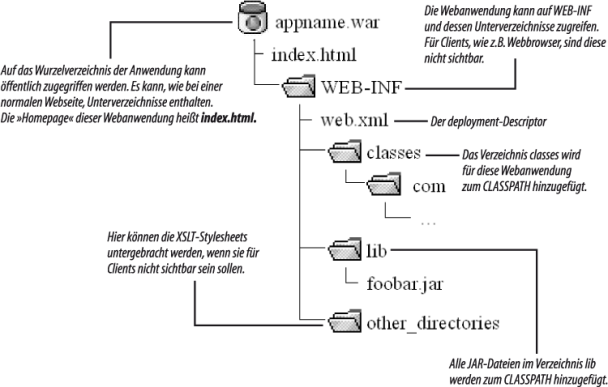
Figure: WAR file structure
Place files in the illustrated structure and run this command from the directory containing index.html (index.html is the web application’s home page):
jar -cvfM ../appname.warThe command creates the WAR in the working directory’s parent. The forward slash (/) works on Windows and Unix. Inspect the WAR contents with:
jar -tvf appname.warIts listing must match the illustrated structure.
The WAR’s top-level directory is publicly accessible and should contain JSP and HTML files. Other accessible subdirectories may be added, commonly an images directory for graphics.
In contrast, directory WEB-INF is inaccessible to clients. It contains deployment descriptor web.xml, directory classes- and directory lib. As illustrated, the ClassLoader can access directory classes, and all JARs in directory lib are available to your code. This makes third-party libraries easy to bundle. Other directories may be stored under andere_verzeichnisse. These too are hidden from clients as subdirectories of WEB-INF. Servlets can still access or deliver their contents.
The deployment descriptor
The descriptor is always named web.xml and resides directly in the application’s WEB-INF directory. It supplies container configuration including security, servlet and resource aliases, initialization parameters and IDE icons. We need only a small subset. For SplashScreenServlet, specify its Java class, servlet alias and URL mapping. This example shows the complete descriptor for SplashScreenServlet:
Example: web.xml for SplashScreenServlet.java
<?xml version="1.0" encoding="UTF-8"?>
<!DOCTYPE web-app PUBLIC "-//Sun Microsystems, Inc.//DTD Web Application 2.2//EN" "http://java.sun.com/j2ee/dtds/web-app_2.2.dtd">
<web-app>
    <servlet>
        <!-- definiere einen Alias für das Servlet -->
        <servlet-name>splashScreen</servlet-name>
        <servlet-class>chap6.SplashScreenServlet</servlet-class>
    </servlet>
    <servlet-mapping>
        <!-- Ordne dem Servlet ein URL-Muster zu -->
        <servlet-name>splashScreen</servlet-name>
        <url-pattern>/splash/*</url-pattern>
    </servlet-mapping>
</web-app>
The DOCTYPE declaration is required in every descriptor, as in example web.xml for SplashScreenServlet.java. Newer specifications such as Servlet 2.3 use a different descriptor version. Unless 2.3 features are needed, use 2.2 for the widest container compatibility.
A servlet definition gives the fully qualified package and class name plus a servlet name. Other descriptor entries use that name to refer to it:
<servlet>
  <servlet-name>splashScreen</servlet-name>
  <servlet-class>chap6.SplashScreenServlet</servlet-class>
</servlet>
As example web.xml for SplashScreenServlet.java shows, servlet mapping associates that name with a URL pattern users type in the browser. Here the URL for SplashScreenServlet is:
"http://hostname:port/chap6/splash"
This follows Tomcat’s standard form, with these components:
hostname:portUsually
localhost:8080, though Tomcat supports any port.chap6The application name, here defined in chap6.war.
splashPart of the servlet URL pattern
Wildcards match arbitrary text. Our descriptor’s pattern /splash/* means each URL below activates SplashScreenServlet:
"http://localhost:8080/chap6/splash/"
"http://localhost:8080/chap6/splash/irgendwas.html"
"http://localhost:8080/chap6/splash/a/b/c"
Deploying SplashScreenServlet on Tomcat
To run SplashScreenServlet, compile its code, create the descriptor from example web.xml for SplashScreenServlet.java and build the WAR with jar. Its contents are illustrated below.
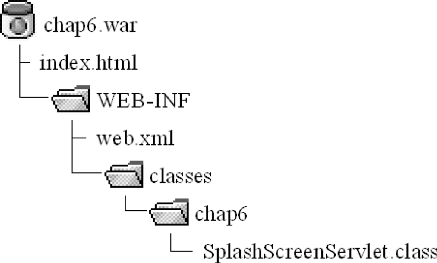
Figure: SplashScreenServlet WAR
After creating chap6.war, check with jar -tvf chap6.war that the structure is correct. Finally copy the WAR into Tomcat directory webapps.
Note:
Copying a WAR into directory webapps while Tomcat runs does not activate it. Restart Tomcat to use the application.
After copying, run startup.bat or startup.sh in Tomcat’s bin directory and open URL "http://localhost:8080/chap6/splash" in a browser. For errors, check environment variables JAVA_HOME and TOMCAT_HOME. Also check Tomcat’s webapps directory for correct extraction. On first access, Tomcat extracts the WAR under webapps. It should contain both chap6.war and directory chap6.
Otherwise consult Tomcat’s documentation, check the descriptor and test its sample servlets. Start Tomcat and open "http://localhost:8080". If this also fails, the Tomcat installation has a basic problem.
Important servlet API features
Later servlets become more complex, but we focus on generating web content with XML and XSLT rather than servlet-specific techniques. First examine some common servlet-package classes.
Class javax.servlet.ServletConfig supplies initialization parameters at startup. Every servlet has this method, called once on initial initialization:
public void init(ServletConfig config) throws ServletExceptionObject ServletConfig provides String name/value pairs for configuration without hardcoding values:
String xmlLocation = config.getInitParameter("xmlLocation");Since xmlLocation is an initialization parameter from the XML descriptor, its value need not be hardcoded. See section Locating stylesheets through initialization parameters.
Another important class is javax.servlet.ServletContext. It provides more than ServletConfig and can be shared across a servlet group. With ServletConfig, obtain a reference to a ServletContext:
// config ist eine Instanz von ServletConfig
ServletContext ctx = config.getServletContext( );
Later we revisit ServletContext for portable resource lookup. You probably know methods getResource( ) and getResourceAsStream( ) on java.lang.Class, locating files through the system CLASSPATH.
ServletContext offers methods getResource( ) and getResourceAsStream( ) based on the web application’s location rather than CLASSPATH. For example,
context.getResource("/WEB-INF/stylesheets/home.xslt")reads a stylesheet from the WAR. It works regardless of Tomcat’s installation path, avoiding a hardcoded path such as C:\path\....
Copyright © 2002 O'Reilly Verlag GmbH & Co. KG
You may print the online version for your private use.
Otherwise, this chapter from “Java und XSLT” is subject to the same conditions as the bound edition. The work, including all its parts, is protected by copyright. All rights reserved, including reproduction, translation, microfilming, and storage and processing in electronic systems.
O’Reilly Verlag GmbH & Co. KG, Balthasarstraße 81, 50670 Köln, kommentar(at)oreilly.de