

XML technologies / ePUB / ePub für (In)Designer / Repeated tasks / Defining hexadecimal colors
(Excerpt from “ePub für (In)Designer — Mit InDesign Schritt für Schritt zum E-Book” by Sascha Heck & Yves Apel)
Throughout the book, colors often appear in HTML and CSS as hexadecimal values. Here is how to find a specific value.
If already using the color in InDesign, double-click it in the Swatches panel, or right-click and choose Swatch Options to avoid accidentally applying it. Remember or note down the color values.
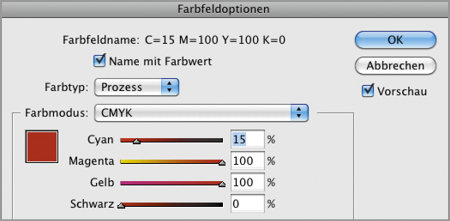
Figure: Note the color values from InDesign.
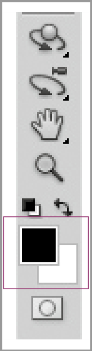
Switch to Photoshop and click the foreground color at the bottom of the Tools panel.
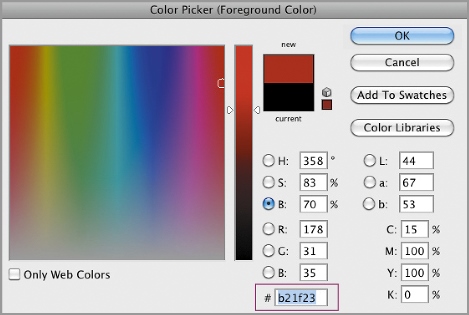
Enter the InDesign RGB or CMYK values, or simply choose another color with the picker. Read and copy the needed hexadecimal value after the hash sign at bottom left.
Without Photoshop, or to try another tool, use the simplified interactive picker at HTML Color Codes. In-Tools also offers an interesting free InDesign plug-in to create hexadecimal colors directly; see Create Hexadecimal Color Swatches in InDesign for Interactive Documents.
Figure: Reading a hexadecimal value in Photoshop’s picker. |
Figure: Clicking the Tools panel color opens the picker. |
Copyright © dpunkt.verlag GmbH 2012
You may print the online version for your private use.
Otherwise, this chapter from “ePub für (In)Designer” is subject to the same terms as the printed edition: the work and all its parts are protected by copyright. All rights reserved, including reproduction, translation, microfilming, and storage and processing in electronic systems.
dpunkt.verlag GmbH, Wieblinger Weg 17, 69123 Heidelberg, fon 06221-14830, fax 06221-148399, hallo(at)dpunkt.de
back to top