

XML technologies / CSS / CSS Cookbook / General topics / Using alternative stylesheets
(Excerpt from “CSS Kochbuch” by Christopher Schmitt)
Problem
You want to offer users different stylesheets, for example larger fonts or another color scheme.
Solution
Give the element link the attribute title and include the alternative stylesheet in the page. The attribute title lets you specify the name offered to the user. In Firefox, for example, display the list through ANSICHT ➝ WEBSEITEN-STIL. For alternative stylesheets, extend the attribute rel with the keyword alternate, as shown below:
<link href="default.css" rel="stylesheet" title="Standardstil" type="text/css" media="screen"/>
<link href="green.css" rel="alternate stylesheet" title="Grünes Farbschema" type="text/css" media="screen"/>
<link href="blue.css" rel="alternate stylesheet" title="Blaues Farbschema" type="text/css" media="screen"/>
Unfortunately, this solution does not work in Internet Explorer 6.0 or Safari.
Discussion
Alternative stylesheets work similarly to the media-specific stylesheets in the recipe Applying styles to a web page. Instead of defining styles for media types, you offer users different screen display options. This also works when JavaScript is disabled, because browsers support the technique directly. Copy an existing stylesheet, save it under another name, make the desired changes, and include it in the document with the required element link, a suitable attribute title and the necessary extension of the attribute rel (see the next figure).
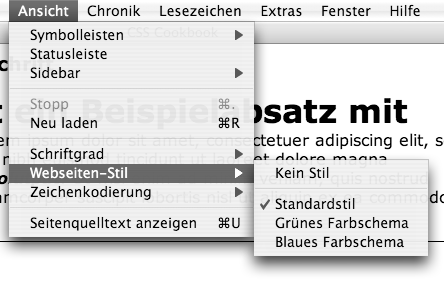
Figure: Many browsers let you choose between alternative stylesheets.
See also
The article “Invasion of the Body Switchers” by Andy Clarke and James Edwards describes implementing stylesheet selection with JavaScript.
Copyright of the German edition © 2007 by O’Reilly Verlag GmbH & Co. KG
You may print the online version for your private use.
Otherwise, this chapter from “CSS Kochbuch” is subject to the same conditions as the bound edition: the work, including all its parts, is protected by copyright. All rights reserved, including reproduction, translation, microfilming, and storage and processing in electronic systems.
O’Reilly Verlag GmbH & Co. KG, Balthasarstr. 81, 50670 Köln