

XML technologies / ePUB / Open Publication Structure / Graphics / SVG-vector graphics
(Excerpt from “E-Books mit ePUB ─ Von Word zum E-Book mit XML” by Dr. Victor Wang)
Extending OPS 2.0 with Scalable Vector Graphics (SVG) creates possibilities unsuited to raster graphics. Immediate benefits are independence from dimensions and much smaller graphic size. An SVG graphic can be a separate file or XML markup inside OPS.
We show only examples, not a full introduction to complex SVG. Take the Euclid circle and change its reference to an external SVG graphic:
<?xml version="1.0" encoding="UTF-8"?>
<svg xmlns="http://www.w3.org/2000/svg" width="150" height="150" viewBox="0 0 550 550" version="1.1">
  <desc/>
  <g alignment-baseline="baseline">
    <!-- Kreis zeichnen -->
    <circle r="200" cx="250" cy="250" stroke="black" fill="white" stroke-width="5" transform="translate(0,10)"/>
    <!-- Durchmesser zeichnen -->
    <line stroke="black" x1="0" x2="400" y1="200" y2="200" stroke-width="3" transform="translate(50,60)"/>
    <!-- Radius zeichnen -->
    <line stroke="black" x1="200" x2="280" y1="200" y2="15" stroke-width="3" transform="translate(50,60)"/>
    <!-- Punktbeschriftungen zeichnen -->
    <text x="200" y="250" transform="translate(5,-5)" style="font-size:64px; font-style:italic; font-variant:normal; font-weight:bold; font-family:Sans; text-align: start; line-height: 100%; fill: #000000;">C</text>
    <text x="0" y="250" transform="translate(0,20)" style="font-size:64px; font-style:italic; font-variant:normal; font-weight:bold; font-family:Sans; text-align: start; line-height: 100%; fill: #000000;">A</text>
    <text x="370" y="60" transform="translate(-20,5)" style="font-size:64px; font-style:italic; font-variant:normal; font-weight:bold; font-family:Sans; text-align: start; line-height: 100%; fill: #000000;">D</text>
    <text x="460" y="250" transform="translate(0,20)" style="font-size:64px; font-style:italic; font-variant:normal; font-weight:bold; font-family:Sans; text-align: start; line-height: 100%; fill: #000000;">B</text>
  </g>
</svg>
Code example: SVG graphic
Change the graphic reference in “Positioned XHTML graphic” to <img src="img/kreis-euklid.svg" style=". . ."/> to include SVG instead of JPG. Quality is much better than the mediocre raster version, and further enlargement remains lossless.
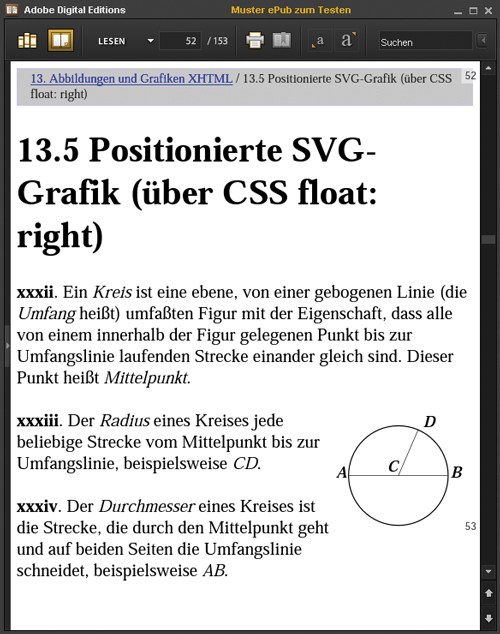
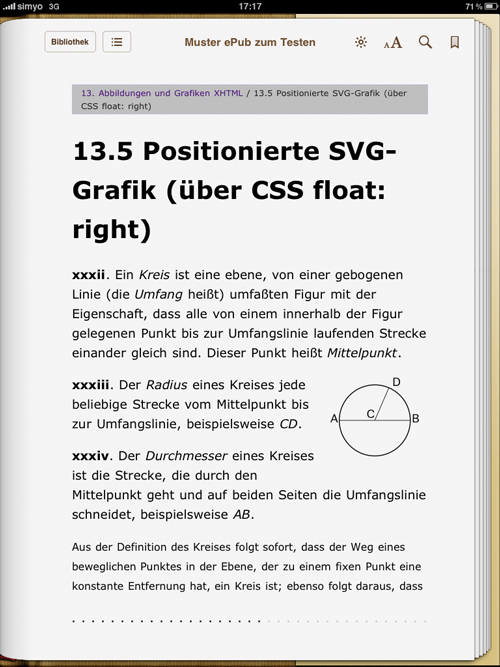
Figures: Referenced SVG in XHTML (Adobe Digital Editions and iBooks)
SVG can also be integrated directly into XHTML. Embed the whole graphic in the XHTML file’s <div> element. Its original root <svg> must receive the default namespace xmlns="http://www.w3.org/2000/svg" and the style attribute of the former <img> element.
<div>
  <svg xmlns="http://www.w3.org/2000/svg" width="150" height="150" viewBox="0 0 550 550" version="1.1" style="float: right; clear: right; width: 30%;">
    <desc/>
    <g alignment-baseline="baseline">
      <!-- Kreis zeichnen -->
      <circle r="200" cx="250" cy="250" stroke="black" fill="white" stroke-width="5" transform="translate(0,10)"/>
      <!-- Durchmesser zeichnen -->
      <line stroke="black" x1="0" x2="400" y1="200" y2="200" stroke-width="3" transform="translate(50,60)"/>
      <!-- Radius zeichnen -->
      <line stroke="black" x1="200" x2="280" y1="200" y2="15" stroke-width="3" transform="translate(50,60)"/>
      <!-- Punktbeschriftungen zeichnen -->
      . . .
    </g>
  </svg>
</div>
Code example: SVG embedded in XHTML (excerpt)
SVG serves more uses than expected: suitable tools handle complex line graphics, presentations and formulas well because text is also vector-based. It handles varying screens elegantly, preserving quality through scaling. Beware overly complex SVG, however: devices may not support every feature.
Copyright © mitp 2011
You may print the online version for your private use.
Otherwise, this chapter from “E-Books mit ePUB” is subject to the same terms as the printed edition: the work and all its parts are protected by copyright. All rights reserved, including reproduction, translation, microfilming, and storage and processing in electronic systems.
Verlagsgruppe Hüthig Jehle Rehm GmbH, Im Weiher 10, 69121 Heidelberg, kundenbetreuung(at)hjr-verlag.de
back to top