

XML technologies / ePUB / Open Publication Structure / Graphics / Mixing SVG and raster graphics
(Excerpt from “E-Books mit ePUB ─ Von Word zum E-Book mit XML” by Dr. Victor Wang)
Finally, combining SVG and raster graphics is especially useful for e-book covers. Apply the advantages of SVG to this important, often sole title image.
SVG can embed raster graphics through its element <image>. Here we take the Laocoön JPEG, embedding it not directly in XHTML but in the <svg> element. The goal is a spotlight-like circle around Laocoön’s suffering head. Here is just the modified <div> element from “Raster graphic in XHTML”:
<div class="grafik-mitte">
  <svg xmlns:xlink="http://www.w3.org/1999/xlink" xmlns="http://www.w3.org/2000/svg" viewBox="0 0 550 200">
    <defs>
      <clipPath id="taschenlampe">              ①
        <circle r="100" cx="220" cy="100"/>
      </clipPath>
    </defs>
    <image xlink:href="img/laokoon.jpg" height="599" width="537" style="clip-path:url(#taschenlampe)"/>   ②
  </svg>
</div>
Code example: Laocoön in a circle—raster reference in SVG (excerpt)
At ① a clipping shape is defined by the element <clipPath>, here just a circle. At ② it is applied within <image> to the referenced raster image. Adobe Digital Editions shows the result below.
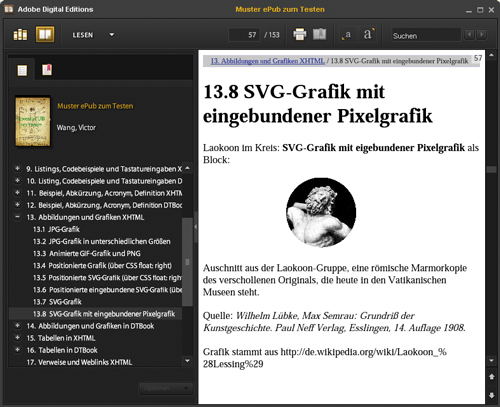
Figure: Laocoön in a circle.
Apply this to the cover. A print cover usually has two or four pages; use only the front. Crop to final format without print marks and save as JPEG, for example cover.jpg. Then create an OPS file embedding the cover, first with an SVG container in simple XHTML:
<?xml version="1.0" encoding="UTF-8"?>
<!DOCTYPE html  PUBLIC "-//W3C//DTD XHTML 1.1//EN" "http://www.w3.org/TR/xhtml11/DTD/xhtml11.dtd">
<html xmlns="http://www.w3.org/1999/xhtml">
  <head>
    <meta http-equiv="Content-Type" content="text/html; charset=UTF-8"/>
    <title>Invent ePUB For Future</title>
    <link rel="stylesheet" href="xhtml-styles.css" type="text/css"/>
  </head>
  <body style="background-color: #000000;">                                      ③
    <svg xmlns:xlink="http://www.w3.org/1999/xlink" xmlns="http://www.w3.org/2000/svg" version="1.1" id="coverpage" viewBox="0 0 400 566" width="100%" height="100%">   ①
      <image x="0" y="0" width="400" height="566" xlink:href="img/cover.jpg"/>   ②
    </svg>
  </body>
</html>
Code example: SVG cover skeleton in XHTML
The image is 400 pixels wide and 566 high. At ①, the SVG attribute viewbox specifies the visible rectangle, matching the whole image. At ②, dimensions ( width and height) and starting point ( x and y) are similarly set. At ③ a black background is set aesthetically through the style attribute.
Now add a title over the raster image, writing Invent ePUB For Future directly into two text elements:
<svg xmlns:xlink="http://www.w3.org/1999/xlink" xmlns="http://www.w3.org/2000/svg" version="1.1" id="coverpage" viewBox="0 0 400 566" width="100%" height="100%">
  <image x="0" y="0" width="400" height="566" xlink:href="img/cover.jpg"/>
  <text x="30" y="270" font-family="Arial" font-size="60px" color="green">Invent ePUB</text>
  <text x="50" y="340" font-family="Arial" font-size="60px" color="green">For Future</text>
</svg>
Code example: Extended SVG cover in XHTML (excerpt)
The cover graphic now adapts to screen size, with optimal text quality. Add other SVG elements similarly: lines, rectangles, circles or patterns.


Figures: SVG cover title in XHTML (Adobe Digital Editions and iBooks)
Copyright © mitp 2011
You may print the online version for your private use.
Otherwise, this chapter from “E-Books mit ePUB” is subject to the same terms as the printed edition: the work and all its parts are protected by copyright. All rights reserved, including reproduction, translation, microfilming, and storage and processing in electronic systems.
Verlagsgruppe Hüthig Jehle Rehm GmbH, Im Weiher 10, 69121 Heidelberg, kundenbetreuung(at)hjr-verlag.de
back to top