

XML technologies / SVG / Creating graphic elements from templates / Using templates efficiently
(Excerpt from “Das Einsteigerseminar SVG — Webgrafiken mit XML” by Helma Spona)
The template method shown earlier is the most common, but some further points help you work efficiently.
Symbols defined in an SVG file are rendered only when used. Gradients, patterns and filters created for one symbol can therefore be reused in others. This works because all previously defined symbols, with their filters and effects, have already been read when a symbol is used.
The following example extends the previous page’s code with a crescent symbol filled with the same gradient #linearerVerlauf as the buttons, without redefining it for the symbol.
...
  <defs>
    <symbol id="smSichel">
      <defs>
        <path id="sichelrohling" d="M300 50 Q500 200 180 250 Q480 200 300 50" style="stroke:none;stroke-width:1;fill:url(#linearerVerlauf)"/>
        <filter id="sichelSchatten">
          ...
        </filter>
      </defs>
      <path id="sichel" d="M300 50 Q500 200 180 250 Q480 200 300 50" style="stroke:none;stroke-width:1;fill:url(#linearerVerlauf);filter:url(#sichelSchatten)"/>
    </symbol>
    <symbol id="smButton">
      ...
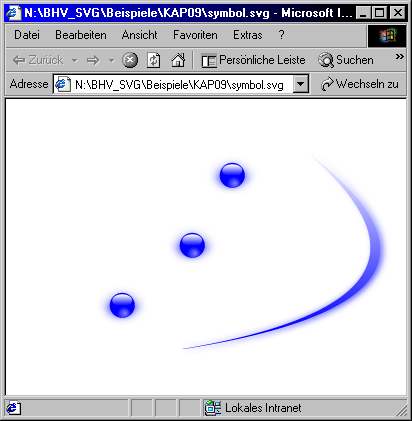
Figure: Crescent filled with the buttons’ gradient.
Since a symbol can use named elements from other symbols, filters, gradients and lighting effects need unique names. You cannot define a gradient named “Verlauf1” in two symbols; this could produce unexpected results.
Copyright © verlag moderne industrie GmbH 2001
You may print the online version for your private use.
Otherwise, this chapter from “Das Einsteigerseminar SVG — Webgrafiken mit XML” is subject to the same conditions as the bound edition. The work, including all its parts, is protected by copyright. All rights reserved, including reproduction, translation, microfilming, and storage and processing in electronic systems.
verlag moderne industrie GmbH, Justus-von-Liebig-Straße 1, D-86899 Landsberg/Lech, fon ++49 (0) 81 91 / 125 – 0, leserservice(at)mi-verlag.de
back to top