

XML technologies / SVG / Creating graphic elements from templates / Using templates efficiently / Formatting symbol instances
(Excerpt from “Das Einsteigerseminar SVG — Webgrafiken mit XML” by Helma Spona)
Instances created from symbols can have different formatting through the style attribute, but only properties not already set in the symbol apply. A symbol’s fill color cannot be changed in instances, for example, but opacity can if not already specified. The next example creates two instances of the symbol smButton and adds formatting with the style attribute. The first sets opacity, border width and a filter; the second also sets fill color. Only the property opacity takes effect, since the symbol supplies all other properties.
<use x="0" y="0" xlink:href="#smButton" transform="translate(160 120) scale(0.7)" style="opacity:0.5;stroke-width:3px;filter:none"/>
<use x="0" y="0" xlink:href="#smButton" transform="translate(90 180) scale(0.7)" style="opacity:0.7;fill:red" />
The two red-framed buttons in the figure have the altered formatting, but only opacity changes.
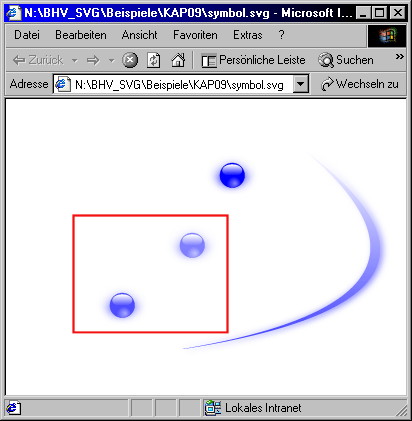
Figure: Formatted instances of smButton.
Careful symbol formatting combines consistent instance appearance with convenient customization, depending on the symbols’ purpose.
For corporate or product logos that users must not modify, explicitly set all relevant formatting in the symbol. For complex geometric shapes, define only path outlines and leave instance formatting open. Using a <path> tag without a style attribute allows all other formatting to be set at use time. The next example defines the symbol smStern and uses it twice with different formatting because it has no style attribute.
<?xml version="1.0" standalone="no"?>
...
<svg width="400" height="800">
  <defs>
    <symbol id="smStern">
      <path d="M92.899 18 C99.2743 18.0367 95.7314 ... z"/>
    </symbol>
  </defs>
  <use x="0" y="0" xlink:href="#smStern" transform="translate(0 0) scale(0.5)" style="fill:none;stroke:red"/>
  <use x="0" y="100" xlink:href="#smStern" transform="translate(0 0) scale(0.5)" style="fill:blue;stroke:black"/>
</svg>
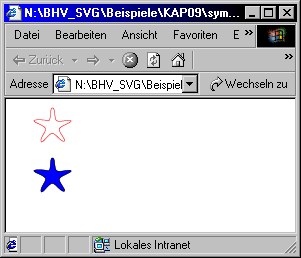
Figure: Result of using smStern.
Note:
This symbol is the star from Jasc WebDraw’s symbol palette.
Copyright © verlag moderne industrie GmbH 2001
You may print the online version for your private use.
Otherwise, this chapter from “Das Einsteigerseminar SVG — Webgrafiken mit XML” is subject to the same conditions as the bound edition. The work, including all its parts, is protected by copyright. All rights reserved, including reproduction, translation, microfilming, and storage and processing in electronic systems.
verlag moderne industrie GmbH, Justus-von-Liebig-Straße 1, D-86899 Landsberg/Lech, fon ++49 (0) 81 91 / 125 – 0, leserservice(at)mi-verlag.de
back to top