

XML technologies / SVG / Creating graphic elements from templates / Using templates efficiently / Defining text as symbols
(Excerpt from “Das Einsteigerseminar SVG — Webgrafiken mit XML” by Helma Spona)
Text can also be defined as symbols, creating reusable text blocks. More often, however, text shares formatting but differs in content, so text symbols are less common.
Repeated terms used within one or several SVG files are a useful exception, illustrated next.
Note:
SVG allows symbols from other documents, but SVG Viewer does not yet support them. For practical use, define symbols in the same file that uses them.
Embedding stylesheets in SVG
For many identically formatted texts, use stylesheets instead of repeating the same <symbol> tag’s style attribute. This reduces file size and typing and lets later changes happen in one stylesheet rather than every symbol.
As in XML, internal stylesheets are placed in a CDATA section containing any number of formats. The example defines formatting for the <text> tag. Alternatively use a custom class name beginning with a dot, preceded by the name to which the format applies. For example, text.hinweis defines the format "hinweis" for the <text> tag. As in HTML and XHTML assign the format to a tag through the class attribute.
<style type="text/css">
  <![CDATA[text {font-family:'Arial Black', Arial, Helvetica; font-weight:bolder; font-stretch:expanded; fill:Black; font-size:20px}]]>
</style>
Note:
Override tag-specific stylesheet formatting only by defining a style attribute inside that tag; formatting the parent group does not help.
Creating symbols
Create symbols like graphical elements, but insert inside the <symbol> tag a <text> tag. Set the coordinates x and y so the text is fully visible. Otherwise instances remain invisible, even if repositioned. At font size 20, y must be at least 20.
<symbol id="smText1">
  <text x="0" y="20">Web-Design</text>
</symbol>
<symbol id="smText2">
  <text x="0" y="20">Programmierung</text>
</symbol>
<symbol id="smText3">
  <text x="0" y="20">Schulungen</text>
</symbol>
Inserting and further formatting text
Add the <use> instructions to insert text. Also add shadows and hyperlinks if desired. For the filter, set the <use> tag’s style attribute. For hyperlinks, enclose the <use> tag with the <a> tag.
<a xlink:href="http://www.edv-sk.de/webdesign/webdesign.htm">
  <use xlink:href="#smText1" transform="translate(310 60) scale(1)" style="filter:url(#textSchatten)"/>
</a>
<a xlink:href="http://www.edv-sk.de/programmierung/programmierung.htm">
  <use xlink:href="#smText2" transform="translate(270 135) scale(1)" style="filter:url(#textSchatten)"/>
</a>
<a xlink:href="http://www.edv-sk.de/schulungen/schulungen.htm">
  <use xlink:href="#smText3" transform="translate(200 195) scale(1)" style="filter:url(#textSchatten)"/>
</a>
Define the shadow filter too, including a large enough filter region to avoid clipping text shifted up and left relative to the shadow.
<filter id="textSchatten" filterUnits="userSpaceOnUse" x="-10" y="-10" width="120%" height="120%">
  <feGaussianBlur in="SourceAlpha" stdDeviation="1.8" result="textSchatten"></feGaussianBlur>
  <feOffset dx="-3" dy="-3" in="SourceGraphic" result="Text"/>
  <feMerge>
    <feMergeNode in="textSchatten" />
    <feMergeNode in="Text" />
  </feMerge>
</filter>
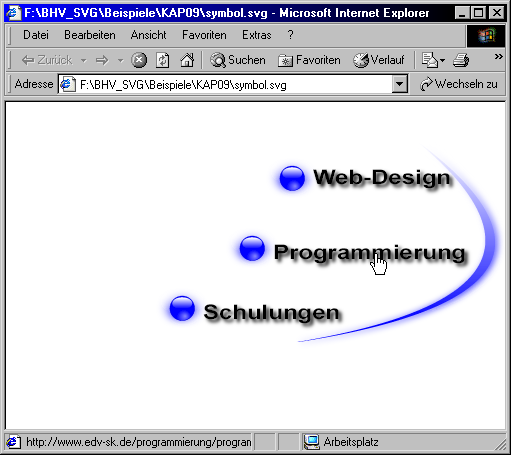
Figure: Result of text as symbols.
Copyright © verlag moderne industrie GmbH 2001
You may print the online version for your private use.
Otherwise, this chapter from “Das Einsteigerseminar SVG — Webgrafiken mit XML” is subject to the same conditions as the bound edition. The work, including all its parts, is protected by copyright. All rights reserved, including reproduction, translation, microfilming, and storage and processing in electronic systems.
verlag moderne industrie GmbH, Justus-von-Liebig-Straße 1, D-86899 Landsberg/Lech, fon ++49 (0) 81 91 / 125 – 0, leserservice(at)mi-verlag.de