

XML technologies / XSLT / Java and XSLT / Discussion forum / Prototyping the XML data
(Excerpt from “Java und XSLT” by Eric M. Burke)
Once requirements and information flow are specified, design can become more detailed. XSLT websites are modular, allowing design and implementation to be divided among team members. Each component can be developed and tested independently before assembly into a web application.
XHTML prototypes
UI prototypes are an early task suited to less experienced programmers or web designers. A complex interface is unnecessary yet: stylesheet adjustments can add refinements later. Too much detail now can distract from essential XML and XSLT design.
Because the interface uses XHTML Strict, a separate Cascading Style Sheet (CSS) makes pages attractive. For XHTML Strict details see XHTML™ 1.0 The Extensible HyperText Markup Language. Strict XHTML disallows most HTML 4.0 formatting tags, encouraging CSS. The next example shows the forum’s CSS file.
Example: forum.css
body {
  font-family : Verdana, Geneva, Arial, Helvetica, sans-serif;
}

.box1 {
  border: 3px solid Navy;
  text-align: center;
  padding: 4px;
  margin : 2px;
  background-color: #c0c0c0;
 }

.box2 {
  border: 1px solid Navy;
  padding: 4px;
  margin: 2px;
  background-color: #FFFFCC;
}

h1 {
  font-size: 22pt;
  font-weight: normal;
  margin: 0px 0px 0px 0px;
}

h2 {
  font-size: 18pt;
  font-weight: normal;
  margin: 0px 0px 0px 0px;
}

h3 {
  font-size: 14pt;
  font-weight: normal;
  margin: 0px 0px 0px 0px;
}

ul {
  margin-top: 0px;
}

.msgSummaryLine {
  font-size: smaller;
  font-weight: normal;
}

a:hover {
  background-color:yellow;
}

.error {
  font-weight: bold;
  color: red;
}
Every XHTML page references this CSS file:
<link type="text/css" rel="stylesheet" href="/forum/forum.css" />This keeps stylesheets and pages small and manageable. Font and color changes in one CSS file immediately affect the entire application. Browsers implementing CSS incorrectly are the only problem. Despite improving support, test pages across many browsers to find formatting errors.
Note:
XSLT’s separation of data and presentation recurs throughout this book. CSS extends it by separating XHTML content from many visual aspects. CSS and XSLT differ greatly but complement each other perfectly.
CSS files are often self-explanatory. For example, style h2 applies to all <h2> elements in XHTML. One style construct many programmers may not know is:
.box2 {
  border: 1px solid Navy;
  padding: 4px;
  margin: 2px;
  background-color: #FFFFCC;
}
The period in .box2 defines a style class. The style class box2 is used in XHTML as follows:
<div class="box2">Nachrichten vom März 2001</div>A style class can apply to any XHTML element. Here every element in class box2 has a thin border and yellow background.
Designers should now draft basic representations of each application page. The next figure shows its home page.
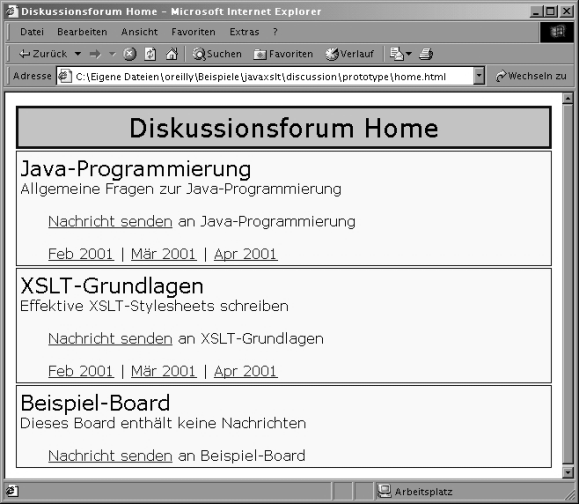
Figure: Home page prototype
The next example gives the home page’s complete XHTML. Links are not valid yet: the servlet and final URLs remain undesigned. This is only a draft; the finished application dynamically generates XHTML from XML through XSLT.
Example: Home page XHTML source
<?xml version="1.0" encoding="ISO-8859-1"?>
<!DOCTYPE html PUBLIC "-//W3C//DTD XHTML 1.0 Strict//EN" "http://www.w3.org/TR/xhtml1/DTD/xhtml1-strict.dtd">
<html xmlns="http://www.w3.org/1999/xhtml">
   <head>
      <title>Diskussionsforum Home</title>
      <link href="../docroot/forum.css" rel="stylesheet" type="text/css" />
   </head>
   <body>
      <div class="box1">
         <h1>Diskussionsforum Home</h1>
      </div>
      <div class="box2">
         <h2>Java-Programmierung</h2>
         <div>Allgemeine Fragen zur Java-Programmierung</div>
         <div style="margin-left: 2em;">
            <p><a href="link_to_post_message">Nachricht senden</a> an Java-Programmierung</p>
            <a href="link_to_feb_messages">Feb 2001</a> | <a href="link_to_mar_messages">Mär 2001</a> | <a href="link_to_apr_messages">Apr 2001</a>
         </div>
      </div>
      <div class="box2">
         <h2>XSLT-Grundlagen</h2>
         <div>Effektive XSLT-Stylesheets schreiben</div>
         <div style="margin-left: 2em;">
            <p><a href="link_to_post_message">Nachricht senden</a> an XSLT-Grundlagen</p>
            <a href="link_to_feb_messages">Feb 2001</a> | <a href="link_to_mar_messages">Mär 2001</a> | <a href="link_to_apr_messages">Apr 2001</a>
         </div>
      </div>
      <div class="box2">
         <h2>Beispiel-Board</h2>
         <div>Dieses Board enthält keine Nachrichten</div>
         <div style="margin-left: 2em;">
            <p><a href="link_to_post_msg">Nachricht senden</a> an Beispiel-Board</p>
         </div>
      </div>
   </body>
</html>
The tags <div> and <span> were unfamiliar to many authors before CSS became widespread. The element <div> groups any number of other elements. The element <span> is similar but is an inline element, part of an existing line, whereas <div> starts a new line like the elements <p> and <h1>, for example. Style classes make <div> and <span> attractive for XHTML Strict, which disallows deprecated HTML 4.0 elements such as <font>. Although <span> is unused here, <div> often creates line breaks and applies CSS styles.
The next prototype shows a message board. XHTML for the remaining pages is not printed.
Figure: Month overview prototype
Replies are indented a few spaces. Later stylesheet changes can add folder icons or other symbols before messages. The next page lets users post new forum messages.
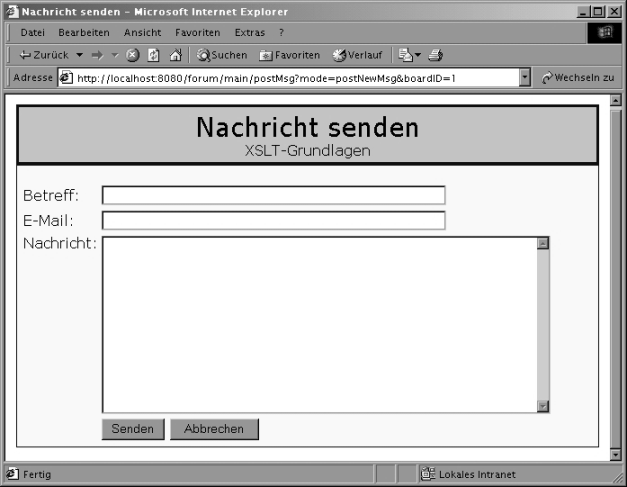
Figure: “Post message” page prototype
The same page replies to existing messages, with title “Reply” and the Subject and Message fields prefilled from the original. Submitting incomplete data redisplays the page with an error.
The final page displays existing messages.
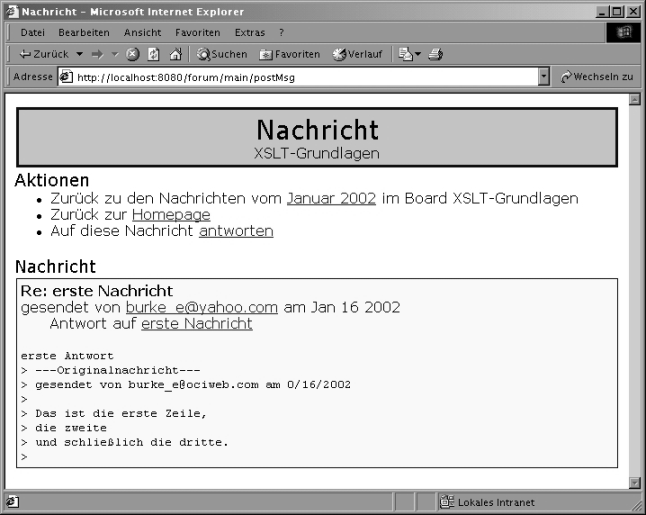
Figure: “View message” page prototype
XML examples
While designers create XHTML layouts, someone else can create sample XML. These tasks still need coordination: the XML structure must supply everything the pages need. XML designers must also work with database developers to ensure requested data are available.
XML design should focus on data, not presentation. CSS colors and fonts should not affect it. XML also includes undisplayed data, such as identifiers in links allowing the servlet to choose a message. XML supplies the identifier; XSLT creates the XHTML link.
The next example shows home page XML. Without presentation information, it is much shorter than XHTML.
Example: home.xml
<?xml version="1.0" encoding="ISO-8859-1"?>
<?xml-stylesheet type="text/xsl" href="../xslt/home.xslt"?>
<home>
  <board id="0">
    <name>Java-Programmierung</name>
    <description>Allgemeine Fragen zur Java-Programmierung</description>
    <messages month="1" year="2001"/>
    <messages month="2" year="2001"/>
    <messages month="3" year="2001"/>
  </board>
  <board id="1">
    <name>XSLT-Grundlagen</name>
    <description>Effektive XSLT-Stylesheets schreiben</description>
    <messages month="1" year="2001"/>
    <messages month="2" year="2001"/>
    <messages month="3" year="2001"/>
  </board>
  <board id="3">
    <name>Beispiel-Board</name>
    <description>Dieses Board enthält keine Nachrichten</description>
  </board>
</home>
This is only a prototype for development and testing. The finished application generates XML dynamically with JDOM.
Each message board is represented by the element <board> with attribute id. Clicking “Post message” uses this ID to identify the destination board. The <messages> elements list months with messages in the database. They need no ID because links use month and year.
The XML file’s second line links the stylesheet:
<?xml-stylesheet type="text/xsl" href="../xslt/home.xslt"?>The final application will not work this way, but it helps prototyping. An XSLT-compatible browser can transform the XML when loaded if the stylesheet is specified.
Iterative design
These examples emerged through several design attempts. Software design is usually iterative, needing revisions before a satisfactory result. Here this concerns XHTML, XML and XSLT contents:
Prototype pages with HTML or XHTML
Create XML prototypes and, where needed, DTDs
Create stylesheets transforming XML to XHTML
Create backend data sources and XML-generating classes
Create servlets connecting the components
Implementing components reveals missing or redundant features elsewhere. Revise whatever seems wrong on the first pass and repeat processes until everything fits.
The next file supplies month-overview data.
Example: viewMonth.xml
<?xml version="1.0" encoding="UTF-8"?>
<?xml-stylesheet type="text/xsl" href="../xslt/viewMonth.xslt"?>
<viewMonth month="1" year="2001">
   <board id="1">
      <name>Java-Programmierung</name>
      <description>Allgemeine Fragen zur Java-Programmierung</description>
   </board>
   <message id="1" day="1">
      <subject>erste Testnachricht</subject>
      <authorEmail>burke_e@yahoo.com</authorEmail>
      <message id="2" day="2">
         <subject>Re: erste Testnachricht</subject>
         <authorEmail>aidan@nirgends.de</authorEmail>
      </message>
   </message>
   <message id="3" day="4">
      <subject>Zweite Testnachricht</subject>
      <authorEmail>burke_e@yahoo.com</authorEmail>
   </message>
</viewMonth>
The next example supplies “Post message/Reply” data.
Example: postMsg.xml
<?xml version="1.0" encoding="UTF-8"?>
<?xml-stylesheet type="text/xsl" href="../xslt/postMsg.xslt"?>
<postMsg>
   <board id="1">
      <name>Java-Programmierung</name>
      <description>Beschreibung des Boards</description>
   </board>
   <inResponseTo id="4">
      <subject>Testthema</subject>
   </inResponseTo>
   <error code="ALL_FIELDS_REQUIRED"/>
   <prefill>
      <subject>Testthema</subject>
      <authorEmail></authorEmail>
      <message>Meine Nachricht</message>
   </prefill>
</postMsg>
This file serves both new messages and replies because the pages and data are almost identical. The elements <error> and <prefill> were absent from the initial prototype. They handle missing required fields. They are absent on the initial “Post message” display but included after an incomplete submission, when the page is shown again.
The next example supplies “View message” XML.
Example: viewMsg.xml
<?xml version="1.0" encoding="UTF-8"?>
<?xml-stylesheet type="text/xsl" href="../xslt/viewMsg.xslt"?>
<message id="5" month="1" day="4" year="2001">
   <board id="1">
      <name>Java-Programmierung</name>
   </board>
   <inResponseTo id="4">
      <subject>Testnachricht</subject>
   </inResponseTo>
   <subject>Re: Testthema</subject>
   <authorEmail>burke_e@yahoo.com</authorEmail>
   <text>Das ist der Text einer Testnachricht.</text>
</message>
Clearly, postMsg.xml and viewMsg.xml are very similar. Minor changes could let the same JDOM code generate both pages. Keeping them separate requires at least one extra Java class but produces clearer XML-generating code without if/else statements to distinguish operating modes.
XSLT stylesheets
Another team member can create stylesheets after XML and XHTML prototypes exist. Often the XML designer also creates the first stylesheets.
A tool such as XMLSpy is valuable here. XMLSpy is a commercial XML editor well suited to XSLT. Editing a stylesheet and previewing changes with an IDE Refresh button simplifies work. Compatible browsers also show changes immediately. Internet Explorer 5.x supports XSLT if the updated parser msxml was installed using xmlinst. At writing, IE 6.0 was in beta and supported the latest specification. Mozilla will also soon support XSLT.
The next example shows the forum home page’s stylesheet.
Example: Home page stylesheet
<?xml version="1.0" encoding="ISO-8859-1"?>
<!--
***********************************************************
** home.xslt
** Transformiert die Homepage nach XHTML
*********************************************************** -->
<xsl:stylesheet version="1.0" xmlns:xsl="http://www.w3.org/1999/XSL/Transform" xmlns="http://www.w3.org/1999/xhtml">
<xsl:import href="utils.xslt"/>
<xsl:param name="rootDir" select="'../docroot/'"/>
<xsl:output method="xml" version="1.0" encoding="ISO-8859-1" indent="yes" doctype-public="-//W3C//DTD XHTML 1.0 Strict//EN" doctype-system="http://www.w3.org/TR/xhtml1/DTD/xhtml1-strict.dtd"/>
<!--
**********************************************************
** Erzeuge die XHTML-Webseite
******************************************************* -->
<xsl:template match="/">
<html>
   <head>
      <title>Diskussionsforum Home</title>
      <link href="{$rootDir}forum.css" rel="stylesheet" type="text/css"/>
   </head>
<body>
<div class="box1">
<h1>Diskussionsforum Home</h1>
</div>
<xsl:apply-templates select="home/board"/>
</body>
</html>
</xsl:template>
<!--
**********************************************************
** Erzeuge eine Box für jedes Board im Diskussionsforum
********************************************************** -->
<xsl:template match="board">
<xsl:variable name="boardID" select="@id"/>
<div class="box2">
<h2><xsl:value-of select="name"/></h2>
<div><xsl:value-of select="description"/></div>
<div style="margin-left: 2em;">
<!-- erzeuge einen Link, mit dem der Nutzer eine neue Nachricht an dieses Board versenden kann -->
<p><a href="/forum/main/postMsg?mode=postNewMsg&boardID={@id}">Nachricht senden</a> to <xsl:value-of select="name"/></p>
<!-- zeige für jeden Monat, der eine Nachricht enthält, den Monatsnamen und die Jahreszahl als Link an -->
<xsl:for-each select="messages">
<a href="forum/main/viewMonth?boardID={$boardID}&month={@month}&year={@year}">
<xsl:call-template name="utils.printShortMonthName">
  <xsl:with-param name="monthNumber" select="@month"/>
</xsl:call-template>
<xsl:text>, </xsl:text>
<xsl:value-of select="@year"/>
</a>
<!-- schreibe ein Pipe-Zeichen nach jedem außer dem letzten Monat -->
<xsl:if test="position() != last( )">
<xsl:text> | </xsl:text>
</xsl:if>
</xsl:for-each>
</div>
</div>
</xsl:template>
</xsl:stylesheet>The stylesheet starts with the usual tag <xsl:stylesheet> and imports utils.xslt, containing date-formatting templates. Almost every page needs these helpers, so they reside in a separate importable file. The stylesheet accepts parameter rootDir for specifying the document root directory:
<xsl:param name="rootDir" select="'../docroot/'"/>The attribute select sets the default if the parameter is absent. During development the stylesheet is tested against static XML outside the application, so no parameter is supplied and the root points to ../docroot/. This locates CSS when working with a static local directory structure. Later the servlet can pass another value relative to the web application context. The technique helps reference external CSS, JavaScript and images.
Next, the element <xsl:output> configures XHTML output using the DTD XHTML 1.0 Strict, forbidding many HTML 4.0 features. Since it lacks formatting tags, CSS formats pages. The stylesheet only needs to generate HTML referencing the external CSS:
<html>
<head>
<title>Diskussionsforum Home</title>
<link href="{$rootDir}forum.css" rel="stylesheet" type="text/css"/>
</head>The CSS file is not processed by the XSLT processor. From XSLT’s perspective, <link> is merely copied into the result tree. CSS loads only when the browser displays XHTML. Thus all pages share styles without complicating stylesheets.
The remaining stylesheet simply matches XML patterns and builds XHTML. Link generation is worth noting:
<a href="/forum/main/postMsg?mode=postNewMsg&boardID={@id}">Nachricht senden</a>Since an ampersand (&) is forbidden in XML attribute values, use the built-in entity &. Browsers handle it and links work normally. We return to this under Java, XSLT and WML when discussing WML.
What is the URL?
You cannot yet know the final link URLs, so links might look like:
<a href="TODO: Link zum Versenden einer neuen Nachricht">Nachricht senden</a>This is enough until the servlet design determines required parameters and valid values. Until then a “TODO” comment suffices.
Another section calls a helper template as follows:
<xsl:call-template name="utils.printShortMonthName">
<xsl:with-param name="monthNumber" select="@month"/>
</xsl:call-template>The template utils.printShortMonthName is defined in utils.xslt and called like a local template. The current stylesheet only needs to import utils.xslt. The “utils” prefix has nothing to do with the filename: it is a naming convention improving readability and reducing name conflicts.
The reusable stylesheet utils.xslt appears in the next example.
Example: Reusable XSLT code
<?xml version="1.0" encoding="ISO-8859-1"?>
<xsl:stylesheet version="1.0" xmlns:xsl="http://www.w3.org/1999/XSL/Transform">
   <xsl:template name="utils.printShortMonthName">
      <xsl:param name="monthNumber"/>
      <xsl:choose>
         <xsl:when test="$monthNumber='0'">Jan</xsl:when>
         <xsl:when test="$monthNumber='1'">Feb</xsl:when>
         <xsl:when test="$monthNumber='2'">Mär</xsl:when>
         <xsl:when test="$monthNumber='3'">Apr</xsl:when>
         <xsl:when test="$monthNumber='4'">Mai</xsl:when>
         <xsl:when test="$monthNumber='5'">Jun</xsl:when>
         <xsl:when test="$monthNumber='6'">Jul</xsl:when>
         <xsl:when test="$monthNumber='7'">Aug</xsl:when>
         <xsl:when test="$monthNumber='8'">Sep</xsl:when>
         <xsl:when test="$monthNumber='9'">Okt</xsl:when>
         <xsl:when test="$monthNumber='10'">Nov</xsl:when>
         <xsl:when test="$monthNumber='11'">Dez</xsl:when>
      </xsl:choose>
   </xsl:template>
   <xsl:template name="utils.printLongMonthName">
      <xsl:param name="monthNumber"/>
      <xsl:choose>
         <xsl:when test="$monthNumber='0'">Januar</xsl:when>
         <xsl:when test="$monthNumber='1'">Februar</xsl:when>
         <xsl:when test="$monthNumber='2'">März</xsl:when>
         <xsl:when test="$monthNumber='3'">April</xsl:when>
         <xsl:when test="$monthNumber='4'">Mai</xsl:when>
         <xsl:when test="$monthNumber='5'">Juni</xsl:when>
         <xsl:when test="$monthNumber='6'">Juli</xsl:when>
         <xsl:when test="$monthNumber='7'">August</xsl:when>
         <xsl:when test="$monthNumber='8'">September</xsl:when>
         <xsl:when test="$monthNumber='9'">Oktober</xsl:when>
         <xsl:when test="$monthNumber='10'">November</xsl:when>
         <xsl:when test="$monthNumber='11'">Dezember</xsl:when>
      </xsl:choose>
   </xsl:template>
</xsl:stylesheet>
To match class java.util.Calendar, where January is 0, month numbers start at 0. The templates return German month names for numbers.
viewMonth.xslt appears next and generates an XHTML page showing every message for a month and board.
Example: Month-overview XSLT
<?xml version="1.0" encoding="ISO-8859-1"?>
<!--
***********************************************************
** viewMonth.xslt
**
** Zeigt eine Monatsübersicht der Nachrichten eines bestimmten Boards.
*********************************************************** -->
<xsl:stylesheet version="1.0" xmlns:xsl="http://www.w3.org/1999/XSL/Transform" xmlns="http://www.w3.org/1999/xhtml">
<xsl:import href="utils.xslt"/>
<xsl:param name="rootDir" select="'../docroot/'"/>
<xsl:output method="xml" version="1.0" encoding="ISO-8859-1" indent="yes" doctype-public="-//W3C//DTD XHTML 1.0 Strict//EN" doctype-system="http://www.w3.org/TR/xhtml1/DTD/xhtml1-strict.dtd"/>
<!-- ================= Globale Variablen ================= -->
<xsl:variable name="global.boardName" select="/viewMonth/board/name"/>
<xsl:variable name="global.boardID" select="/viewMonth/board/@id"/>
<xsl:variable name="global.monthNum" select="/viewMonth/@month"/>
<xsl:variable name="global.yearNum" select="/viewMonth/@year"/>
<!--
**********************************************************
** Erzeuge die XHTML-Webseite
******************************************************* -->
<xsl:template match="/">
<html>
<head>
<title>
<xsl:value-of select="$global.boardName"/>
</title>
<!-- referenziere eine externe CSS-Datei, um dieses XSLT-Stylesheet kleiner zu halten -->
<link href="{$rootDir}forum.css" rel="stylesheet" type="text/css"/>
</head>
<body>
<div class="box1">
<h1>
<xsl:value-of select="$global.boardName"/>
</h1>
</div>
<div class="box2">
<xsl:text>Nachrichten des Monats </xsl:text>
<xsl:call-template name="utils.printLongMonthName">
<xsl:with-param name="monthNumber" select="$global.monthNum"/>
</xsl:call-template>
<xsl:text>, </xsl:text>
<xsl:value-of select="$global.yearNum"/>
</div>
<!-- ===== Aktionen ====== -->
<h3>Aktionen</h3>
<ul>
<li><a href="postMsg?mode=postNewMsg&boardID={$global.boardID}">Sende</a> eine neue Nachricht...</li>
<li>Zurück zur <a href="home">Homepage</a>...</li>
</ul>
<!-- ===== Zeige den Nachrichtenbaum rekursiv ===== -->
<xsl:apply-templates select="viewMonth/message"/>
</body>
</html>
</xsl:template>
<!--
**********************************************************
** Zeige eine Zusammenfassung für jede Nachricht.
******************************************************* -->
<xsl:template match="message">
<xsl:param name="indent" select="0"/>
<!-- Einrückung entsprechend dem Parameter 'indent' -->
<div style="margin-left: {$indent}em;">
<a href="viewMsg?msgID={@id}"><xsl:value-of select="subject"/></a>
<xsl:text> gesendet von </xsl:text>
<xsl:apply-templates select="authorEmail"/>
<xsl:text> am </xsl:text>
<xsl:value-of select="@day"/>
<xsl:text> </xsl:text>
<xsl:call-template name="utils.printShortMonthName">
<xsl:with-param name="monthNumber" select="$global.monthNum"/>
</xsl:call-template>
<xsl:text>&’160;</xsl:text>
<xsl:value-of select="$global.yearNum"/>
<!-- Wähle rekursiv alle Nachrichten, die Antworten dieser Nachricht sind. Erhöhe die Einrückung mit jedem Aufruf -->
<xsl:apply-templates select="message">
<xsl:with-param name="indent" select="$indent + 1"/>
</xsl:apply-templates>
</div>
</xsl:template>
<!--
**********************************************************
** Zeige die E-Mail-Adresse des Autors.
******************************************************* -->
<xsl:template match="authorEmail">
<a href="mailto:{.}"><xsl:value-of select="."/></a>
</xsl:template>
</xsl:stylesheet>Since viewMonth.xslt summarizes many messages, it omits their body text and shows subject, author and date instead. Indenting replies makes the discussion flow clear.
Global variables simplify maintenance and can be referenced throughout the stylesheet. Each variable uses the string global. as a prefix, making code easy to understand:
<xsl:value-of select="$global.boardName"/>Note:
The naming convention global. is not an XSLT standard; it makes this application’s code self-explanatory.
The interesting part renders messages as a tree, recursively traversing hierarchical XML to show the discussion. Revisit part of viewMonth.xml:
<viewMonth month="1" year="2001">
   <board id="1">
      <name>Java-Programmierung</name>
      <description>Allgemeine Fragen zur Java-Programmierung</description>
   </board>
   <message id="1" day="1">
      <subject>Erste Testnachricht</subject>
      <authorEmail>burke_e@yahoo.com</authorEmail>
      <message id="2" day="2">
         <subject>Re: Erste Testnachricht</subject>
         <authorEmail>aidan@irgendwo.de</authorEmail>
      </message>
   </message>
   <message id="3" day="4">
      <subject>Zweite Testnachricht</subject>
      <authorEmail>burke_e@yahoo.com</authorEmail>
   </message>
</viewMonth>
Recursion begins by selecting all <message> elements that are direct children of the element <viewMonth>:
<xsl:apply-templates select="viewMonth/message"/>These are messages with IDs 1 and 3, for which this template is instantiated:
<xsl:template match="message">
 <xsl:param name="indent" select="0"/>
Its indentation-depth parameter defaults to 0. Simple XSLT then outputs a one-line message summary, before the template recursively instantiates itself:
<xsl:apply-templates select="message">
  <xsl:with-param name="indent" select="$indent + 1"/>
</xsl:apply-templates>
This selects all <message> elements inside the current message and increases indentation by 1, indenting replies correctly. Recursion continues until no messages remain.
Another stylesheet, viewMsg.xslt, displays a single message. The next example shows postMsg.xslt, which operates in two modes and is consequently slightly more complex.
Example: Stylesheet for “Post message” and “Reply”
<?xml version="1.0" encoding="ISO-8859-1"?>
<!--
   ***********************************************************
   ** postMsg.xslt
   **
   ** Erzeugt die XHTML-Seiten "Nachricht senden" und "Antworten".
   *********************************************************** -->
<xsl:stylesheet version="1.0" xmlns:xsl="http://www.w3.org/1999/XSL/Transform" xmlns="http://www.w3.org/1999/xhtml">
   <xsl:import href="utils.xslt"/>
   <!-- übergebe das Wurzelverzeichnis als Parameter, so daß das Stylesheet auf die CSS-Datei zugreifen kann -->
   <xsl:param name="rootDir" select="'../docroot/'"/>
   <xsl:output method="xml" version="1.0" encoding="ISO-8859-1" indent="yes" doctype-public="-//W3C//DTD XHTML 1.0 Strict//EN" doctype-system="http://www.w3.org/TR/xhtml1/DTD/xhtml1-strict.dtd"/>
   <!-- ===== Globale Variablen ===== -->
   <xsl:variable name="global.subject" select="/postMsg/prefill/subject"/>
   <xsl:variable name="global.email" select="/postMsg/prefill/authorEmail"/>
   <xsl:variable name="global.message" select="/postMsg/prefill/message"/>
   <xsl:variable name="global.title">
      <xsl:choose>
         <xsl:when test="/postMsg/inResponseTo">
            <xsl:text>Antworten</xsl:text>
         </xsl:when>
         <xsl:otherwise>
            <xsl:text>Nachricht senden</xsl:text>
         </xsl:otherwise>
      </xsl:choose>
   </xsl:variable>
   <!--**********************************************************
      ** Erzeuge die XHTML-Webseite
      ******************************************************* -->
   <xsl:template match="/">
      <html>
         <head>
            <title><xsl:value-of select="$global.title"/></title>
            <link href="{$rootDir}forum.css" rel="stylesheet" type="text/css"/>
         </head>
         <body>
            <!-- zeige den Titel der Seite und den Namen des Boards -->
            <div class="box1">
               <h1><xsl:value-of select="$global.title"/></h1>
               <div>
                  <xsl:value-of select="postMsg/board/name"/>
               </div>
            </div>
            <xsl:apply-templates select="postMsg/inResponseTo"/>
            <div class="box2">
               <!-- zeige eine optionale Fehlermeldung an -->
               <xsl:if test="postMsg/error/@code='ALL_FIELDS_REQUIRED'">
                  <p class="error">Es müssen alle Felder ausgefüllt werden...</p>
               </xsl:if>
               <!-- Erzeuge ein XHTML-Formular. Der Nutzer gibt den Betreff, die E-Mail-Adresse und den Nachrichtentext ein -->
               <form method="post" action="postMsg">
                  <div>
                     <input type="hidden" name="boardID"
                        value="{postMsg/board/@id}"/>
                     <!-- Lege den Arbeitsmodus fest -->
                     <xsl:choose>
                        <xsl:when test="/postMsg/inResponseTo">
                           <input type="hidden" name="origMsgID"
                              value="{postMsg/inResponseTo/@id}"/>
                           <input type="hidden" name="mode" value="replyToMsg"/>
                        </xsl:when>
                        <xsl:otherwise>
                           <input type="hidden" name="mode" value="postNewMsg"/>
                        </xsl:otherwise>
                     </xsl:choose>
                  </div>
                  <!-- Stelle die Eingabefelder in einer Tabelle dar, um sie korrekt anzuordnen -->
                  <table>
                     <tr>
                        <td>Betreff:</td>
                        <td>
                           <input type="text" name="msgSubject"
                              value="{$global.subject}" size="60" maxlength="70"/>
                        </td>
                     </tr>
                     <tr>
                        <td nowrap="nowrap">E-Mail:</td>
                        <td>
                           <input type="text" name="authorEmail"
                              value="{$global.email}" size="60" maxlength="70"/>
                        </td>
                     </tr>
                     <tr valign="top">
                        <td>Nachricht:</td>
                        <td>
                           <!-- xsl:text verhindert, daß der XSLT-Prozessor die Ausgabe auf <textarea/> reduziert, was bei vielen Browsern zu Problemen führt. -->
                           <textarea name="msgText" wrap="hard" rows="12" cols="60"><xsl:value-of select="$global.message"/><xsl:text> </xsl:text></textarea>
                        </td>
                     </tr>
                     <!-- Die letzte Spalte der Tabelle enthält die Buttons "Senden" und "Abbrechen" -->
                     <tr>
                        <td> </td>
                        <td>
                           <input type="submit" name="submitBtn" value="Senden"/>
                           <input type="submit" name="cancelBtn" value="Abbrechen"/>
                        </td>
                     </tr>
                  </table>
               </form>
            </div>
         </body>
      </html>
   </xsl:template>
   <!--
      **********************************************************
      ** Zeige den Text: 'Antwort auf: Nachricht Betreff'
      ******************************************************* -->
   <xsl:template match="inResponseTo">
      <div>Antwort auf: <span style="font-weight: bold;"><xsl:value-of select="subject"/></span></div>
   </xsl:template>
</xsl:stylesheet>
To handle new messages and replies, the stylesheet must determine its mode by checking for mode-specific elements. For example, XML element <inResponseTo> exists only when replying. The stylesheet can therefore define a page-title variable as follows:
<xsl:variable name="global.title">
   <xsl:choose>
      <xsl:when test="/postMsg/inResponseTo">
         <xsl:text>Antworten</xsl:text>
      </xsl:when>
      <xsl:otherwise>
         <xsl:text>Nachricht senden</xsl:text>
      </xsl:otherwise>
   </xsl:choose>
</xsl:variable>
<xsl:when test="/postMsg/inResponseTo"> returns true if the element <inResponse-To> exists in XML. In that case, variable global.title receives “Reply”; otherwise it defaults to “Post message”.
Incomplete XHTML form submission produces an error message and redisplays the page so users can correct it. This XML element is added:
<error code="ALL_FIELDS_REQUIRED"/>The stylesheet checks for it as follows:
<xsl:if test="postMsg/error/@code='ALL_FIELDS_REQUIRED'">
  <p class="error">Es müssen alle Felder ausgefüllt werden...</p>
</xsl:if>
The stylesheet also cooperates with the servlet. When users submit the form, the servlet determines their mode from request parameter mode. Its valid values are replyToMsg and postNewMsg. XHTML forms can pass it through a hidden field mode. Here is the code:
<xsl:choose>
   <xsl:when test="/postMsg/inResponseTo">
      <input type="hidden" name="origMsgID" value="{postMsg/inResponseTo/@id}"/>
      <input type="hidden" name="mode" value="replyToMsg"/>
   </xsl:when>
   <xsl:otherwise>
      <input type="hidden" name="mode" value="postNewMsg"/>
   </xsl:otherwise>
</xsl:choose>
The stylesheet also adds a hidden original-message ID field when the mode is replyToMsg. The servlet code is:
public void doGet(HttpServletRequest request, HttpServletResponse response) ... {
  String mode = request.getParameter("mode");
  if ("replyToMsg".equals(mode)) {
     String origMsgID = request.getParameter("origMsgID");
     ....
Copyright © 2002 O'Reilly Verlag GmbH & Co. KG
You may print the online version for your private use.
Otherwise, this chapter from “Java und XSLT” is subject to the same conditions as the bound edition. The work, including all its parts, is protected by copyright. All rights reserved, including reproduction, translation, microfilming, and storage and processing in electronic systems.
O’Reilly Verlag GmbH & Co. KG, Balthasarstraße 81, 50670 Köln, kommentar(at)oreilly.de