

XML technologies / XSLT / Java and XSLT / Applications for mobile devices / Java, XSLT and WML
(Excerpt from “Java und XSLT” by Eric M. Burke)
Except for corporate intranets, web applications must serve a wide range of devices. As the examples show, mobile devices vary far more than ordinary browsers. This reinforces the need to separate data and presentation with XML/XSLT. Multiple presentations must be optimized for individual devices. Java servlets connect the pieces, recognize the client device and control XSLT transformation.
A WML example
WML is a relatively new XML markup language designed for mobile devices: compact, easy to parse and optimized for small displays. It was created by the WAP Forum, over 500 companies defining mobile specifications (data2type editorial note: now part of the Open Mobile Alliance). For more on WML, see Learning WML and WMLScript by Martin Frost (O’Reilly). This book is out of print but available at oreilly.com through Safari Books Online.
WML is XML-based: its documents follow a WML DTD. Unlike HTML, WML must therefore be well-formed and valid: lowercase, properly nested tags and quoted attribute values. The example shows a WML document.
Example: A simple WML page
<?xml version="1.0" encoding="ISO-8859-1"?>
<!DOCTYPE wml PUBLIC "-//WAPFORUM//DTD WML 1.1//EN" "http://www.wapforum.org/DTD/wml_1.1.xml">
<wml>
    <card id="home" title="Namenseintrag">
        <p>Vorname: <input name="vorname"/></p>
        <p>Alter: <input name="alter" format="*N"/></p>
        <do type="accept">
            <go href="#hallo"/>
        </do>
    </card>
    <card id="hallo" title="Hallo">
        <p>Hallo $(vorname:e)!</p>
        <p>Sie behaupten <em>$(alter:e)</em> Jahre alt zu sein. Kann das stimmen?</p>
        <p>Klicken Sie <a href="#home">hier</a> um Ihre Antwort zu ändern.</p>
    </card>
</wml>
This document follows WML 1.1. Unlike HTML, its root element is <wml>, commonly called a deck or stack. A WML deck contains one or more <card> elements, each representing a screen. Grouping cards into decks improves performance by reducing server requests when navigating between cards.
The first card asks for a first name and age. Unlike HTML forms, it stores values in WML variables vorname and alter. Given limited mobile bandwidth, this is better than posting a form. Field Alter demonstrates another feature absent from HTML:
<input name="alter" format="*N"/>Attribute format permits any number of digits or decimal points. Not all devices support this. Simple WML format strings describe dates, phone numbers and other patterns, an advantage over traditional web techniques requiring scripts for client-side validation. The table lists WML 1.1 formats.
Table: WML format strings
Format | Display |
|---|---|
| Uppercase letters, symbols and punctuation; no digits. |
| Lowercase letters, symbols and punctuation; no digits. |
| Any digit. |
| Digits, symbols and punctuation. |
| Like |
| Like |
| Any characters, preferably uppercase on the device. |
| Any characters, preferably lowercase on the device. |
| Any number of the specified characters; |
| |
| Displays a specific character; for example, |
The first card in example A simple WML page ends with element <do>:
<do type="accept">
  <go href="#hallo"/>
</do>
It creates a button linking to URL #hallo, referencing the deck’s second card. No server request is needed when pressing it. The figures show both cards on one device.
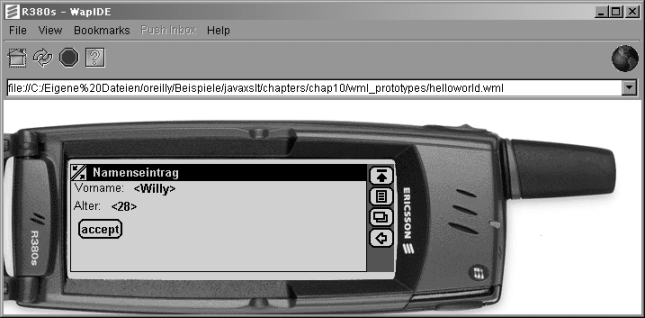
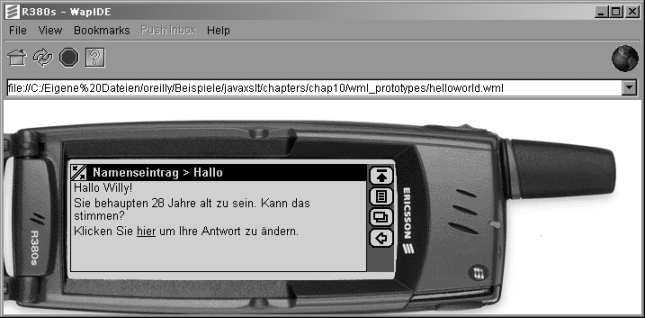
Figures: Mobile phone simulator
The card displays values entered on the first card. This device ignores tag <em> when displaying age. Here is an excerpt:
Hallo $(vorname:e)!This shows WML variables. The optional :e at the end of a variable name requests URL escaping before display, useful for spaces or characters such as < that can cause WML problems.
WML hyperlinks resemble HTML:
<p>Klicken Sie <a href="#home">hier</a>, umWML’s greatest difficulty is device diversity. The next figure shows the same cards on a smaller phone display.
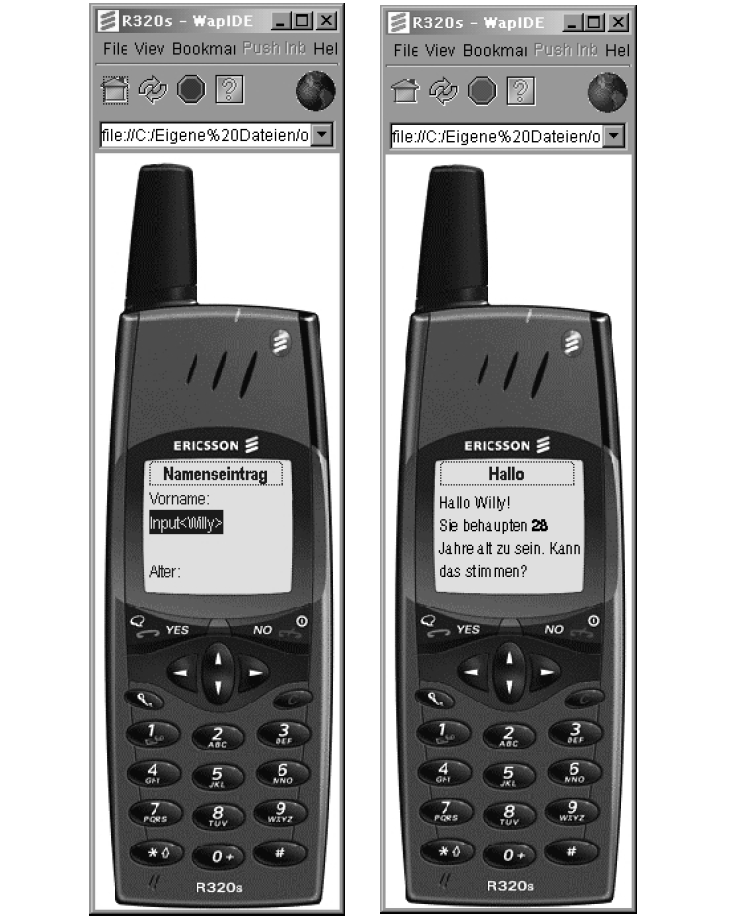
Figure: Another mobile phone simulator
The first card requires scrolling. On the second, the emphasis tag (<em>) affects the age, unlike the first browser in figure Mobile phone simulator. Manufacturers should gradually implement the full specification, but button and <input> field rendering remains uncertain. Often <do> elements map to physical keys instead of appearing on screen.
WMLScript and WBMP
Low bandwidth makes scripting essential on mobile devices. WAP defines WMLScript, tightly integrated with WML and syntactically close to JavaScript. Client-side validation and simple processing reduce server requests substantially.
Wireless Bitmap (WBMP) is a simple small-device image format. Its black-and-white images can be created with freely available tools.
See Learning WML & WMLScript for a comprehensive introduction.
Servlets and WML
Servlets recognize client types and select different XSLT stylesheets for ordinary browsers, advanced PDAs and basic phones, making them important for mobile service developers.
Identifying the client
Recognizing the client is the servlet’s main task. It uses two HTTP headers: User-Agent and Accept. The example shows the Ericsson R520m simulator’s headers.
Example: HTTP header example
GET / HTTP/1.1
Host: 25.12.44.22
Accept: application/vnd.wap.wmlc, application/vnd.wap.wbxml,
application/vnd.wap.wmlscriptc, */*, text/vnd.wap.wml, application/xml, text/xml, text/vnd.wap.wmlscript
User-Agent: EricssonR520/R1A
Accept-Charset: *
Except for the first line, each line is a Name:Wert pair. Header Accept lists displayable MIME types. Search for string text/vnd.wap.wml to check WML support. This example could thus represent a mobile device.
Warning:
Some browsers also display text/vnd.wap.wml. Header Accept is therefore insufficient to identify the client.
Header User-Agent uniquely identifies the device, but manufacturers follow standards inconsistently. The table lists user agents from phone simulators.
Table: User-agent examples
Simulator type | User-Agent |
|---|---|
Ericsson R320s | EricssonR320/R1A |
Ericsson R380s | R380 2.1 WAP1.1 |
Ericsson R520m | EricssonR520/R1A |
Motorola | Motorola VoxGateway/2.0 |
Nokia | Nokia-WAP-Toolkit/2.1 |
Openwave | OWG1 UP/4.1.20a UP.Browser/4.1.20a-XXXX UP.Link/4.1.HTTP-DIRECT |
Usually manufacturer precedes model, except for Ericsson R380s. As noted in Browser detection, almost every web browser’s User-Agent starts with “Mozilla”, helping distinguish browsers from mobile devices.
Accessing these headers in a servlet is simple:
protected void doGet(HttpServletRequest req, HttpServletResponse res)
     throws IOException, ServletException {
  String userAgent = req.getHeader("User-Agent");
  String accept = req.getHeader("Accept");

  if (userAgent != null) {
  ...
A complete example appears in “Cinema information”.
Setting the content type
After identifying a browser or mobile client, send a response. The table lists three common content types.
Table: MIME content types
MIME type | Extension | Description |
|---|---|---|
| .wml | WML source |
| .wmls | WMLScript source |
| .wmlc | Mobile bitmaps |
Before sending WML, execute this servlet code:
public void doGet(HttpServletRequest req, HttpServletResponse res) ... {
  res.setContentType("text/vnd.wap.wml");
  // hole einen PrintWriter oder einen OutputStream und führe
  // die XSLT-Transformation durch...
That suffices for dynamic pages. For static resources such as WMLScript files or WBMP images, also update the deployment descriptor with entries such as:
Example: Deployment-descriptor MIME mappings
<mime-mapping>
    <extension>.wml</extension>
    <mime-type>text/vnd.wap.wml</mime-type>
</mime-mapping>
<mime-mapping>
    <extension>.wmls</extension>
    <mime-type>text/vnd.wap.wmlscript</mime-type>
</mime-mapping>
<mime-mapping>
    <extension>.wmlc</extension>
    <mime-type>image/vnd.wap.wbmp</mime-type>
</mime-mapping>
This tells the server which MIME type to use for each requested extension.
Cinema information
That brief introduction needs a detailed example to deepen the concepts.
Flowchart
Three WML decks with several cards let users choose a city, a cinema and its schedule. The flowchart shows the connections between screens.
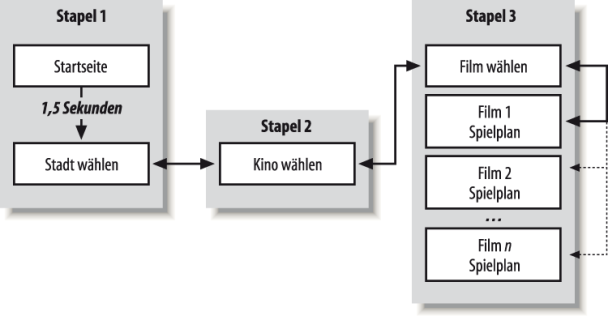
Figure: Flowchart
The first deck shows a splash screen for 1.5 seconds. A WML timer then automatically switches to a city-selection page.
The second deck has one card listing the city’s cinemas. Choosing one loads a third deck with one card per film. Users switch films without further server requests.
The servlet needs parameters to build decks and cards dynamically, passing them to XSLT to select XML data. The table lists each deck’s parameters, appearing in WML, servlet and stylesheet. Missing or invalid parameters send users back home.
Table: Required parameters
Deck | Parameters | Notes |
|---|---|---|
1 | | Lists all cities |
2 | | Lists a city’s cinemas |
3 | | Lists films in one cinema in a given city |
XML data
For easy updates by cinema owners, all pages derive from one server XML file. Its DTD follows.
Example: Cinema-information DTD
<!ELEMENT filme (filmdef+, stadt+)>
<!ELEMENT filmdef (kurzName, langName)>
<!ELEMENT stadt (name, kino+)>
<!ELEMENT name (#PCDATA)>
<!ELEMENT kurzName (#PCDATA)>
<!ELEMENT langName (#PCDATA)>
<!ELEMENT kino (name, film+)>
<!ELEMENT film (zeiten)>
<!ELEMENT zeiten (#PCDATA)>
<!ATTLIST stadt
id ID #REQUIRED
>
<!ATTLIST film
ref IDREF #REQUIRED
>
<!ATTLIST filmdef
id ID #REQUIRED
>
<!ATTLIST kino
id ID #REQUIRED
>
Note the difference between element <filmdef> and <film>. A <filmdef> defines a film’s short and long descriptions. Films often appear in multiple cinemas, so define a <filmdef> once and reference it throughout the document with a <film> element.
The next XML excerpt follows this DTD and supplies data displayed below.
Example: Cinema XML file
<?xml version="1.0" encoding="ISO-8859-1"?>
<?xml-stylesheet type="text/xsl" href="../xslt/wml/spielplan.xslt"?>
<filme>
    <!-- alle Filme -->
    <filmdef id="ringe1">
        <kurzName>Der Herr der Ringe 1</kurzName>
        <langName>Der Herr der Ringe 1: Die Gefährten</langName>
    </filmdef>
    <filmdef id="ringe2">
        <kurzName>Der Herr der Ringe 2</kurzName>
        <langName>Der Herr der Ringe 2: Die zwei Türme</langName>
    </filmdef>
    <filmdef id="ringe3">
        <kurzName>Der Herr der Ringe 3:</kurzName>
        <langName>Der Herr der Ringe 3: Die Wiederkehr des Königs</langName>
    </filmdef>
    <!-- ... weitere filmdef-Elemente -->
    <stadt id="ef">
        <name>Erfurt</name>
        <kino id="cinestar">
            <name>Cinestar</name>
            <film ref="ringe1">
                <zeiten>14:15, 17:45, 21:15</zeiten>
            </film>
            <film ref="ringe2">
                <zeiten>12:00, 15:30, 19:00</zeiten>
            </film>
            <film ref="ringe3">
                <zeiten>18:00, 21:30</zeiten>
            </film>
            <film ref="bond3">
                <zeiten>17:00, 20:00</zeiten>
            </film>
        </kino>
        <kino id="ufa">
            <name>UfA-Palast</name>
            <film ref="ringe1">
                <zeiten>17:00, 20:30</zeiten>
            </film>
            <film ref="ringe2">
                <zeiten>14:30, 18:00</zeiten>
            </film>
            <film ref="ringe3">
                <zeiten>19:00, 21:00</zeiten>
            </film>
        </kino>
        <!-- ... weitere kino-Elemente -->
    </stadt>
    <!-- ... weitere stadt-Elemente -->
</filme>
Nothing in XML restricts output to WML. Different stylesheets can produce XHTML or WML. WML is the main goal; element <kurzName> serves mobile devices and could be omitted for browsers alone.
WML prototypes and screenshots
Prototype XHTML or WML before writing XSLT. Static WML is easy to develop and test in a simulator; once it works, write the XML-to-WML stylesheet.
The first deck below has two cards, starting with a 1.5-second splash screen.
Example: Home-page WML
<?xml version="1.0" encoding="ISO-8859-1"?>
<!DOCTYPE wml PUBLIC "-//WAPFORUM//DTD WML 1.1//EN" "http://www.wapforum.org/DTD/wml_1.1.xml">
<wml>
<card ontimer="#home" title="KinoInfo" id="splash">
<timer value="15"/>
<p align="center"><big>Willkommen bei KinoInfo</big></p>
<p>Mmmm...Popcorn...</p>
<do type="accept">
<go href="#home"/>
</do>
</card>
<card newcontext="true" title="Home" id="home">
<p align="center">Wählen Sie eine Stadt:
<select multiple="false" name="stadt">
<option value="EF">Erfurt</option>
<option value="WE">Weimar</option>
<option value="IL">Ilmenau</option>
</select>
</p>
<p><em><a href="movieguide?aktion=kinos&stadt=$(stadt)">Kinos anzeigen...</a></em></p>
</card>
</wml>Attribute ontimer on the first card sets the URL loaded when element <timer> expires. Its value 15 is in tenths of seconds. Element <do> lets users press a button instead of waiting. Like XHTML, element <p> represents a paragraph starting on a new line.
The next card has a <select> element for choosing a city. The choice goes into variable stadt and can be sent to the server with element <a>:
<a href="movieguide?aktion=kinos&stadt=$(stadt)">Kinos anzeigen...</a>This is the final application URL. During prototyping, prefer:
<a href="kinos.wml">Kinos anzeigen...</a>Linking static WML files allows navigation before any servlet exists. The figure shows the first two pages in a simulator.
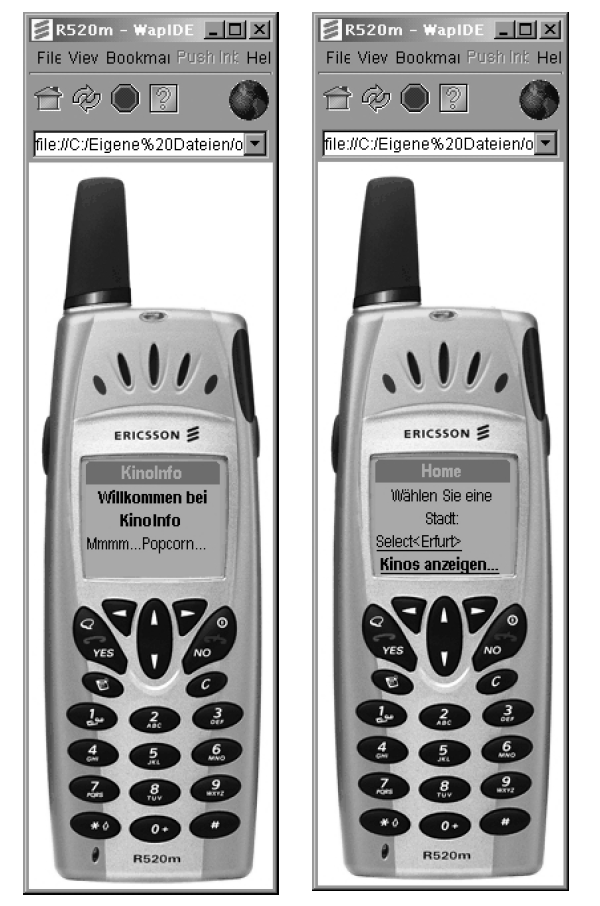
Figure: Our home page in a phone simulator
The left splash screen becomes the right page after 1.5 seconds. This phone uses up/down cursor keys for navigation and key YES to select.
The next WML page lists city cinemas as hyperlinks. Element <select> was another option, but hyperlinks and <br/> tags expose the entire list, requiring scrolling on small screens.
Example: Cinema-list WML
<?xml version="1.0" encoding="ISO-8859-1"?>
<!DOCTYPE wml PUBLIC "-//WAPFORUM//DTD WML 1.1//EN" "http://www.wapforum.org/DTD/wml_1.1.xml">
<wml>
<card title="Kinos" id="kinos">
<p><big>Erfurt</big></p>
<p>Wählen Sie ein Kino:</p>
<p><a href="movieguide?aktion=spielplan&stadt=ef&kino=cinestar">Cinestar</a>
<br/>
<a href="movieguide?aktion=spielplan&stadt=ef&kino=ufa">UfA-Palast</a>
<br/>
<a href="movieguide?aktion=spielplan&stadt=ef&kino=citykino">CityKino</a>
<br/>
</p>
<p><em><a href="movieguide">Stadt wechseln...</a></em></p>
</card>
</wml>The left image shows WML in another simulator; the right shows XHTML of the same data in a browser. One servlet and XML file generated both, using different stylesheets.
|
|
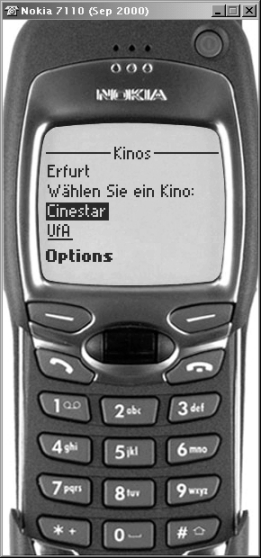
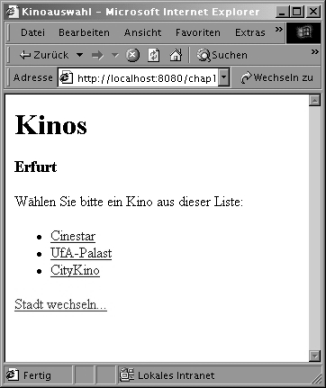
Figures: Cinema list
The last deck has several cards, one per film.
Example: Screening WML file
<?xml version="1.0" encoding="ISO-8859-1"?>
<!DOCTYPE wml PUBLIC "-//WAPFORUM//DTD WML 1.1//EN" "http://www.wapforum.org/DTD/wml_1.1.xml">
<wml>
<template>
<do name="common_prev" label="Zurück" type="prev">
<prev/>
</do>
</template>
<card title="Filme" id="filme">
<do name="common_prev" type="prev">
  <noop/>
</do>
<p><big>Cinestar</big></p>
<p>Wählen Sie einen Film:</p>
<p>
<a href="#ringe1">Der Herr der Ringe 1</a>
<br/>
<a href="#ringe2">Der Herr der Ringe 2</a>
<br/>
<a href="#ringe3">Der Herr der Ringe 3</a>
<br/>
</p>
<p><em><a href="movieguide?aktion=kinos&stadt=ef">Kino wechseln...</a></em></p>
</card>
<card title="Spielplan" id="ringe1">
<p><em>Der Herr der Ringe 1: Die Gefährten</em></p>
<p>14:15, 17:45, 21:15</p>
</card>
<card title="Spielplan" id="ringe2">
<p><em>Der Herr der Ringe 2: Die zwei Türme</em></p>
<p>12:00, 15:30, 19:00</p>
</card>
<card title="Spielplan" id="ringe3">
<p><em>Der Herr der Ringe 3: Die Wiederkehr des Königs</em></p>
<p>18:00, 21:30</p>
</card>
</wml>This WML file defines reusable markup as a <template> for all cards and decks. This particular template defines the back button (Back), displayed on every schedule card to return to the film list.
It should not appear on the film list, so it is hidden:
<do name="common_prev" type="prev">
<noop/>
</do>Element <noop/> means “no operation” and removes element <do> defined in template common_prev. An element in a card takes precedence over a same-named template element. Cards can thus change template behavior or suppress it with <noop/>.
The screenshot shows these cards on a phone. As intended, the Back button is absent from the film list but appears on card Spielplan.
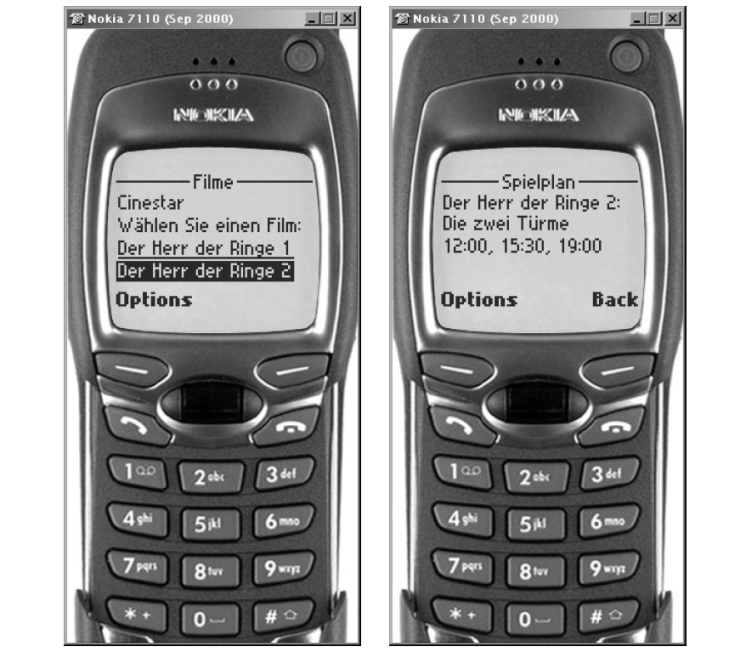
Figure: WML schedule output
The final screenshot shows all information in one table on a large browser display. A different stylesheet converts XML to XHTML.
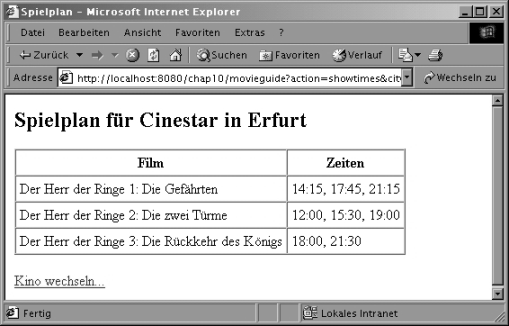
Figure: XHTML schedule output
Although WML defines element <table>, many devices omit support because tables rarely fit a phone display.
Servlet implementation
One servlet implements these functions:
Parse request parameters and choose the next page
Identify the client
Run the appropriate XSLT transformation
Example: MovieServlet.java
package chap10;

import java.io.*;
import javax.servlet.*;
import javax.servlet.http.*;
import javax.xml.transform.*;
import javax.xml.transform.stream.*;

/**
 * Ein Servlet, das die Spielpläne von Kinos mehrerer Städte darstellt.
 * Unterstützt normale Webbrowser und PDAs oder Handys mit WAP-Unterstützung.
 */
public class MovieServlet extends HttpServlet {

  // unterstützt zwei Typen von Clients (kann natürlich erweitert werden)
  private static final int XHTML_CLIENT_TYPE = 1;
  private static final int WML_CLIENT_TYPE = 2;

  // diese Webanwendung besitzt drei Seiten
  private static final int HOME_PAGE = 100;
  private static final int KINOS_PAGE = 101;
  private static final int SPIELPLAN_PAGE = 102;

  /**
   * Dieses Servlet unterstützt GET- und POST-Anfragen.
   */
  public void doGet(HttpServletRequest req, HttpServletResponse res)
      throws IOException, ServletException {
    doPost(req, res);
  }

  public void doPost(HttpServletRequest req, HttpServletResponse res)
      throws IOException, ServletException {
    try {
      String aktion = req.getParameter("aktion");
      String stadt = req.getParameter("stadt");
      String kino = req.getParameter("kino");

      // voreingestellt ist die Homepage
      int pageToShow = HOME_PAGE;

      if ("kinos".equals(aktion) && stadt != null) {
        // stadt wird als Parameter der Kinoliste benötigt
        pageToShow = KINOS_PAGE;
      } else if ("spielplan".equals(aktion) && stadt != null
          && kino != null) {
        // stadt und kino werden als Parameter für spielplan benötigt
        pageToShow = SPIELPLAN_PAGE;
      }

      // setze den Content-Type der Antwort
      int clientType = determineClientType(req);
      switch (clientType) {
      case XHTML_CLIENT_TYPE:
        res.setContentType("text/html");
        break;
      case WML_CLIENT_TYPE:
        res.setContentType("text/vnd.wap.wml");
        break;
      default:
        res.sendError(HttpServletResponse.SC_INTERNAL_SERVER_ERROR);
        return;
      }

      File xsltFile = locateStylesheet(req, clientType, pageToShow);

      // bereite die Transformation mit JAXP vor
      TransformerFactory transFact = TransformerFactory.newInstance( );
      Transformer trans = transFact.newTransformer(
        new StreamSource(xsltFile));

      // übergib die Parameter an das XSLT-Stylesheet
      if (stadt != null) {
        trans.setParameter("stadt_id", stadt);
      }
      if (kino != null) {
        trans.setParameter("kino_id", kino);
      }

      // alle Seiten, ob WML oder XHTML, benutzen dieselbe XML-Datei
      InputStream xmlIn = getServletContext( ).getResourceAsStream(
        "/WEB-INF/xml/movies.xml");

      // führe die Transformation durch
      trans.transform(new StreamSource(xmlIn),
        new StreamResult(res.getOutputStream( )));
    } catch (TransformerException te) {
        throw new ServletException(te);
    }
  }

  /**
   * @param clientType eine der in dieser Klasse definierten Konstanten,
   * also WML_CLIENT_TYPE oder XHTML_CLIENT_TYPE.
   * @param pageToShow eine der _PAGE-Konstanten dieser Klasse.
   * @return den Namen des passenden XSLT-Stylesheets.
   */
  private File locateStylesheet(HttpServletRequest req,
    int clientType, int pageToShow) {
    String xsltDir = null;
    switch (clientType) {
    case WML_CLIENT_TYPE:
      xsltDir = "wml";
      break;
    case XHTML_CLIENT_TYPE:
      xsltDir = "xhtml";
      break;
    default:
      throw new IllegalArgumentException("Ungültiger Clienttyp: "
        + clientType);
    }

    String xsltName = null;
    switch (pageToShow) {
    case HOME_PAGE:
      xsltName = "home.xslt";
      break;
    case KINOS_PAGE:
      xsltName = "kinos.xslt";
      break;
    case SPIELPLAN_PAGE:
      xsltName = "spielplan.xslt";
      break;
    default:
      throw new IllegalArgumentException("Ungültige darzustellende Seite: "
        + pageToShow);
    }

    // erzeuge einen plattformabhängigen Pfad
    String fullPath = getServletContext( ).getRealPath(
      "/WEB-INF/xslt/" + xsltDir + "/" + xsltName);
    return new File(fullPath);
  }

  /**
   * Ermittelt den Clienttyp.
   *
   * @return XHTML_CLIENT_TYPE oder WML_CLIENT_TYPE.
   */
  private int determineClientType(HttpServletRequest req) {
    // prüfe auf normale Webbrowser, die behaupten,
    // Mozilla-kompatibel zu sein
    String userAgent = req.getHeader("User-Agent");
    if (userAgent != null
        && userAgent.toLowerCase( ).startsWith("mozilla")) {
      return XHTML_CLIENT_TYPE;
    }

    // akzeptiert der Client wml, handelt es sich um ein WAP-kompatibles Gerät
    String accept = req.getHeader("Accept");
    if (accept != null && accept.indexOf("text/vnd.wap.wml") > -1) {
      return WML_CLIENT_TYPE;
    }

    // verwende ansonsten XHTML
    return XHTML_CLIENT_TYPE;
  }
}
The servlet identifies clients using HTTP headers User-Agent and Accept. Method determineClientType( ) first checks User-Agent for Mozilla-compatible browsers such as Microsoft Internet Explorer and Netscape Navigator. Otherwise it searches header Accept for string text/vnd.wap.wml. If both tests fail, XHTML is used because the device does not accept WML.
Once identified, set the response’s Content-Type to the appropriate MIME type:
switch (clientType) {
case XHTML_CLIENT_TYPE:
  res.setContentType("text/html");
  break;
case WML_CLIENT_TYPE:
  res.setContentType("text/vnd.wap.wml");
  break;
default:
  res.sendError(HttpServletResponse.SC_INTERNAL_SERVER_ERROR);
  return;
}
The default branch indicates a servlet bug, so it raises an internal server error. Helper method locateStylesheet( ) selects the stylesheet:
File xsltFile = locateStylesheet(req, clientType, pageToShow);Two stylesheet groups reside in directories wml and xhtml. As before, ServletContext locates them portably:
String fullPath = getServletContext( ).getRealPath("/WEB-INF/xslt/" + xsltDir + "/" + xsltName);Finally, JAXP performs the XSLT transformation.
XSLT stylesheets
The application has six stylesheets. Only the three WML generators appear here; the XHTML versions can be downloaded with the book’s examples. The first generates the home-page deck.
Example: Home-page XSLT
<?xml version="1.0" encoding="ISO-8859-1"?>
<!--
***********************************************************************
** Erzeugt die Homepage für Geräte mit WML-Unterstützung.
******************************************************************** -->
<xsl:stylesheet version="1.0" xmlns:xsl="http://www.w3.org/1999/XSL/Transform">
<xsl:output method="xml" version="1.0" encoding="ISO-8859-1" indent="yes" doctype-public="-//WAPFORUM//DTD WML 1.1//EN" doctype-system="http://www.wapforum.org/DTD/wml_1.1.xml"/>
<!--
*********************************************************************
** Das Root-Template erzeugt den Stapel und die Home-Karte.
****************************************************************** -->
<xsl:template match="/filme">
<wml>
<!-- rufe das Template zur Erzeugung des Anfangsbildschirms auf -->
<xsl:call-template name="createSplashCard"/>
<card id="home" title="Home" newcontext="true">
<p align="center">Wählen Sie bitte Ihre Stadt aus: <select name="stadt" multiple="false"><xsl:apply-templates select="stadt"/></select></p>
<p><em><a href="movieguide?aktion=kinos&stadt=$(stadt)">Zeige Kinos...</a></em></p>
</card>
</wml>
</xsl:template>
<!--
*********************************************************************
** Erzeuge ein <option>-Element für eine Stadt
****************************************************************** -->
<xsl:template match="stadt">
<option value="{@id}">
<xsl:value-of select="name"/>
</option>
</xsl:template>
<!--
*********************************************************************
** Erzeuge den Anfangsbildschirm.
****************************************************************** -->
<xsl:template name="createSplashCard">
<card id="splash" title="KinoInfo" ontimer="#home">
<timer value="15"/>
<p align="center"><big>Willkommen bei KinoInfo</big></p>
<p>Mmmm...Popcorn...</p>
<do type="accept">
<go href="#home"/>
</do>
</card>
</xsl:template>
</xsl:stylesheet>This simple stylesheet’s key element is <xsl:output>, defining XML output and the WML DTD. WML 1.1 maximizes phone compatibility despite newer versions being available.
The only slightly complex line is:
<a href="movieguide?aktion=kinos&stadt=$(stadt)">Zeige Kinos...</a>It links to the next deck, passing parameters for aktion and stadt. Write ampersand (&) as & so the XML parser handles it correctly. Syntax $(stadt) resembles an attribute value template but is a WML variable. XSLT AVT syntax is {$var}. Activating the link passes the city to the servlet. XHTML would need a form or script.
The next stylesheet lists a city’s cinemas.
Example: Film-list XSLT
<?xml version="1.0" encoding="ISO-8859-1"?>
<!--
***********************************************************************
** Erzeugt eine Liste von Kinos für Geräte mit WML-Unterstützung.
******************************************************************** -->
<xsl:stylesheet version="1.0" xmlns:xsl="http://www.w3.org/1999/XSL/Transform">
<xsl:param name="stadt_id" select="'ef'"/>
<xsl:output method="xml" version="1.0" encoding="ISO-8859-1" indent="yes" doctype-public="-//WAPFORUM//DTD WML 1.1//EN" doctype-system="http://www.wapforum.org/DTD/wml_1.1.xml"/>
<!--
*********************************************************************
** Das Wurzel-Template erzeugt den Stapel und die Karte kinos.
****************************************************************** -->
<xsl:template match="/filme">
<wml>
<card id="kinos" title="Kinos">
<!-- wähle die passende Stadt aus -->
<xsl:apply-templates select="stadt[@id=$stadt_id]"/>
<p><em><a href="movieguide">Stadt wechseln...</a></em></p>
</card>
</wml>
</xsl:template>
<!--
*********************************************************************
** Zeige die Kinos einer Stadt.
****************************************************************** -->
<xsl:template match="stadt">
<p><big><xsl:value-of select="name"/></big></p>
<p>Wählen Sie ein Kino:</p>
<p>
<!-- zeige die Liste der Kinos dieser Stadt -->
<xsl:apply-templates select="kino"/>
</p>
</xsl:template>
<!--
*********************************************************************
** Erzeuge einen Link für ein bestimmtes Kino.
****************************************************************** -->
<xsl:template match="kino">
<a href="movieguide?aktion=spielplan&stadt={$stadt_id}&kino={@id}">
<xsl:value-of select="name"/>
</a>
<br/>
</xsl:template>
</xsl:stylesheet>Unlike the first, it needs a city parameter:
<xsl:param name="stadt_id" select="'ef'"/>During testing it defaults to ef; the real servlet should supply it. Since one XML file contains all cities, this selects one city’s data. The first <xsl:apply-templates> uses a predicate to select the city whose attribute id matches parameter stadt_id:
<xsl:apply-templates select="stadt[@id=$stadt_id]"/>The rest outputs its cinemas. The last stylesheet lists one cinema’s schedule and is most complex because it creates multiple cards.
<?xml version="1.0" encoding="ISO-8859-1"?>
<!--
***********************************************************************
** Erzeugt ein Kinoprogramm für Geräte mit WML-Unterstützung.
******************************************************************** -->
<xsl:stylesheet version="1.0" xmlns:xsl="http://www.w3.org/1999/XSL/Transform">
<xsl:param name="stadt_id" select="'ef'"/>
<xsl:param name="kino_id" select="'cinestar'"/>
<xsl:output method="xml" version="1.0" encoding="ISO-8859-1" indent="yes" doctype-public="-//WAPFORUM//DTD WML 1.1//EN" doctype-system="http://www.wapforum.org/DTD/wml_1.1.xml"/>
<!--
*********************************************************************
** Das Wurzel-Template erzeugt den Stapel und die Karten für die Filme.
****************************************************************** -->
<xsl:template match="/filme">
<wml>
<!-- erzeuge das WML-Template -->
<template>
<do type="prev" label="Zurück" name="common_prev">
<prev/>
</do>
</template>
<card id="filme" title="Filme">
<!-- verstecke das Template in dieser Karte -->
<do type="prev" name="common_prev">
<noop/>
</do>
<!-- wähle das Kino mit passenden Stylesheet-Parametern für stadt_id und kino_id -->
<xsl:apply-templates select="stadt[@id=$stadt_id]/kino[@id=$kino_id]"/>
</card>
<!-- erzeuge mehrere Karten, eine pro Film -->
<xsl:apply-templates select="stadt[@id=$stadt_id]/kino[@id=$kino_id]/film" mode="createCard"/>
</wml>
</xsl:template>
<!--
*********************************************************************
** Zeige weitere Informationen über ein Kino.
****************************************************************** -->
<xsl:template match="kino">
<p><big><xsl:value-of select="name"/></big></p>
<p>Wählen Sie einen Film:</p>
<p><xsl:apply-templates select="film"/></p>
<p><em><a href="movieguide?aktion=kinos&stadt={$stadt_id}">Kino wechseln...</a></em></p>
</xsl:template>
<!--
*********************************************************************
** Zeige weitere Informationen über einen Film in der Hauptkarte.
****************************************************************** -->
<xsl:template match="film">
<xsl:variable name="curId" select="@ref"/>
<!-- der Text des Hyperlinks ist der kurzName aus der <filmdef> -->
<a href="#{$curId}">
<xsl:value-of select="/filme/filmdef[@id=$curId]/kurzName"/>
</a>
<br/>
</xsl:template>
<!--
*********************************************************************
** Erzeuge eine Karte mit dem Spielplan für einen Film.
****************************************************************** -->
<xsl:template match="film" mode="createCard">
<xsl:variable name="curId" select="@ref"/>
<card id="{$curId}" title="Spielplan">
<p><em><xsl:value-of select="/filme/filmdef[@id=$curId]/langName"/></em></p>
<p><xsl:value-of select="zeiten"/></p>
</card>
</xsl:template>
</xsl:stylesheet>This deck creates a template defining the Back button on every card except the first. The template precedes that first card, which overrides it with element <noop/>.
Parameters stadt_id and kino_id select the city and cinema with this <xsl:apply-templates> element:
<xsl:apply-templates select="stadt[@id=$stadt_id]/kino[@id=$kino_id]"/>To recap the familiar syntax:
Select all
<stadt>children of element<filme>.Use predicate
[@id=$stadt_id]to select the correct city.Select all
<kino>children of<stadt>.Use predicate
[@id=$kino_id]to narrow this to one<kino>.
After creating the Home card, use <xsl:apply-templates> to create one card per film:
<xsl:apply-templates select="stadt[@id=$stadt_id]/kino[@id=$kino_id]/film" mode="createCard"/>This uses a template mode, as discussed in Parameters and variables. The next template is instantiated because its mode matches:
<xsl:template match="film" mode="createCard">
   ...erzeuge eine Karte mit dem Spielplan für einen Film
</xsl:template>
Copyright © 2002 O'Reilly Verlag GmbH & Co. KG
You may print the online version for your private use.
Otherwise, this chapter from “Java und XSLT” is subject to the same conditions as the bound edition. The work, including all its parts, is protected by copyright. All rights reserved, including reproduction, translation, microfilming, and storage and processing in electronic systems.
O’Reilly Verlag GmbH & Co. KG, Balthasarstraße 81, 50670 Köln, kommentar(at)oreilly.de