

XML technologies / XSLT / XSLT development environments / Altova XMLSpy 2008
(Excerpt from “XSLT 2.0 & XPath 2.0” by Frank Bongers)
The new XMLSpy 2008 (now Altova XMLSpy 2014, as of July 2014) succeeds XMLSpy 2007, which already supported XSLT 2.0 and XQuery through Altova’s processor. Version 2008 adds schema-aware processing as standard. The new XSLT processor in the previously introduced suite AltovaXML is fully schema-aware. The package still includes Stylesheet Designer, also usable separately for drag-and-drop stylesheet creation.
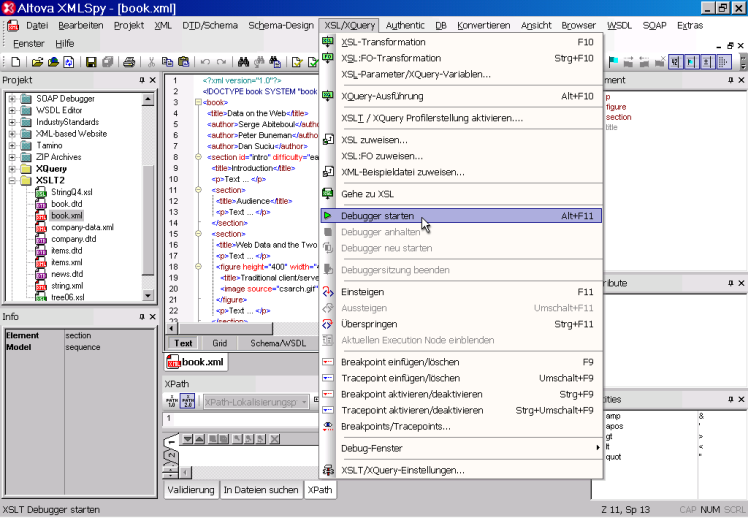
Figure: XMLSpy 2008 – workspace
Altova offers two editions: Professional, covering XML, XSLT and XML Schema development, and Enterprise, adding web services through WSDL, database support, XSL-FO integration and XSLT/XQuery profilers.
Both integrate third-party products, including Apache FOP and connections to .NET development tools or Eclipse.
Features
The interface is highly configurable, especially its menus. A reasonably large screen is advisable: many modules can reduce clarity, though tooltips explain the icons. Modules can dock anywhere or float in small windows. Unavailable commands and icons are grayed out.
Project-based organization
XMLSpy organizes work into named projects with related information. Templates simplify document creation, supplying declarations, namespaces, root elements and references to a DTD or schema. Templates can be modified, extended or added to the pool.
Each project has a virtual folder grouping files by type: XML, XSL, HTML, CSS, DTD/schema and entities. Files need not share a disk directory. Project Properties stores individual transformation and validation settings.
Editing documents
Several project documents can be open simultaneously, each with up to five views according to type and editing method. Every view provides unrestricted undo and redo.
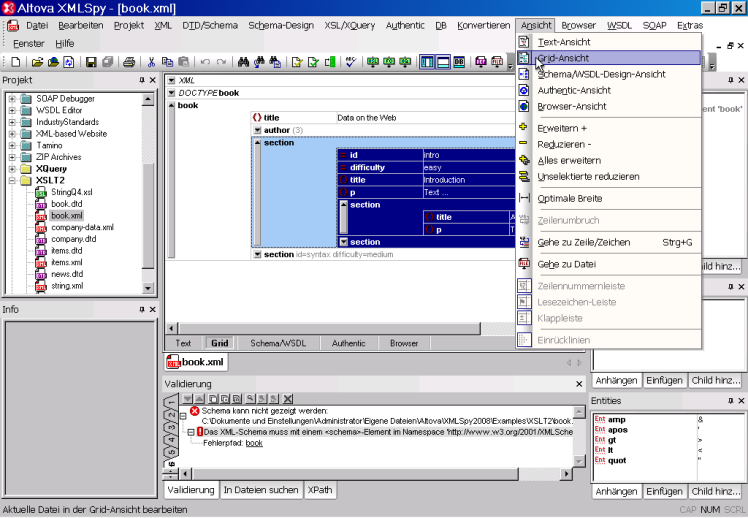
Figure: XMLSpy 2008 – grid workspace
Source view (Text view) offers syntax highlighting, completion, contextual syntax help and more. Alternatively, Grid view edits values with collapsible containers. When a DTD or schema exists, inserting elements or attributes offers a dropdown of permitted choices. Schemas have a schema view; Authentic View applies a stylesheet for browser display, enabling result-oriented editing.
Debugging stylesheets
Start stepwise stylesheet debugging through XSL | Start Debugger or Alt + F11. Source, stylesheet and result appear simultaneously; additional windows show the call stack and current context.
Unusually, built-in default templates are shown as explicit debugging steps; preferences can disable this. Advance using the menu or F11. Set a breakpoint at the cursor with F9 or the menu. A separate breakpoint list allows disabling or deleting them.
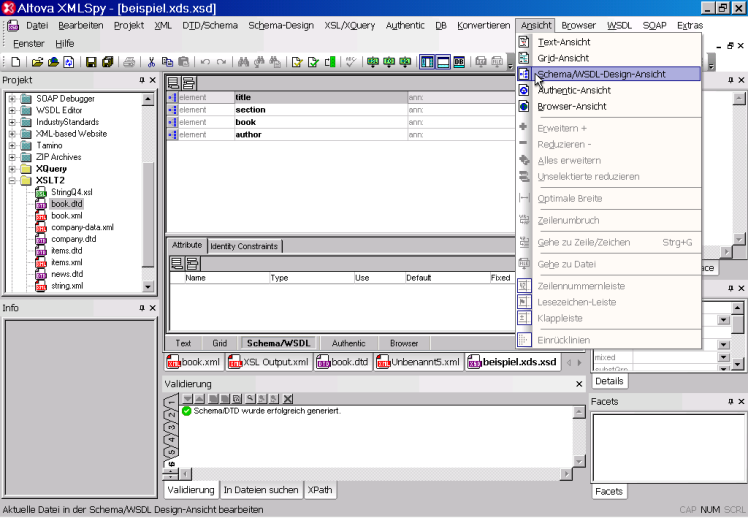
Figure: XMLSpy 2008 – schema view
The Visual Studio .NET edition integrates into Microsoft Visual Studio .NET, making every XMLSpy feature directly accessible there.
XSLT 2.0/XPath 2.0 support
XMLSpy 2008 fully supports XSLT 2.0, XPath 2.0 and XQuery 1.0, including schema-aware processing through Altova’s integrated processor. External processors are still possible; version 9.0.0.1 of Saxon is currently the leading choice.
Note
Debugging always uses Altova’s built-in processor. Configure an external processor through menu Extras | Optionen | XSL. Enter the command line for Saxon’s Java class, net.sf.saxon.transform. JDK 1.4 must be installed and Saxon classes (saxon9.jar) correctly entered in Java’s class path.
XMLSpy expects three parameters (%1, %2, %3) for source, result and stylesheet. Only stylesheet parameter %3 is optional. Use result extension .xml rather than the default .html unless HTML is intended; otherwise HTML view shows only tag content.
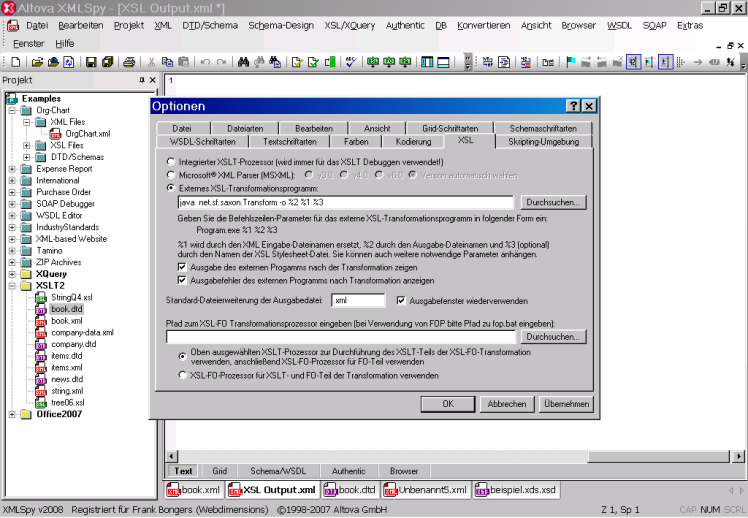
Figure: XMLSpy 2008 – external processor configuration
Problem and solution
Saxon does not expect an output filename by default. Integration therefore needs this small workaround:
java net.sf.saxon.Transform -o %2%1%3
Saxon option -o marks required value %2 as the output filename. XMLSpy will not let you omit parameter %2. The result then appears in the output window as expected.
Assessment
XMLSpy 2008 is a good choice for comprehensive, extensible XML/XSLT work. Its substantial learning curve rewards users with a structured environment covering all tasks. The detailed German and English online manual corresponds to almost 900 printed pages.
Web service or SOAP developers need Enterprise Edition; otherwise Professional Edition is suitable.
Product information
Download/manufacturer contact: www.altova.com
Developer: Altova GmbH, Vienna
Platform: Microsoft Windows (2000, XP, Vista)
XSLT processors: Altova, MSXML
External processors: global option, without debugging
Languages: German/English
Manual/help: English, very detailed
Status: commercial; evaluation versions available
Copyright © Galileo Press, Bonn 2008
You may print the online version for your private use.
Otherwise, this chapter from “XSLT 2.0 & XPath 2.0 ― Das umfassende Handbuch” is subject to the same conditions as the bound edition. The work, including all its parts, is protected by copyright. All rights reserved, including reproduction, translation, microfilming, and storage and processing in electronic systems.
Galileo Press, Rheinwerkallee 4, 53227 Bonn