

XML technologies / XSLT / Java and XSLT / Discussion forum / Generating dynamic XML code
(Excerpt from “Java and XSLT” by Eric M. Burke)
We now have specifications for the web pages, their XML data and the transforming XSLT stylesheets. Next comes the actual data source. During design, XML was treated as static files, greatly simplifying stylesheet development: authors could work quickly without depending on the database or its access mechanisms.
Static XML files cannot meet a real system’s needs. We want to extract relational data and immediately convert it to XML when a page is requested. This makes the application live and database changes immediately visible. For the XSLT developer this step is irrelevant: transformations work independently of whether XML comes from files, a relational database or another source.
Domain classes
A domain class is a Java class describing a concept in a particular problem domain: it represents the problem being solved. Here several Java classes describe the discussion forum and buffer XML data from the underlying relational database. They represent forum data and may also contain business logic.
The following UML diagram shows classes in package com.oreilly.forum.domain. They contain neither database access code nor XML handling. They are simply data structures with basic functions, allowing the relational database to be replaced by another source without changing XML generation code.
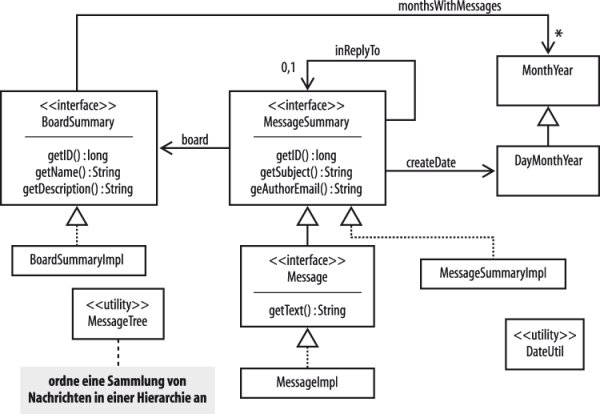
Figure: Important domain classes
BoardSummary, MessageSummary and Message are interfaces describing the forum’s capabilities. Each has an Impl class providing a basic implementation with get and set methods not shown here. The classes MonthYear, DayMonthYear and DateUtil represent and conveniently manipulate dates. Finally, class MessageTree sorts a collection of messages by replies and creation dates and organizes it as a hierarchical tree.
Interface BoardSummary in the following example contains data later used to generate the forum home page.
Example: BoardSummary.java
package com.oreilly.forum.domain;

import java.util.Iterator;

/**
 * Informationen über das Nachrichten-Board.
 */
public interface BoardSummary {
  /**
   * @return eine eindeutige ID des Boards.
   */
  long getID( );

  /**
   * @return einen Namen für dieses Board.
   */
  String getName( );

  /**
   * @return eine Beschreibung dieses Boards.
   */
  String getDescription( );

  /**
   * @return einen Iterator von Objekten des Typs <code>MonthYear</code>.
   */
  Iterator getMonthsWithMessages( );
}
Interface BoardSummary is designed to be read-only. This matters because a programmer cannot accidentally change a database-created instance by calling a set method: such changes would not be saved to the database. Technically a user could obtain an iterator over months containing messages and call remove( ) on that iterator. Making interface instances truly immutable is possible, but would be excessive here.
An early design decision assigned each domain object a unique long identifier, greatly simplifying SQL queries. (The code generating unique IDs is in class DBUtil in example DBUtil.java.) This also lets objects be referenced in XHTML hyperlinks, since identifiers can be converted to string representations and back.
The next interface summarizes a single message.
Example: MessageSummary.java
package com.oreilly.forum.domain;

import java.util.*;
/**
 * Informationen über eine Nachricht, ausgenommen dem Nachrichtentext.
 */
public interface MessageSummary extends Comparable {

  /**
   * @return die ID der Nachricht, auf die geantwortet wurde, oder
   * -1, wenn dies keine Antwort ist.
   */
  long getInReplyTo( );

  /**
   * @return die eindeutige ID der Nachricht.
   */
  long getID( );

  /**
   * @return wann diese Nachricht erzeugt wurde.
   */
  DayMonthYear getCreateDate( );

  /**
   * @return das Board, zu dem diese Nachricht gehört.
   */
  BoardSummary getBoard( );

  /**
   * @return der Betreff der Nachricht.
   */
  String getSubject( );

  /**
   * @return die E-Mail-Adresse des Autors (max. 80 Zeichen).
   */
  String getAuthorEmail( );
}
The only item missing from interface MessageSummary is the message text itself. Interface Message extends MessageSummary and adds method getText( ). It appears in the following example.
Example: Message.java
package com.oreilly.forum.domain;

/**
 * Repräsentiert eine Nachricht einschließlich des Nachrichtentexts.
 */
public interface Message extends MessageSummary {
  /**
   * @return der Text der Nachricht.
   */
  String getText( );
}
Putting message text in a separate interface assumes a substantial performance gain. Consider a page showing all messages in a month hierarchically. It could contain hundreds of messages while displaying only information from interface MessageSummary. Each text may contain thousands of words, retrieved only when that message is actually displayed. Then an instance of the class implementing Message can be created.
Such design decisions cannot be made in isolation. However cleanly XSLT and XML separate presentation and data, heavily used pages should influence data structure design. Avoid premature optimization at the expense of clarity. Here, potentially many very long messages justified a separate interface for Message.
Our three reference implementations are classes MessageImpl, Message-SummaryImpl and BoardSummaryImpl. The JDBC data abstraction layer (see “Data abstraction layer”) creates and returns new instances of classes implementing these interfaces. If the data source changes later, these classes can be reused or new implementations written.
The last class in this package, MessageTree, appears below.
Example: MessageTree.java
package com.oreilly.forum.domain;

import java.util.*;

/**
 * Arrangiert eine Sammlung von MessageSummary-Objekten in einer Baumstruktur.
 */
public class MessageTree {
  private List topLevelMsgs = new ArrayList( );

  // bilde IDs auf MessageSummary-Objekte ab
  private Map idToMsgMap = new HashMap( );

  // bilde Antwort-IDs auf Listen von MessageSummary-Objekten ab
  private Map replyIDToMsgListMap = new HashMap( );

  /**
   * Erzeuge einen neuen Nachrichtenbaum aus einem Iterator von MessageSummary-
   * Objekten.
   */
  public MessageTree(Iterator messages) {
    while (messages.hasNext( )) {
      // Speichere Nachrichten in einer Map, für einen schnellen ID-Zugriff
      MessageSummary curMsg = (MessageSummary) messages.next( );
      this.idToMsgMap.put(new Long(curMsg.getID( )), curMsg);

      // erzeuge eine invertierte Map, die Antwort-IDs auf
      // Listen von Nachrichten abbildet
      Long curReplyID = new Long(curMsg.getInReplyTo( ));
      List replyToList =
          (List) this.replyIDToMsgListMap.get(curReplyID);
      if (replyToList == null) {
        replyToList = new ArrayList( );
        this.replyIDToMsgListMap.put(curReplyID, replyToList);
      }
      replyToList.add(curMsg);
    }

    // Erzeuge die Liste von Top-Level-Nachrichten, die
    // eine der folgenden Kriterien erfüllen müssen:
    // - ihre Antwort-ID ist -1
    // - ihre Antwort-ID wurde nicht in der Liste von Nachrichten gefunden. Das
    // ist der Fall, wenn es sich um eine Antwort auf eine Nachricht des
    // Vormonats handelt
    Iterator iter = this.replyIDToMsgListMap.keySet().iterator( );
    while (iter.hasNext( )) {
      Long curReplyToID = (Long) iter.next( );
      if (curReplyToID.longValue( ) == -1
        || !this.idToMsgMap.containsKey(curReplyToID)) {
      List msgsToAdd =
        (List) this.replyIDToMsgListMap.get(curReplyToID);
      this.topLevelMsgs.addAll(msgsToAdd);
      }
    }
    Collections.sort(this.topLevelMsgs);
  }

  public Iterator getTopLevelMessages( ) {
    return this.topLevelMsgs.iterator( );
  }

  /**
   * @return einen Iterator von MessageSummary-Objekten der Antworten auf
   * die übergebene Nachricht.
   */
  public Iterator getReplies(MessageSummary msg) {
    List replies = (List) this.replyIDToMsgListMap.get(
      new Long(msg.getID( )));
    if (replies != null) {
      Collections.sort(replies);
      return replies.iterator( );
    } else {
      return Collections.EMPTY_LIST.iterator( );
    }
  }
}
Class MessageTree organizes messages according to the discussion thread. Looking again at MessageSummary, each message stores its predecessor’s ID:
public interface MessageSummary extends Comparable {
   ...
   long getInReplyTo( );
   ...
 }
A top-level message has reply ID –1; otherwise it points to another message. Since messages have no method to retrieve their replies, class MessageTree must construct that list for each message. This creates the tree structures of class MessageTree:
private List topLevelMsgs = new ArrayList( );
private Map idToMsgMap = new HashMap( );
private Map replyIDToMsgListMap = new HashMap( );
When MessageTree is constructed, it receives an Iterator of all messages in a month. From this Iterator, data structure idToMsgMap is created. In idToMsgMap all messages are stored for fast lookup by ID. While creating idToMsgMap, the constructor also creates a replyIDToMsgListMap. Its keys are reply IDs and its values lists of message IDs. Each key thus maps to a list of replies.
After these two structures, a list of top-level messages is created by iterating over the keys of idToMsgMap and finding reply ID –1. Messages whose reply IDs cannot be found are also top-level, as when replying to a message from the previous month. All this code is in the constructor of MessageTree.
Data abstraction layer
Connecting an object-oriented class library to a physical database is often difficult. Enterprise JavaBeans (EJB) can do this, but make deploying the forum with a typical provider harder. Limiting the application to servlets and a relational database lets us choose among ISPs supporting servlets and JDBC access to databases such as MySQL.
Besides providers’ software restrictions, design flexibility matters. Direct MySQL access is preferred today, but a future solution could use EJB and another database, or store messages in files. Abstract class DataAdapter keeps these options open. It appears with related classes below.
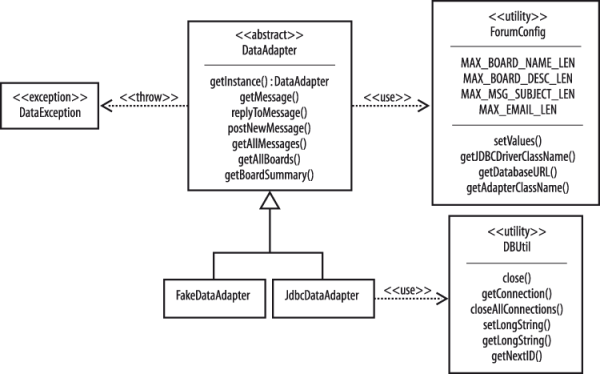
Figure: Data abstraction layer design
Class DataAdapter defines the interface to a backend data source. The class diagram shows that FakeDataAdapter and JdbcDataAdapter are subclasses implementing the data layer with plain files and a relational database respectively. A future implementation could add an EJBDataAdapter. ForumConfig determines which subclass of DataAdapter to instantiate. Class DBUtil encapsulates frequently used JDBC functions.
The source for ForumConfig appears below. This simple class centralizes configuration data. As shown later, all configurable settings are stored in the servlet deployment descriptor rather than hard-coded. The servlet first reads these values into ForumConfig. (JNDI is another option, but requires more configuration and may be harder to deploy with an ISP.)
Example: ForumConfig.java
package com.oreilly.forum;

/**
 * Definiert Konfigurationsinformationen der Anwendung. Das Servlet
 * muß die Methode setValues( ) aufrufen, bevor eine der get-
 * Methoden dieser Klasse verwendet werden kann.
 */
public class ForumConfig {
  // Maximalgrößen verschiedener Felder in der Datenbank
  public static final int MAX_BOARD_NAME_LEN = 80;
  public static final int MAX_BOARD_DESC_LEN = 255;
  public static final int MAX_MSG_SUBJECT_LEN = 80;
  public static final int MAX_EMAIL_LEN = 80;

  private static String jdbcDriverClassName;
  private static String databaseURL;
  private static String adapterClassName;

  public static void setValues(
    String jdbcDriverClassName,
    String databaseURL,
    String adapterClassName) {
    ForumConfig.jdbcDriverClassName = jdbcDriverClassName;
    ForumConfig.databaseURL = databaseURL;
    ForumConfig.adapterClassName = adapterClassName;
  }

  /**
   * @return der Klassenname des JDBC-Treibers.
   */
  public static String getJDBCDriverClassName( ) {
    return ForumConfig.jdbcDriverClassName;
  }

  /**
   * @return die URL der JDBC-Datenbank.
   */
  public static String getDatabaseURL( ) {
    return ForumConfig.databaseURL;
  }

  /**
   * @return den Klassennamen der Datenabstraktionsimplementierung.
   */
  public static String getAdapterClassName( ) {
    return ForumConfig.adapterClassName;
  }

  private ForumConfig( ) {
  }
}
Class DataException is an exception indicating a problem with the underlying source. It hides database-specific exceptions from clients, allowing future implementations without databases. An EJB layer, for example, could replace a SQLException with a RemoteException or EJBException. Every specific exception is therefore wrapped in an instance of DataException before reaching the caller.
The following code for DataAdapter shows every method throwing a DataException. This is the core of the data abstraction layer separating domain classes from the database.
Example: DataAdapter.java
package com.oreilly.forum.adapter;

import com.oreilly.forum.*;
import com.oreilly.forum.domain.*;
import java.util.*;

/**
 * Definiert die Schnittstelle zur Datenquelle.
 */
public abstract class DataAdapter {
  private static DataAdapter instance;

  /**
   * @return die einzige Instanz dieser Klasse.
   */
  public static synchronized DataAdapter getInstance( )
      throws DataException {
    if (instance == null) {
      String adapterClassName = ForumConfig.getAdapterClassName( );
      try {
        Class adapterClass = Class.forName(adapterClassName);
        instance = (DataAdapter) adapterClass.newInstance( );
      } catch (Exception ex) {
        throw new DataException("Kann nicht instantiieren: "
            + adapterClassName);
      }
    }
    return instance;
  }

  /**
   * @param msgID muß eine gültige Nachrichten-ID sein.
   * @return die Nachricht mit der spezifizierten ID.
   * @throws DataException, falls die msgID nicht existiert oder ein Fehler
   * in der Datenbank auftritt.
   */
  public abstract Message getMessage(long msgID) throws DataException;

  /**
   * Füge eine Antwort auf eine bestehende Nachricht ein.
   *
   * @throws DataException, wenn ein Fehler in der Datenbank auftritt oder
   * ein Parameter ungültig ist.
   */
  public abstract Message replyToMessage(long origMsgID, String msgSubject,
    String authorEmail, String msgText) throws DataException;

  /**
   * Versende eine neue Nachricht.
   *
   * @return die neu erzeugte Nachricht.
   * @throws DataException, wenn ein Fehler in der Datenbank auftritt oder
   * ein Parameter ungültig ist.
   */
  public abstract Message postNewMessage(long boardID, String msgSubject,
    String authorEmail, String msgText) throws DataException;

  /**
   * Liefere einen leeren Iterator, wenn für das angegebene Board
   * und den Monat keine Nachricht existiert.
   * @return einen Iterator von <code>MessageSummary</code>-Objekten.
   * @throws DataException, wenn die boardID ungültig ist oder ein Fehler in
   * der Datenbank auftritt.
   */
  public abstract Iterator getAllMessages(long boardID, MonthYear month)
    throws DataException;

  /**
   * @return einen Iterator über alle <code>BoardSummary</code>-Objekte.
   */
  public abstract Iterator getAllBoards( ) throws DataException;

  /**
   * @return eine Zusammenfassung des Boards mit der angegebenen ID.
   * @throws DataException, wenn die boardID ungültig ist oder ein Fehler in
   * der Datenbank auftritt.
   */
  public abstract BoardSummary getBoardSummary(long boardID)
    throws DataException;
}
Class DataAdapter consists of abstract methods and static method getInstance( ). It implements the Singleton design pattern and returns an instance of a subclass of DataAdapter. (See Gamma et al., Entwurfsmuster: Elemente wiederverwendbarer objektorientierter Software, Addison-Wesley, 2001.) Class ForumConfig specifies the actual return type, and Java reflection APIs instantiate the object:
String adapterClassName = ForumConfig.getAdapterClassName( );
try {
  Class adapterClass = Class.forName(adapterClassName);
  instance = (DataAdapter) adapterClass.newInstance( );
} catch (Exception ex) {
  throw new DataException("Kann nicht instantiieren: "
    + adapterClassName);
}
All remaining methods are abstract and defined according to interfaces in package com.oreilly.forum.domain. For example, a message can be retrieved by ID:
public abstract Message getMessage(long msgID) throws DataException;Writing code against interface Message allows another class to implement Message differently later. Class DataAdapter always throws a DataException when an ID is invalid or the database reports an error.
The example forum includes a dummy implementation of DataAdapter and a JDBC implementation. The latter was tested with Microsoft Access and MySQL and should work with any relational database providing a JDBC driver. The next diagram shows the database design and use of class JdbcDataAdapter.
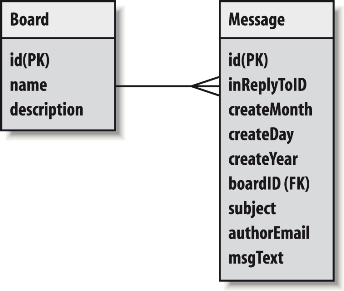
Figure: Database design
The database is simple. Each table has column id, a unique identifier serving as primary key. Message.inReplyToID references the message being answered, or is –1 for a top-level message. Dates are split into month, day and year. Other date/time formats could be used, but this one simplifies queries such as:
SELECT subject
FROM Message
WHERE createMonth=3 AND createYear=2001
Column Message.boardID is the foreign key identifying a message’s board. Column Message.msgText can hold unlimited text; the other fields have limited lengths.
With MySQL, the next dump file and the import tool create the database.
Example: MySQL dump file
# MySQL dump 8.8
#
# Host: localhost Database: forum
#--------------------------------------------------------
# Server version3.23.23-beta

#
# Struktur der Tabelle 'board'
#

CREATE TABLE board (
  id bigint(20) DEFAULT '0' NOT NULL,
  name char(80) DEFAULT '' NOT NULL,
  description char(255) DEFAULT '' NOT NULL,
  PRIMARY KEY (id)
);

#
# Füllen der Tabelle 'board'
#

INSERT INTO board VALUES (0,'XSLT Grundlagen','XSLT-Stylesheets und -Prozessoren');
INSERT INTO board VALUES (1,'JAXP: Programmiertechniken','JAXP 1.1 verwenden');

#
# Struktur der Tabelle 'message'
#

CREATE TABLE message (
  id bigint(20) DEFAULT '0' NOT NULL,
  inReplyToID bigint(20) DEFAULT '0' NOT NULL,
  createMonth int(11) DEFAULT '0' NOT NULL,
  createDay int(11) DEFAULT '0' NOT NULL,
  createYear int(11) DEFAULT '0' NOT NULL,
  boardID bigint(20) DEFAULT '0' NOT NULL,
  subject varchar(80) DEFAULT '' NOT NULL,
  authorEmail varchar(80) DEFAULT '' NOT NULL,
  msgText text DEFAULT '' NOT NULL,
  PRIMARY KEY (id),
  KEY inReplyToID (inReplyToID),
  KEY createMonth (createMonth),
  KEY createDay (createDay),
  KEY boardID (boardID)
);
Class DBUtil below contains helpers for relational database access.
Example: DBUtil.java
package com.oreilly.forum.jdbcimpl;

import java.io.*;
import java.sql.*;
import java.util.*;

/**
 * Hilfsmethoden für den Zugriff auf eine relationale Datenbank mit JDBC.
 */
public class DBUtil {

  // Eine Abbildung von Tabellennamen auf maximale ID-Nummern
  private static Map tableToMaxIDMap = new HashMap( );

  /**
   * Beende eine Anweisung und Verbindung.
   */
  public static void close(Statement stmt, Connection con) {
    if (stmt != null) {
      try {
        stmt.close( );
      } catch (Exception ignored1) {
      }
    }
    if (con != null) {
      try {
        con.close( );
      } catch (Exception ignored2) {
      }
    }
  }

  /**
   * @return eine neue Verbindung zur Datenbank.
   */
  public static Connection getConnection(String dbURL)
      throws SQLException {
    // Vorschlag: die Implementierung eines Verbindungs-Pools wäre eine
    // sinnvolle Erweiterung
    return DriverManager.getConnection(dbURL);
  }

  /**
   * Beende alle offenen Verbindungen. Das Servlet ruft
   * diese Methode aus seiner Methode destroy( ) auf.
   */
  public static void closeAllConnections( ) {
    // sollte einmal ein Verbindungs-Pool implementiert werden, müssen
    // die Verbindungen hier beendet werden.
  }

  /**
   * Speichere einen langen Text in der Datenbank. Der Text einer Nachricht
   * ist z.B. zu lang, um mit der Methode setString() von JDBC
   * gespeichert zu werden.
   */
  public static void setLongString(PreparedStatement stmt,
      int columnIndex, String data) throws SQLException {
    if (data.length( ) > 0) {
      stmt.setAsciiStream(columnIndex,
        new ByteArrayInputStream(data.getBytes( )),
        data.length( ));
    } else {
      // Dieser 'else'-Zweig wurde eingeführt, weil der Code von
      // 'setAsciiStream' bei MS Access dazu führt, daß ein
      // "function sequence error" auftritt, wenn die String-Länge
      // null ist.
      stmt.setString(columnIndex, "");
    }
  }
  /**
   * @return ein langes Textfeld aus der Datenbank.
   */
  public static String getLongString(ResultSet rs, int columnIndex)
      throws SQLException {
    try {
      InputStream in = rs.getAsciiStream(columnIndex);
      if (in == null) {
        return "";
      }

      byte[] arr = new byte[250];
      StringBuffer buf = new StringBuffer( );
      int numRead = in.read(arr);
      while (numRead != -1) {
        buf.append(new String(arr, 0, numRead));
        numRead = in.read(arr);
      }
      return buf.toString( );
    } catch (IOException ioe) {
      ioe.printStackTrace( );
      throw new SQLException(ioe.getMessage( ));
    }
  }
  /**
   * Berechne eine neue eindeutige ID. Es wird angenommen, daß in der
   * spezifizierten Tabelle die Spalte 'id' vom Typ 'long' existiert.
   * Jeder Programmteil muß diese Methode verwenden, um neue IDs zu erzeugen.
   * @return die nächste verfügbare eindeutige ID für die Tabelle
   */
  public static synchronized long getNextID(String tableName,
      Connection con) throws SQLException {
    Statement stmt = null;

    try {
      // wenn das Maximum bereits aus der Tabelle ausgelesen wurde,
      // berechne die nächste ID, ohne in der Datenbank nachzuschauen
      if (tableToMaxIDMap.containsKey(tableName)) {
        Long curMax = (Long) tableToMaxIDMap.get(tableName);
        Long newMax = new Long(curMax.longValue( ) + 1L);
        tableToMaxIDMap.put(tableName, newMax);
        return newMax.longValue( );
      }
      stmt = con.createStatement( );
      ResultSet rs = stmt.executeQuery(
        "SELECT MAX(id) FROM " + tableName);
      long max = 0;
      if (rs.next( )) {
        max = rs.getLong(1);
      }
      max++;
      tableToMaxIDMap.put(tableName, new Long(max));
      return max;
    } finally {
      // beende die Anweisung
      close(stmt, null);
    }
  }
}
DBUtil has private class variable tableToMaxIDMap, remembering each table’s greatest unique ID in conjunction with method getNextID( ), which returns the next available unique ID for a table name. Caching IDs in the map reduces database accesses. This fails, however, if someone inserts an ID manually without using this method.
Method close( ) is needed because JDBC almost always requires closing a Statement and a Connection. Always call this method from a finally-block, which runs whether an exception occurs or not. For example:
Connection con = null;
Statement stmt = null;
try {
    // Code zum Aufbau der Verbindung und der Anweisung
    ...
    // Zugriff auf die Datenbank
    ...
} finally {
    DBUtil.close(stmt, con);
}
Failing to release JDBC resources in a finally block can leave Connections open for long periods, harming performance; some databases also limit concurrent connections.
This version of DBUtil does not pool connections, but includes this method:
public static Connection getConnection(String dbURL)A later version could return a Connection from a pool rather than creating a connection each time. Method DBUtil.close( ) could similarly return the Connection to the pool instead of closing it. These future extensions were omitted for lack of space.
Methods setLongString( ) and getLongString( ) store and retrieve message text. Potentially long texts need different storage from short strings. Some databases call these CLOB columns; MS Access uses MEMO, MySQL TEXT. Since implementations differ, access code is centralized in class DBUtil. Database-specific changes then affect one location rather than every SQL statement.
Next, class JdbcDataAdapter appears below. It implements class DataAdapter for almost any relational database.
Example: JdbcDataAdapter.java
package com.oreilly.forum.jdbcimpl;

import com.oreilly.forum.*;
import com.oreilly.forum.adapter.*;
import com.oreilly.forum.domain.*;
import java.sql.*;
import java.util.*;

/**
 * Eine Implementierung von DataAdapter für JDBC.
 */
public class JdbcDataAdapter extends DataAdapter {

  private static String dbURL = ForumConfig.getDatabaseURL( );
  /**
   * Konstruiere den Datenadapter und lade den JDBC-Treiber.
   */
  public JdbcDataAdapter( ) throws DataException {
    try {
      Class.forName(ForumConfig.getJDBCDriverClassName( ));
    } catch (Exception ex) {
      ex.printStackTrace( );
      throw new DataException("Der JDBC-Treiber kann nicht geladen werden: "
        + ForumConfig.getJDBCDriverClassName( ));
    }
  }

  /**
   * @param msgID muß eine gültige Nachrichten-ID sein.
   * @return die Nachricht mit der angegebenen ID.
   * @throws DataException, wenn die msgID nicht existiert oder ein
   * Datenbankfehler auftritt.
   */
  public Message getMessage(long msgID) throws DataException {
    Connection con = null;
    Statement stmt = null;
    try {
      con = DBUtil.getConnection(dbURL);
      stmt = con.createStatement( );
      ResultSet rs = stmt.executeQuery(
        "SELECT inReplyToID, createDay, createMonth, createYear, "
        + "boardID, subject, authorEmail, msgText "
        + "FROM Message WHERE id="
        + msgID);
      if (rs.next( )) {
        long inReplyToID = rs.getLong(1);
        int createDay = rs.getInt(2);
        int createMonth = rs.getInt(3);
        int createYear = rs.getInt(4);
        long boardID = rs.getLong(5);
        String subject = rs.getString(6);
        String authorEmail = rs.getString(7);
        String msgText = DBUtil.getLongString(rs, 8);

        BoardSummary boardSummary = this.getBoardSummary(boardID, stmt);

        return new MessageImpl(msgID,
          new DayMonthYear(createDay, createMonth, createYear),
          boardSummary, subject, authorEmail, msgText,
          inReplyToID);
      } else {
        throw new DataException("Ungültige msgID");
      }
      } catch (SQLException sqe) {
        sqe.printStackTrace( );
        throw new DataException(sqe.getMessage( ));
      } finally {
        DBUtil.close(stmt, con);
      }
    }
    /**
     * Füge eine Antwort auf eine bestehende Nachricht ein.
     * @throws DataException, wenn ein Datenbankfehler auftritt oder
     * ein Parameter ungültig ist.
     */
    public Message replyToMessage(long origMsgID,
        String msgSubject, String authorEmail, String msgText)
        throws DataException {
      Message inReplyToMsg = this.getMessage(origMsgID);
      return insertMessage(inReplyToMsg.getBoard( ), origMsgID,
        msgSubject, authorEmail, msgText);

    }
    /**
     * Versende eine neue Nachricht.
     *
     * @return die neue Nachricht.
     * @throws DataException, wenn ein Datenbankfehler auftritt oder
     * ein Parameter ungültig ist.
     */

    public Message postNewMessage(long boardID, String msgSubject,
        String authorEmail, String msgText) throws DataException {

      BoardSummary board = this.getBoardSummary(boardID);
      return insertMessage(board, -1, msgSubject, authorEmail, msgText);
    }

    /**
     * Liefere einen leeren Iterator zurück, wenn für das Board und den Monat
     * keine Nachricht existiert
     * @return einen Iterator von Objekten des Typs <code>MessageSummary</code>.
     * @throws DataException, wenn die Board-ID ungültig ist oder ein
     * Datenbankfehler auftritt.
     */
    public Iterator getAllMessages(long boardID, MonthYear month)
        throws DataException {
      List allMsgs = new ArrayList( );

      Connection con = null;
      Statement stmt = null;
      try {
        con = DBUtil.getConnection(dbURL);
        stmt = con.createStatement( );

        BoardSummary boardSum = this.getBoardSummary(boardID, stmt);

        ResultSet rs = stmt.executeQuery(
          "SELECT id, inReplyToID, createDay, "
          + "subject, authorEmail "
          + "FROM Message WHERE createMonth="
          + month.getMonth( )
          + " AND createYear="
          + month.getYear( )
          + " AND boardID="
          + boardID);

       while (rs.next( )) {
         long msgID = rs.getLong(1);
         long inReplyTo = rs.getLong(2);
         int createDay = rs.getInt(3);
         String subject = rs.getString(4);
         String authorEmail = rs.getString(5);

         DayMonthYear createDMY = new DayMonthYear(
           createDay, month.getMonth(), month.getYear( ));

         allMsgs.add(new MessageSummaryImpl(msgID, createDMY,
           boardSum,
           subject, authorEmail, inReplyTo));
       }
       return allMsgs.iterator( );
     } catch (SQLException sqe) {
       sqe.printStackTrace( );
       throw new DataException(sqe);
     } finally {
       DBUtil.close(stmt, con);
     }
   }

  /**
   * @return einen Iterator aller Objekte des Typs <code>BoardSummary</code>.
   */
  public Iterator getAllBoards( ) throws DataException {
    List allBoards = new ArrayList( );

    Connection con = null;
    Statement stmt = null;
    Statement stmt2 = null;
    try {
      con = DBUtil.getConnection(dbURL);
      stmt = con.createStatement( );
      stmt2 = con.createStatement( );
      ResultSet rs = stmt.executeQuery(
        "SELECT id, name, description FROM Board "
        + "ORDER BY name");

      while (rs.next( )) {
        long id = rs.getLong(1);
        String name = rs.getString(2);
        String description = rs.getString(3);

        // Hole die Monate mit Nachrichten. Es wird ein anderes
        // Objekt für die Anweisung benutzt, weil das Ergebnis-Set
        // der ersten Anweisung bearbeitet wird.
        // List monthsWithMessages =
          this.getMonthsWithMessages(id, stmt2);

        allBoards.add(new BoardSummaryImpl(id, name, description,
          monthsWithMessages));
      }
      return allBoards.iterator( );
    } catch (SQLException sqe) {
      sqe.printStackTrace( );
      throw new DataException(sqe);
    } finally {
      if (stmt2 != null) {
        try {

          stmt2.close( );
        } catch (SQLException ignored) {
        }
      }
      DBUtil.close(stmt, con);
    }
  }

  /**
   * @return eine Zusammenfassung des Boards mit der übergebenen ID.
   * @throws DataException, wenn die boardID ungültig ist oder
   * ein Datenbankfehler auftritt.
   */
  public BoardSummary getBoardSummary(long boardID)
      throws DataException {
    Connection con = null;
    Statement stmt = null;
    try {
      con = DBUtil.getConnection(dbURL);
      stmt = con.createStatement( );
      return getBoardSummary(boardID, stmt);
    } catch (SQLException sqe) {
      sqe.printStackTrace( );
      throw new DataException(sqe);
    } finally {
      DBUtil.close(stmt, con);
    }
  }

  private BoardSummary getBoardSummary(long boardID, Statement stmt)
      throws DataException, SQLException {
    ResultSet rs = stmt.executeQuery(
      "SELECT name, description FROM Board WHERE id=" + boardID);

    if (rs.next( )) {
      String name = rs.getString(1);
      String description = rs.getString(2);

      List monthsWithMessages = getMonthsWithMessages(boardID, stmt);

      return new BoardSummaryImpl(boardID, name, description,
        monthsWithMessages);
    } else {
      throw new DataException("Unbekannte boardID");
    }
  }

  /**
   * @return eine Liste von Objekten des Typs MonthYear
   */
  private List getMonthsWithMessages(long boardID, Statement stmt)
      throws SQLException {

    List monthsWithMessages = new ArrayList( );
    ResultSet rs = stmt.executeQuery(
      "SELECT DISTINCT createMonth, createYear "
      + "FROM Message "
      + "WHERE boardID=" + boardID);
    while (rs.next( )) {
      monthsWithMessages.add(new MonthYear(
        rs.getInt(1), rs.getInt(2)));
    }
    return monthsWithMessages;
  }

  private Message insertMessage(BoardSummary board, long inReplyToID,
      String msgSubject, String authorEmail,
      String msgText) throws DataException {
    // verhindere einen Überlauf der maximalen Spaltenbreite der Datenbank
    if (msgSubject.length( ) > ForumConfig.MAX_MSG_SUBJECT_LEN) {
      msgSubject = msgSubject.substring(0,
        ForumConfig.MAX_MSG_SUBJECT_LEN);
    }
    if (authorEmail.length( ) > ForumConfig.MAX_EMAIL_LEN) {
      authorEmail = authorEmail.substring(0,
        ForumConfig.MAX_EMAIL_LEN);
    }

    DayMonthYear createDate = new DayMonthYear( );

    Connection con = null;
    PreparedStatement stmt = null;
    try {
      con = DBUtil.getConnection(dbURL);
      long newMsgID = DBUtil.getNextID("Message", con);
      stmt = con.prepareStatement("INSERT INTO Message "
        + "(id, inReplyToID, createMonth, createDay, createYear, "
        + "boardID, subject, authorEmail, msgText) "
        + "VALUES (?,?,?,?,?,?,?,?,?)");
      stmt.setString(1, Long.toString(newMsgID));
      stmt.setString(2, Long.toString(inReplyToID));
      stmt.setInt(3, createDate.getMonth( ));
      stmt.setInt(4, createDate.getDay( ));
      stmt.setInt(5, createDate.getYear( ));
      stmt.setString(6, Long.toString(board.getID( )));
      stmt.setString(7, msgSubject);
      stmt.setString(8, authorEmail);
      DBUtil.setLongString(stmt, 9, msgText);
      stmt.executeUpdate( );

      return new MessageImpl(newMsgID, createDate,
        board, msgSubject, authorEmail,
        msgText, inReplyToID);

    } catch (SQLException sqe) {
      sqe.printStackTrace( );
      throw new DataException(sqe);
    } finally {
      DBUtil.close(stmt, con);
    }
  }
}
This book is not about relational database access with Java, so JDBC basics are omitted. SQL is deliberately simple to support different databases. The database URL and JDBC driver class name come from class ForumConfig:
private static String dbURL = ForumConfig.getDatabaseURL( );
/**
* Erzeuge den Datenadapter und lade den JDBC-Treiber.
*/
public JdbcDataAdapter( ) throws DataException {
  try {
    Class.forName(ForumConfig.getJDBCDriverClassName( ));
  } catch (Exception ex) {
    ex.printStackTrace( );
    throw new DataException("JDBC-Treiber kann nicht geladen werden: "
        + ForumConfig.getJDBCDriverClassName( ));
  }
}
Class DBUtil establishes database connections:
Connection con = null;
try {
    con = DBUtil.getConnection(dbURL);
As mentioned, connection pooling could be added later at just one place in class DBUtil. Connections and statements should always be closed in a finally block when no longer needed:
} finally {
   DBUtil.close(stmt, con);
}
Such finally blocks always execute, whether an exception occurs or not.
Generating XML with JDOM
The forum can now retrieve relational data and create Java domain objects. Next these objects must become XML for XSLT transformation. We use the open source JDOM library, available from jdom.org. Although JDOM is easier and yields clearer code, the DOM API is also possible. (For a DOM example, see Generating XML with DOM in class BibliothekDOMCreator.)
The basic pattern uses several JDOM builder classes, each converting one or more domain objects to XML. Exploiting XML’s recursive nature, each creates a JDOM object of type Elements. Some Element instances represent whole documents, others small fragments. These can recursively nest inside other Element instances to form larger structures.
Keeping XML outside domain objects has several advantages:
JDOM builders can be replaced by DOM builders or another technology.
Additional builders can generate different XML without changing existing domain objects or XML builders.
Domain objects can use Java interfaces with multiple implementations. Separate XML generation lets the same builder work with every implementation.
Class HomeJDOM below is simple. It creates a <home> element containing a list of <board> elements. Since the <board> elements come from a separate JDOM builder, class HomeJDOM merely assembles these fragments into a larger structure.
Example: HomeJDOM.java
package com.oreilly.forum.xml;

import com.oreilly.forum.domain.*;
import java.util.*;
import org.jdom.*;

/**
 * Erzeuge die JDOM-Daten für die Homepage.
 */
public class HomeJDOM {

  /**
   * @param boards ein Iterator von <code>BoardSummary</code>-Objekten.
   */
  public static Element produceElement(Iterator boards) {
    Element homeElem = new Element("home");
    while (boards.hasNext( )) {
      BoardSummary curBoard = (BoardSummary) boards.next( );
      homeElem.addContent(BoardSummaryJDOM.produceElement(curBoard));
    }

    return homeElem;
  }

  private HomeJDOM( ) {
  }
}
Other JDOM options
Static methods are not the only way to generate JDOM data. One could subclass JDOM’s Element class, passing a domain object to the constructor. Instead of calling a static method, XML would then be created as follows:
Iterator boards = ...
Element homeElem = new HomeElement(boards);
JDOM code could also be integrated into domain objects:
BoardSummary board = ...
Element elem = board.convertToJDOM( );
This tightly couples JDOM code to domain classes. It also fails when XML comes from a group of objects rather than a single one.
Whatever the method, consistency matters most. If all classes follow one pattern, understanding one example familiarizes the team with the whole system.
Class HomeJDOM has a private constructor, preventing instantiation and improving efficiency. All forum JDOM builders are stateless and thus thread-safe, so this method declaration is possible: produceElement( ) static. Creating builder instances is unnecessary because concurrent threads share the same method. There is no common base class either, since each produceElement( ) method accepts different parameter types.
The next example shows ViewMonthJDOM, which generates XML for a whole month of messages.
Example: ViewMonthJDOM.java
package com.oreilly.forum.xml;

import java.util.*;
import com.oreilly.forum.*;
import com.oreilly.forum.adapter.*;
import com.oreilly.forum.domain.*;
import org.jdom.*;

/**
 * Erzeugt JDOM für die Monatsübersicht des Boards.
 */
public class ViewMonthJDOM {

  /**
   * @param board das Nachrichten-Board, für das JDOM erzeugt werden soll.
   * @param month der Monat und das Jahr, die angezeigt werden sollen.
   */
  public static Element produceElement(BoardSummary board,
      MonthYear month) throws DataException {
    Element viewMonthElem = new Element("viewMonth");
    viewMonthElem.addAttribute("month",
      Integer.toString(month.getMonth( )));
    viewMonthElem.addAttribute("year",
      Integer.toString(month.getYear( )));

    // erzeuge das Element <board> ...
    Element boardElem = BoardSummaryJDOM.produceNameIDElement(board);
    viewMonthElem.addContent(boardElem);

    DataAdapter adapter = DataAdapter.getInstance( );

    MessageTree msgTree = new MessageTree(adapter.getAllMessages(
      board.getID( ), month));

    // hole einen Iterator für die MessageSummary-Objekte
    Iterator msgs = msgTree.getTopLevelMessages( );

    while (msgs.hasNext( )) {
      MessageSummary curMsg = (MessageSummary) msgs.next( );
      Element elem = produceMessageElement(curMsg, msgTree);
      viewMonthElem.addContent(elem);
     }

     return viewMonthElem;
   }

   /**
    * Erzeuge ein XML-Fragment für eine bestimmte Nachricht. Das
    * ist eine rekursive Funktion.
    */
   private static Element produceMessageElement(MessageSummary msg,
       MessageTree msgTree) {
     Element msgElem = new Element("message");
     msgElem.addAttribute("id", Long.toString(msg.getID( )));
     msgElem.addAttribute("day",
       Integer.toString(msg.getCreateDate().getDay( )));
     msgElem.addContent(new Element("subject")
       .setText(msg.getSubject( )));
     msgElem.addContent(new Element("authorEmail")
       .setText(msg.getAuthorEmail( )));

     Iterator iter = msgTree.getReplies(msg);
     while (iter.hasNext( )) {
       MessageSummary curReply = (MessageSummary) iter.next( );

       // Erzeuge den XML-Code rekursiv für alle Antworten
       msgElem.addContent(produceMessageElement(curReply, msgTree));
     }
     return msgElem;
   }

   private ViewMonthJDOM( ) {
   }
}
The only difficult code in ViewMonthJDOM is the recursive method generating <message> elements. Since <message> elements are indented, XML forms a recursive tree of arbitrary depth. JDOM supports this by allowing nested elements. Method produceMessageElement( ) creates the required XML.
The following simple class creates an XML view of a specific message.
Example: ViewMessageJDOM.java
package com.oreilly.forum.xml;

import com.oreilly.forum.domain.*;
import java.util.Date;
import org.jdom.*;
import org.jdom.output.*;

/**
 * Erzeuge JDOM-Daten für die Nachrichtenansicht.
 */
public class ViewMessageJDOM {

  /**
   * @param message die Nachricht, die angezeigt werden soll.
   * @param inResponseTo die Nachricht, auf die mit dieser geantwortet wurde,
   * bzw. null, wenn es sich um eine Top-Level-Nachricht handelt.
   */
  public static Element produceElement(Message message,
    MessageSummary inResponseTo) {
    Element messageElem = new Element("message");
    messageElem.addAttribute("id", Long.toString(message.getID( )));
    DayMonthYear d = message.getCreateDate( );
    messageElem.addAttribute("month", Integer.toString(d.getMonth( )));
    messageElem.addAttribute("day", Integer.toString(d.getDay( )));
    messageElem.addAttribute("year", Integer.toString(d.getYear( )));

    Element boardElem = BoardSummaryJDOM.produceNameIDElement(
      message.getBoard( ));
    messageElem.addContent(boardElem);

    if (inResponseTo != null) {
      Element inRespToElem = new Element("inResponseTo")
        .addAttribute("id", Long.toString(inResponseTo.getID( )));
      inRespToElem.addContent(new Element("subject")
        .setText(inResponseTo.getSubject( )));
      messageElem.addContent(inRespToElem);
    }

    messageElem.addContent(new Element("subject").setText(message.getSubject( )));
    messageElem.addContent(new Element("authorEmail").setText(message.getAuthorEmail( )));
    messageElem.addContent(new Element("text").setText(message.getText( )));
    return messageElem;
  }

  private ViewMessageJDOM( ) {
  }
}
JDOM builder BoardSummaryJDOM below generates XML for a BoardSummary object, not a whole document. Its elements are embedded in other application XML pages. The home page, for example, lists all system <board> elements, each created by BoardSummaryJDOM. In your own designs, reusable fragments will probably emerge. Write a shared helper instead of duplicating code.
Example: BoardSummaryJDOM.java
package com.oreilly.forum.xml;

import com.oreilly.forum.domain.*;
import java.util.*;
import org.jdom.*;

/**
 * Erzeugt JDOM für ein BoardSummary-Objekt.
 */
public class BoardSummaryJDOM {
  public static Element produceNameIDElement(BoardSummary board) {
    // erzeuge das Folgende:
    // <board id="123">
    // <name>der Board-Name</name>
    // <description>eine Board-Beschreibung</description>
    // </board>
    Element boardElem = new Element("board");
    boardElem.addAttribute("id", Long.toString(board.getID( )));
    boardElem.addContent(new Element("name").setText(board.getName( )));
    boardElem.addContent(new Element("description")
      .setText(board.getDescription( )));
    return boardElem;
  }

  public static Element produceElement(BoardSummary board) {
    Element boardElem = produceNameIDElement(board);

    // füge die Liste von Nachrichten hinzu
    Iterator iter = board.getMonthsWithMessages( );
    while (iter.hasNext( )) {
      MonthYear curMonth = (MonthYear) iter.next( );
      Element elem = new Element("messages");
      elem.addAttribute("month", Integer.toString(curMonth.getMonth( )));
      elem.addAttribute("year", Integer.toString(curMonth.getYear( )));
      boardElem.addContent(elem);
    }

    return boardElem;
  }

  private BoardSummaryJDOM( ) {
  }
}
The final JDOM builder, PostMessageJDOM , appears below. Method produceElement( ) accepts many parameters to create XML for new messages or replies. Subject, author email and message text can be prefilled. The application uses this when redisplaying an HTML form with the user’s previous values.
Example: PostMessageJDOM.java
package com.oreilly.forum.xml;

import com.oreilly.forum.domain.*;
import org.jdom.*;

/**
 * Erzeuge JDOM für die Seite "Nachricht senden".
 */
public class PostMessageJDOM {

  public static Element produceElement(
      BoardSummary board,
      MessageSummary inResponseToMsg,
      boolean showError,
      String subject,
      String authorEmail,
      String msgText) {
    Element messageElem = new Element("postMsg");

    // benutze die Klasse BoardSummaryJDOM, um ein
    // XML-Fragment zu erzeugen
    messageElem.addContent(BoardSummaryJDOM.produceNameIDElement(board));

    if (inResponseToMsg != null) {
      Element inRespTo = new Element("inResponseTo")
        .addAttribute("id", Long.toString(inResponseToMsg.getID( )));
      inRespTo.addContent(new Element("subject")
        .setText(inResponseToMsg.getSubject( )));
      messageElem.addContent(inRespTo);
    }

    if (showError) {
      messageElem.addContent(new Element("error")
        .addAttribute("code", "ALL_FIELDS_REQUIRED"));
    }

    Element prefill = new Element("prefill");
    prefill.addContent(new Element("subject").setText(subject));
    prefill.addContent(new Element("authorEmail").setText(authorEmail));
    prefill.addContent(new Element("message").setText(msgText));
    messageElem.addContent(prefill);

    return messageElem;
  }

  private PostMessageJDOM( ) {
  }
}
Copyright © 2002 O'Reilly Verlag GmbH & Co. KG
You may print the online version for your private use.
Otherwise, this chapter from “Java und XSLT” is subject to the same conditions as the bound edition. The work, including all its parts, is protected by copyright. All rights reserved, including reproduction, translation, microfilming, and storage and processing in electronic systems.
O’Reilly Verlag GmbH & Co. KG, Balthasarstraße 81, 50670 Köln, kommentar(at)oreilly.de