

XML technologies / ePUB / ePub für (In)Designer / Video in ePub / Importing into InDesign
(Excerpt from “ePub für (In)Designer — Mit InDesign Schritt für Schritt zum E-Book” by Sascha Heck & Yves Apel)
InDesign makes video import easy: import and place it just like an image.
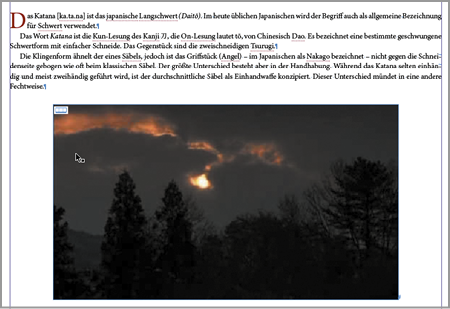
Figure: Placing video in InDesign.
Step 1
Exporting now would include video without pause or stop controls. Enable Controls through the Media panel at Window → Interactive → Media and select the video. For Controls choose SkinOverAll.
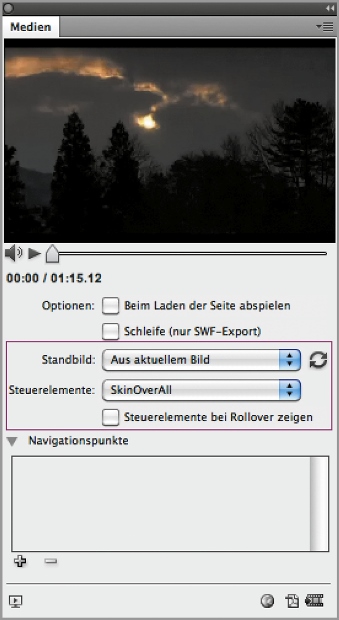
Figure: Media → Controls → SkinOverAll.
Step 2
For another preview image, choose Poster → From Current Frame, move the upper slider to the desired frame, then confirm with the circular two-arrow icon beside From Current Frame. An InDesign bug exports this preview incorrectly or not at all. Having changed it, select the frame and export as JPEG. Later source editing will show how to insert that image.
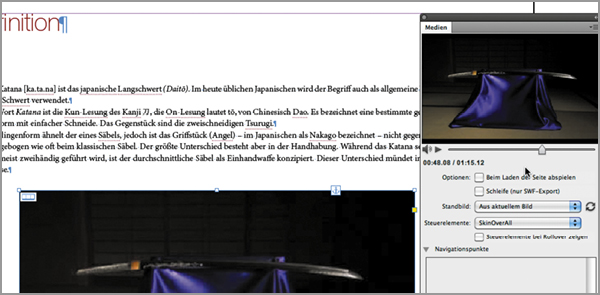
Figure: Selecting a video preview.
Step 3
You can also enable Play on Page Load. It actually plays when opening the ePub, not when viewing the page. If enabled on several videos, iBooks tries to play all at once. It only supports one simultaneously, so in our tests each played for about one second or iBooks quit.
Now export the ePub. Video works, but no preview or only its first frame appears, so editing remains necessary.
Copyright © dpunkt.verlag GmbH 2012
You may print the online version for your private use.
Otherwise, this chapter from “ePub für (In)Designer” is subject to the same terms as the printed edition: the work and all its parts are protected by copyright. All rights reserved, including reproduction, translation, microfilming, and storage and processing in electronic systems.
dpunkt.verlag GmbH, Wieblinger Weg 17, 69123 Heidelberg, fon 06221-14830, fax 06221-148399, hallo(at)dpunkt.de