

XML technologies / DITA / DITA authoring environments / XMetal Author Enterprise Edition
(Excerpt from “DITA – Der neue Standard für Technische Dokumentation” by Johannes Hentrich)
Among XML editors, XMetal from JustSystems Canada Inc. is an old hand at editing XML files. DITA’s increasing popularity has gradually turned XMetal into a DITA editor. Unlike many other XML editors, XMetal Author Enterprise Edition is available only for Windows.
The current XMetal Author Enterprise Edition, version 5.1, is fully adapted to DITA. It uses the current DITA version 1.1, supporting bookmaps, glossary topics, the indexing domain and so on.
XMetal Author Enterprise Edition provides a convenient graphical interface for creating and editing XML documents. All allowed elements are displayed on the right according to cursor position, along with the attributes available for each element.
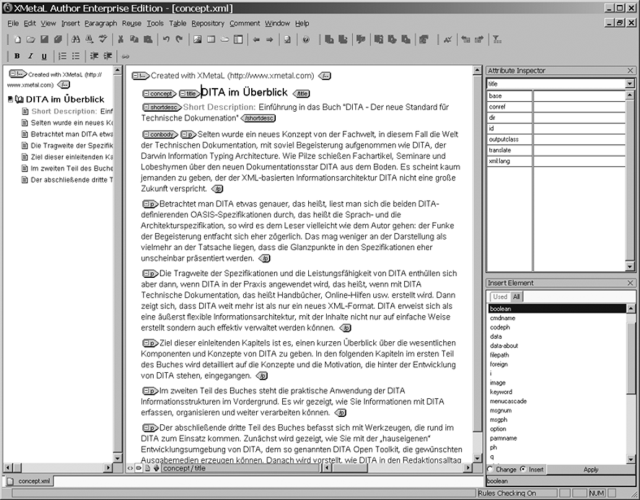
Figure: A topic of type concept in XMetal Author Enterprise Edition.
To edit maps and bookmaps, use a map editor. This makes bookmap editing particularly easy.
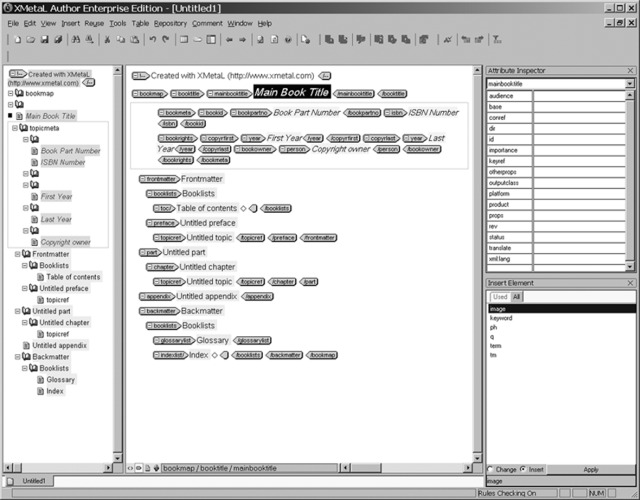
Figure: An empty bookmap in the bookmap editor.
XMetal Author Enterprise Edition fully integrates the DITA Open Toolkit version 1.4. Installation stores toolkit files and program files in separate directories. A standard installation puts toolkit files in C:/Programme/Gemeinsame Dateien/XMetal Shared/DITA_OT. The directory C:/Programme/Gemeinsame Dateien/XMetal Shared/ also contains files and programs needed by the toolkit, such as Apache Ant, the Java Development Runtime Environment and the XSLT parser Saxon.
Separating toolkit files clearly from program files makes the toolkit easy to update. Proceed as follows:
Download the new version’s full package (full easy install package) of the DITA Open Toolkit from the internet.
Unzip the file, for example in the directory
C:/Programme/Gemeinsame Dateien/XMetal Shared/.Then, in XMetal Author Enterprise Edition, open the menu Tools and select Configure Output...
On the tab Advanced , enter the path to the new DITA Open Toolkit:
DITA_OT_DIR = C:/Programme/Gemeinsame Dateien/XMetal Shared/DITA-OT1.4.2.1
After the next XMetal Author Enterprise Edition restart, the new toolkit is used.
Note that the updated toolkit no longer contains the FO plugin for PDF production. To generate PDFs with XMetal Author Enterprise Edition, install the FO plugin in the new toolkit version. Installation information is provided in DITA Open Toolkit.
Using the DITA Open Toolkit, XMetal Author Enterprise Edition can produce:
Eclipse Help
Microsoft HTML Help (CHM)
JavaHelp
HTML files
PDF files
PDFs are produced through the FO plugin, using RenderX Personal Edition as the XSL-FO formatter. The XMetal Author Enterprise Edition 5.1 User’s Guide was itself created with DITA and produced with RenderX Desktop.
Stylesheets for individual output formats are customized directly in the toolkit’s files, not in XMetal Author Enterprise Edition. Information is provided in DITA Open Toolkit.
XMetal Author Enterprise Edition also handles specialization easily. First specialize the DTDs and module files as described in Specialization . Then make the new DTDs and modules known to XMetal Author Enterprise Edition. Proceed as follows:
In the menu Tools , select Select Specialized DITA.
Select the specialized DTD in the dialog. A further dialog then opens for selecting the topic type from which it was specialized.
In the field Specialized Public ID, enter the specialized DTD’s public identifier. After restarting XMetal Author Enterprise Edition, the DTD is available.
To create new documents with the specialized DTD, create a new template in XMetal Author Enterprise Edition. Proceed as follows:
In the menu File , select New.
On the tab General , select Blank XML Document.
Select the specialized DTD in the dialog.
Insert all elements and attributes needed for the template.
Save the document.
In the menu View , select Plain Text.
In the Document Type Declaration, remove from the path
„_ditabase“.In the Document Type Declaration, change the keyword
SYSTEMtoPUBLICand add the public identifier to the keywordPUBLIC.In the menu Tools , select Macro...
Select the macro DITA Configuration: Save Copy as Template.
Save the file with an extension such as
.xml,.ditaor.dita-mapand choose UTF-8 as the encoding. After the next XMetal Author Enterprise Edition restart, you can create DITA XML documents with the specialized DTD.
XMetal Author Enterprise Edition provides a configurable adapter for communicating with practically all common content management and version control systems. In a standard installation, adapter configuration files are in the C:/Programme/XMetaL 5.1/Author/CRCL/configs directory. When connected to a content management system, the menu Repository then provides numerous operations for retrieving DITA XML files from it and saving them back.
Copyright © 2008 XLcontent Verlag
You may print the online version for your private use.
Otherwise, this chapter from “DITA - Der neue Standard für Technische Dokumentation” is subject to the same conditions as the bound edition. The work, including all its parts, is protected by copyright. All rights reserved, including reproduction, translation, microfilming, and storage and processing in electronic systems.
XLcontent Verlag, Pflegerstraße 40, 81247 München
back to top