

XML technologies / DITA / DITA authoring environments / Eclipse
(Excerpt from “DITA – Der neue Standard für Technische Dokumentation” by Johannes Hentrich)
DITA is primarily a software documentation standard, so it is natural to look for DITA tools in software development. Eclipse, an open-source software development framework originally developed by IBM, is certainly among the most popular and widely used development environments in this field.
Eclipse is programmed in Java and provides a plugin architecture. Plugins can integrate practically everything needed for programming software and documenting it. Numerous XML editors are available as Eclipse plugins, including XMLBuddy and WTP XML Editor.
These XML editors do not, however, offer the convenience of dedicated XML editors. For example, you will search in vain for spell-checking in an XML editor in Eclipse. The mechanism conref is not directly supported by the current Eclipse XML editors either.
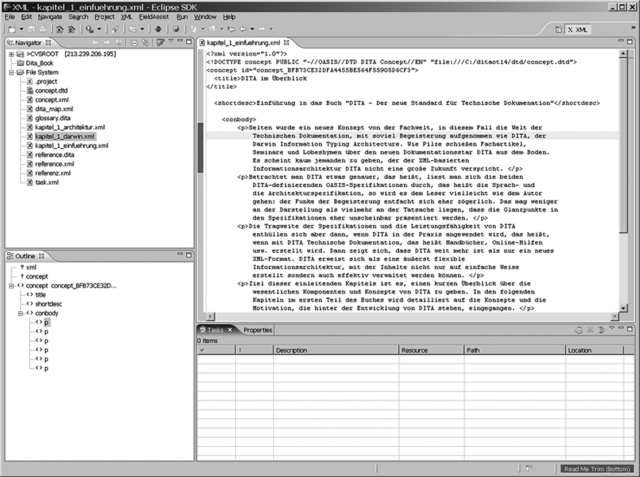
Figure: The XMLBuddy XML editor in Eclipse with a concept topic.
The editors’ lack of convenience is offset by a complete file management environment and the ability to automate output production.
Eclipse integrates connections to version control systems such as Concurrent Versions System (CVS) or Subversion (SVN). This is particularly useful in software development, where teams work on software. Centrally stored files are accessible while control is maintained over who edits them. This arrangement is also very useful for documentation creation.
Using ANT build files is routine in Eclipse. They control software creation from Java source code. DITA’s ANT build files can also produce output such as HTML or PDF from DITA XML files created in Eclipse.
For XSLT transformations, use the Orangevolt EclipseXSLT plugin. It can use the DITA Open Toolkit’s XSLT stylesheets.
To integrate the XSL-FO formatter Apache FOP, Ahmadsoft provides the FOP bridge plugin.
The components
SVN connection,
XMLBuddy plugin,
Orangevolt EclipseXSLT plugin,
FOP bridge plugin
thus create an area within a software development environment for documenting that software. Although the available XML editors may not meet the highest XML editing expectations, Eclipse keeps technical writers close to product development.
Besides creating documentation with DITA, Eclipse can help structure the actions users must perform, for example to operate software correctly. IBM DITA Task Modeler is available for this purpose.
Assuming product-use actions are goal-oriented, a hierarchy of individual tasks can be determined until product operation is complete. IBM DITA Task Modeler can model this hierarchy of possible tasks.
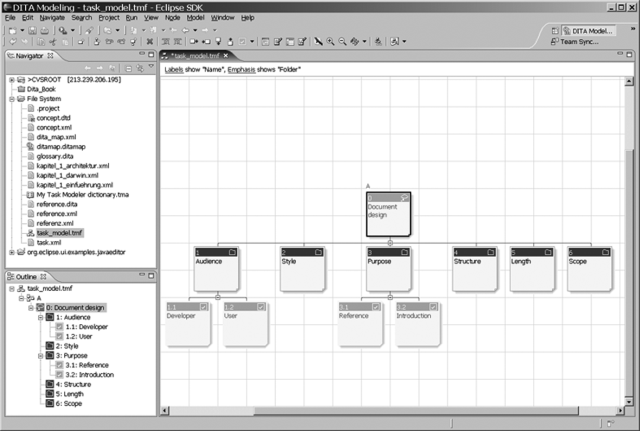
Figure: IBM DITA Task Modeler for modeling a task hierarchy.
The concept resembles the storyboard used in the STOP structuring method. Information about STOP is provided in “STOP”.
To put the planned task hierarchy into practice, IBM DITA Task Modeler provides a DITA map editor. It is supplemented by another editor for creating relationship tables for the topics.
IBM DITA Task Modeler is a very powerful tool, particularly suitable for complex projects involving one or more teams.
Eclipse and IBM DITA Task Modeler thus provide an integrated environment primarily suited to software development.
Copyright © 2008 XLcontent Verlag
You may print the online version for your private use.
Otherwise, this chapter from “DITA - Der neue Standard für Technische Dokumentation” is subject to the same conditions as the bound edition. The work, including all its parts, is protected by copyright. All rights reserved, including reproduction, translation, microfilming, and storage and processing in electronic systems.
XLcontent Verlag, Pflegerstraße 40, 81247 München
back to top