

Software / Octopus / Supported input formats / Structured Word
Word files (docx format) can serve as input for an Octopus transformation in two ways: either “unstructured”, meaning any Word files regardless of their formatting, or “structured”, meaning marked up with special Octopus Word styles.
In addition to the fixed set of Octopus styles, further customer-specific styles can be created (= Octopus extension styles) and implemented for the desired output formats. We call these generic extensions.
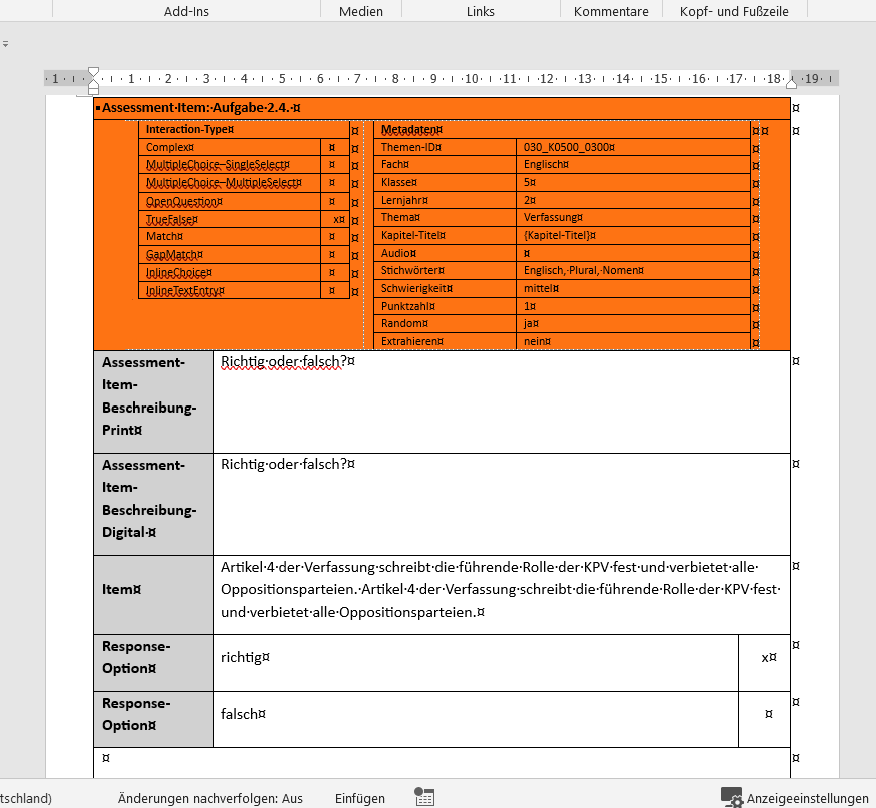
Fig.: Example Word input file with an authoring template for a true/false question.
Generic extensions without programming
Using generic extensions requires no programming skills. Octopus’s user-friendly structure makes it easy to adapt and extend Word content. Functions such as adapting layouts, extending text boxes or integrating additional information can be implemented without in-depth technical knowledge.
Benefits of generic extensions:
Cross-format availability: extensions can be used in all supported formats.
No programming required: ease of use saves time and resources.
Flexibility and adaptability: content can be adapted quickly and easily.
Efficient workflows: optimised processes increase productivity.
Examples of generic extensions:
Custom inline formatting: Highlight words or phrases using custom fonts, colours or styles in Word or InDesign.
Custom paragraph styles: Structure documents using custom paragraph styles that can, for example, provide consistent layouts in Word or InDesign.
Individually designed table styles
Versatile text box types: Create boxes for quotations, notes or important information that can be used flexibly in programs such as Word or InDesign to make content visually appealing.
Special media box types: Create boxes for playing audio and video files in the respective output formats.
Octopus’s generic extensions provide a flexible, efficient solution for processing and adapting documents in different formats.
Octopus checking tool for data quality
Octopus provides a powerful tool for validating and checking Word (and InDesign) documents and generating mapping-based XML output. Designed to improve the quality and consistency of editorial processes, it offers a wide range of functions for checking and optimising documents.
What features does the checking tool offer?
Advanced functionality
As part of Octopus, the tool uses technologies such as XML grammars, Schematron and specialised checks (such as checking links to websites) for even deeper and more precise document analysis.
Structural checking at the highest level
Structural checking ensures that Word documents meet individually defined rules. For example, it checks for unknown or incorrectly used paragraph and character styles, styles used in the first paragraph, and various Word components such as text boxes, charts and objects. Validation results are inserted directly into the Word document as comments, precisely where the problem occurs.
Replacing pattern-based text phrases
The tool offers search and replace with REGEX support, with or without change tracking, and the option to add your own comments.
Mapping-based XML output
Word style names can be mapped to XML element names. Customer-specific extensions for lists, paragraph and table formatting, and checking reports are also possible. The resulting XML output is an important intermediate step for generating further output formats with Octopus via exHTML.
Seamless integration
Integration into Octopus enables smooth collaboration with other tools and technologies. This optimises quality assurance in editorial processes.
Core objectives of Octopus
Octopus aims to check and improve the structure and formatting of Word documents for XML production. It is the perfect choice for businesses with the highest requirements for document quality and consistency.