

Software / Octopus XML Framework
1. Introduction
The coronavirus pandemic showed us all that digital transformation in educational institutions still has room for improvement, to put it optimistically.
Pupils in all school years and types of school, university students and participants in adult education and continuing education courses had to stay home, facing months of homeschooling, hybrid teaching and distance learning. Often, the necessary digital infrastructure was not adequately available to everyone at home or at school: stable, fast Internet, laptops or tablets, printers, online platforms for learning content and communication with teachers, and so on. In many places, cumbersome bureaucratic procedures were first needed to apply for and purchase Wi-Fi, work phones, devices for learners and teachers, email addresses, overpriced software and expertise.
For many, everyday school life looked roughly like this: teachers distributed assignments, exercises and reading recommendations for different subjects by email or learning platform, in a wide variety of formats and forms. At best, weekly online meetings clarified questions and offered help. At worst, where teachers were not digital natives or institutions were poorly equipped, stacks of printed worksheets had to be collected from school, completed independently and returned for grading. Individual learning needs were consequently neglected.
Resourceful learners searched online for supplementary learning content and exercises. Parents and siblings had to step in as teachers, recalling the subject matter themselves or learning it anew. The web is of course full of information, commercial learning platforms, tutorials, podcasts and videos. However, we found that learners can struggle to locate exactly the right content and then use and combine it intuitively.
The pandemic showed us that homeschooling and distance learning will play an increasingly important role in the future. Schools, universities, textbook publishers, providers of learning and continuing education content, and e-testing platforms should prepare for this by making learning offerings more interactive, user-friendly and adaptive, supporting learners as effectively as possible both on site and at home. Our Octopus XML Framework addresses precisely this challenge and is presented in detail below.
2. What is Octopus XML Framework and what can it do?
data2type developed Octopus XML Framework to prepare and process learning content and materials. It generates all major educational standards fully automatically and individually from Word, QTI, exHTML or DITA-LT input and transforms them into numerous output channels: print PDF, interactive PDF, LBook (interactive website), EPUB, Moodle courses, other LMS or e-testing platforms.
Octopus XML Framework covers XML content output, checking and import and is comparable to the DITA Open Toolkit, the output framework for DITA documents. It provides the technical data and output foundation for adaptive learning and introduces the new approach of object-oriented publishing.
2.1 How is Octopus XML Framework controlled?
Starting the framework essentially requires two items: the config file and the DITA map generated from Word, for example.
The conversion pipeline can be started in batch mode through an Apache Ant user menu:
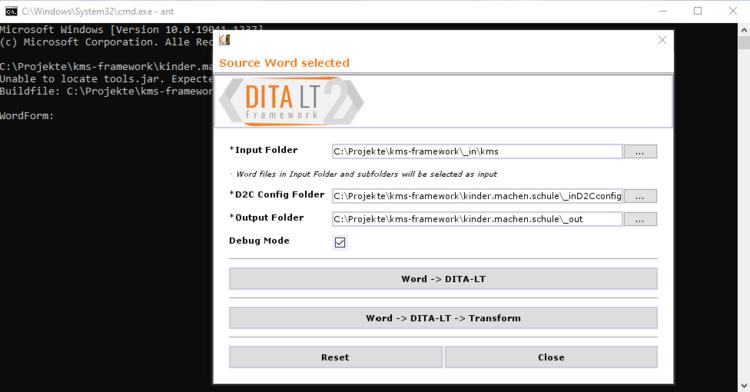
Fig. 1: Ant user interface for starting conversion.
The config file contains all information relevant to conversion, such as which output formats and modules should be generated and customer details for personalising the outputs.
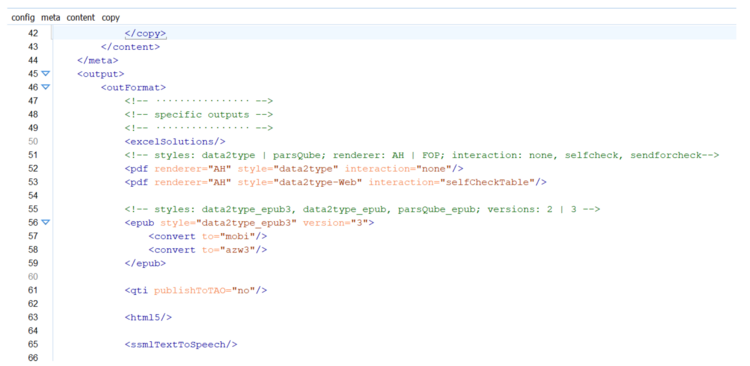
Fig. 2: Excerpt from the config file.
The framework is controlled by an XProc pipeline that creates various log files, including data validation and output format logs.
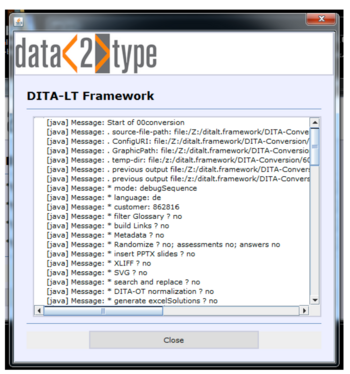
Fig. 3: Window with messages during conversion.
Conversion produces an output folder with many subfolders containing the selected target formats, DITA (with filters and variables resolved), the selected DITA Objects and analyses. For translations, all formats are generated repeatedly in the different languages.
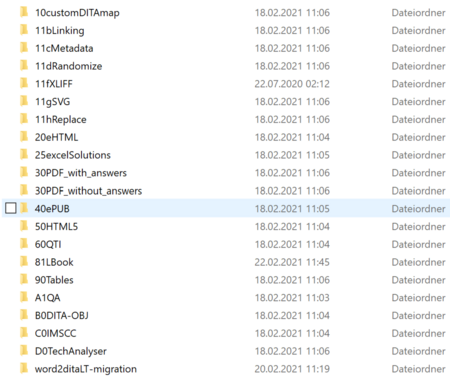
Fig. 4: Output folder after successful conversion.
2.2 Conversion workflows
The following conversion workflows are already fully implemented in the framework:
Conversion from Word to DITA-LT
Conversion from Word through DITA-LT to further output formats
Conversion from QTI to DITA-LT
Conversion from QTI through DITA-LT to further output formats
Conversion from DITA-LT to further output formats
Further information about the available input formats and output formats and the exchange format exHTML is provided below.
2.3 Publishing workflows
Possible ways of integrating Octopus XML Framework into publishing workflows include:
Use exHTML, QTI or Word input to generate the desired outputs fully automatically.
Use the framework for migration to DITA-LT, processing Word or exHTML by folder. Analysis outputs are used to obtain quality-assured DITA-LT data.
Where DITA-LT and a CMS or XML database are already in use, employ the framework as an output and import channel.
Where QTI is already integrated into testing software or an LMS, employ the framework as an output and import channel.
2.4 Target audiences
The framework is suitable for target audiences including:
Schools of all types
Providers of learning and continuing education content
Textbook publishers
E-testing platforms
Pupils, teachers, learners and students
Universities
Homeschooling, hybrid teaching and distance learning
Distance education, distance schools and distance universities
2.5 Use scenarios
Possible use scenarios for Octopus XML Framework include:
Teachers independently create tasks and tests through the framework for school lessons or self-study at home. Pupils log into a learning platform to access them.
Online tests can be submitted and marked by teaching staff.
Textbook publishers extend their print offerings with digital content through websites or apps, allowing pupils to work through lessons and exercises online or offline.
Online learning or e-testing platforms extend their offerings with, for example, interactive exercise PDFs, apps, websites, audio content, translated or multilingual content, linked content and content adapted to each user.
3. Which input formats are processed?
Octopus XML Framework can process the following input formats:
3.1 Word
Microsoft Word files (.docx format) are converted by data2type software into a flat XML format (d2tXML), which is then converted into the exHTML exchange format and used to generate various output formats.
For example, the software can perform the following checks on a Word file:
Structural checking | Check for unknown styles, incorrect use of paragraph and character styles, and styles used in the first paragraph |
Word components | Allow or disallow images (various formats), text boxes, shapes, charts, non-Word objects, change tracking and comments |
Search and replace rules | Regex support, comment function, and replacement of the search term without feedback |
XML transformation | Convert, unwrap and delete styles in XML tags |
Table 1: Possible checks on a Word file.
The software is built entirely with XSLT/XProc and requires no Word macros.
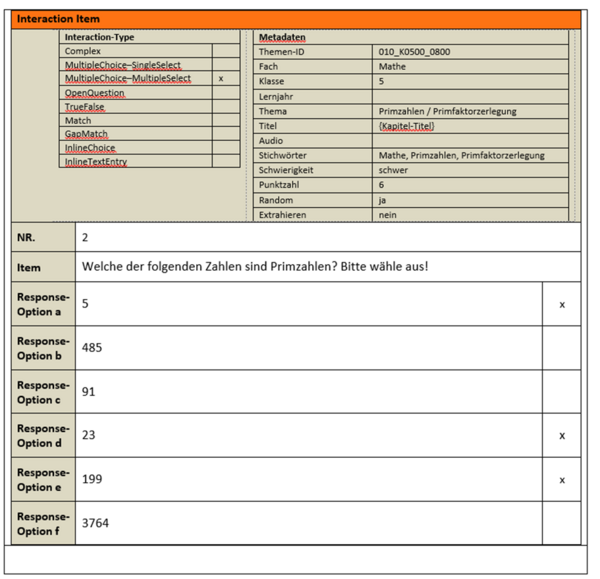
Fig. 5: Example Word input file with an authoring template for a “MultipleChoice – MultipleSelect” task.
3.2 QTI
QTI files can also be used as input data in Octopus XML Framework.
IMS QTI (Question & Test Interoperability) is a standardised data format defined by the IMS Global Learning Consortium specifically for designing online materials. Online questions and answers, quizzes and multiple-choice tests can be created, used and varied as desired in all standardised programs. Tests and quizzes can therefore be exchanged between different applications. The format is also suitable for storing test results (source: Wikipedia: IMS QTI).
QTI is therefore an important input format for assessment software providers, since they cannot output other formats such as PDF.
Further information is available under QTI as an output format in Octopus XML Framework.
3.3 DITA-LT
The DITA extension “DITA Learning & Training” (DITA-LT for short) can also be used for direct input.
DITA-LT can be used to create training materials. The XML standard provides several interactive question types. DITA-LT also includes additional topic types that help design a training module.
DITA-LT also contains specific metadata derived from LOM (Learning Object Metadata). Further information is available in the “LOM metadata” section.
DITA-LT’s strengths lie in content reuse and flexibility.
Octopus XML Framework provides an XML schema in XSD format with documentation for validating DITA-LT data.
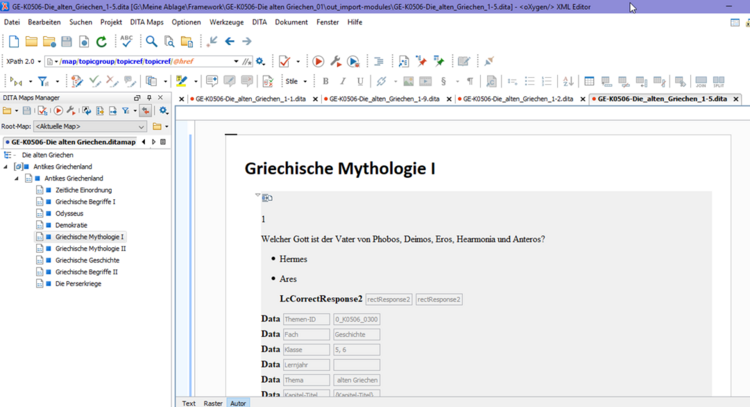
Fig. 6: Example DITA-LT file open in Author view in Oxygen XML Editor.
4. exHTML as an import and export interface
The exHTML format (exChangeHTML) is based on HTML5. This exchange format developed by data2type can be used in Octopus XML Framework as both an input and an output format.
4.1 Import
The framework uses exHTML as an import interface. exHTML is a simplified but valid form of HTML5. For example, inline elements are marked up with the HTML <span> element and block elements with the HTML <div> element. DITA and Word input data is converted into the exHTML exchange format. An XML Schema file and a Schematron file are also created. exHTML can then be used as input for the conversion pipeline to generate DITA-LT. All DITA-LT constructs, including tasks and metadata, are therefore represented in exHTML too.
In addition to automatic division of DITA Learning Objects (LO), optional manual division is available through the “Splitting” function.
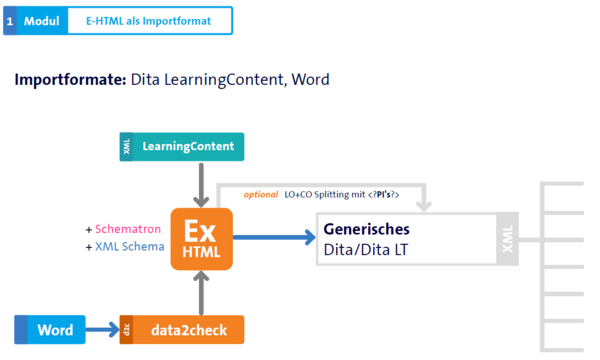
Fig. 7: Diagram of exHTML as an import format.
Possible uses of exHTML as an import interface include external content and fully automated output generation with the framework without using DITA-LT itself as input, for example using Word input.
4.2 Export
The framework also uses the exHTML exchange format as an export interface. It serves as input for all further output channels and modules, such as translation. The desired outputs can be configured easily through the config file.
Metadata can thus be supplied in different formats or disabled entirely. The framework supports the metadata formats JSON, RDF and Dublin Core. Other metadata standards can also be supported. Metadata can be output as either elements or attributes.
The exHTML format allows additional output components to be enabled or disabled as needed:
Table of contents: generated from headings up to level 4 in the Word document.
Index
List of figures: all image captions in the Word document marked with a defined paragraph style are included in a list of figures.
List of tables: all table titles in the Word document marked with a defined paragraph style are included in a list of tables.
CSS stylesheets for exHTML and HTML5 output can be included within output files or supplied as an external stylesheet file.
Images can be included within output files as Base64 image files or supplied as external image files.
Elements can be deleted or filtered. Entire elements can be deleted together with their content, or the tags of the surrounding parent element can be removed. In the latter case, the element itself and its content remain.
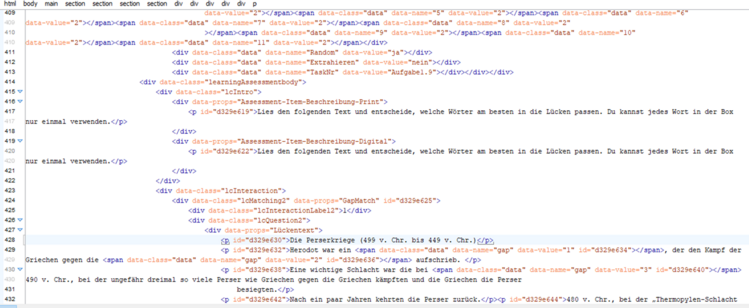
Fig. 8: Example excerpt from an exHTML file.
5. Which output formats are generated and what can they do?
5.1 Standard output formats
Octopus XML Framework offers three standard output formats, described in more detail below.
5.1.1 PDF
Standard PDF output is implemented using XSL-FO and generated by the PDF renderers Antenna House Formatter (commercial) or Apache™ FOP (open source).
Configuration lets Octopus XML Framework produce several layouts in a single output run, such as web PDF, print PDF, a different layout, with or without solutions, and so on.
A set of commands (processing instructions) is available for fine-tuning page layout. Layout optimisation through repeated rendering can also be added, but is highly individual and computationally intensive. Fine layout adjustments can be reset for later editions and are better suited to printed products. They make little sense for fully automated outputs assembled from a database.
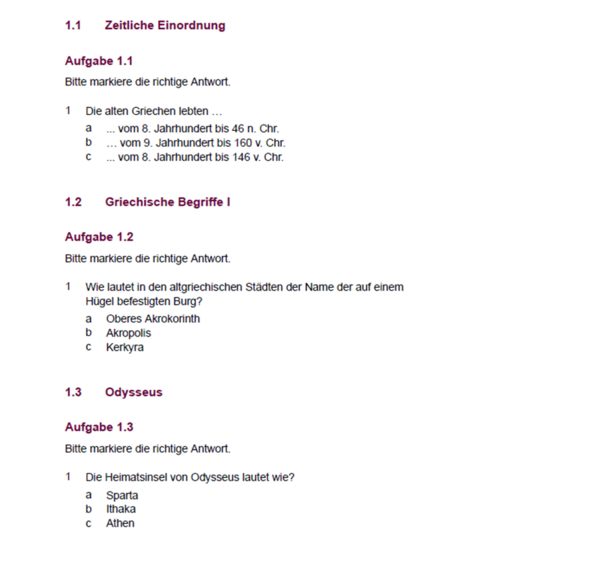
Fig. 9: Example print PDF output.
5.1.2 EPUB
Octopus XML Framework offers a choice between EPUB 2 and EPUB 3 output.
Configuration can generate multiple layouts in one output run, for example with or without solutions. A set of commands (PIs) also enables fine layout adjustments for EPUB output. Tables and formulas can be output fully automatically as SVG or PNG graphics. The EPUB formats Mobipocket (mobi) and the Amazon Kindle file format (azw3) can also be generated.
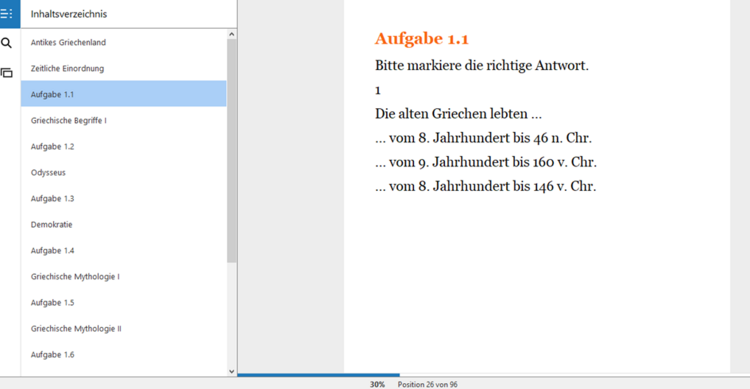
Fig. 10: Example EPUB output in mobi format.
5.1.3 HTML5
Octopus XML Framework can generate HTML5 from the exHTML exchange format. HTML5 output serves several purposes:
Using content in websites and apps
HTML5 is the main display format in learning management systems (LMS) such as Moodle.
HTML5 data can also be divided into different levels of granularity using the framework’s “splitting function”. Content is normally divided according to the DITA map rules. The splitting function instead outputs content automatically according to other rules, for example by chapter levels 1 to 4 or by topic. This produces many small HTML files.
This feature is important for exporting data to other applications or customers.
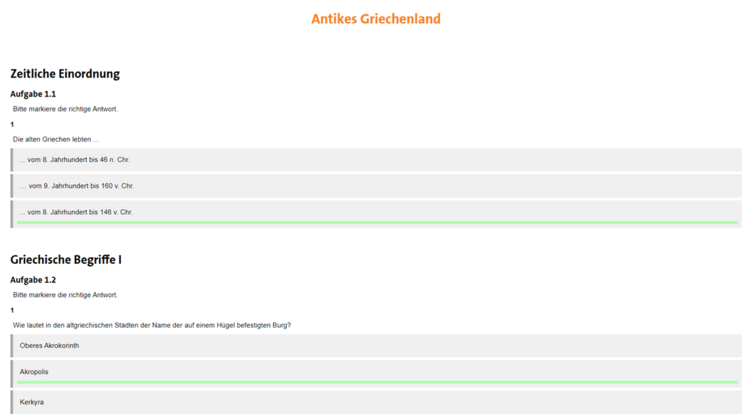
Fig. 11: Example HTML5 output (here with correct answers marked).
5.2 Learning formats
Besides the standard outputs described above, Octopus XML Framework offers further output formats particularly useful for interactive learning. These learning formats are described below in more detail.
5.2.1 QTI
Octopus XML Framework also outputs content in QTI (Question and Test Interoperability) format for exchanging and importing task data into an LMS.
QTI 2.1 is generated by default. Other QTI versions can be configured. All generated tests are checked for QTI validity and can be sent fully automatically to a test provider through a REST API.
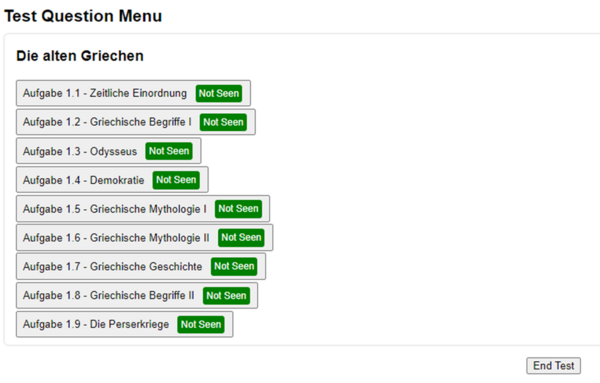
Fig. 12: Example QTI test entry menu displayed using QTIWorks.
Each question can be created in combination with DITA Objects; for example, tables or formulas can be output in SVG or other formats.
Questions can form part of the learning content and be extracted for QTI individually or in blocks (for example chapters or entire books).
A link or QR code can be inserted in other channels, such as print.
QTI also allows questions and feedback to be individualised; for example, incorrect answers can trigger references to other content the user has not yet learned.
The framework already supports 9 QTI question types, explained in more detail in the “Interactive PDF” section.
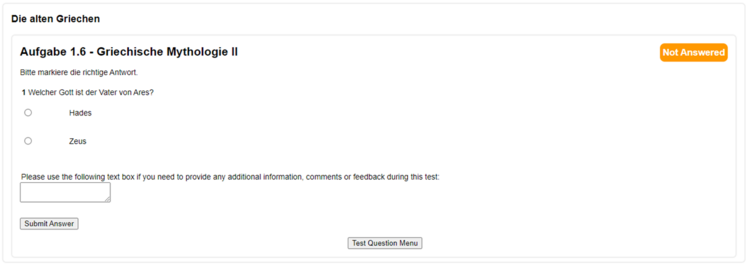
Fig. 13: Interactive QTI task displayed using QTIWorks, here with the “MultipleChoice–SingleSelect” question type.
5.2.2 Answer or solution output
All output formats can include the solutions to questions, highlighting correct answers in tests or exercises. Individualisation, randomisation and localisation are also taken into account.
Correct answers are marked in green in the following two examples.
Example 1: HTML5 output
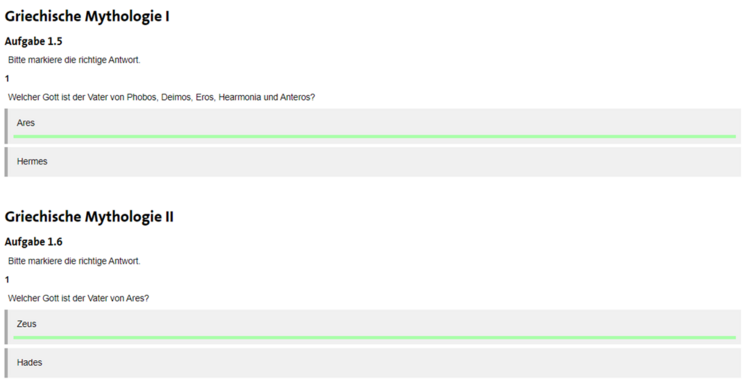
Figure 14: Example HTML5 output with correct answers marked.
Example 2: PDF output
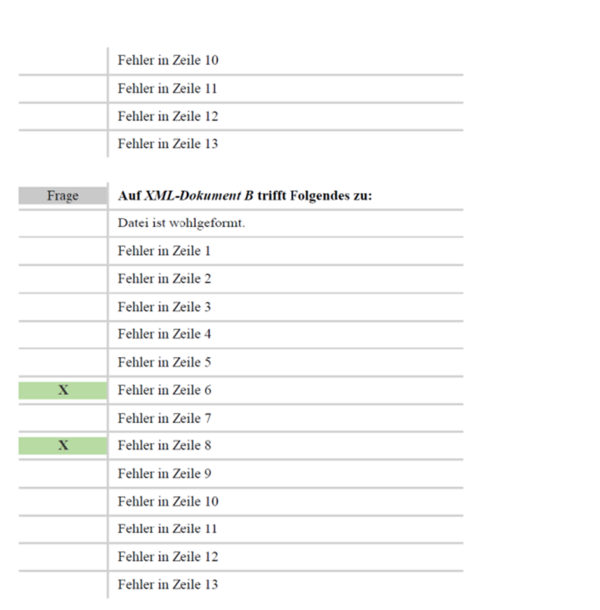
Figure 15: Example PDF output with correct answers marked.
5.2.3 Interactive PDF
Besides the print PDF output described above, Octopus XML Framework also produces interactive PDFs with Acrobat form functionality. These can be configured individually to meet requirements and offer the following variants:
formsReadOnly
Read-only output
Questions with or without the correct answers displayed
selfCheckChapter
Interactive question output
A new chapter containing the tasks and their correct answers is displayed at the end of the document for self-assessment.
Tasks in the content and the answer chapter are linked in both directions.
In addition to the correct answers, the score achieved by the user is displayed.
selfCheckTable
Interactive question output
Link to the results table at the end of the document, listing the user’s answers, the correct answers and the user’s score.
Tasks in the content and the assessment chapter are linked in both directions.
sendForCheck
Interactive question output
A field for a digital signature and a submit button are displayed in a separate chapter at the end of the document.
Useful applications include independent learning and checking answers at home, or online tests and examinations submitted for grading.

Fig. 16: Example interactive PDF output with the “selfCheckTable” setting: true/false task linked to the results table at the end of the document.
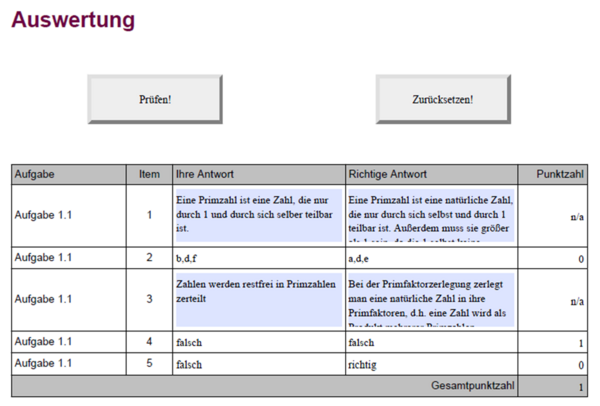
Figure 17: Example interactive PDF output with the “selfCheckTable” setting: results table at the end of the document with 'Prüfen!' and 'Zurücksetzen!' buttons.
Available question types
The framework already supports the following 9 question types for interactive PDF output (and QTI output):
MultipleChoice–SingleSelect (selection question with one correct answer)
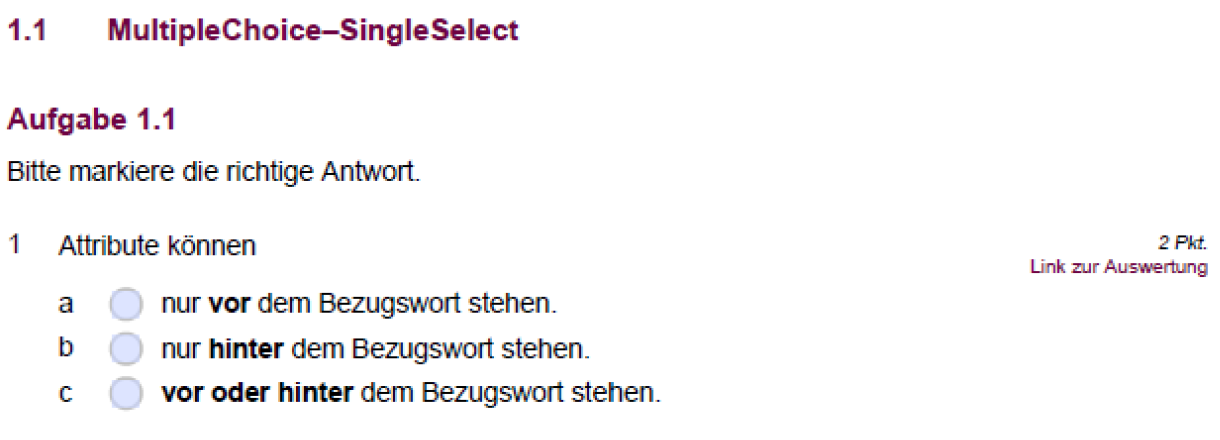
Figure 18: “Multiple Choice–SingleSelect” question type.
MultipleChoice–MultipleSelect (selection question with two or more correct answers)
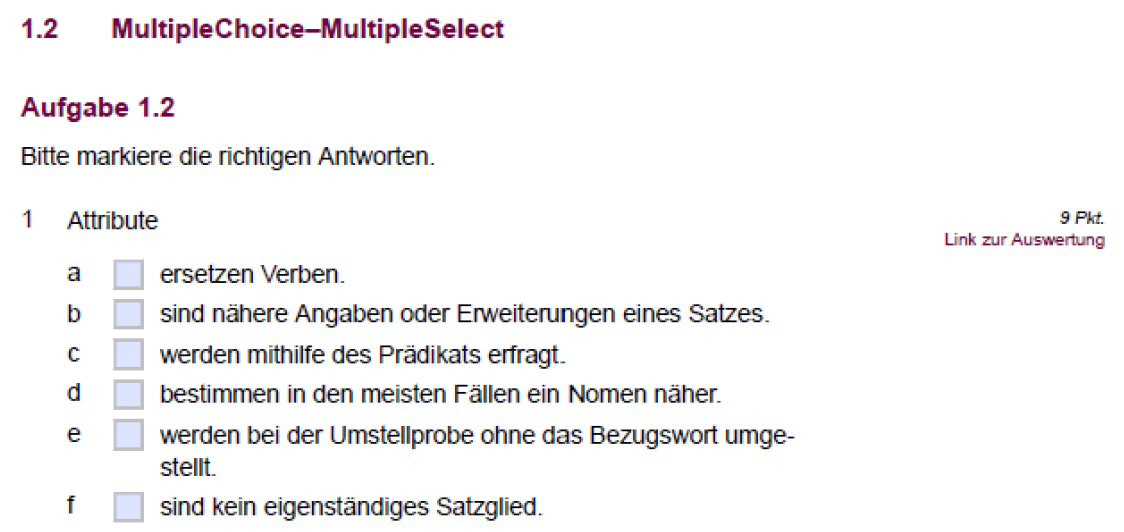
Fig. 19: “MultipleChoice–MultipleSelect” question type.
OpenQuestion (text field for answering a question; the answer is assessed by a person)
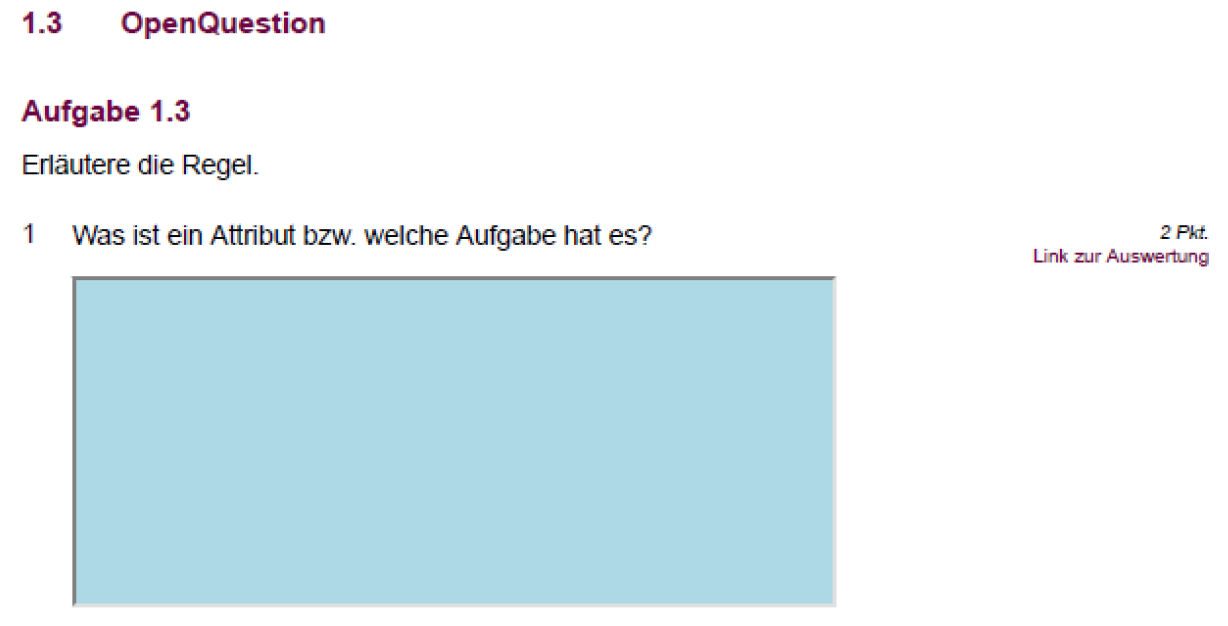
Fig. 20: “OpenQuestion” question type.
TrueFalse (select true or false)
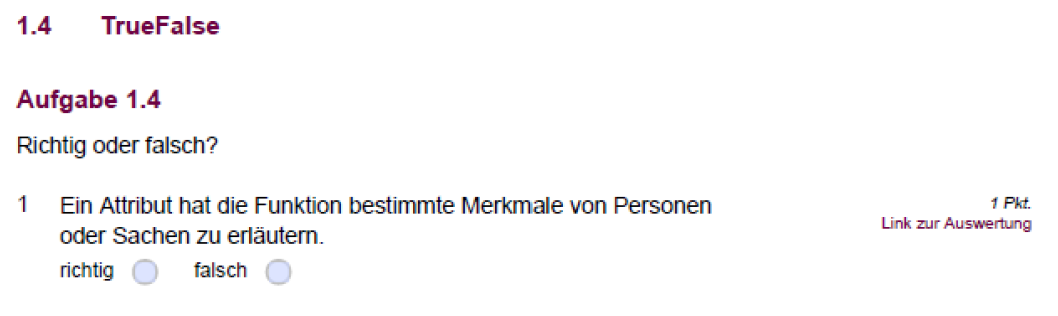
Fig. 21: “TrueFalse” question type.
Match (assign the correct answer to a question; any number of questions is possible)
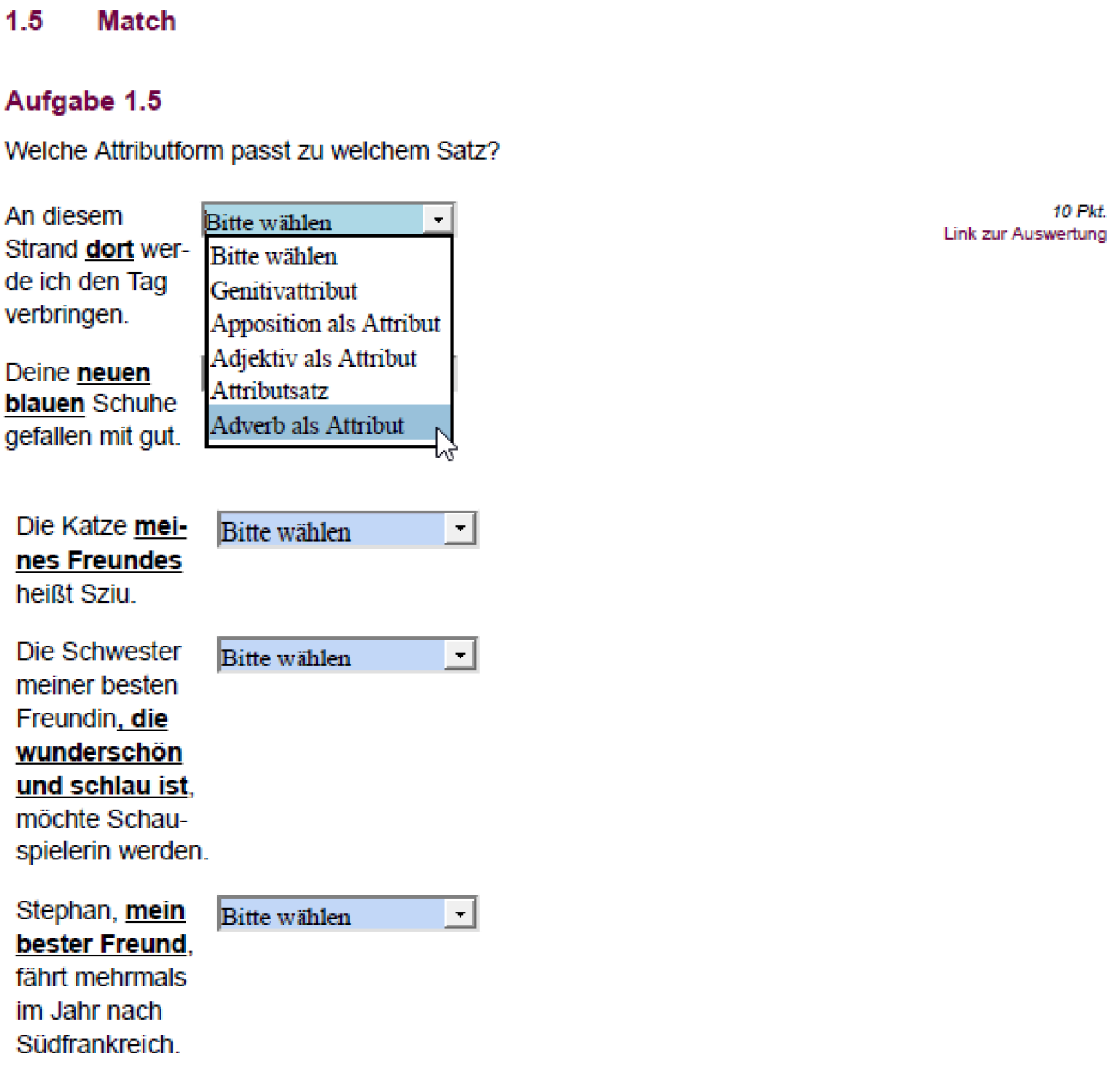
Fig. 22: “Match” question type.
GapMatch (fill-in-the-blank text with the same answer options for each gap)
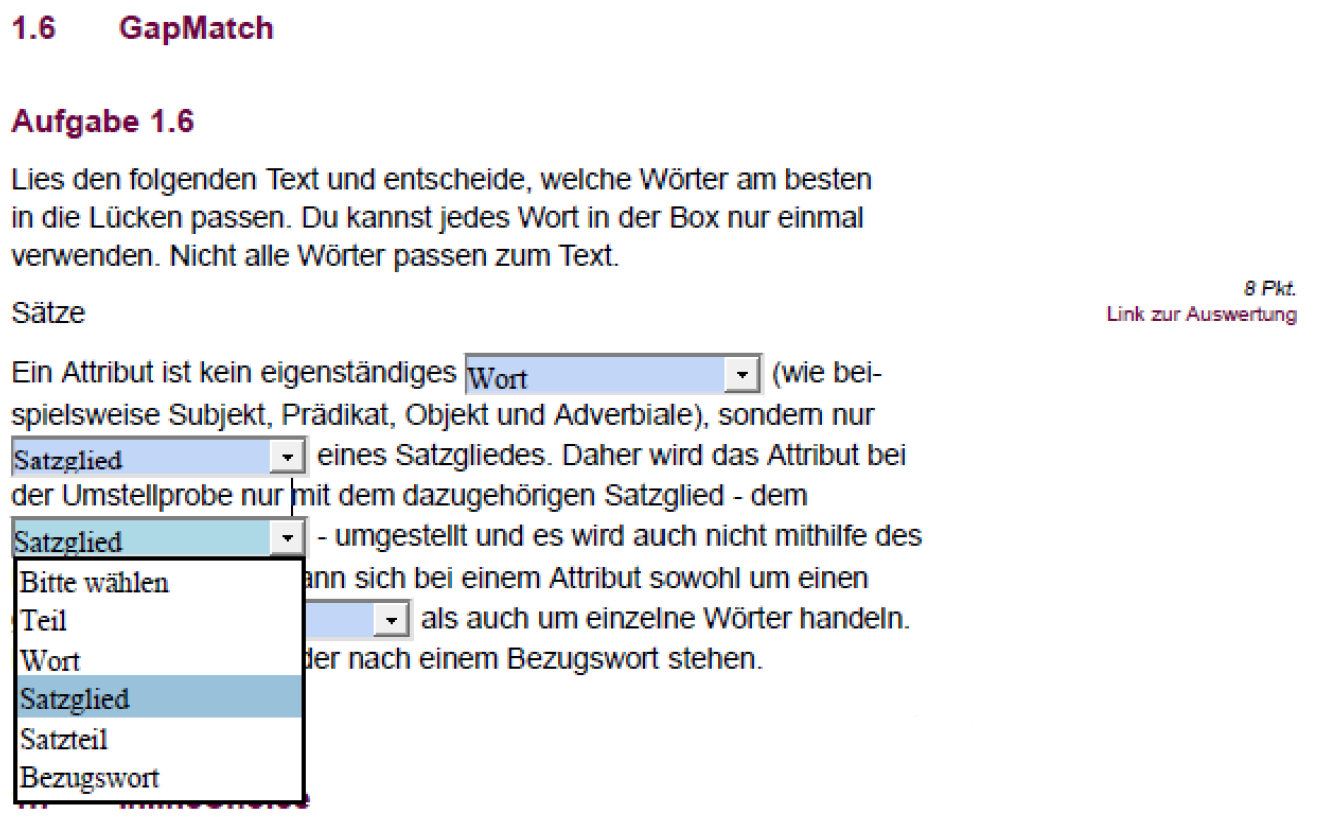
Fig. 23: “GapMatch” question type.
InlineChoice (fill-in-the-blank text with different answer options for each gap)
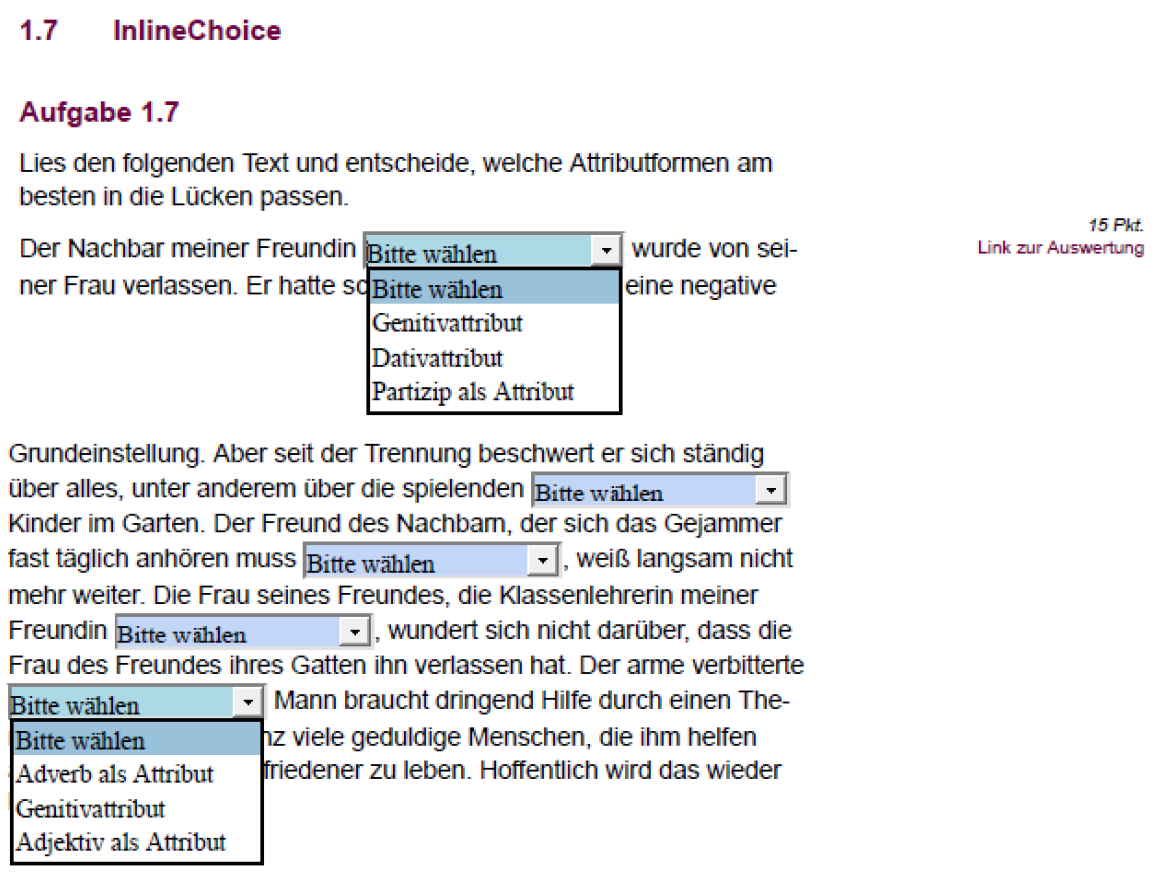
Fig. 24: “InlineChoice” question type.
InlineTextEntry (text field for answering a question; any number of questions is possible; intended for short answers)
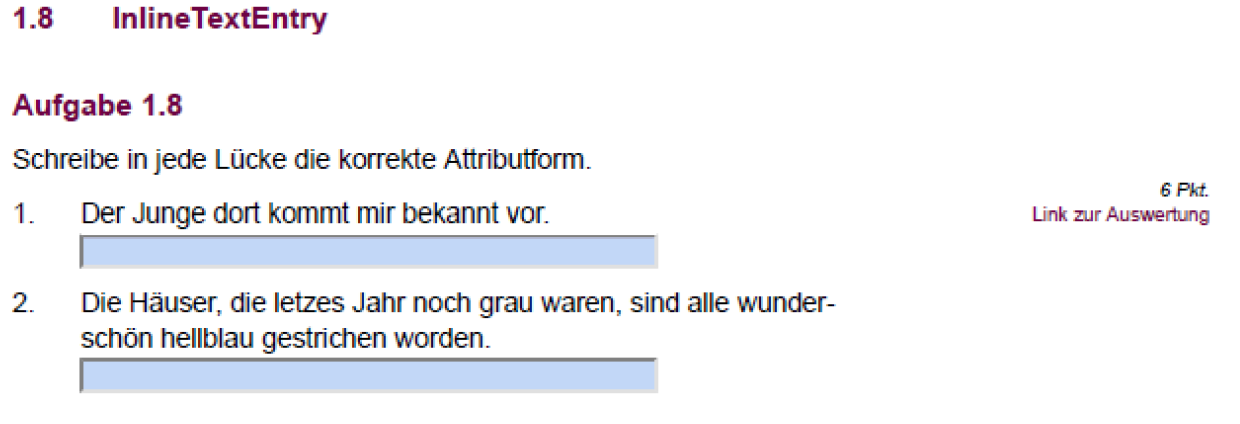
Fig. 25: “InlineTextEntry” question type.
Complex (complex task comprising several subtasks of different types)
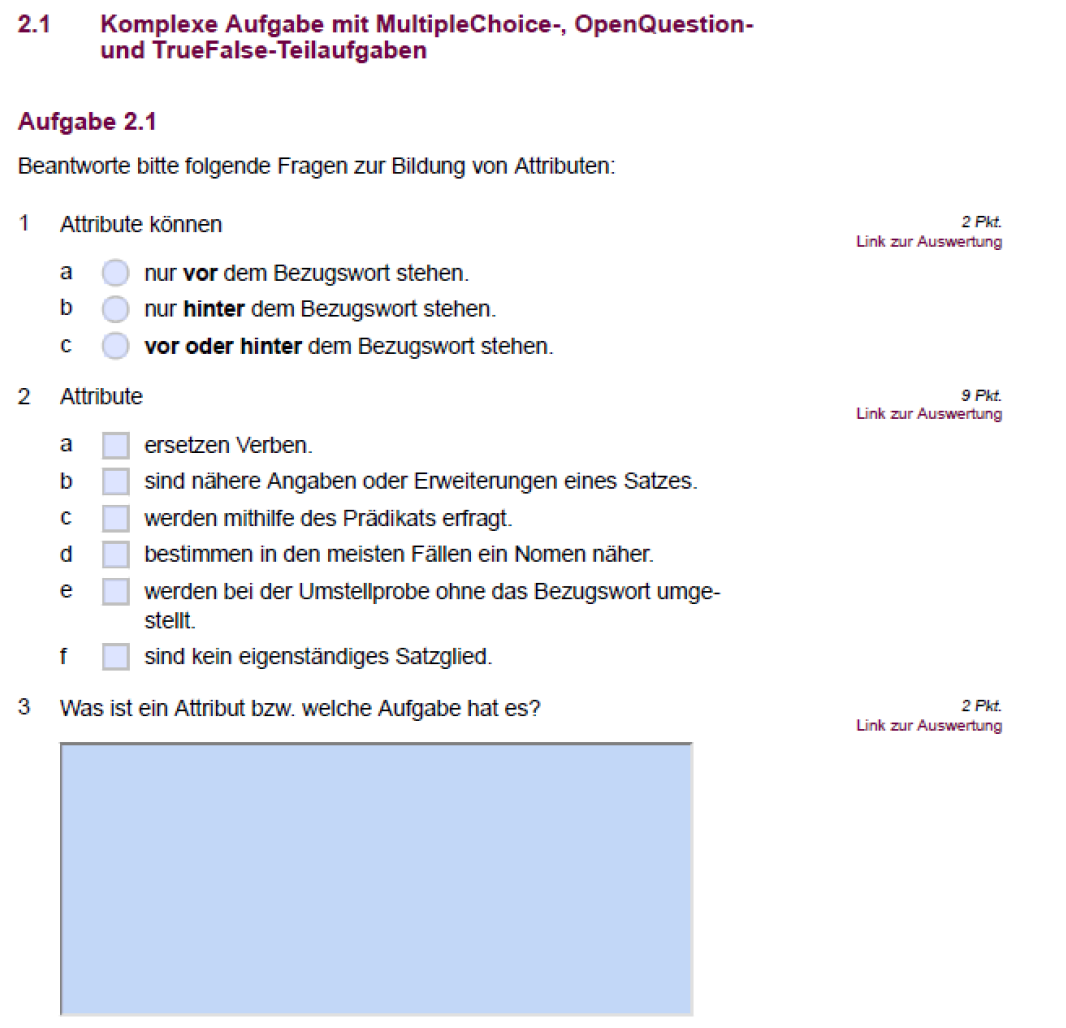
Fig. 26: “Complex” question type.
5.2.4 Answer key in Excel
If input data includes tasks with solutions, the framework also outputs the solutions in a separate Excel spreadsheet. This answer key takes existing individualisation, randomisation and localisation into account.
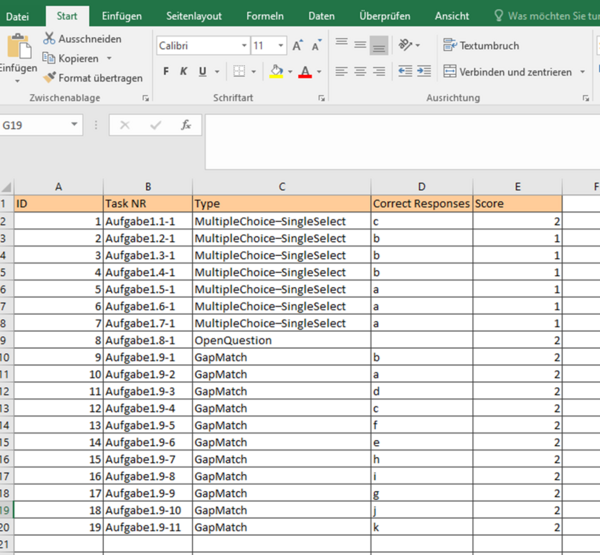
Fig. 27: Example answer key in Excel.
5.2.5 IMSCC (LMS)
Octopus XML Framework also provides the IMSCC (IMS Common Cartridge® Specification) format as an output channel.
This open standard developed by IMS provides a standard method of representing digital course materials for online learning systems. Content can therefore be developed in one format and used in many learning systems, such as course management systems, learning management systems, virtual learning environments or teaching management systems. It also aims to enable new publishing models for online course materials and digital books that are modular, distributed over the web, interactive and customisable (source: imsglobal.org).
IMSCC therefore allows courses and tests containing interactive tasks (QTI), content (HTML5, PDF and so on) and metadata to be loaded into an LMS such as Canvas. Configuration must be adapted to the particular LMS.
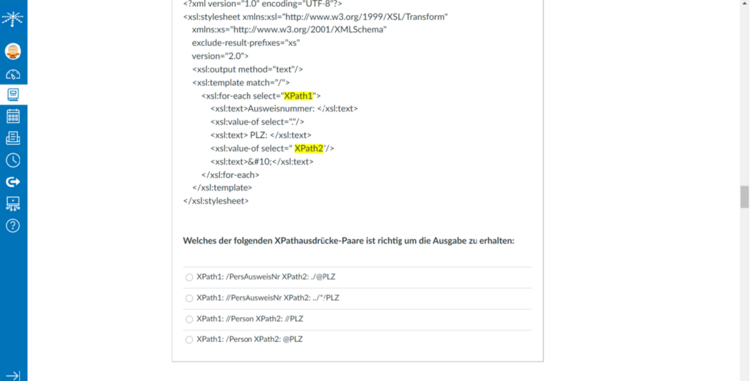
Fig. 28: Example interactive task displayed using the Canvas LMS.
5.2.6 LOM metadata
Octopus XML Framework outputs DITA metadata as LOM objects. Learning Object Metadata (LOM) is an open metadata standard for describing learning objects.
Good, complex metadata is the key to reusing DITA-LT data! To exchange content between learning applications, an application’s resources must first be given standardised metadata describing the learning content so that it can be reused in another application. Learning content encapsulated with metadata in this way is called a learning object.
The LOM standard was developed to facilitate exchanging, finding, acquiring and using learning objects. It enables sharing and exchange through directories and inventories that also account for cultural and linguistic differences (source: Wikipedia: Learning Objects Metadata).
One LOM file is generated per DITA file. Some metadata is created through inheritance. The inheritance model passes metadata through LOs (Learning Objects) to COs (Content Objects). External sources such as Excel can also enrich the metadata.
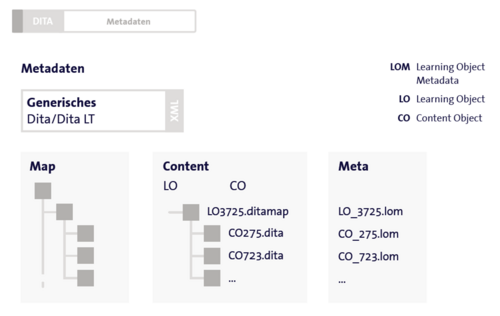
Fig. 29: Metadata concept.
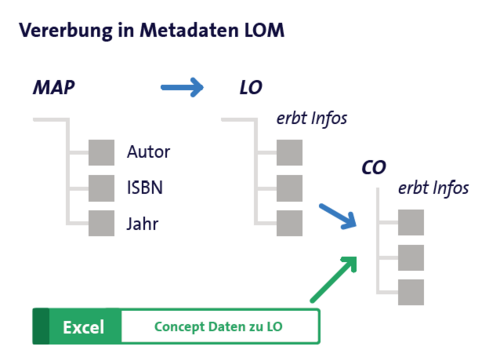
Fig. 30: Metadata inheritance model.
Detailed characterisation of learning objects helps users find specific content and document formats and assess whether particular learning programs suit their purposes. LOM also seeks to resolve questions in advance, such as how current a document is or whether it can be combined with other learning materials. The standard can describe learning object type (exercise, simulation, questionnaire, diagram, table, text and so on), interactivity level, teaching context, difficulty, average target-audience age and other educational aspects (source: Wikipedia: Learning Objects Metadata).
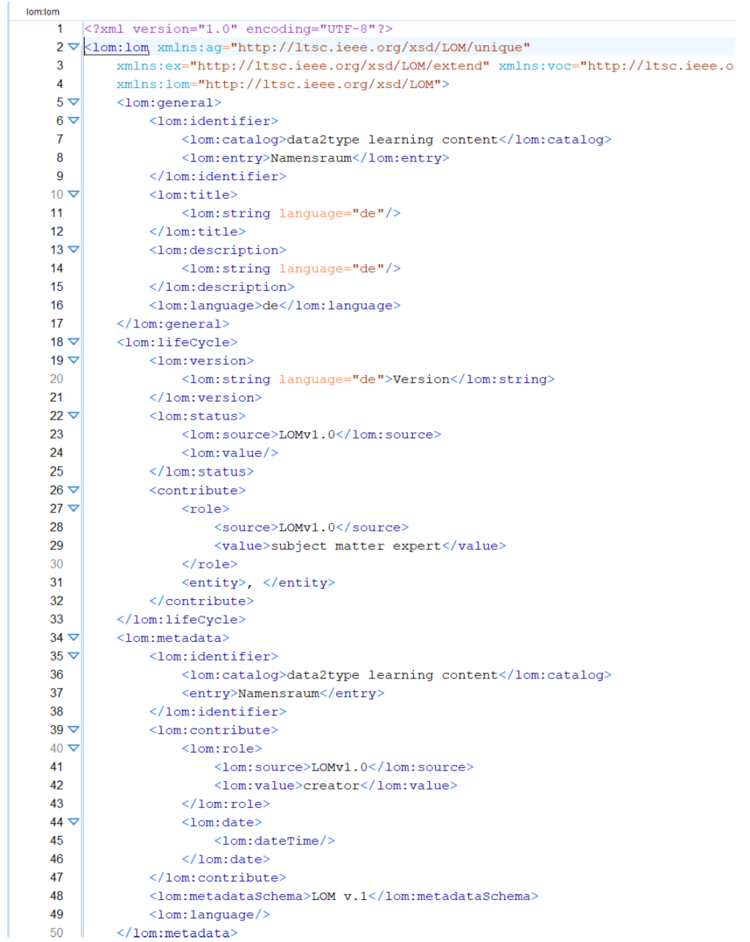
Fig. 31: Excerpt of DITA metadata in LOM format.
6. Further outputs and features
Besides the output channels described above, Octopus XML Framework offers further useful features and output formats, presented in more detail below:
6.1 Randomiser for tasks and solutions
With the Randomize module, the framework can output tasks and/or solutions in random order rather than only in the order defined in the DITA map.
For example, all solutions can be shuffled if the respective task allows it. This can also be applied to an entire block of tasks.
The tasks themselves are then output in a different order. Randomisation affects all output formats generated by the framework, including answer keys, which follow the shuffled order.
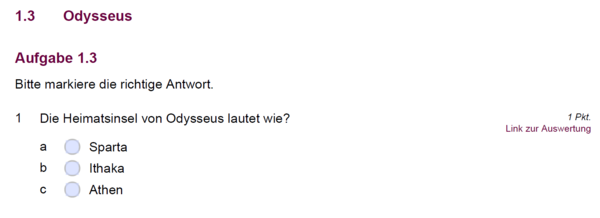
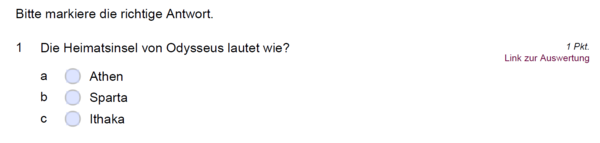
Fig. 32: Example task with answer options in two different orders.
A special variant is planned that would, for example, show only three of five possible solutions. This would provide more variations and even reduce the cost of creating tasks.
Randomising tasks and solutions is useful in examinations and tests because it makes copying and cheating more difficult.
Besides randomly displaying tasks and solutions, tasks can be generated simply in a way that makes memorising the answer key very difficult. This is achieved through “variants”.
Example:
[[Lukas | Matthias | Lola] geht in [[die Schule | den Unterricht]]
The following permutations can be generated in tasks and texts:
Lukas geht in die Schule
Lukas geht in den Unterricht
Matthias geht in die Schule
Matthias geht in den Unterricht
Lola geht in die Schule
Lola geht in den Unterricht
6.2 Fully automated translation with DeepL
Octopus XML Framework supports fully automated translation of outputs at runtime through an integrated DeepL API. DeepL is an online service for AI-powered machine translation.
Translation is available into Chinese, German, English, French, Italian, Japanese, Dutch, Polish, Portuguese, Russian and Spanish.
This machine translation is strikingly good, but naturally imperfect. For example, SVG graphics can be translated well, whereas other image formats cannot.
This functionality makes content accessible, for example, to learners whose native language is not German, which can provide substantial learning support.
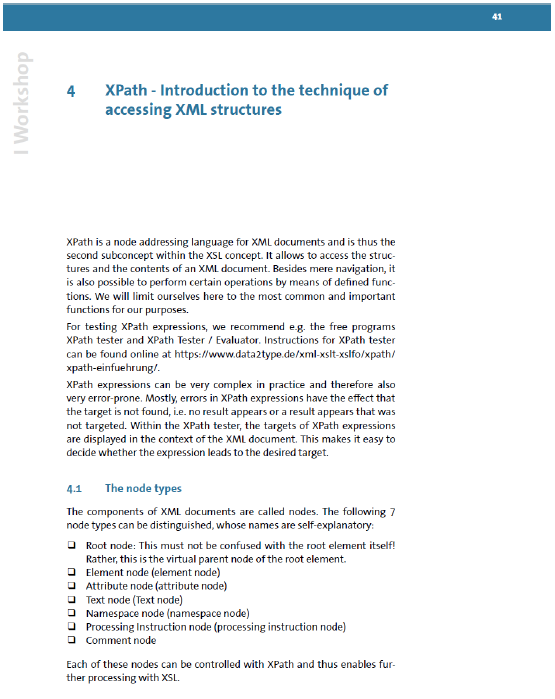
Fig. 33: Example automatically translated PDF output.
6.3 Automated translation with XLIFF
Octopus XML Framework uses the Okapi Framework to support output in XLIFF 2.0 format. XLIFF (XML Localization Interchange File Format) is an input format for CAT (computer-assisted translation) tools. It is designed specifically for exchanging translation data and associated context information with minimal loss (source: Wikipedia: XLIFF).
Translation is available into Chinese, German, English, French, Italian, Japanese, Dutch, Polish, Portuguese, Russian and Spanish.
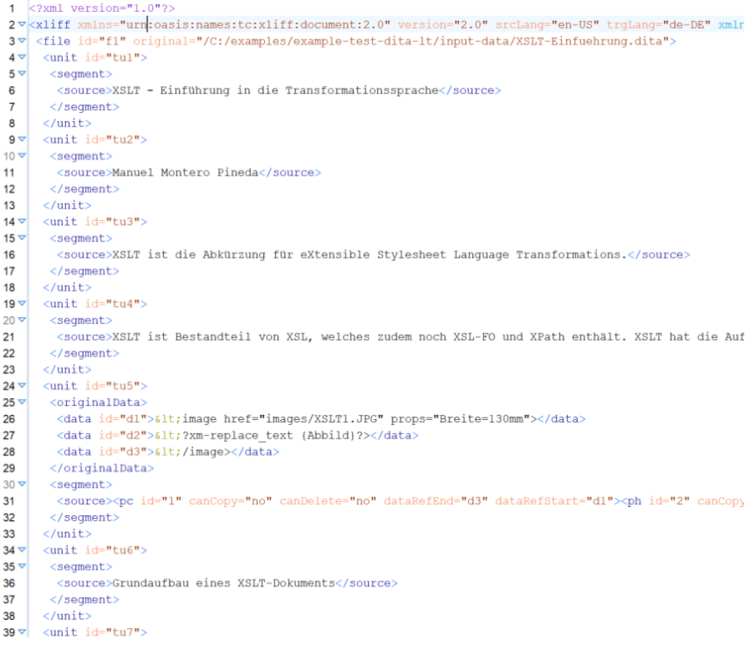
Fig. 34: Example XLIFF document.
Semi-automated translation takes place at runtime and should subsequently be edited manually. XLIFF allows translation agencies to translate quickly, at high quality and at lower cost using translation memory systems. Terminology databases can also be supported.
The framework also reintegrates translated content into DITA-LT, allowing professionally translated learning content to be offered in several countries.
6.4 Automatic linking
The linking module automatically links content using the desired search terms or regular expressions (Regex). DITA topics with inserted links are output.
Links are created automatically in all output channels. Content can thus be reconnected fully automatically during output, either to your own content or external information sources. The aim is, for example, to link old content to new content without editing it. This can depend on language and user-defined categories. Link counts are automatically reduced, for example to only the first occurrence of a term per chapter.
This useful function automatically enriches learning content with further information on a topic or definitions of terms, improving the reading and learning experience.
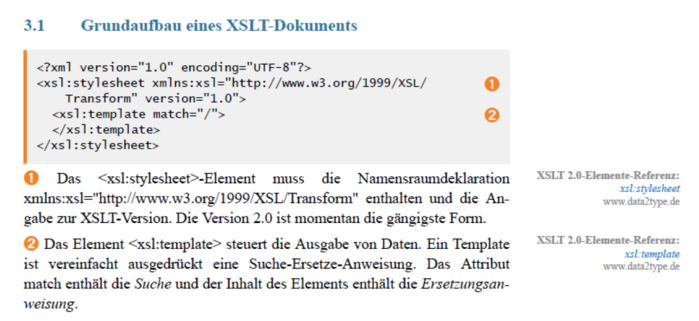
Fig. 35: Example automatic links in PDF output at the document’s right edge.
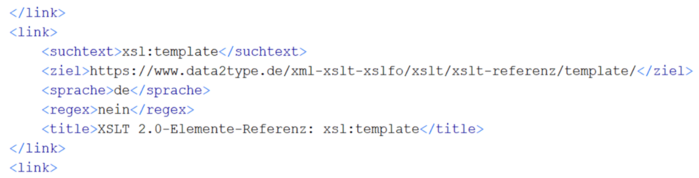
Fig. 36: Example code excerpt with search text and link target.
6.5 QR codes
For PDF output, Octopus XML Framework can also present automatically generated links as QR codes.
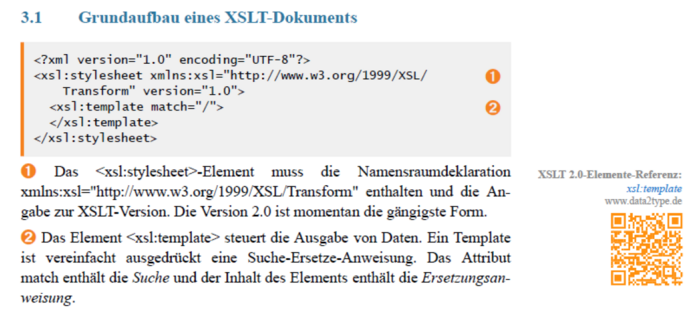
Fig. 37: Example link as a QR code at the document’s right edge.
6.6 Automatic graphics generation
Octopus XML Framework can output tables and MathML formulas as image files in different formats.
For each table or MathML formula in the exHTML exchange format, an XSL-FO document is generated using the same styles as PDF conversion. A renderer (Antenna House Formatter or FOP) converts these documents into SVG tables or SVG MathML expressions. For JPG tables or MathML expressions, PDFs are first generated from the XSL-FO documents. Finally, the free image processing software “ImageMagick” converts the PDFs to JPG images.
This is particularly useful for displaying large, complex tables and mathematical formulas as desired in all output channels.
6.7 Automatic glossary library generation
Octopus XML Framework can automatically create glossary libraries for DITA-LT output. Entries appear in outputs only if corresponding glossary references have been set in the DITA files.
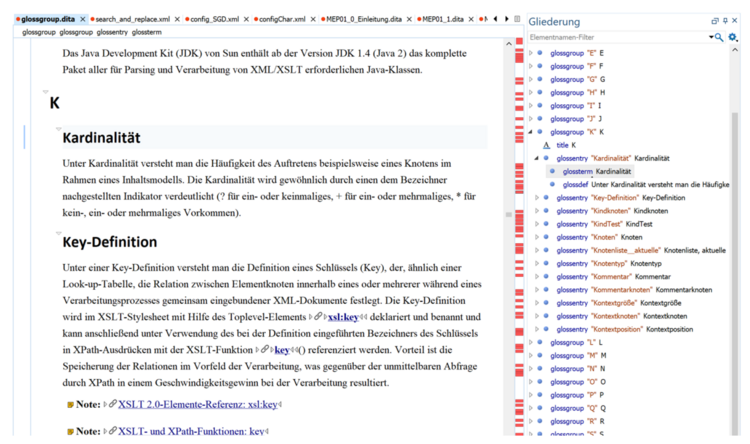
Fig. 38: Example DITA glossary file.
6.8 Speech output as MP3
Speech output from text through SSML (Speech Synthesis Markup Language) is still under development.
SSML is a W3C XML standard for generating synthetic speech in web and other applications. Its main purpose is to give authors of synthesised content a standard method for controlling speech aspects such as pronunciation, volume, pitch and speed across platforms (source: W3C Recommendation: SSML).
Content is output as an audiobook in MP3 files. The next step is support for tasks read aloud with their solutions. A final development stage would be a dialogue system with speech input.
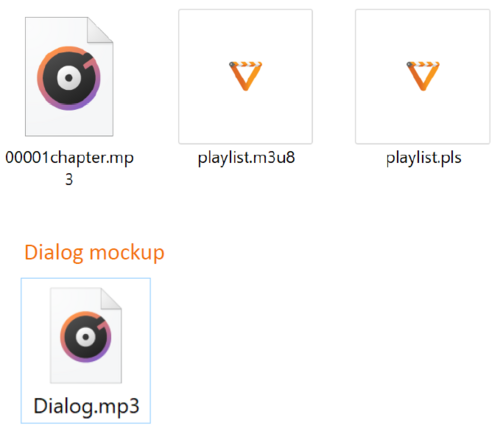
Fig. 39: Speech output files.
Audio learning content offers users many benefits and possible applications, for example:
Foreign language learning: correct pronunciation of words
Support for reading and spelling difficulties
Hearing information helps with memorisation and application
Accessible learning content for users with impaired vision
6.9 Individualising DITA metadata
Octopus XML Framework also supports customer-specific individualisation of DITA metadata, entered directly in the config file’s <ind> element and stored in the various output format folders during conversion.
HTML5 and exHTML output is thus supplemented with individual details such as customer number, form of address and address information.
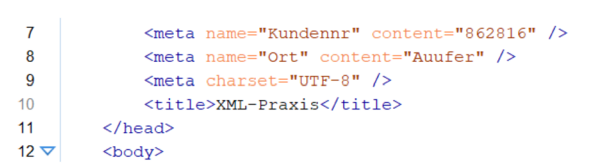
Fig. 40: Example individual metadata output (here customer number and location) in HTML5.
6.10 Advertising
The module advertising can add DITA files for advertising purposes.
The files are inserted under the heading 'Recommended for you' as the last chapters in the DITA map. This small optional feature rounds out framework use, for example by pointing users to other products and content.
6.11 Individualised SVG graphic
Octopus XML Framework can automatically generate individualised SVG graphics based on the data. This requires, as part of custom programming, a separate XSLT stylesheet for each SVG file. Specific areas can thus be displayed separately or highlighted, controlled by parameters in the DITA data.
data2type has already developed two SVG graphics we like to use for illustration: the XML periodic table and a presentation of our XML training courses.
The following figure shows the XML periodic table with XML standards highlighted according to the data. In this example, the addressing language XPath is marked in orange.
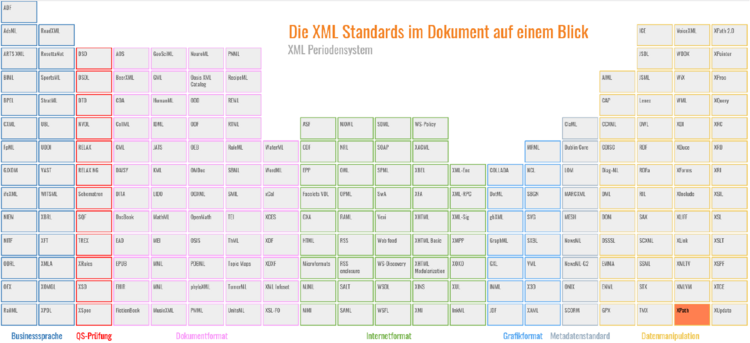
Fig. 41: SVG graphic with highlighted areas in the XML periodic table.
6.12 Technical data analysis
Octopus XML Framework includes a module for structural and technical analysis of input DITA-LT data down to character level. Results include the number of well-formed files, total elements, total distinct elements and so on.
Detailed checking of input data makes error analysis faster and more effective, helping assess whether and to what extent customer data is suitable for the framework.
The individual analysis outputs and their contents are listed below:
6.12.1 Excel
An Excel file with several worksheets is output:
The “Metainfo” worksheet contains the analysis date, number of well-formed files, total elements, total distinct elements, total attributes, total distinct attributes, total characters, total distinct characters, total comments, total processing instructions, namespaces and root elements.
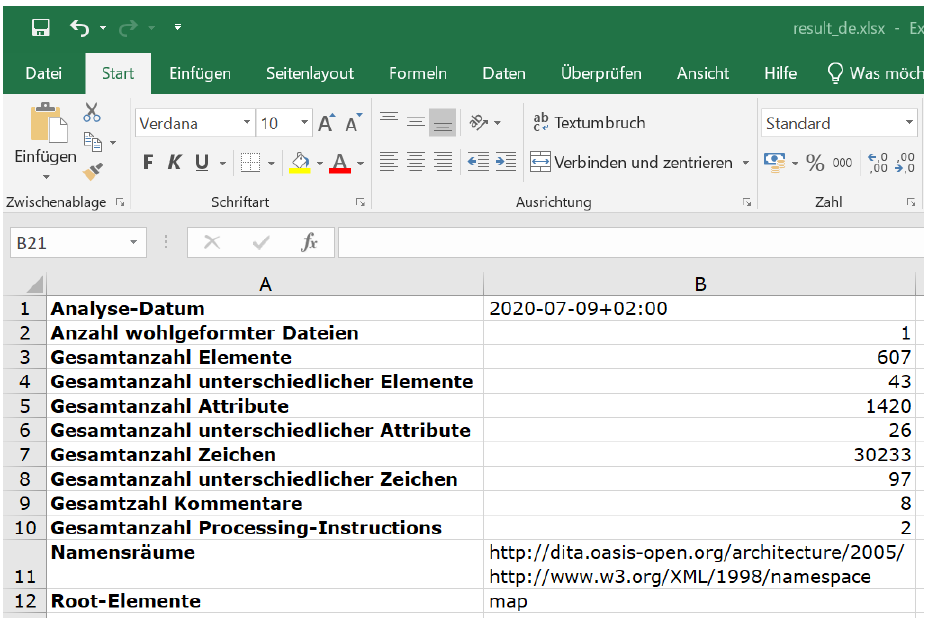
Fig. 42: Example analysis results in a “Metainfo” worksheet.The “Files” worksheet lists the paths of well-formed files.
The “Errorfiles” worksheet lists the paths of invalid files.
The “Elements” worksheet lists the following analysis results: Namespace, element name, element count, type (block or inline element), content (mixed content or text), recursiveness, attributes, parent elements and child elements.
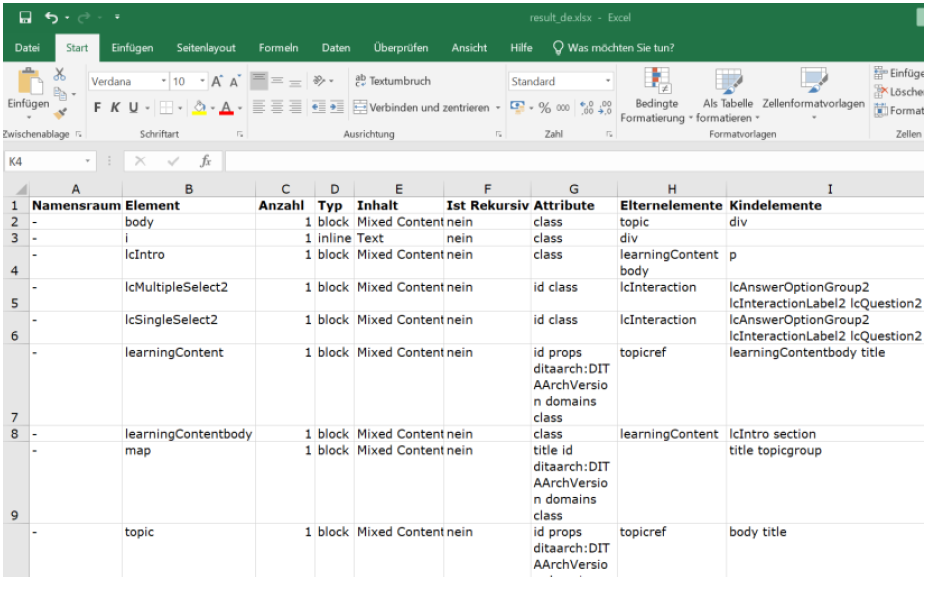
Fig. 43: Example analysis results in an “Elements” worksheet.The “Attributes” worksheet lists attribute name, element and example.
The “Characters” worksheet lists the following analysis results: Unicode character, its appearance (glyph), an English description and total character count.
The “ProcessingInstructions” worksheet lists the name of the processing instruction (PI), total count of a PI and its individual values.
6.12.2 Grammar folder
Data analysis also creates a “grammar” folder containing the following generated schema files for different XML grammars:
XML Schema
RELAX NG schema (RNG)
RELAX NG Compact Schema (RNC)
6.12.3 HTML
Data analysis generates an HTML file listing all the information in the Excel file described above. It also contains linked schema diagrams and element paths and occurrences.
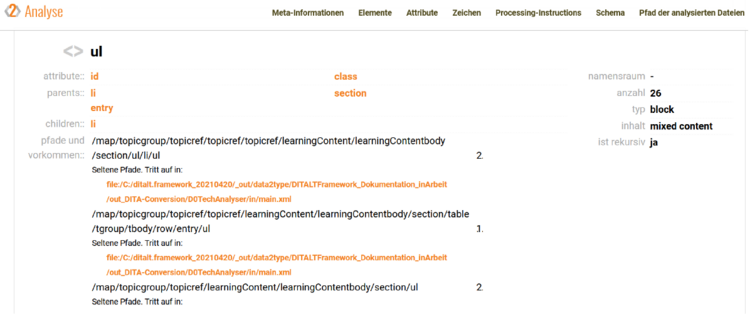
Fig. 44: Example analysis results in HTML.
6.12.4 PDF
Finally, data analysis generates a PDF containing all HTML results in a different presentation, for example with a linked table of contents.
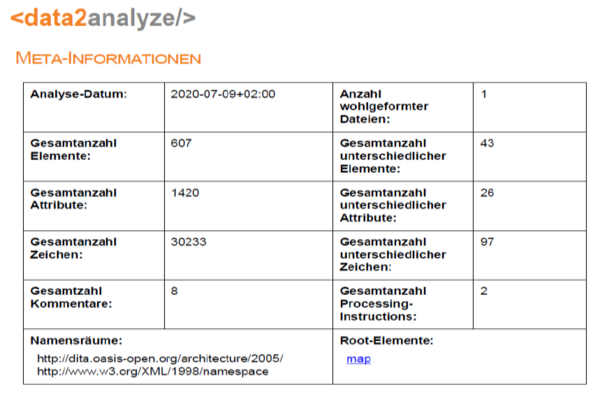
Fig. 45: Example analysis results in PDF format.
PDF schema design diagrams are also generated for all elements.
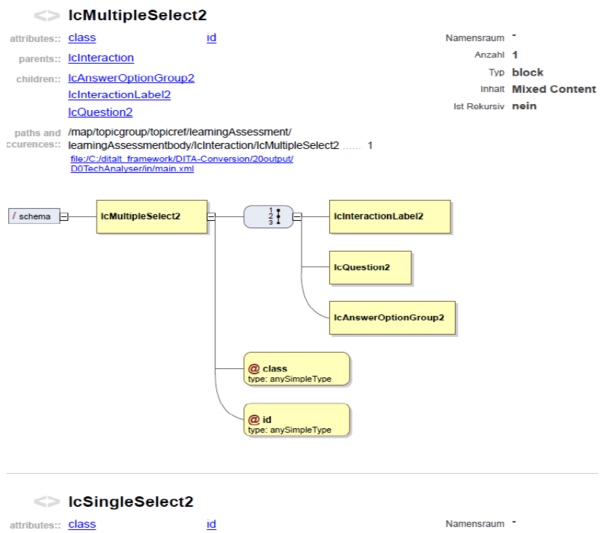
Fig. 46: Schema design diagram in PDF.
6.13 Data quality assurance
Octopus XML Framework can perform quality assurance analysis on DITA files. Various validations are applied to input files, with results stored and made available in checking reports.
The following checks and actions are performed:
List Regex replacements and the Regex rules used
Check all DITA files using DTD, XML Schema and Schematron
Check XML well-formedness of the files
Check that link targets exist
Output an overview report containing all messages
Checking reports in XML, HTML and Excel
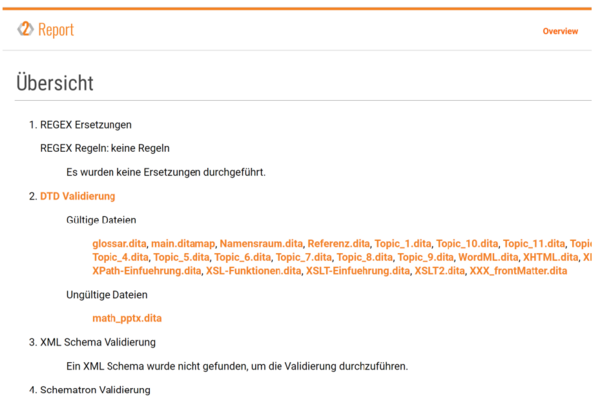
Fig. 47: Quality assurance error report: overview.
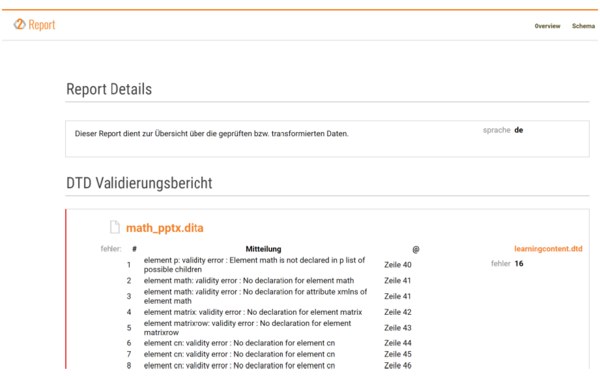
Fig. 48: Quality assurance error report: DTD validation report.
These checks ensure XML data quality regarding well-formedness, validity and coherence, enabling error-free processing into different output formats and channels.
7. Planned modules
The following output formats and functions are still planned for Octopus XML Framework:
7.1 Word as an output format
MS Word (.docx) output is planned.
It will be generated using XSLT, CSS and Word styles. Users can change the layout themselves by adapting CSS and the styles.
7.2 PowerPoint as images
Octopus XML Framework is also intended soon to convert Microsoft PowerPoint files into images and display them in all output channels. JPG, PNG and SVG output is planned. Users will also be able to select slides, such as slides 3 to 23, to save as image files.
The images are referenced in the DITA-LT files.
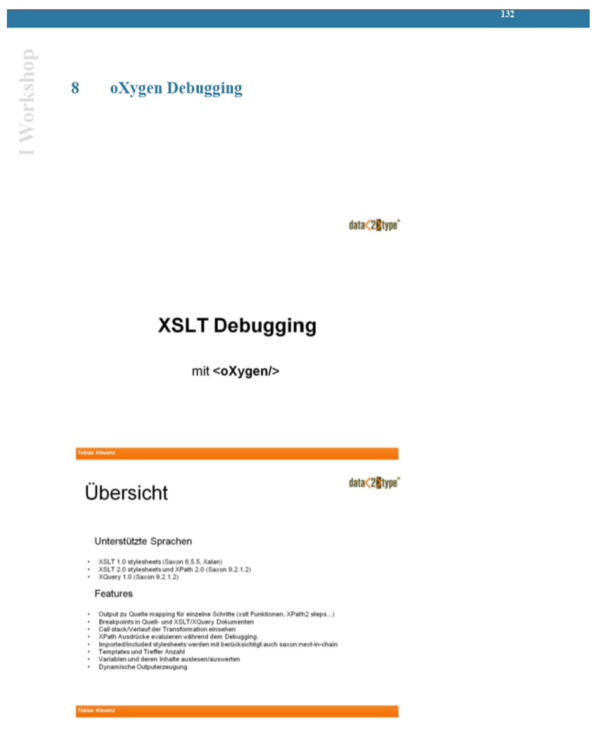
Fig. 49: PowerPoint slide embedded as an image in PDF.
7.3 Duden hyphenation
The framework already supports its own hyphenation.
Duden-based hyphenation is planned for the future. Pricing and implementation would need to be negotiated with Dudenverlag.
7.4 AI and Semantic Web use
Another possible extension to Octopus XML Framework is a module using artificial intelligence to link parts of learning documents.
Possible uses include automatically linking bibliographies and interlinking large collections without regular expressions.
Semantic Web technologies such as RDF for linking knowledge or content are another exciting extension. The Semantic Web approach extends existing web technologies with semantic functions that allow machines to interpret data content. DITA metadata and bibliographies, for example, are suitable for RDF enrichment.
7.5 Wikipedia
Another useful planned feature is directly linking learning content to the free online encyclopaedia Wikipedia.
Links could point to Wikipedia articles. These articles would then be converted into DITA-LT, added automatically to an appendix and linked to the reference location, allowing them to be read offline too.
7.6 Output analysis for strategic planning
Octopus XML Framework can also potentially analyse DITA data in advance to enable strategic output planning.
Each DITA Content Object (CO) could be analysed for special features such as highly complex tables, mathematical formulas or special characters. Rules for these content objects could then determine whether they can be represented in a target format. While assembling the DITA maps, any formats that cannot be generated would already be indicated.
This would produce an overview of all products and target formats, showing which can and cannot be generated, enabling better assessment and planning of framework projects.
8. What is the concept of object-oriented publishing?
The following explains the concept of object-oriented publishing of learning content, mentioned at the beginning, in relation to Octopus XML Framework.
8.1 DITA Objects
With Octopus XML Framework, we aim to introduce DITA Objects as a new publishing concept, establishing object-oriented publishing.
The framework contains a “DITA Objects” module that generates various DITA Objects output variants for a DITA map or topic.
Example: QTI 1.2 output with mathematical tasks and formulas as PNG and an SVG preview of the formulas.
All information about a DITA topic or map is collected in output folders. A series of folders with the corresponding objects is generated for each Learning Object (LO) or Content Object (CO). In the following example, the object contains many tables output as JPG and SVG graphics.
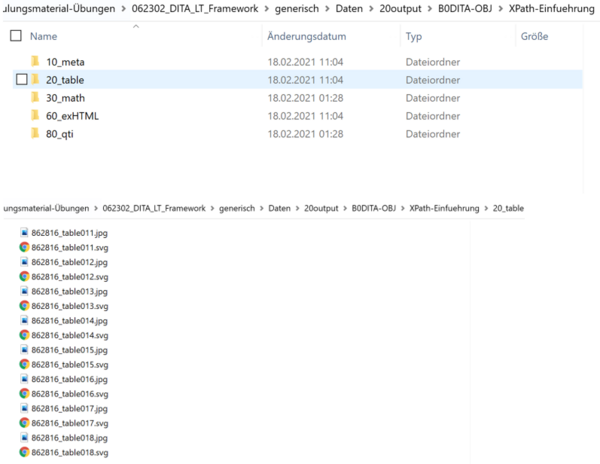
Fig. 50: DITA Objects stored in different output folders.
Processing takes place when content is created or changed, rather than at output time. The conversion pipeline pre-produces all component objects of a printed publication: all input content such as text, images, tables and formulas. These components are output in different representations or formats. The output is finally assembled from the desired objects and generated for the specific application.
Generated components and outputs include:
Structural information
For an InDesign workflow (see also “InDesign output for textbook publishers”):
InDesign layout
Word equivalent for the editorial workflow
Page height and width
Available layout variants
PDF output
SVG output
Print page height and width
Hyphenation in all languages; optionally Duden-compliant for German
Translations (possibly automated)
All tasks, tables and MathML formulas output as PDF, SVG, PNG and TeX
Word lists
Weighted word lists with position information for offline search
Index terms
Structural analysis down to individual characters
What is the purpose of this “prefabricated” approach?
Generating some output formats is computationally intensive and costly, especially in large numbers. The “pre-production” of some components opens up new possibilities, for example:
QTI views can be displayed directly when assembling test and practice tasks, making the work much easier.
During assembly, users can immediately see an approximate preview of the result in each desired target format, such as PDF layout, LBook and so on.
Extent calculations are therefore possible while creating the DITA map, for example to estimate the space needed for double-page spreads in textbooks.
Object-oriented publishing also provides the basis for fragmented content reuse. Content laid out in other tools such as InDesign or Word could thus be reused, for example as fragments in EPUB or QTI. Complex tables and formulas can be inserted as images, as in print output. Even the regionalisation of content described in the next section can be achieved economically, saving resources.
8.2 InDesign output for textbook publishers
Using Octopus XML Framework, we are developing a special InDesign output workflow, particularly relevant to textbook publishers, that connects reuse of InDesign and DITA-LT data.
Standard InDesign typesetting in the textbook market does not normally provide roundtripping: automatically returning corrected final data to its source after approval. “Output only” is common, so text changes must be entered manually twice, in the output and input data. Consequently, text changes are often prohibited, making content reuse and further use harder.
We identified the following issues, among others, for German textbook publishers:
Content needs to be reused. With 16 federal states and three school types per state (greatly simplified), there are theoretically 48 opportunities for reuse.
Content and tasks must, however, be adapted to each region, for example maths exercises in Bavaria using Munich as the state capital.
Textbooks follow the double-page principle: content should preferably fit on a double-page spread. Each page is individually designed rather than rule-based.
Reusing tasks for digital tests would be desirable.
Content should be used in apps.
Checking language content for vocabulary and grammatical forms not yet introduced would be desirable.
Conventional InDesign implementation makes these requirements very costly in typesetting and editorial work!
Our InDesign output workflow is based on object-oriented publishing and aims to solve these issues through the following features and outputs:
An “extent checker” based on DITA-LT data would be used directly during output assembly to determine which content still fits on a page and in what form, for example by estimating image height and width.
Partial regionalisation of content.
Rough page previews without InDesign.
The workflow connects to Word, including detection of new parts in the editorial process.
Returning data to Word.
A typeset view of the DITA Content Object (CO) already in the XML editor.
QTI and InDesign output of tasks.
InDesign typesetting can be relatively free because data2type software checks the data. For example, layout changes and minor text changes such as numbering, spaces and hyphenation are detected and checked.
Frequent content reuse can reduce typesetting costs by up to 90 percent.
8.3 LBook
“L(earn)Book” is still a working title for an output format we are developing with our sister company parsQube. It is still under construction. LBook is also intended to use object-oriented publishing.
The goal is an online- and offline-capable web format that contains all media and loads complete learning units. It is HTML5-based and responsive.
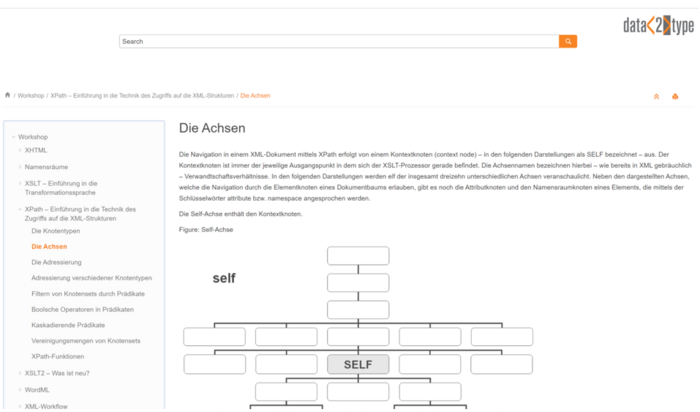
Fig. 51: Example learning content in LBook format.
Offline search and automatic indexing are also intended to be part of the application.
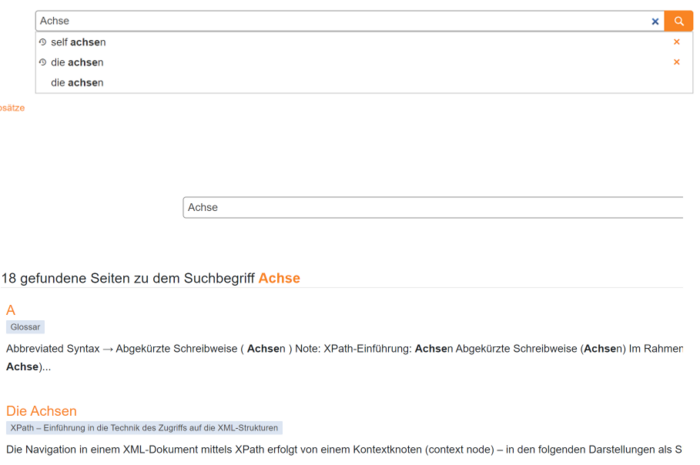
Fig. 52: Example search function in LBook format.
LBook is intended to integrate self-assessment tests that also display the solutions directly.
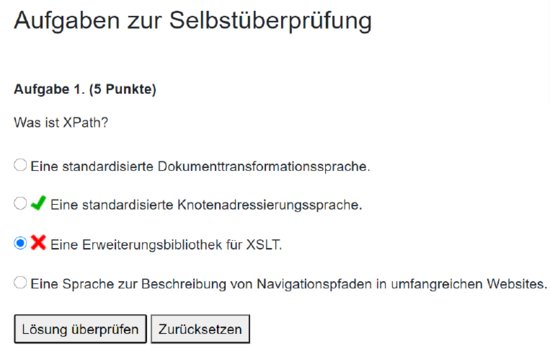
Fig. 53: Example task with the correct solution in LBook format.
Assessments can be generated and displayed automatically for a specific task group or the entire LBook.
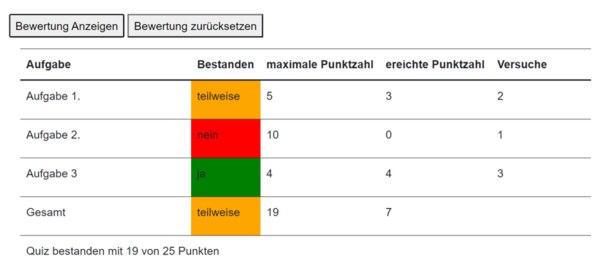
Fig. 54: Example quiz results table.
Test results should also generate recommendations for further content. Personalised learning content and recommendations aim to increase motivation and improve learning outcomes, an important part of adaptive learning.
8.4 Adaptive learning
In future, Octopus XML Framework is also intended to provide a technical data and output foundation for adaptive learning by further developing object-oriented publishing theory and implementing it in the framework.
Adaptive learning is an established concept in education (and marketing) according to which knowledge delivery must be adapted to learners’ knowledge, learning preferences and environment to achieve comparable learning outcomes for everyone (source: Wikipedia: Adaptive learning).
Using AI, the Semantic Web, metadata in different formats and XML databases, the framework therefore has the potential to display learning content adapted and individualised for each user to improve individual learning outcomes.
Since every learner thinks and learns differently, educational offerings should take individual characteristics and needs into account as effectively as possible. Supported by AI and other technologies, interactive learning systems can measure learners’ actions, analyse and interpret the data, compare it with other measurements and then suggest new content adapted to their learning progress (source: Talk: “Adaptive learning – when learning content adapts to learners”). As on Amazon, users could therefore receive suggestions about topics that might interest them or areas where their knowledge still has gaps.