

XML technologies / XSLT / Java and XSLT / Introduction / XML in brief
(Excerpt from “Java and XSLT” by Eric M. Burke)
XML stores structured data. Though resembling HTML, it is stricter about quotes, closed tags and similar details. It defines no tag names: authors must invent them or await a suitable standardized XML markup language (markup language). A markup language defines tags with semantic meaning. XSLT is one, using XML syntax.
Terms element and tag are often interchangeable, and both appear here. Technically, an element is the represented concept; a tag is the document markup. <kunde> is thus the tag representing element kunde in a program.
SGML, XML and markup languages
SGML (Standard Generalized Markup Language) underlies HTML, XHTML, XML and XSLT differently. The figure shows their relationships.
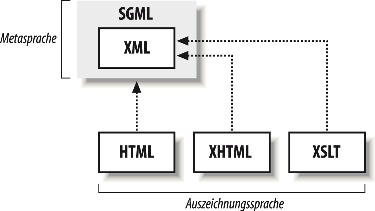
Figure: SGML family tree
SGML is a sophisticated metalanguage for complex documentation. It defines tag syntax, not specific tags. HTML instead is a markup language implemented with SGML, defining tags such as <h1> and <p>. Because HTML is a markup language, not a metalanguage, you cannot add tags hoping browsers will implement them.
XML is an SGML subset, compatible with SGML but much smaller. Simplicity is a goal because web bandwidth and client processing are limited. Easy parsing and checking improve performance. As a metalanguage, XML defines no tags. XSLT, an XML-based markup language, is detailed in the next two chapters.
XHTML is another XML markup language, intended to replace HTML while remaining almost fully compatible with existing browsers. Strict XML well-formedness makes tools easier to build: syntax is predictable and standard XML validation applies. Many book examples use XHTML, though XSLT handles either format.
Advanced XML/XSLT processing shows that tagged text need not be XML. Files and tags serialize underlying elements, useful for storage but not always efficient for exchange or modification. For large documents, relational or object databases outperform and scale better than native XML text files.
XHTML basics
XHTML is W3C’s recommendation for HTML’s future. Based on HTML 4.0, it works with existing browsers and obeys XML. Correct XHTML is well-formed XML and must follow an XHTML DTD, allowing validation with parsers such as Apache Crimson.
XHTML’s modular design supports subsets for mobile devices. XHTML Basic, another W3C recommendation, is one result and should become important for wireless applications.
An XHTML document example:
<?xml version="1.0" encoding="UTF-8"?>
<!DOCTYPE html PUBLIC "-//W3C//DTD XHTML 1.0 Strict//EN" "http://www.w3.org/TR/xhtml1/DTD/xhtml1-strict.dtd">
<html xmlns="http://www.w3.org/1999/xhtml">
    <head>
        <title>Hallo Welt!</title>
    </head>
    <body>
        <p>Hallo Welt!</p>
    </body>
</html>
Key XHTML rules include:
Documents must be well-formed XML and follow an XHTML DTD: close all elements, quote attribute values and nest correctly.
The
<!DOCTYPE ...>tag is required.Unlike HTML, all tags are lowercase.
The root must be named
<html>and declare the XHTML namespace.<head>and<body>must occur in the document.
The example follows the strict DTD, prohibiting deprecated and many styling tags. Two other DTDs, transitional and frameset, improve compatibility but should be avoided where possible. Full details are in W3C specifications.
XML syntax
Example bundespraesidenten.xml contains former federal presidents. It is well-formed because it obeys basic XML formatting rules.
bundespraesidenten.xml
<?xml version="1.0" encoding="ISO-8859-1"?>
<!DOCTYPE bundespraesidenten SYSTEM "bundespraesidenten.dtd">
<bundespraesidenten>
    <bundespraesident>
        <amtsperiode von="1959" bis="1969"/>
        <name>
            <vorname>Heinrich</vorname>
            <nachname>Lübke</nachname>
        </name>
        <partei>CDU</partei>
    </bundespraesident>
    <bundespraesident>
        <amtsperiode von="1969" bis="1974"/>
        <name>
            <titel>Dr.</titel>
            <titel>Dr.</titel>
            <vorname>Gustav</vorname>
            <mittelinitial>W.</mittelinitial>
            <nachname>Heinemann</nachname>
        </name>
        <partei>SPD</partei>
    </bundespraesident>
    <!-- Die übrigen Bundespräsidenten werden ausgelassen -->
</bundespraesidenten>
HTML browsers tolerate missing tags or misplaced quotes and try to render malformed pages. This makes the web friendlier than constantly reporting syntax errors.
XML represents structured data, so well-formedness matters greatly. If banks exchange a corrupted message, the receiver must reject it rather than risk assumptions. XSLT authors must understand this: stylesheets are XML and must obey well-formedness rules.
Every well-formed document has exactly one root element. In example Bundespraesidenten.xml, the root is <bundespraesidenten>. Every other element has one parent and zero or more children. All must close and nest correctly:
<name>
 <vorname>Heinrich</vorname>
 <nachname>Lübke</nachname>
</name>
Although whitespace (spaces, tabs and line breaks) between elements is irrelevant, indentation improves readability. Even if XML parsers preserve whitespace, element meaning stays unchanged. Other changes do matter: the next <vorname> tag needs a matching </vorname> tag. Incorrect nesting makes this invalid:
<name>
  <vorname>Heinrich
    <nachname>Lübke</vorname>
  </nachname>
</name>
Empty elements have an alternative closing syntax. They have neither content nor children and are called empty elements. Element <amtsperiode> is an example:
<amtsperiode von="1959" bis="1969"/>The closing slash means no content, though attributes may exist. An attribute is a name-value pair such as von="1959". Well-formed XML requires single ('') or double ("") quotes around every attribute value.
Some presidents have middle initials or titles, represented here by optional elements. Gustav Heinemann, for example, had another given name and two titles:
<bundespraesident>
    <amtsperiode from="1969" bis="1974"/>
    <name>
        <titel>Dr.</titel>
        <titel>Dr.</titel>
        <vorname>Gustav</vorname>
        <mittelinitial>W.</mittelinitial>
        <nachname>Heinemann</nachname>
    </name>
    <partei>SPD</partei>
</bundespraesident>
Unlike HTML, XML is case-sensitive: <bundespraesident> differs from <BUNDESPRAESIDENT>. Either spelling works if consistent. XHTML is likewise case-sensitive and requires lowercase tags such as <html>, <body> and <head>.
Basic well-formedness rules:
Exactly one root; the remaining tree gives each element exactly one parent.
Close every element correctly.
<name>Leo</name>is correctly closed: tag<name>ends with</name>. Empty elements can also use form<ledig/>.Nest correctly. This is allowed:
<b><i>fett und kursiv</i></b>This is not:
<b><i>fett und kursiv</b></i>Quote attributes with single or double quotes. Example:
<datum monat="april" tag='05' jahr="1979"/>Attributes need name-value pairs. HTML sometimes uses flags such as
<td nowrap>. XHTML writes this as<td nowrap="nowrap"/>, XML-compatible and supported by existing browsers.
This is not exhaustive, but suffices for these examples. Most HTML is not well-formed: tags like <br> or <hr> lack closing tags, and browsers accept unquoted attributes. This can confuse XSLT authors: an XML stylesheet often outputs HTML, yet its own well-formedness makes malformed HTML difficult to write directly. XHTML output is easier because it too is XML.
Validation
Well-formed XML follows basic syntax. Valid XML also follows a document type definition (DTD) or XML schema. Validity first requires well-formedness. DTDs traditionally validate XML; schemas are their logical successor. XML Schema is another W3C specification with richer validation than DTDs. Since XML Schema is still new, DTDs remain during transition.
Line 2 of example Bundespraesidenten.xml contains this document type declaration:
<!DOCTYPE bundespraesidenten SYSTEM "bundespraesidenten.dtd">This references the DTD beside bundespraesidenten.xml. DTDs are also often referenced by URI:
<!DOCTYPE bundespraesidenten SYSTEM "http://bund.de/dtds/bundesprasesidenten.dtd">Wherever stored, a DTD defines permitted XML structures. Here is the presidents-list DTD.
bundespraesidenten.dtd
<!ELEMENT bundespraesidenten (bundespraesident+)>
<!ELEMENT bundespraesident (amtsperiode, name, partei)>
<!ELEMENT name (titel*, vorname, mittelinitial*, nachname, spitzname?)>
<!ELEMENT titel (#PCDATA)>
<!ELEMENT vorname (#PCDATA)>
<!ELEMENT mittelinitial (#PCDATA)>
<!ELEMENT nachname (#PCDATA)>
<!ELEMENT spitzname (#PCDATA)>
<!ELEMENT partei (#PCDATA)>
<!ELEMENT amtsperiode EMPTY>
<!ATTLIST amtsperiode von CDATA #REQUIRED bis CDATA #REQUIRED>
The first line requires element <bundespraesidenten> to contain one or more <bundespraesident> children. Each <bundespraesident> in turn has an <amtsperiode>, a <name> and a <partei>, in exactly that order. Validating parsers reject violations.
Element <name> can contain zero or more <titel>, exactly one <vorname> followed by zero or more <mittelinitial> elements, exactly one <nachname> and finally zero or one <spitzname>.
Content of elements such as <vorname>Gustav</vorname> is called #PCDATA, short for parsed character data. This is ordinary text that may contain markup such as nested tags. Type CDATA is used for attributes and forbids markup. Thus a < in an attribute must be encoded as <. Element <amtsperiode> is marked EMPTY, allowing attributes but no content. The DTD requires element <amtsperiode> to have von and bis attributes:
<amtsperiode von="1969" bis="1974"/>Other DTD syntax is outside this book, since it scarcely affects XSLT code. DTDs primarily validate while parsing files into memory; generating new site XML leaves less to validate. We will use DTDs in Java/XSLT unit tests in Development environments, testing and performance.
Java and XML
This book uses Java XML APIs including SAX, DOM and JDOM. Parsing API details are not our focus, but understanding their roles matters because Java XSLT tools depend on them. For depth, read Brett McLaughlin’s Java und XML (O’Reilly).
A parser loads XML into memory, usually from text but also from any Java InputStream or URL. Validating parsers additionally check DTD/schema validity. Successful loading thus saves considerable Java checking code.
SAX
The most common parsing approach among Java programmers is SAX (Simple API for XML). SAX is a free API from David Megginson and members of the XML-DEV mailing list. Download it at Megginson Technologies: Simple API for XML. Most parsers include SAX, so separate download is rarely needed. Other languages have implementations, but we focus on Java. SAX scans sequentially, emitting events for elements, text and other parts. The receiver processes these events. It retains no whole document and handles large files quickly.
SAX currently has versions 1.0 and 2.0. The book uses 2.0 with its many changes. Parsers generally retain 1.0 support, but compiling old APIs gives deprecation warnings.
Java SAX parsers use interfaces, chiefly org.xml.sax.ContentHandler, declaring methods such as startDocument( ), startElement( ), characters( ), endElement( ) and endDocument( ). Parsing calls startDocument( ) once, then startElement( ) and endElement( ) are called once per tag.
For the following XML:
<vorname>Gustav</voname>Method startElement() runs, followed by characters(). Next comes endElement(). Method characters() returns text "Gustav". This repeats until document end calls endDocument().
Note:
Depending on implementation, method characters( ) splits contiguous text into chunks, calling characters( ) repeatedly until all characters are parsed.
Interface ContentHandler must be implemented by application code to react to callbacks. SAX provides class DefaultHandler, implementing interface ContentHandler. To use DefaultHandler, subclass it and override methods of interest, ignoring the empty others. AWT programmers will recognize the same approach as event adapters such as java.awt.event.WindowAdapter.
XSLT processors often accept SAX events instead of files. You can generate events yourself without a parser: it merely calls methods of interface ContentHandler. A pseudo-parser can do the same. In XSLT processing with Java we combine SAX with an XSLT processor to transform non-XML query results or CSV ( Comma Separated Values).
DOM
The Document Object Model (DOM) lets programs modify XML’s underlying structures. DOM is a W3C recommendation implemented in many languages. Its in-memory XML is called a DOM tree, a tree structure whose root represents the document through interface org.w3c.dom.Document. The document root element instead uses interface org. w3c.dom.Element. In the presidents example, element <bundespraesidenten> is the document root element. Nearly every DOM interface derives from org.w3c.dom.Node; Document and Element are no exception. Interface Node provides navigation and modification methods for the tree.
Surprisingly, DOM Level 2 specifies no standard XML reading/writing mechanism. Vendors differ, although all offer parsing and serialization. This introduces vendor-specific code into applications.
Note:
At writing time, W3C draft “Document Object Model (DOM) Level 3 Content Models and Load and Save Specification” promised these missing mechanisms once recommended.
Most DOM implementations delegate loading to a parser, since DOM defines no standard. Java favors SAX. The figure shows their typical interaction.
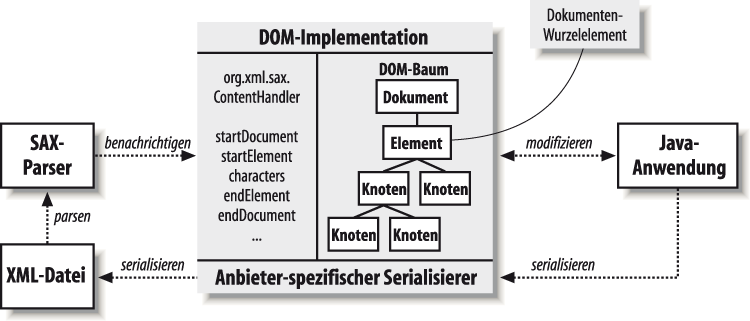
Figure: DOM and SAX interaction
Understanding these roles matters, but parsing syntax is not detailed here. Later examples generate XML dynamically rather than reading files. Let us create a new document with DOM, using a small library:
Example: bibliothek.xml
<?xml version="1.0" encoding="ISO-8859-1"?>
<!DOCTYPE bibliothek SYSTEM "bibliothek.dtd">
<bibliothek>
    <!-- Das ist übrigens ein XML-Kommentar -->
    <verlag id="oreilly">
        <name>O'Reilly</name>
        <strasse>Balthasarstrasse 81</strasse>
        <ort>Köln</ort>
        <plz>50670</plz>
    </verlag>
    <buch verlag="oreilly" isbn="3-89721-219-6">
        <ausgabe>1</ausgabe>
        <veroeffentlichungsDatum mm="02" jj="2000"/>
        <titel>XML kurz und gut</titel>
        <autor>Robert Eckstein</autor>
    </buch>
    <buch verlag="oreilly" isbn="3-89721-280-3">
        <ausgabe>1</ausgabe>
        <veroeffentlichungsDatum mm="03" jj="2001"/>
        <titel>Java und XML</titel>
        <autor>Brett McLaughlin</autor>
    </buch>
</bibliothek>
As bibliothek.xml shows, a <bibliothek> consists of <verlag> elements and <buch> elements. We generate them with Java classes Bibliothek, Buch and Verlag. Simple data classes are not shown in full; here is part of class Buch:
public class Buch {
  private String autor;
  private String titel;
  ...

  public String getAutor( ) {
  return this.autor;
  }

  public String getTitel( ) {
  return this.titel;
  }
  ...
}
These three helpers hold data only. Separate class BibliothekDOMCreator encapsulates XML generation, shown next.
Example: Generating XML with DOM
package chap1;

import java.io.*;
import java.util.*;
import org.w3c.dom.Document;
import org.w3c.dom.Element;

/**
* Ein Beispiel aus Kapitel 1. Es erzeugt die XML-Datei für Bibliothek mittels der
* DOM API.
*/
public class BibliothekDOMCreator {

  /**
  * Erzeuge ein neues DOM org.w3c.dom.Document-Objekt aus dem spezifizierten
  * Bibliothek-Objekt.
  *
  * @param bibliothek: eine anwendungsdefinierte Klasse, die eine
  * Liste von Verlagen und Büchern bereithält.
  * @return: ein neues DOM-Dokument.
  */
  public Document createDocument(Bibliothek bibliothek)
      throws javax.xml.parsers.ParserConfigurationException {
    // Verwende Suns Java-API für XML-Parsing, um das DOM-Dokument
    // zu erzeugen
    javax.xml.parsers.DocumentBuilderFactory dbf =
      javax.xml.parsers.DocumentBuilderFactory.newInstance( );
    javax.xml.parsers.DocumentBuilder docBuilder =
      dbf.newDocumentBuilder( );
    Document doc = docBuilder.newDocument( );

    // ACHTUNG: DOM hat keine eingebaute Methode zum Erzeugen von:
    // <!DOCTYPE bibliothek SYSTEM "bibliothek.dtd">
    // Apaches Xerces unterstützt die createDocumentType-Methode
    // über die DocumentImpl-Klasse, um das zu machen. Wird hier nicht verwendet.
    // erzeuge das <bibliothek>-Wurzelelement des Dokuments
    Element root = doc.createElement("bibliothek");
    doc.appendChild(root);

    // füge dem <bibliothek>-Element <verlag>-Kindelemente hinzu
    Iterator verlagsIter = bibliothek.getVerlage().iterator( );
    while (verlagsIter.hasNext( )) {
      Verlag verlag = (Verlag) verlagsIter.next( );
      Element verlagElem = createVerlagElement(doc, verlag);
      root.appendChild(verlagElem);
    }

    // füge nun <buch>-Kindelemente zum <bibliothek>-Element hinzu
    Iterator buchIter = bibliothek.getBuecher().iterator( );
    while (buchIter.hasNext( )) {
      Buch buch = (Buch) buchIter.next( );
      Element buchElem = createBuchElement(doc, buch);
      root.appendChild(buchElem);
    }
    return doc;
  }

  private Element createVerlagElement(Document doc, Verlag verlag) {
    Element verlagElem = doc.createElement("verlag");

    // setze das Attribut id="oreilly"
    verlagElem.setAttribute("id", pub.getId( ));

    Element name = doc.createElement("name");
    name.appendChild(doc.createTextNode(verlag.getName( )));
    verlagElem.appendChild(name);

    Element strasse = doc.createElement("strasse");
    strasse.appendChild(doc.createTextNode(verlag.getStrasse( )));
    verlagElem.appendChild(strasse);

    Element stadt = doc.createElement("stadt");
    stadt.appendChild(doc.createTextNode(verlag.getStadt( )));
    verlagElem.appendChild(stadt);

    Element plz = doc.createElement("plz");
    plz.appendChild(doc.createTextNode(pub.getPlz( )));
    verlagElem.appendChild(plz);

    return verlagElem;
  }

  private Element createBuchElement(Document doc, Buch buch) {
    Element buchElem = doc.createElement("buch");

    buchElem.setAttribute("verlag", buch.getVerlag().getId( ));
    buchElem.setAttribute("isbn", buch.getIsbn( ));

    Element ausgabe = doc.createElement("ausgabe");
    ausgabe.appendChild(doc.createTextNode(Integer.toString(buch.getAusgabe( ))));
    buchElem.appendChild(ausgabe);

    Element veroeffentlichungsDatum = doc.createElement("veroeffentlichungsDatum");
    veroeffentlichungsDatum.setAttribute("mm",
      Integer.toString(buch.getVeroeffentlichungsMonat( )));
    veroeffentlichungsDatum.setAttribute("jj",
      Integer.toString(buch.getVeroeffentlichungsJahr( )));
    buchElem.appendChild(veroeffentlichungsDatum);

    Element titel = doc.createElement("titel");
    titel.appendChild(doc.createTextNode(buch.getTitel( )));
    buchElem.appendChild(titel);

    Element autor = doc.createElement("autor");
    autor.appendChild(doc.createTextNode(buch.getAutor( )));
    buchElem.appendChild(autor);
    return buchElem;
  }

  public static void main(String[] args) throws IOException,
      javax.xml.parsers.ParserConfigurationException {
    Bibliothek bibl = new Bibilothek( );
    BibliothekDOMCreator bdc = new BibliothekDOMCreator( );
    Document doc = bdc.createDocument(bibl);

    // Schreibe das Dokument mit Apache Xerces
    // gib das Dokument mit UTF-8-Kodierung aus; rücke jede Zeile ein

    org.apache.xml.serialize.OutputFormat fmt =
      new org.apache.xml.serialize.OutputFormat(doc, "UTF-8", true);
    org.apache.xml.serialize.XMLSerializer serial =
      new org.apache.xml.serialize.XMLSerializer(System.out, fmt);
    serial.serialize(doc.getDocumentElement( ));
  }
}
The usual import statements import two interfaces from org.w3c.dom.*, but not packages like org.apache.xml.serialize.*. Fully qualified names emphasize that many classes are outside standard DOM. Although DOM is a W3C recommendation, common tasks still require vendor-specific code.
The main method is createDocument, accepting the object bibliothek and returning an org.w3c.dom.Document object. A ParserConfigurationException indicates that Sun’s Java XML parsing API (JAXP) could not find a parser:
public Document createDocument(Bibliothek bibliothek)
  throws javax.xml.parsers.ParserConfigurationException {
Class Bibliothek only holds personal-library data. A real application’s Bibliothek class would also connect to a backend source. Separating XML generation from the database allows one programmer to work on class BibliothekDOMCreator generating DOM trees while another implements Bibliothek, Buch and Verlag.
Next create a DOM Document object:
javax.xml.parsers.DocumentBuilderFactory dbf =
  javax.xml.parsers.DocumentBuilderFactory.newInstance( );
  javax.xml.parsers.DocumentBuilder docBuilder =
    dbf.newDocumentBuilder( );
  Document doc = docBuilder.newDocument( );
JAXP is needed because standard DOM cannot create a Document object portably. Vendors differ; JAXP hides these differences behind one consistent Java API. In XSLT processing with Java we will see that JAXP 1.1 wraps XSLT processors too, as well as SAX/DOM parsers.
JAXP’s DocumentBuilderFactory class creates a DocumentBuilder object, which creates new Document objects. Interface Document is part of DOM, which defines most remaining code.
DOM creates elements through factory methods such as createElement(...) or an instance of Document. Add them to the document or an existing element before they become XML content:
// erzeuge das <bibliothek>-Wurzelelement des Dokuments
Element root = doc.createElement("bibliothek");
doc.appendChild(root);
Element <bibliothek/> is still empty but attached. Next add all <verlag> children:
// füge dem <bibliothek>-Element <verlag>-Kindelemente hinzu
Iterator verlagsIter = bibliothek.getVerlag().iterator();
while (verlagsIter.hasNext()) {
   Verlag verlag = (Verlag) verlagsIter.next();
   Element verlagElem = createVerlagElement(doc, verlag);
   root.appendChild(verlagElem);
}
For each Verlag instance, create a <Verlag> element and add it to the <bibliothek>. Private helper method createVerlagElement simplifies DOM element creation. Adding text is less obvious, for example O’Reilly in tag <name>O'Reilly</name>:
Element name = doc.createElement("name");
name.appendChild(doc.createTextNode(verlag.getName()));
verlagElem.appendChild(name);
The first line creates an empty <name/> element. Instead of assigning text directly, the next adds a text node child. DOM treats parsed character data as children, not part of the element itself. Interface org.w3c.dom.Text, extending org.w3c.dom.Node, represents text nodes. This often annoys by requiring an extra line per element.
Method main() in example Generating XML with DOM creates a library, converts it to DOM and prints XML to System.out. Since DOM cannot standardly serialize, we use Xerces-specific code:
// Schreibe das Dokument mit Apache Xerces
// gib das Dokument mit UTF-8-Kodierung aus; rücke jede Zeile ein
org.apache.xml.serialize.OutputFormat fmt =
  new org.apache.xml.serialize.OutputFormat(doc, "UTF-8", true);
org.apache.xml.serialize.XMLSerializer serial =
  new org.apache.xml.serialize.XMLSerializer(System.out, fmt);
serial.serialize(doc.getDocumentElement());
As XSLT processing with Java will show, JAXP 1.1’s transformation API can do this portably without Xerces code. It adds XSLT processor overhead, however, where only DOM was needed.
JDOM
DOM is specified in language-neutral CORBA IDL (Common Object Request Broker Architecture Interface Definition Language), enabling shared concepts across languages but missing Java-specific advantages. JDOM is pure Java, offering more intuitive XML creation and modification and simplifying awkward DOM programming through Java features.
JDOM is open source, not a W3C specification. Its clearer, maintainable code and conversion to standard DOM integrate it with other XML tools. It accepts any parser and writes to streams or files. Class SAXOutputter integrates JDOM with SAX-consuming tools.
Example Generating XML with JDOM does the same as DOM with about fifty fewer lines; complex applications would differ even more.
Example: Generating XML with JDOM
package com.oreilly.javaxslt.chap1;

import java.io.*;
import java.util.*;
import org.jdom.DocType;
import org.jdom.Document;
import org.jdom.Element;
import org.jdom.output.XMLOutputter;

/**
* Ein Beispiel aus Kapitel 1. Es erzeugt die Bibliothek-XML-Datei.
*/
public class BibliothekJDOMCreator {

  public Document createDokument(Bibliothek bibliothek) {
    Element root = new Element("bibliothek");
    // JDOM unterstützt <!DOCTYPE...>
    DocType dt = new DocType("bibliothek", "bibliothek.dtd");
    Document doc = new Document(root, dt);

    // füge dem <bibliothek>-Element <verlag>-Kindelemente hinzu
    Iterator verlagsIter = bibliothek.getVerlage().iterator( );
    while (verlagsIter.hasNext( )) {
      Verlag verlag = (Verlag) verlagsIter.next( );
      Element verlagElem = createVerlagElement(verlag);
      root.addContent(verlagElem);
    }

    // nun füge dem <bibliothek>-Element <buch>-Kindelemente hinzu
    Iterator buchIter = bibliothek.getBuecher().iterator( );
    while (buchIter.hasNext( )) {
      Buch buch = (Buch) buchIter.next( );
      Element buchElem = createBuchElement(buch);
      root.addContent(buchElem);
    }

    return doc;
  }

  private Element createVerlagElement(Verlag verlag) {
    Element verlagElem = new Element("verlag");
    verlagElem.addAttribute("id", verlag.getId( ));
    verlagElem.addContent(new Element("name").setText(verlag.getName( )));
    verlagElem.addContent(new Element("strasse").setText(verlag.getStrasse( )));
    verlagElem.addContent(new Element("stadt").setText(verlag.getStadt( )));
    verlagElem.addContent(new Element("plz").setText(verlag.getPlz( )));

    return verlagElem;
  }

  private Element createBuchElement(Buch buch) {
    Element buchElem = new Element("buch");
    // Füge dem <buch>-Element die Attribute verlag und isbn
    // hinzu
    buchElem.addAttribute("verlag", buch.getVerlag().getId( ))
      .addAttribute("isbn", buch.getIsbn( ));

    // nun kommt das <ausgabe>-Element hinzu
    buchElem.addContent(new Element("ausgabe").setText(
      Integer.toString(buch.getAusgabe( ))));

    Element veroeffentlichungsDatum = new Element("veroeffentlichungsDatum");
    veroeffentlichungsDatum.addAttribute("mm",
      Integer.toString(buch.getVeroeffentlichungsMonat( )));
    veroeffentlichungsDatum.addAttribute("jj",
      Integer.toString(buch.getVeroeffentlichungsJahr( )));
    buchElem.addContent(veroeffentlichungsDatum);

    buchElem.addContent(new Element("titel").setText(buch.getTitel( )));
    buchElem.addContent(new Element("autor").setText(buch.getAutor( )));

    return buchElem;
  }

  public static void main(String [] args) throws IOException {
    Bibliothek bibl = new Bibliothek( );
    BibliothekJDOMCreator bjc = new BibliothekJDOMCreator( );
    Document doc = bjc.createDocument(bibl);

    // Schreibe das XML auf System.out, rücke um zwei Leerzeichen ein, füge
    // Zeilenwechsel hinter jedem Element hinzu
    new XMLOutputter(" ", true, "ISO-8859-1").output(doc, System.out);
  }
}
Like DOM, the example starts by converting a Bibliothek object to a JDOM Document.
public Document createDocument(Bibliothek bibliothek) {The main difference is creation. JDOM directly constructs Java objects representing XML rather than DOM interfaces and factories. Creating the document is simple:
Element root = new Element("bibliothek");
// JDOM unterstützt <!DOCTYPE...>
DocType dt = new DocType("bibliothek", "bibliothek.dtd");
Document doc = new Document(root, dt);
Unlike DOM, JDOM can reference a DTD, avoiding another implementation dependency. New elements are also easier: text is assigned directly to Element objects, intuitive for Java programmers:
private Element createVerlagElement(Verlag verlag) {
  Element verlagElem = new Element("verlag");

  verlagElem.addAttribute("id", verlag.getId());
  verlagElem.addContent(new Element("name").setText(verlag.getName()));
  verlagElem.addContent(new Element("strasse").setText(verlag.getStrasse()));
  verlagElem.addContent(new Element("stadt").setText(verlag.getStadt()));
  verlagElem.addContent(new Element("plz").setText(verlag.getPlz()));

  return verlagElem;
}
Methods such as addContent( ) and addAttribute( ) return the Element instance, permitting one long chained line, like method StringBuffer.append():
buf.append("a").append("b").append("c");For readability, our example adds one element per line.
Finally serialize XML using JDOM class XMLOutputter, printing a Document object in one line:
new XMLOutputter(" ", true, "ISO-8859-1").output(doc, System.out);The three parameters to XMLOutputter request two-space indentation, line breaks and UTF-8 output.
JDOM and DOM interoperability
Current XSLT processors flexibly accept these XML/stylesheet sources:
A DOM tree or SAX parser output
Any Java
InputStreamorReaderA URI, filename or
java.io.Fileobject
Some processors lack direct JDOM support, likely to change soon. At printing, SAXON 6.4 added beta JDOM-tree transformation support; JDOM Beta 7 added classes JDOMSource and JDOMResult for any JAXP-compliant processor. Usually one converts a JDOM Document instance to another format. Class DOMOutputter makes this easy:
org.jdom.output.DOMOutputter outputter =
     new org.jdom.output.DOMOutputter( );
org.w3c.dom.Document domDocument = outputter.output(jdomDocument);
This DOM Document object works with any processor and many XML libraries. JDOM can also turn a Document object into SAX events or send XML to an OutputStream or Writer object. Soon, direct JDOM support may remove these conversions.
Copyright © 2002 O'Reilly Verlag GmbH & Co. KG
You may print the online version for your private use.
Otherwise, this chapter from “Java und XSLT” is subject to the same conditions as the bound edition. The work, including all its parts, is protected by copyright. All rights reserved, including reproduction, translation, microfilming, and storage and processing in electronic systems.
O’Reilly Verlag GmbH & Co. KG, Balthasarstraße 81, 50670 Köln, kommentar(at)oreilly.de