

XML technologies / CSS / CSS Cookbook / Typography for the web / Hanging indents
(Excerpt from “CSS Kochbuch” by Christopher Schmitt)
Problem
Use hanging indents in your page design.
Solution
Give the property text-indent a negative value:
p.hanging {
 text-indent: -5em;
}
Discussion
Most browsers already use hanging indents by default for definition lists. The simple code shown here produces hanging indents without much effort (see the following figure).
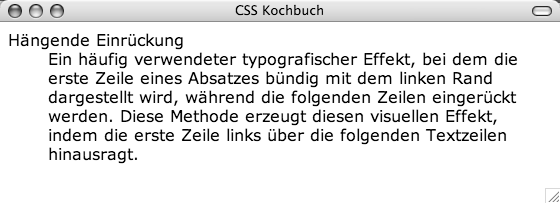
Figure: Definition lists have hanging indents by default.
<dl>
  <dt>Hängende Einrückung</dt>
  <dd>Ein häufig verwendeter typografischer Effekt, bei dem die erste Zeile eines Absatzes bündig mit dem linken Rand dargestellt wird, während die folgenden Zeilen eingerückt werden. Diese Methode erzeugt diesen visuellen Effekt, indem die erste Zeile links über die folgenden Textzeilen hinausragt.</dd>
</dl>
A definition list is inappropriate if you only want a hanging indent for a particular paragraph rather than a list. The solution instead uses the CSS property text-indent.
Using hanging indents safely
Before using the property text-indent in a stylesheet, make sure the code is implemented correctly. For example, using text-indent with certain font properties can make a hanging indent reduce readability.
The following figure shows a hanging indent extending beyond the viewport’s left edge. Readers may still guess the clipped words from context, but this burden is unnecessary.
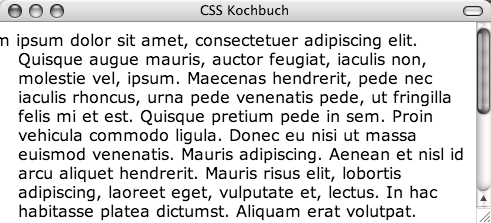
Figure: The hanging indent extends beyond the viewport’s left edge.
To prevent this, set the paragraph’s left margin to the same value by which the following lines should be indented. The hanging indent then occupies the space reserved by that extra margin, keeping the text visible.
p.hanging {
 text-indent: -5em;
 margin-left: 5em;
}
Double hanging indents
In addition to the first-line hanging indent, create a double effect by shifting a heading to the left as well (see the next figure):
#content p.hanging {
 text-indent: -60px;
 margin: 0 0 0 60px;
 padding: 0;
}
#content h3 {
 text-indent: -60px;
 margin: 0 0 0 60px;
 padding: 0;
}
Here is the HTML for this effect:
<div id="content">
<h3>Und noch einmal mit mehr Gefühl</h3>
<p class="hanging">Lorem ipsum dolor sit amet, consectetuer adipiscing elit. Quisque aug ue mauris, auctor feugiat, iaculis non, molestie vel, ipsum. Maecenas hendrerit, pede nec iaculis rhoncus, urna pede venenatis pede, ut fringilla felis mi et est. Quisque pretium pede in sem. Proin vehicula commodo ligula…</p>
</div>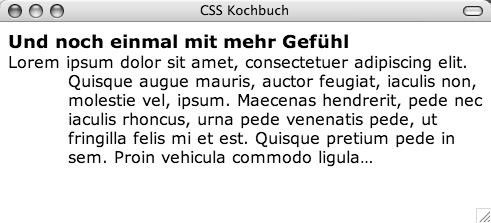
Figure: The hanging indent has been doubled.
A few minor adjustments make only the heading appear as a hanging indent (see the following figure):
#content p {
 margin: 0;
 padding: 0 0 0 60px;
}
#content h3 {
 text-indent: -60px;
 margin: 0 0 0 60px;
 padding: 0;
}
The HTML is unchanged:
<div id="content">
<h3>Und noch einmal mit mehr Gefühl</h3>
<p class="hanging">Lorem ipsum dolor sit amet, consectetuer adipiscing elit. Quisque augue mauris, auctor feugiat, iaculis non, molestie vel, ipsum. Maecenas hendrerit, pede nec iaculis rhoncus, urna pede venenatis pede, ut fringilla felis mi et est. Quisque pretium pede in sem. Proin vehicula commodo ligula…</p>
</div>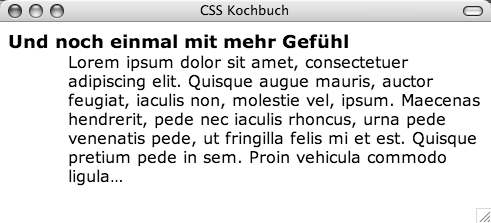
Figure: A hanging indent for the heading only.
See also
The CSS 2.1 specification for the text-indent property.
Copyright of the German edition © 2007 by O’Reilly Verlag GmbH & Co. KG
You may print the online version for your private use.
Otherwise, this chapter from “CSS Kochbuch” is subject to the same conditions as the bound edition: the work, including all its parts, is protected by copyright. All rights reserved, including reproduction, translation, microfilming, and storage and processing in electronic systems.
O’Reilly Verlag GmbH & Co. KG, Balthasarstr. 81, 50670 Köln