

XML technologies / SVG / Interactive graphics / The event and object model in detail / The SVG event model / Using mouse events correctly
(Excerpt from “Das Einsteigerseminar SVG — Webgrafiken mit XML” by Helma Spona)
The three mouse events onmouseover, onmouseout and onclick are self-explanatory and support hover effects as shown. Other mouse events generally require knowing the pointer’s position, especially the event onmousemove when moving elements to the pointer. The evt object passes pointer positions to mouse event procedures. Retrieve them with the methods getClientX( ) and getClientY( ) of the evt object inside the event handler.
The example creates a gradient-filled circle with six black dots circling it. The whole follows the pointer and always surrounds it.
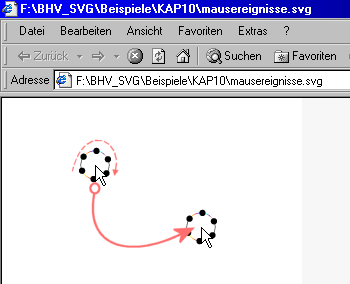
Figure: Movement around the pointer.
The simple SVG code contains a path representing the dots’ circular route and six dots defined by the <circle> tag, each containing an <animateMotion> tag for animation. Only their animation start times differ. Group the elements and position them using the transform attribute of the <g> tag.
<?xml version="1.0"?>
...
<svg width="300" height="300">
  <defs>
    <linearGradient id="verlauf">
      <stop offset="0%" style="stop-color:black;stop-opacity:1"/>
      ...
    </linearGradient>
  </defs>
  <g transform="translate(50,50)" id="kreis">
    <path id="pfadkreis" style="stroke:rgb(0,0,0);fill:none;stroke-width:0.5;stroke:url(#verlauf)"d="M0 0 a10,10 -30 0,1 20,-20 a10,10 -30 0,1 -20,+20"/>
    <circle cx="0" cy="0" r="3" style="fill:black;stroke:none">
      <animateMotion dur="3s" repeatCount="indefinite" path="M0 0 a10,10 -30 0,1 20,-20 a10,10 -30 0,1 -20,+20" rotate="auto" />
    </circle>
    ...
  </g>
</svg>
Next add the code. Simply handling the mousemove event of the <svg> tag will not work: only SVG elements inside the <svg> tag have mouse events. Instead use a rectangle as large as the graphic, starting at its origin. In the following code the rectangle is named "Zeichnung" and uses the <rect> tag.
Ideally place the rectangle above all elements except the moving group. Define the <rect> tag immediately before the group "kreis". Filling it hides underlying elements, but leaving it unfilled strangely prevents events. Fill it with any color and set the property opacity to 0, making it filled yet fully transparent.
The source resembles the previous example. Initialize the event listener in a function, again init. The important function here is positionieren, which makes the group "kreis" follow the pointer. First retrieve the group with the getElementById method, then the pointer’s position with getClientX( ) and getClientY( ). Both return positions relative to the graphic’s origin, regardless of its location in a webpage or application.
To center the circle and dots on the pointer, shift the group left and down by the circle’s radius. Add the corresponding values to the variables posY and posX before setting the group’s transform attribute.
<?xml version="1.0"?>
...
<svg width="300" height="300" onload="init(evt)">
  <script type="text/ecmascript">
    <![CDATA[
      var elem;
      var svgdok;
      function init(evt)
      {
        svgdok=evt.getTarget().getOwnerDocument();
        elem=svgdok.getElementById("Zeichnung");
        elem.addEventListener("mousemove", positionieren, false)
      }
      function positionieren(evt)
      {
        var kreis= svgdok.getElementById("kreis");
        var posX=evt.getClientX();
        var posY=evt.getClientY();
        posX=posX-10;
        posY=posY+10;
        kreis.setAttribute("transform","translate("+posX+","+posY+")");
      }
    ]]>
  </script>
  <defs>
    ...
  </defs>
  <rect id="Zeichnung" x="0" y="0" width="300" height="300" style="fill:white;stroke:none;opacity:0"/>
  ...
</svg>
Copyright © verlag moderne industrie GmbH 2001
You may print the online version for your private use.
Otherwise, this chapter from “Das Einsteigerseminar SVG — Webgrafiken mit XML” is subject to the same conditions as the bound edition. The work, including all its parts, is protected by copyright. All rights reserved, including reproduction, translation, microfilming, and storage and processing in electronic systems.
verlag moderne industrie GmbH, Justus-von-Liebig-Straße 1, D-86899 Landsberg/Lech, fon ++49 (0) 81 91 / 125 – 0, leserservice(at)mi-verlag.de
back to top