

XML technologies / ePUB / ePub für (In)Designer / Repeated tasks / Installing scripts
(Excerpt from “ePub für (In)Designer — Mit InDesign Schritt für Schritt zum E-Book” by Sascha Heck & Yves Apel)
Programmers offer many useful free InDesign scripts, some cited in this book to simplify work. Do not worry if unfamiliar: most use JavaScript and run on Windows and Mac OS. AppleScript runs only on Apple, Visual Basic only on Windows. An InDesign JavaScript is a small text file ending .jsx, .jsxbin (binary-encoded) or .js.
To install scripts, open the Scripts panel through Window → Utilities → Scripts. Application contains preinstalled scripts. Select User, then choose from the panel’s top-right menu Reveal in Finder (Explorer). This opens the folder at a long path (for example on Mac: User → Library → Preferences → Adobe InDesign → Version 7.5 → de_DE → Scripts → Script Panel).
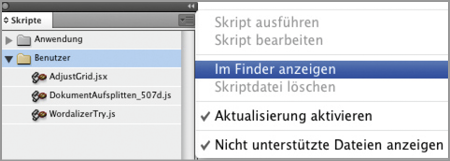
Figure: InDesign Scripts panel.
Open Script Panel and copy the downloaded script into it. It becomes available immediately in InDesign and starts with a double-click.
Script as code
Sometimes you have code rather than a script file. Copy all of it into a text editor, not Word. Better still, use Extended Script Toolkit, installed with Creative Suite or downloadable from adobe.com. Paste into a new document and save as ASCII plain text ( text only), with a meaningful name ending .js. Install it as described above.
Copyright © dpunkt.verlag GmbH 2012
You may print the online version for your private use.
Otherwise, this chapter from “ePub für (In)Designer” is subject to the same terms as the printed edition: the work and all its parts are protected by copyright. All rights reserved, including reproduction, translation, microfilming, and storage and processing in electronic systems.
dpunkt.verlag GmbH, Wieblinger Weg 17, 69123 Heidelberg, fon 06221-14830, fax 06221-148399, hallo(at)dpunkt.de